The Lenovo ThinkSystem SR630 is a dual-socket 1U rack server for virtualisation, databases and enterprise applications, based on Xeon Scalable processors and the newer Xeon 6 family. Consider the original model and V2 for workloads that can run on DDR4, V3 for a move to DDR5 and PCIe 5.0, and V4 for an Intel Xeon 6 infrastructure. Choose according to workload, licensing costs and the exact hardware configuration: the generations differ in processors, memory, drive bays and expansion options.
What is the Lenovo SR630?
The 1U chassis lets you install a compute node in a single rack unit. This format suits infrastructure with external storage or local SSDs. The server can operate with one processor, but some memory slots and devices connected to the second processor will then be unavailable.
Components compete for space inside a 1U chassis. Rear-mounted drives may occupy space otherwise used by expansion cards, while powerful processors and accelerators require specific cooling arrangements. You cannot automatically combine the maximum drive and card counts from different sections of the specifications in a single configuration. Installation also requires adequate rack depth, rails, power and heat removal.
SR630, V2, V3 and V4 compared
The V2–V4 designations identify generations of the server platform. They do not match Intel Xeon generation numbers: for example, the SR630 V2 uses 3rd Gen Xeon Scalable processors, while V3 supports the 4th and 5th generations.
| Specification | SR630 | SR630 V2 | SR630 V3 | SR630 V4 |
|---|---|---|---|---|
| Processors | 1st/2nd Gen Xeon Scalable | 3rd Gen Xeon Scalable | 4th/5th Gen Xeon Scalable | Xeon 6 6500P/6700P or 6700E series |
| Memory | DDR4, 24 DIMM slots | DDR4, 32 DIMM slots | DDR5, 32 DIMM slots | DDR5, up to 32 DIMM slots; MRDIMM subject to configuration requirements |
| Memory channels per processor | 6 | 8 | 8 | 8 |
| PCIe | 3.0 | 4.0 | 5.0 and 4.0, depending on the slot | 5.0 |
| Drive options | 2.5″ or 3.5″; SAS/SATA/NVMe | 2.5″, 3.5″ or E1.S; SAS/SATA/NVMe | 2.5″, 3.5″ or E1.S; SAS/SATA/NVMe | 2.5″ or E3.S; SAS/SATA/NVMe; no 3.5″ bays |
| Management controller | XCC | XCC | XCC2 | XCC3 |
Memory slot counts are for dual-processor systems; on V4, the count also depends on the cooling configuration. The drive bay options in the table are alternatives. NVMe or SAS/SATA support means that a suitable platform configuration exists, rather than that every drive is compatible with every bay.
The original SR630 and the 7X02 designation
You can select a first-generation server on the Lenovo ThinkSystem SR630 page in the Servermall catalogue.
The original SR630 suits infrastructure services and smaller virtualisation environments whose requirements fit its resources. When choosing a refurbished server, component balance matters: insufficient memory or slow drives can outweigh the benefit of a more expensive processor.
The Lenovo Press LP1049 guide lists machine types 7X01 and 7X02. A search for “Lenovo SR630 7X02” refers to the original SR630 with that machine type. It does not identify a V2 model, the number of installed processors or the memory capacity.
Originally, 7X01 came with a one-year base factory warranty, and 7X02 with a three-year warranty. Current manufacturer support is determined by the serial number and contract, while the seller’s warranty depends on the terms of purchase. For a refurbished server, service periods and procedures may differ from the factory terms.
Choosing the Right Equipment
Our specialists will contact you and answer all your questions
SR630 V2 with DDR4 and PCIe 4.0

Lenovo ThinkSystem SR630 V3, product view. Source: Lenovo Press.
For Lenovo ThinkSystem SR630 V2 configurations with 3rd Gen Xeon Scalable processors, explore Servermall’s Lenovo server catalogue.
V2 retains DDR4 and increases the number of memory channels to eight per processor. PCIe 4.0 offers greater link bandwidth than PCIe 3.0 with the same number of lanes. This benefits fast drives and network adapters when the interface becomes a bottleneck.
According to Lenovo Press LP1391, the platform supports processors with up to 40 cores per socket and DDR4 memory at up to 3200 MT/s. Several drive configurations are available, including E1.S; management remains based on XCC.
Compare V2 with the original SR630 when increasing the number of virtual machines or when memory and I/O requirements become more demanding.
SR630 V3 and the move to DDR5
To discuss a DDR5-based Lenovo ThinkSystem SR630 V3 configuration, use Servermall’s Lenovo server catalogue.
The Lenovo ThinkSystem SR630 V3 runs on 4th or 5th Gen Xeon Scalable processors. It suits infrastructure upgrades involving a move to DDR5. Existing DDR4 modules cannot be transferred to it, so the budget must include new memory.
Lenovo Press LP1600 lists 32 DIMM slots and the XCC2 controller. Drive configurations include 2.5″, 3.5″ and E1.S options. PCIe 5.0 support requires attention to the expansion layout: in the configuration with three rear slots, two are PCIe 5.0 and one is PCIe 4.0. The number of available slots depends on the risers, processors and rear drive bays.
A drive or network card will not run at PCIe 5.0 speeds if its slot or drive backplane provides only PCIe 4.0.
SR630 V4 with Intel Xeon 6
For an Intel Xeon 6-based Lenovo ThinkSystem SR630 V4 configuration, contact Servermall through its Lenovo server catalogue.
V4 uses Xeon 6 processors with either Performance-cores (P-cores) or Efficient-cores (E-cores). These are separate processor designs, with no mixing of core types on one chip. When choosing between them, distinguish single-thread performance requirements from the need to handle many parallel tasks.
Lenovo Press LP1971 lists Xeon 6500P/6700P and 6700E processors, PCIe 5.0 and XCC3 for this model. E-cores do not support Hyper-Threading, so core and hardware thread counts cannot be compared with those of P-cores without considering the architecture and application.
Storage has also changed: the increasingly popular E3.S format replaces E1.S, and 3.5″ drive bays are not available. MRDIMM and CXL memory expansion are available in suitable P-core configurations. These features require separate configuration planning and do not apply to every SR630 V4.
Configuration options and limitations
Processors and memory

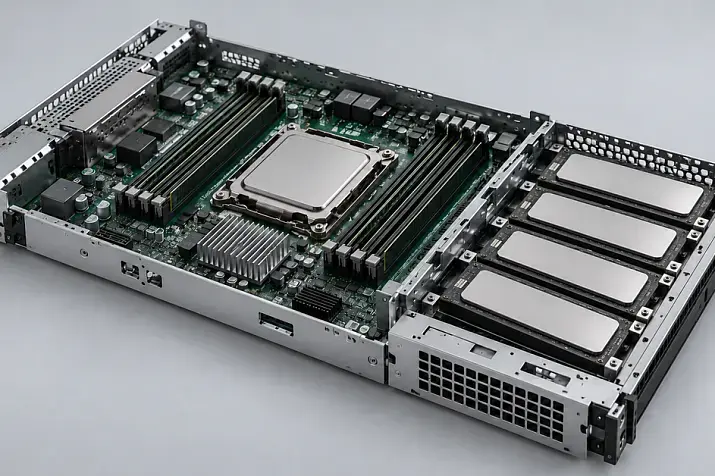
Internal layout of the Lenovo ThinkSystem SR630 V4. Source: Lenovo Press.
More cores are usually useful for running many independent virtual machines. For operations with limited parallelism, single-core performance matters more. Comparing generations solely by clock speed in GHz is insufficient: architecture, cache and memory behaviour also change.
With per-core or per-socket licensing, additional processors may increase database software costs by more than the price of the server itself. Evaluate a second processor alongside the need for memory channels and I/O devices.
Three separate parameters matter for memory:
- Capacity must cover the working data, virtual machines and operating system requirements, with headroom for growth.
- Channel population affects bandwidth: one large module does not replace the benefit of using multiple channels.
- Speed is limited by the processor, DIMM type and number of modules per channel. 1 DPC and 2 DPC mean one and two DIMMs per channel.
For the original SR630, the maximum conventional DDR4 capacity is 3 TB with two processors and 24 × 128 GB 3DS RDIMMs; the processors must support the required memory capacity per socket. V2 and V3 are specified for up to 8 TB with two processors and 32 compatible 256 GB 3DS RDIMMs.
On V3 with a suitable 5th Gen Xeon processor, RDIMMs run at up to 5600 MT/s at 1 DPC. At 2 DPC, the stated limit is up to 4400 MT/s, or up to 4800 MT/s with Performance+. For 4th Gen processors, the limits are up to 4800 and 4400 MT/s respectively. Some processors have lower limits.
For V4, Lenovo’s technical guide specifies up to 6400 MT/s for RDIMMs at 1 DPC, up to 5200 MT/s at 2 DPC and up to 8000 MT/s for compatible MRDIMMs at 1 DPC. These figures depend on the processor; only some P-core models support MRDIMMs.
The V4 maximum of 8 TB is achieved with two suitable P-core processors and 32 × 256 GB 3DS RDIMMs in a configuration without the Compute Complex Neptune Core Module. Configurations with this cooling module provide 16 DIMM slots and up to 4 TB in total. The 8 TB limit must not be assumed to apply to E-core configurations, which support conventional RDIMMs.
Intel Optane Persistent Memory must be counted separately: the original SR630’s 7.5 TB figure refers to a combination of DDR4 and Optane in a specific operating mode, rather than conventional DDR4 alone. On V4, CXL modules occupy E3.S 2T bays; Lenovo does not list support for them with Windows Server or VMware ESXi.
Storage drives and boot devices
SFF and LFF usually refer to 2.5″ and 3.5″ drive bays. They describe physical size, rather than the interface. Bays that look similar may support only SAS/SATA, only NVMe, or several connection options in a universal configuration.
Connecting drives requires compatible components:
- a drive backplane;
- a controller or a direct connection to the processor;
- cables, drive caddies and the specified cooling.
AnyBay allows different interfaces to be used with the appropriate connections. A drive caddy does not turn a SAS/SATA bay into an NVMe bay. Expanding a configuration to the platform maximum may require hardware replacement.
SAS/SATA drives use compatible RAID controllers or host bus adapters (HBAs) for direct access. NVMe can use other arrangements, including Intel VROC with the required licences. A SAS/SATA controller should not automatically be treated as an NVMe controller.
The operating system can boot from separate M.2 SSDs, leaving the main bays available for data. Having two M.2 drives does not automatically provide a working mirror: the appropriate adapter and RAID support are required. Servicing internal M.2 drives usually involves shutting down and opening the server; hot-swap V4 options require a configuration specifically designed for this.
Networking and expansion cards
Select networking for virtualisation and external storage together with the switch and cables. The XCC management port is intended for administration and does not replace an application network adapter.
Risers are adapter boards with expansion connectors that determine the available positions for cards. Card dimensions, PCIe lane count and the slot’s connection to a processor all matter. V2–V4 have dedicated OCP networking slots, but the required module may not be included.
Select GPUs from the list of compatible accelerators, taking power and cooling into account. An x16 connector alone does not guarantee that a card can be installed. For several powerful GPUs and a large number of adapters, consider a more spacious platform.
XClarity and day-to-day operation

Rear-panel configurations of the Lenovo ThinkSystem SR630 V3. Source: Lenovo Press.
The integrated XClarity Controller (XCC) lets you monitor and manage the server independently of the operating system. The available remote access features depend on the licence.
XCC Advanced and Enterprise differ in their features: the remote graphical console is included in Advanced, while virtual media mounting requires Enterprise. On V3, advanced features are combined in XCC2 Platinum; V4 uses XCC3 Premier. For details, see Servermall’s article “Lenovo XClarity: remote management of ThinkSystem servers”.
Two power supplies provide redundancy when their capacity and connection arrangement are appropriate; independent power feeds are preferable. Hot swapping of drives, fans and power supplies applies only to supported components in the specific configuration.
Powerful processors and accelerators may require higher-performance fans, special heatsinks or liquid cooling. The permitted ambient temperature depends on the configuration. Assess noise and power consumption using measurements under the intended workload; a power supply’s rating is not the server’s constant power draw.
Choosing the Right Equipment
Our specialists will contact you and answer all your questions
Which workloads suit the SR630?
Determine the configuration from measurements of the existing system or a model of the expected workload.
| Workload | Key resources | Factors that constrain the choice |
|---|---|---|
| Virtualisation | Cores, memory capacity, networking, fast drives or external storage | Aggregate VM workload, spare capacity for a node failure, licences and hypervisor compatibility |
| Database systems | Single-core performance, memory for working data, SSD latency and endurance | Per-core licensing, query characteristics, log writes and data availability |
| Enterprise applications | Resources for application services and the database, reliable storage and backups | Concurrent user count, background operations and software vendor requirements |
A virtualisation cluster needs enough spare capacity to tolerate at least one node failure (N+1): if every server is at its limit, there will be nowhere to move the workload. For databases, first identify the cause of delays: extra cores will not help queries that are waiting for disk reads. For enterprise applications, account for peaks during month-end closing, calculations and report generation.
Windows Server, Linux and VMware ESXi compatibility must be determined from Lenovo’s matrices for the specific versions and devices. Being able to install an operating system does not mean it is officially supported. For Proxmox VE, confirm hardware operation and support arrangements separately; Linux compatibility does not establish Proxmox certification.
Which generation should you choose, and when do you need a 2U server?
The original SR630 makes sense when it provides sufficient resources, supports the required software and comes with suitable service terms. Consider V2 for additional memory channels and PCIe 4.0 while retaining DDR4. Choose V3 for a move to DDR5 and newer Xeon processors, and V4 for Xeon 6 capabilities and specific memory requirements.
A 2U chassis, such as a Lenovo ThinkSystem SR650 of the appropriate generation, is useful when expansion requirements are greater:
- you need more local drives or a more convenient arrangement of drives and cards;
- you need to install several large adapters or accelerators;
- the chosen components are difficult to combine within the limits of a 1U chassis.
A larger chassis does not remove power and cooling limits. Choose between 1U and 2U by comparing complete configurations for the same workload, including memory, networking and licensing costs.
How to choose a specific configuration

Front-drive configurations of the Lenovo ThinkSystem SR630 V4. Source: Lenovo Press.
For the first generation, you can use the Lenovo SR630 8SFF configurator. Its parameters apply to the original SR630 and do not describe V2, V3 or V4. The capabilities of other generations must be configured separately.
The supply quotation should specify the exact hardware and licences, the memory layout, drive connections and available expansion slots. Power, cooling and the operating system must match this configuration. Platform specifications describe the permitted options; the supplied configuration determines what the customer can use immediately.
For refurbished equipment, diagnostic results, SSD wear and warranty service procedures matter. Choose a generation according to application requirements and expansion plans: buying a newer platform is justified when its capabilities are needed in operation and fit the cost of the overall infrastructure.
Choosing the Right Equipment
Our specialists will contact you and answer all your questions