Lenovo XClarity is a family of management tools for ThinkSystem servers. On supported models, its foundation is XClarity Controller, an embedded controller that monitors hardware and manages power independently of the operating system, as long as the server is connected to mains power and receives standby power. The controller is usually sufficient for a single server, while XClarity Administrator is useful for a fleet. If you need remote screen access and OS installation from an image, choose the appropriate paid XCC licence in advance.
What is Lenovo XClarity?
A conventional remote connection to Windows or Linux works while the OS and its network services are available. XClarity Controller, or XCC, resides on the system board and has its own management environment. This type of service controller is called a BMC.
Through XCC, an administrator can check the status of memory, fans, power supplies and other components, receive hardware events, and power on or restart the server. With the appropriate licence, the boot screen and installation image mounting are available. This helps when the OS has not yet been installed, fails to boot or stops responding.
When choosing Lenovo ThinkSystem servers, consider the specific model: not every member of the family has XCC. For example, the original SR635 and SR655 use ThinkSystem System Manager. Older System x servers use IMM and IMM2; these technologies are discussed in Servermall's article iDRAC vs iLO vs IPMI: Remote Server Management Explained. Connection instructions for these controllers cannot automatically be applied to XCC.
What the XClarity family includes
| Tool | Purpose |
|---|---|
| XClarity Controller | Embedded management of an individual server: hardware status, power, diagnostics and additional licensed features |
| XClarity Administrator | Centralised management of a fleet of compatible devices from a separate virtual machine |
| XClarity One | A unified management platform, including for multiple sites; cloud or on-premises deployment |
| XClarity Orchestrator | Consolidation of multiple management systems and sites; the product has been withdrawn from sale |
| XClarity Essentials | OneCLI command-line utilities and UpdateXpress for hardware updates |
| XClarity Provisioning Manager | Server configuration, diagnostics and provisioning at boot, within the capabilities of the model |
| XClarity Integrator | Integration tools for VMware vCenter, Microsoft System Center and other platforms |
XClarity Controller vs XClarity Administrator: what is the difference?
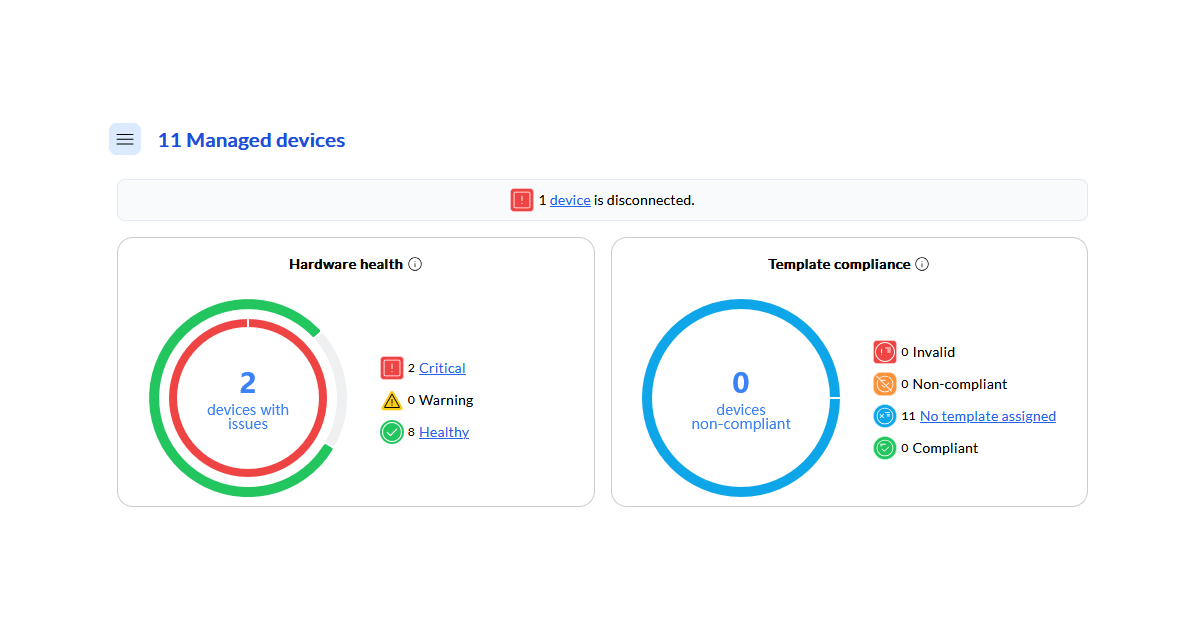
Hardware health and template compliance summaries in Lenovo XClarity One. Source: Lenovo Press.
Controller manages the hardware of one server; Administrator brings compatible devices together in a shared interface. Administrator does not replace the embedded controller: it communicates with it over the management network.
Lenovo XClarity Administrator, or LXCA, is installed separately as a prebuilt virtual machine. It makes recurring tasks easier:
- collecting information about models, components and firmware versions;
- viewing hardware alerts in one place;
- comparing installed firmware against a selected update policy;
- performing group operations on compatible servers.
There is no fixed threshold for the number of servers. For one or two machines, a separate platform is often unnecessary. If an administrator regularly opens several interfaces to perform the same operation, centralisation may already save time. Across dozens of servers, the benefits of unified inventory and coordinated updates become particularly noticeable. This is a practical guideline, not a Lenovo requirement.
Choosing the Right Equipment
Our specialists will contact you and answer all your questions
When you need XClarity Administrator Pro
Administrator's basic functions are free: device discovery, hardware inventory, monitoring and update management. XClarity Pro adds entitlements for configuration patterns and operating system deployment, along with technical support under the purchased package. The distinction is described in the Lenovo XClarity Administrator guide.
A Pro licence unlocks features of the central platform; an XCC licence unlocks controller capabilities. One does not replace the other.
How XClarity One differs
XClarity One is a standalone platform with cloud and on-premises deployment options. It can connect multiple sites through local management hubs. It should not be viewed as a free upgrade to Administrator.
Under the terms published in the XClarity One guide, a licence is required for each physical managed device. Starter is limited to ten devices per organisation and provides the same functionality as Standard. Confirm the subscription term and hardware compatibility for the selected offering. These terms are stated as of October 2026.
XCC generations in ThinkSystem servers
| Controller | Where it is used | Licence levels |
|---|---|---|
| First-generation XCC | Many original ThinkSystem and V2 models: SR630, SR650, SR630 V2, SR650 V2 and others | Standard, Advanced, Enterprise |
| XCC2 | Many ThinkSystem V3 models: SR250 V3, SR630 V3, SR650 V3 and others | Standard, Platinum |
| XCC3 | Supported ThinkSystem V4 models: SR630 V4, SR650 V4, SR850 V4 and others | Standard, Premier |
The original models usually do not include a V1 suffix in their names. For example, the Lenovo SR650 8SFF without V2 or V3 is a dual-socket 2U platform with first-generation XCC. The shared SR650 model name does not mean that every version has the same controller.
XCC3 is built on OpenBMC, an open-source software foundation for management controllers. This does not remove Lenovo's interface or the licensing of additional features.
XCC licences: Standard, Platinum and Premier
Standard is sufficient for hardware monitoring and basic power management. Powering on a server remotely and viewing its screen before the OS boots are different capabilities. A restart button in the browser does not confirm that a graphical console is available.
| Feature | Standard in XCC2/XCC3 | XCC2 Platinum / XCC3 Premier |
|---|---|---|
| Hardware information, status and event log | Yes | Yes |
| Remote power on, power off and restart | Yes | Yes |
| System firmware updates | Yes, through supported methods | Yes, with additional tools |
| Graphical remote console | No | Yes |
| Virtual media and installation image mounting | No | Yes |
| System Guard: monitoring unexpected hardware inventory changes | No | Yes |
| Power capping | No | Yes |
| Additional tools for remote OS deployment | No | Yes |
| Firmware repository synchronisation and batch updates through XCC | No | Yes |
Platinum features are listed in the Lenovo XCC2 overview. The availability of operations also depends on the model and firmware.
First-generation XCC uses a different division of licence levels: Advanced unlocks the graphical console, while Enterprise adds virtual media, console collaboration and other features. Therefore, saying that a server “has a paid XCC licence” is insufficient if remote ISO mounting is required.
This is particularly relevant to entry-level Lenovo ThinkSystem SR250 servers. Standard allows hardware monitoring but does not provide graphical access to the boot process. If the machine will operate in an office without an on-site administrator, include the required licence level in the configuration when purchasing it.
Is Premier required for Administrator and One?
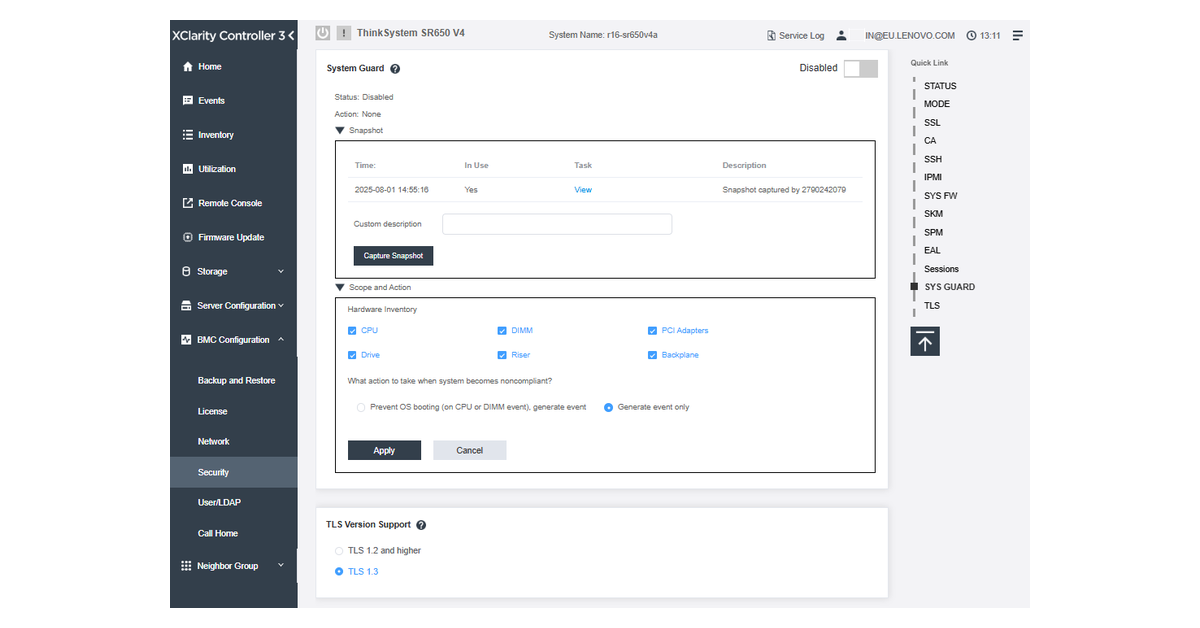
System Guard settings in Lenovo XClarity Controller 3. Source: Lenovo Press.
Lenovo explicitly states in the XCC3 overview that tasks such as remote console access and bare-metal OS deployment through Administrator, One or Orchestrator require Premier on the server.
This requirement applies to the relevant operations; it does not mean that all server monitoring through a central platform requires Premier. Also check the compatibility of the model and management platform version, and the entitlements for the platform's paid functions. A platform licence does not replace a BMC licence.
The XCC level is upgraded by installing a Features on Demand key appropriate for the server. Check the active licence in the web interface and record it in the supply specification. For refurbished equipment, activation must be confirmed: the model name does not guarantee it.
How to connect to XClarity Controller
First identify the management network connector. Depending on the model, XCC uses a dedicated port or a supported shared server network port. An XCC label or management icon helps locate the connector, but the rear-panel diagram for the specific server is the definitive reference.
For example, the Lenovo ST250 has a dedicated XCC connector and can also use the first onboard network port. Shared mode must be selected in the BMC settings. In a small office, this allows one cable to be used, but access to management must still be controlled.
Connect in the following order:
- Connect the server to mains power and wait for the controller to start. The OS does not need to boot for XCC access.
- Connect the selected port to the management network. For a shared connection, configure the appropriate mode beforehand.
- Find the IP address in the DHCP lease information or in the BMC settings through the server's local menu.
- Open https://controller-address in a browser and enter the credentials.
Choosing the Right Equipment
Our specialists will contact you and answer all your questions
Default username, password and IP address
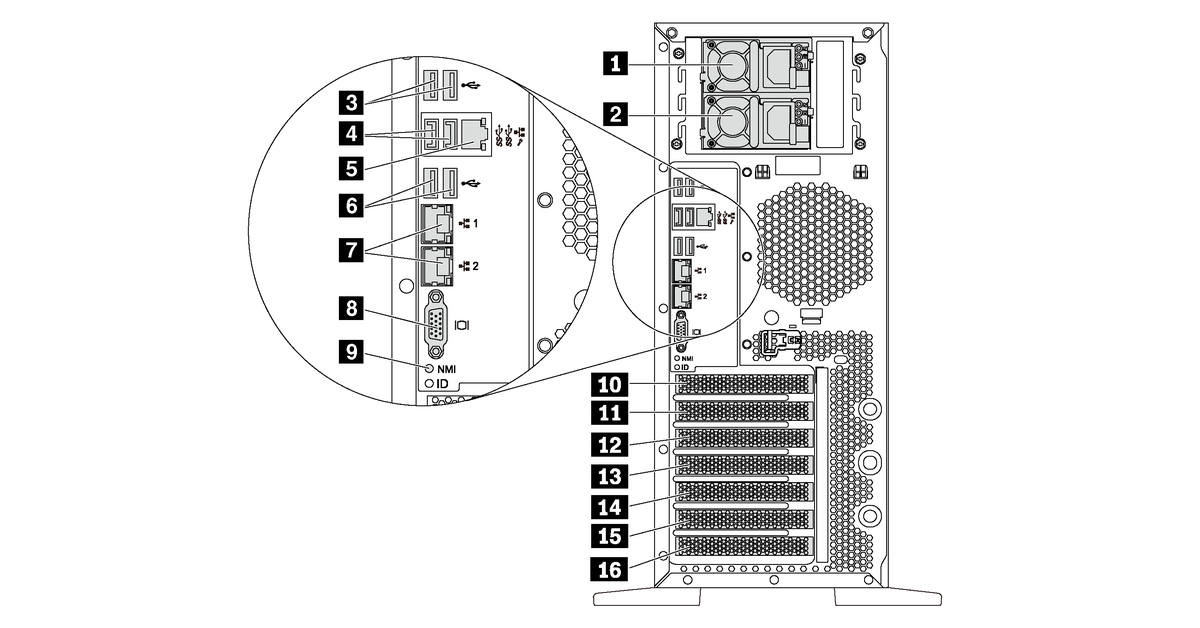
Rear connectors on Lenovo ThinkSystem ST550, including the dedicated XClarity Controller port. Source: Lenovo Docs.
For a number of models, Lenovo specifies the following defaults:
- username — USERID;
- password — PASSW0RD, with the digit zero instead of the letter O;
- IPv4 address assignment — DHCP;
- fallback static address when DHCP is unavailable — 192.168.70.125.
The factory credentials are listed, for example, in the XCC2 login documentation. Check them against the guide for the specific model and the information supplied with the server. If the server has a unique factory password on its pull-out information tab, use that password. A unique password on the tab should not be treated as a mandatory feature of every new ThinkSystem: the XCC3 documentation also lists the standard USERID / PASSW0RD credentials.
On a previously used server, the address and password may have been changed. If login fails, first obtain the current settings from the responsible administrator. On supported models, access can be recovered locally through the BMC settings in UEFI or Provisioning Manager, or through OneCLI from the OS with the necessary privileges. A network OneCLI command with an unknown password is not a way to bypass authentication.
Restoring factory settings may delete network settings and user accounts, causing the remote connection to be lost. Select the procedure from the model's guide and perform it only when you have a way to restore access. Restarting XCC and resetting its settings are different actions.
Initial configuration and ongoing operation
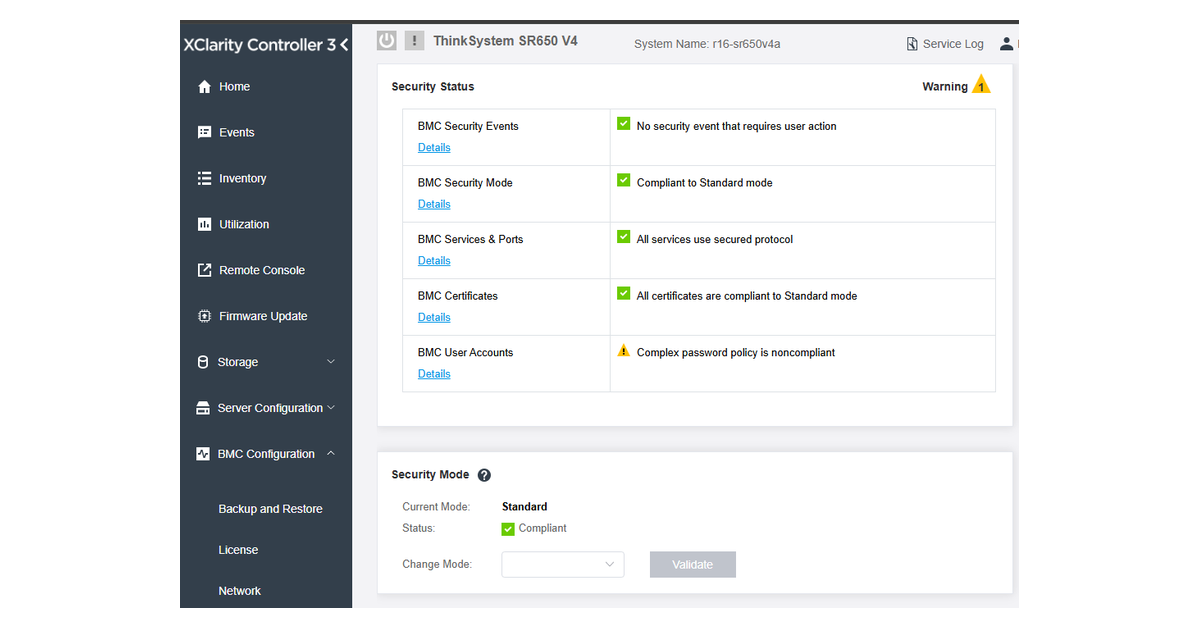
Security status dashboard in Lenovo XClarity Controller 3. Source: Lenovo Press.
Network and administrator access
Place the controller in a separate management segment accessible only to administrators and management systems. Use a secure channel for external connections. A dedicated port alone does not restrict access.
Instead of routinely using the factory account, create named user accounts with appropriate roles. Read-only access suits monitoring staff, while power and console control belong with administrators. After confirming that a new account works, disable the factory account if the chosen management setup permits it. Handle service accounts for the central platform separately.
Time, certificates and alerts
NTP synchronises the controller's clock with the corporate time source. Hardware events can then be correlated with OS, network equipment and monitoring system logs.
For HTTPS, install a certificate from a trusted certification authority so that the browser can verify the device's identity. Send hardware notifications to the responsible staff or monitoring system. Redfish, SNMP and LDAP integration are available within the platform's capabilities.
Firmware and the remote console
Select updates for the exact server model and machine type. UpdateXpress helps manage the appropriate Lenovo packages. When updating both components, XCC is usually updated before UEFI, but the requirements of the specific package take priority: dependencies may require an intermediate version or a different sequence.
With a paid licence, test opening the graphical console and mounting an authorised installation image in advance. This reveals licence or network limitations before an incident occurs.
Current XCC documentation lists IPMI over LAN as disabled by default. Enable it only for a specific management system that requires it. For example, some combinations of servers and Administrator versions require it for management enrolment. Enabling the service must be accompanied by network access restrictions, rather than exposing the controller to the entire network.
Choosing XClarity starts with the tasks: monitoring hardware, recovering a server through a remote screen or centrally provisioning an entire fleet. Then identify the controller model and required licence. This makes remote management part of the server configuration from the outset, instead of an unexpected purchase during the first failure.
Choosing the Right Equipment
Our specialists will contact you and answer all your questions