An NTP server distributes time over a network so that computers, servers, cameras and other equipment can synchronise their clocks. Public services such as NIST, Cloudflare, Google Public NTP or NTP Pool are suitable for a standalone computer; within a company, internal time sources are easier to manage. Choose sources with compatible leap-second policies: Google uses leap smearing, so it should not be combined with conventional UTC servers such as NIST and Cloudflare.
Why devices need a common time
Computer clocks gradually drift because of oscillator characteristics and operating conditions. Virtualisation adds its own complications; a one-off manual adjustment does not solve the problem.
NTP stands for Network Time Protocol; NTPv4 is described in RFC 5905. A client requests time and adjusts its clock. A server can be an appliance, a physical machine or a virtual machine. A node can obtain time externally and distribute it to local devices.
Consistent time is essential for:
- Domain sign-in. Kerberos uses timestamps to protect against replay attacks. Microsoft specifies a default clock-skew tolerance of five minutes, which can be changed through policy. This is a tolerance limit, rather than a target accuracy.
- Certificates. An incorrect date can make a valid TLS certificate appear expired or not yet valid.
- Logs and incident investigation. Events from applications, databases and firewalls need to be placed in a common sequence.
- Business applications. Clock differences make transactions, data exchanges and audit records harder to correlate.
- Backups and schedules. Clock changes affect job execution and the interpretation of timestamps.
- Video surveillance. Camera footage must align with recorder archives and access-control events.
How NTP works
Port 123 and four timestamps
A conventional NTP server accepts requests over UDP on port 123. Calculations use four timestamps: when the client sends the request, when the server receives it, when the server sends the reply and when the client receives the reply. These are used to estimate round-trip delay and clock offset.
The service collects measurements, rejects unsuitable samples and selects usable sources. The calculation assumes roughly equal delay in both directions. An asymmetric route or congested link introduces error: a server with a good reference cannot eliminate network problems.
Small offsets are usually corrected gradually by adjusting the clock rate. Software may correct a large error with a time step, especially at startup. Behaviour depends on the implementation and settings; a major correction on a running server must take application requirements into account.
Allowing 123/TCP does not replace 123/UDP. A client needs outbound requests and returning traffic. Synchronising an ordinary computer does not require accepting requests from the entire internet.
Stratum levels and actual accuracy
Stratum indicates a node's position in the synchronisation chain:
- 0 — a conventional designation for the original reference, such as an atomic clock or satellite receiver. This is not a public NTP server; zero in the network packet field has a special protocol meaning.
- 1 — the server obtains time directly from a connected reference.
- 2–15 — the server obtains time over the network; its level is one higher than that of its selected source.
- 16 — the node is unsynchronised and unsuitable as a normal time source.
A lower stratum does not guarantee accuracy: a nearby stratum 2 server over a stable network may be more useful than a distant stratum 1 server.
Over the internet, typical expectations are milliseconds or tens of milliseconds; on a good local network, fractions of a millisecond. These are guidelines, rather than guarantees. Strict microsecond accuracy requires a separately designed system, often using PTP under IEEE 1588 and compatible hardware.
Public time server addresses

Addresses and service characteristics were checked against official documentation on 12 November 2026. This verifies published information, rather than UDP reachability or accuracy from your network.
| Service | Configuration addresses | Considerations | Official source |
|---|---|---|---|
| NIST Internet Time Service |
time.nist.gov
|
Service of the US national metrology institute; UTC(NIST), without Google's leap-smearing method | NIST server list |
| Cloudflare Time Services |
time.cloudflare.com
|
Global anycast network; no leap smearing; NTS protection available | Cloudflare service configuration |
| Google Public NTP |
time.google.com or time1.google.com — time4.google.com
|
Smears leap seconds; do not mix with conventional UTC sources | Google Public NTP documentation |
| NTP Pool |
pool.ntp.org or 0.pool.ntp.org — 3.pool.ntp.org
|
Changing nodes run by different participants; operator and stratum depend on the selected server | NTP Pool guide |
Choosing the Right Equipment
Our specialists will contact you and answer all your questions
NIST: the national time scale
NIST is the US National Institute of Standards and Technology. Its internet service distributes time tied to UTC(NIST). The institute recommends the general hostname time.nist.gov, which distributes requests among servers.
The reference does not eliminate route delay: outside the US, assess actual connection stability. Separate authenticated NIST services should not be substituted for public addresses without checking their requirements.
Cloudflare: a distributed service with NTS
Cloudflare uses time.cloudflare.com. Anycast allows one address to be served from multiple network locations. This improves availability, but one hostname still represents one operator rather than several independent sources.
Cloudflare supports NTS, which cryptographically protects time exchanges. A compatible client must explicitly enable it: simply specifying the server hostname does not protect an ordinary NTP request.
Google: use the time service address
Google publishes time.google.com and four separate hostnames, time1.google.com — time4.google.com. The address google.com is not a documented NTP service address.
When a leap second occurs, Google spreads the adjustment over 24 hours. During this smear, readings temporarily differ from conventional UTC. Google also states that Public NTP does not support NTS: do not add the corresponding option to its sources.
NTP Pool: several participants behind one name
Through DNS, the pool returns server addresses, usually in or near the client's country. Prefixes 0–3 allow several hostnames to be configured; the numbers do not indicate stratum.
Pool membership changes, so do not permanently pin a random IP returned by DNS. In chrony, use the pool directive, designed for a changing set of sources. If company policy requires operators to be approved in advance, choosing specific services is more convenient.
How to choose compatible sources
Why Google, NIST and Cloudflare should not be combined
Adding every familiar hostname to one configuration is a poor redundancy strategy. During leap smearing, Google and conventional UTC sources deliberately report different times. A client may reject sources or make unwanted corrections.
Choose a consistent policy for related systems:
- conventional UTC with compatible leap-second handling — for example, NIST, Cloudflare and suitable pool sources;
- or Google Public NTP, excluding incompatible addresses, including those supplied through DHCP and platform tools.
This is separate from the time zone. Switching the displayed time to UTC does not remove the difference between smeared and conventional time.
How many sources are needed
One source is a single point of failure. Two allow failover, but conflicting readings make it difficult to determine which is correct. Three provide more comparison data; losing one leaves two.
The IETF's NTP operational guidance, RFC 8633, recommends at least four independent, diverse sources when accuracy matters. Google's four hostnames still represent one service; different pool addresses may also share infrastructure.
Consider source independence alongside leap-second handling. In the cloud, first take the platform's recommendations into account.
Configuring time in Windows

A standalone computer
Open Settings → Time & language → Date & time, enable automatic time setting, check the time zone and click the synchronisation button if available. An error of an exact number of hours usually calls for checking the time zone rather than replacing the server.
To specify a list explicitly, open Command Prompt as administrator. If W32Time is stopped, start it with net start w32time. This example is for a computer outside an Active Directory domain:
w32tm /config /manualpeerlist:"0.pool.ntp.org,0x8 1.pool.ntp.org,0x8 2.pool.ntp.org,0x8 3.pool.ntp.org,0x8" /syncfromflags:manual /update
w32tm /resync /rediscover
w32tm /query /source
w32tm /query /status
According to Microsoft documentation, addresses in /manualpeerlist are separated by spaces, and the entire list is enclosed in quotation marks. The comma in hostname,0x8 separates the client-mode flag, rather than the next server.
For a Google-only policy, replace the entire list with time1.google.com,0x8 — time4.google.com,0x8, separating entries with spaces. Do not append them to the pool example. After making the change, check the selected source and last successful synchronisation.
Domain computers
Keep domain members on the domain time hierarchy. At the top of the standard forest hierarchy is the PDC emulator in the forest root domain: configure it with trusted external or hardware sources.
An ordinary member manually switched to an external server can be returned to domain synchronisation with administrator commands:
w32tm /config /syncfromflags:domhier /update
net stop w32time
net start w32time
w32tm /resync /rediscover
This example is not intended for the root PDC. Take Group Policy into account; after transferring the role, check the new holder's source.
Configuring NTP in Linux
Which service is running
Start with these commands:
timedatectl status
systemctl status chronyd chrony systemd-timesyncd --no-pager
Some services may be absent; names and files depend on the distribution. timedatectl displays status and manages services, but does not implement NTP.
Keep one service for continuous correction. Chrony is suitable for comparing multiple sources and distributing time; systemd-timesyncd is suitable for a simpler client.
Chrony and NTP Pool
Open the active configuration, usually /etc/chrony.conf or /etc/chrony/chrony.conf. Preserve the distribution's operational settings and replace the relevant source entries:
pool pool.ntp.org iburst maxsources 4
Remove unnecessary duplicates and incompatible sources, including those in included files. iburst speeds up initial measurements. Restart the appropriate service — sudo systemctl restart chronyd or sudo systemctl restart chrony — and run:
chronyc sources -v
chronyc tracking
If makestep 1.0 3 is configured, chrony permits a step for an error greater than one second during the first three updates after startup. Restarting opens this window again: consider running applications.
For a Google-only configuration, replace the pool with four lines, server time1.google.com iburst — server time4.google.com iburst. Check that no conventional UTC sources remain in additional files.
Systemd-timesyncd
With systemd-timesyncd installed and selected, create the directory /etc/systemd/timesyncd.conf.d and an ntp.conf file inside it:
[Time]
NTP=0.pool.ntp.org 1.pool.ntp.org 2.pool.ntp.org 3.pool.ntp.org
After disabling the competing service, apply the settings:
sudo systemctl enable --now systemd-timesyncd
sudo systemctl restart systemd-timesyncd
timedatectl status
timedatectl timesync-status
According to systemd documentation, timesyncd implements SNTP and tries servers sequentially. Several addresses provide alternatives rather than a full comparison of readings. Sources can also come from network settings and DHCP: check which server is actually selected.
FallbackNTP is used when no other server information is available. It is not a simple backup list for failures of addresses in NTP.
Running a company time service
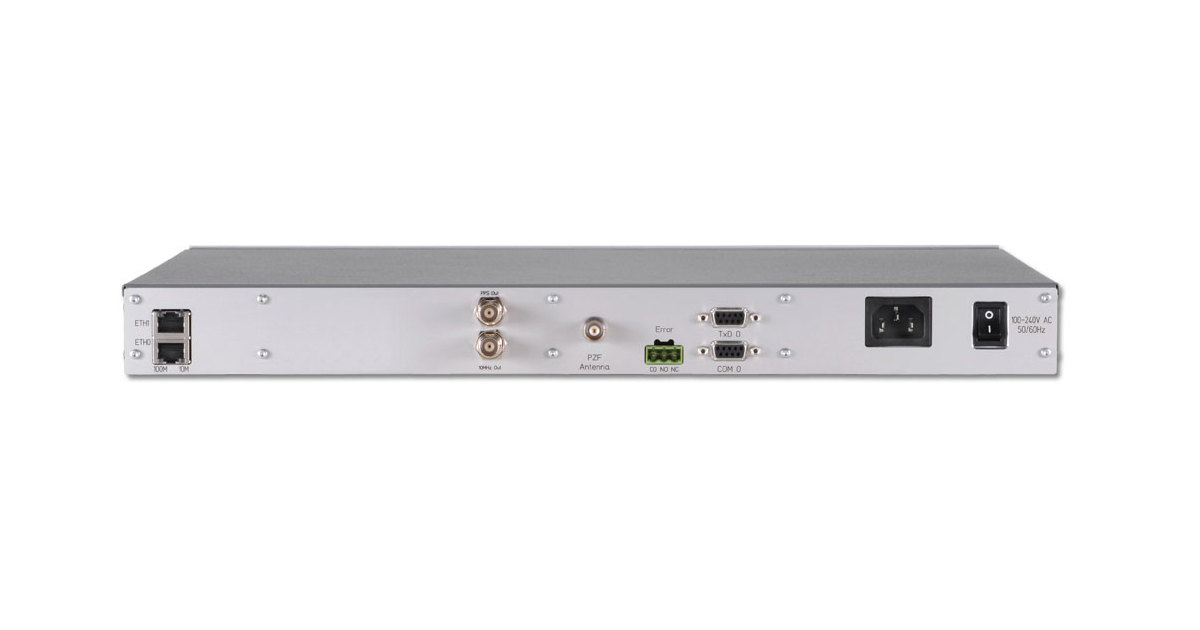
LANTIME M300 rear panel. Photo: Meinberg.
Internal sources reduce direct internet queries and simplify management. In a small network without a domain, two nodes can obtain external time while other devices query them. Two nodes improve availability but cannot resolve every conflict in readings; stricter requirements call for a more diverse architecture.
In chrony, a serving node permits requests from the local subnet with:
allow 192.168.10.0/24Replace the subnet, retain suitable external sources and allow 123/UDP from the required segments in the firewall. Both application and network rules are necessary. Avoid accidentally exposing the service to the entire internet.
Reliability matters more than CPU power
Ordinary office synchronisation rarely needs a powerful dedicated server. A healthy, continuously available node is usually sufficient. If you are also upgrading infrastructure, assess Servermall office servers against the overall workload; platform selection is covered in the guide to choosing a small-business or office server.
Connect time servers and the network serving them to a suitable UPS. A running node cannot help clients behind a powered-off switch. Power sizing is covered in Servermall's article on rack UPS and PDUs.
Without an external reference, clocks keep running, but uncertainty grows. Monitor synchronisation; do not declare arbitrary local clocks a reference merely to clear warnings.
Hardware sources and isolated networks
An isolated network can align device clocks, but needs a reference to tie them to accurate external time. An appliance with a satellite-navigation receiver and a properly installed antenna provides local stratum 1 without internet services.
Assess signal reception, oscillator holdover accuracy, antenna, cabling and redundancy independence. Two appliances sharing an antenna or the same reception conditions retain common risks.
Virtual machines and clouds
Continuous hypervisor correction may conflict with the guest's time service. Follow platform documentation: a one-off time adjustment after startup or restoration differs from periodic synchronisation and may sometimes coexist with NTP.
For virtual domain controllers, Microsoft recommends disabling host time synchronisation and retaining the domain hierarchy. Avoid a loop in which the controller obtains time from the host while the host obtains it from the same domain.
After reverting to a snapshot, check the clock and a new successful synchronisation. In the cloud, retain the platform's recommended mechanism unless you have a justified, compatible replacement design.
Choosing the Right Equipment
Our specialists will contact you and answer all your questions
Network equipment, cameras and BMCs

Routers, switches and recorders
Synchronise managed network equipment alongside servers. An NTP menu field may indicate only a client role; time-serving capability depends on the model and firmware.
Give cameras and recorders consistent sources and display settings. Check access from their own segment, including DNS when using hostnames. Correlate recording timestamps with recorder and access-control events. Platform selection is covered in the video surveillance server guide.
iDRAC and iLO controllers
A BMC has its own management environment and hardware event log. Correct operating-system time does not guarantee correct iDRAC or iLO timestamps. Configure the controller according to its model documentation and check source access from the management network.
This lets you correlate hardware faults with application logs. Differences between the systems are covered in the iDRAC, iLO and IPMI comparison.
How SNTP and NTS differ
SNTP is a simplified use of NTP with compatible basic packets. An embedded client may not perform full filtering or source comparison, but usually queries a conventional compatible NTP server.
NTS, defined in RFC 8915, adds cryptographic authentication. Keys are negotiated over TLS, normally on 4460/TCP, and time packets are protected over 123/UDP. Both sides must support it.
For a chrony build with NTS support, the Cloudflare source entry is:
server time.cloudflare.com iburst ntsThis example defines one protected source. Redundancy and an authentication policy for other sources are still needed. Google Public NTP does not support this mode; a pool hostname does not guarantee NTS.
Protection does not eliminate route delay or reference errors. Certificate validation requires a reasonably correct initial date. Authentication and source independence address different problems.
Checking synchronisation and common errors

In Windows, use w32tm /query /status, /query /source and /query /peers. Check the source and last successful synchronisation, rather than merely whether the service is running.
To take several measurements against a separate node:
w32tm /stripchart /computer:time.cloudflare.com /dataonly /samples:5This command does not configure synchronisation. It uses an ephemeral outbound UDP port, while the W32Time NTP client uses port 123. A successful test does not prove that the network allows the service's own traffic.
For chrony, use chronyc sources -v and chronyc tracking. An asterisk marks the selected source; Reach 377 means replies to the last eight polls, rather than milliseconds. Check the offset and reference measurement updates. For timesyncd, use timedatectl timesync-status; for an already running compatible ntpd implementation, use ntpq -p. There is no need to install another service solely for diagnostics.
| Symptom | Possible cause | What to check |
|---|---|---|
| No measurements received | UDP 123, DNS or routing blocked | Access from the client's actual segment |
| Discrepancy around a leap second | Conventional and smeared time mixed | A consistent source policy |
| Different times within a domain | Sources bypass the hierarchy | Domain policy and the root PDC's source |
| Error of an exact number of hours | Time zone or hardware-clock interpretation | Display and hardware-clock settings |
| NTS fails while ordinary NTP works | TCP 4460, certificate or client | Key exchange and initial date |
| VM clock jumps | Competing corrections or restoration | Hypervisor tools and the guest service |
In Linux, keeping the hardware clock in UTC is usually preferable. With two operating systems, agree on its interpretation. Local time in the hardware clock does not itself prevent NTP, but conflicting interpretations cause a shift after boot.
Frequently asked questions
Which public NTP server is best?
There is no universal winner. Consider the route from your network, stability, authentication support and leap-second handling. Preserve the hierarchy in a domain and follow platform recommendations in the cloud.
Can I specify google.com?
Google Public NTP uses time.google.com and four numbered time-service hostnames. The ordinary website address is not a documented NTP source.
Can I combine Google and Cloudflare for redundancy?
Not in an ordinary configuration: Google smears leap seconds, while Cloudflare does not. You need sources with a compatible policy.
Do different time zones need different servers?
No. The source provides a common time, and the time zone is applied when displaying it. Users in different time zones do not require different NTP services.
What does stratum 16 mean?
The node is unsynchronised. Network reachability alone is insufficient to consider it a usable source.
Making time a reliable part of infrastructure
Start with a compatible source policy, configure an appropriate service and verify the result. In a company, manage external sources centrally, retain the domain hierarchy and synchronise cameras and management controllers. Reliable time depends on consistent sources, available infrastructure and clock monitoring.
Choosing the Right Equipment
Our specialists will contact you and answer all your questions