Introduction
The best server for virtualization is not necessarily the model with the most cores or the newest processor. The right choice begins with assessing the virtual machines: their CPU load, active RAM usage, storage capacity and performance, network traffic, availability requirements, and expected growth.
The number of virtual machines alone says very little about the required configuration. A couple of heavily loaded databases may need more resources than several dozen small infrastructure VMs. In addition, the same server model may be either undersized or excessive depending on its CPUs, DIMMs, drives, controller, network adapters, and power supplies.
For a new project, consider current Dell PowerEdge 16G/17G and HPE ProLiant Gen12 platforms. Dell 14G/15G and HPE Gen10, Gen10 Plus, and Gen11 remain sensible refurbished options if they deliver the required performance, appear on the hypervisor compatibility list, and are cost-effective when licensing, power consumption, and ongoing maintenance are taken into account.
Form factor also matters:
-
1U servers provide high compute density;
-
2U servers usually offer more drive bays, PCIe slots, and cooling capacity;
-
tower servers are suitable for offices, branch locations, or labs without a server rack.
What Makes a Good Virtualization Server
A good server for virtual machines must provide enough performance not only for today's workload, but also for load peaks, growth, maintenance, and the failure of a component or node.
Key criteria include:
-
CPU. Both the number of physical cores and per-core performance matter. High clock speed benefits applications with limited parallelism, while a large core count helps consolidate many moderately loaded VMs.
-
RAM. Memory is often the first constraint on a VM host. Account for assigned RAM, actual consumption, hypervisor overhead, cache, failure reserve, and growth.
-
NUMA. The distribution of CPUs and memory across NUMA nodes affects RAM access latency. A large VM that spans more than one NUMA node may run more slowly even on a powerful server.
-
Storage. Evaluate not only terabytes, but also IOPS, latency, write intensity, SSD endurance, RAID, controller cache, array rebuild time, and path redundancy.
-
Network. Management, VM traffic, storage, live migration, and backup produce different traffic profiles. Production systems need redundant adapters and switches, not only a high nominal port speed.
-
Compatibility. The server, NIC, HBA, RAID controller, drives, boot device, firmware, and drivers must be supported by the selected hypervisor version.
-
Availability. Two power supplies do not turn a standalone server into a high-availability cluster. Automatically restarting VMs after a host failure requires multiple nodes, quorum, compatible storage, and correctly sized spare capacity.
-
Management. Dell iDRAC and HPE iLO simplify remote configuration, monitoring, firmware updates, and diagnostics, but they do not replace hypervisor and application monitoring.
How to Calculate Virtualization Hardware Requirements
Build a Workload Inventory
Begin with a list of existing or planned VMs, not a server catalog. When migrating an existing environment, collect metrics not only during average operation but also during peak periods such as month-end closing, backup jobs, antivirus scans, and batch processing.
| VM or role | vCPU | Assigned / active RAM | Capacity | Peak IOPS / latency | Network | Required availability | Growth |
|---|---|---|---|---|---|---|---|
| Domain controller | 2 | 4 / 2 GB | 80 GB | Low | Low | High | Low |
| Application server | 8 | 32 / 22 GB | 300 GB | Medium | Medium | High | Medium |
| Database | 16 | 128 / 105 GB | 2 TB | High, latency-sensitive | Medium | Critical | High |
| Test environment | 4 | 16 / 5 GB | 150 GB | Low | Low | Low | Unpredictable |
The values in this table are only an example of how to structure an inventory. The actual configuration must be calculated from measurements of the specific applications.
CPU and vCPU Overcommit
A vCPU is a virtual processor that the hypervisor schedules on the host's physical cores. Virtual machines can be assigned more vCPUs than the server has physical cores. This is called overcommit, or CPU oversubscription.
Overcommit works because most VMs do not use all their assigned vCPUs at the same time. However, the more often workloads peak simultaneously, the greater the contention for physical cores and the longer virtual processors wait to run.
For an initial estimate, the following ranges may be used only as a starting point:
-
around 1:1 for latency-sensitive databases, applications licensed per core, and workloads with predictably high utilization;
-
approximately 2:1–4:1 for mixed server workloads with moderate CPU utilization;
-
higher overcommit may be possible for lightweight VMs, test environments, and some VDI scenarios, but it requires monitoring CPU Ready, steal time, or the equivalent metric for the selected hypervisor.
Do not count SMT/Hyper-Threading logical processors as full additional cores. They improve overall throughput, but they do not double compute resources.
There is no universally safe vCPU-to-pCPU ratio. It depends on the applications, the duration of load peaks, latency requirements, and scheduler capabilities. If the current environment is already virtualized, real metrics are more useful than any generic ratio.
Licensing must also be considered. Windows Server, SQL Server, Oracle, and other products may be licensed by physical or virtual core. A server with fewer, faster cores can sometimes be more cost-effective than a maximum-core-density model, even if the hardware prices are similar.
RAM, NUMA, and Failure Headroom
For memory sizing, calculate several separate values:
-
Total RAM assigned to virtual machines.
-
Memory that is actually active during peak periods.
-
Memory required by the hypervisor, management VMs, and system services.
-
File-system or software-defined storage cache.
-
Growth headroom.
-
Resources required after the failure of one node.
Memory ballooning, compression, or swap should not be treated as the normal way to compensate for insufficient RAM. These mechanisms can help during a temporary shortage, but they may sharply increase application latency.
On a multi-socket server, processors and their local memory form NUMA nodes. Some modern CPUs can also present a single socket as several NUMA domains. Local memory access is usually faster than access to memory attached to another NUMA node.
A large VM should therefore be configured so that its vCPUs and RAM fit within an appropriate NUMA node where possible, unless the application is designed to scale across multiple nodes. The hypervisor can expose a virtual NUMA topology to the guest, but it should reflect the host's physical architecture.
Memory for an HA cluster is sized for the state after a node failure, not for normal operation. If three identical hosts provide 3 TB of RAM in total, that does not mean that all 3 TB can be safely assigned to VMs. With an N+1 requirement, the two remaining nodes must be able to accept critical VMs from the failed server and continue operating without sustained swapping.
The smaller the cluster, the more noticeable this reserve becomes. In a two-node design, each node must effectively be able to absorb the other's critical load. In a cluster of four or more nodes, the loss of one host represents a smaller share of total capacity, although quorum, networking, and operational requirements still apply.
Choosing the Right Equipment
Our specialists will contact you and answer all your questions
VM Storage: Capacity, IOPS, and Latency
“We will install SSDs or NVMe drives” is not a complete storage calculation. A VM environment requires consideration of:
-
usable capacity after RAID or replication;
-
peak read/write IOPS;
-
average and 95th/99th percentile latency;
-
the ratio of random to sequential operations;
-
write intensity and SSD endurance;
-
controller cache and cache protection;
-
rebuild time after a drive failure;
-
the impact of rebuilds on running VMs;
-
HBA, NIC, and path redundancy;
-
live migration and automatic failover requirements;
-
backup and recovery.
The main architecture options are:
Local RAID. Drives are installed inside one server and combined with a hardware RAID controller or operating-system tools. This is a simple design for a standalone host, lab, and some edge scenarios. Without additional replication, however, the VMs remain tied to that server. This approach is also used when minimum latency is required and fault tolerance is provided by other means.
Shared SAN or NAS. Several hosts use shared storage over Fibre Channel, iSCSI, NFS, SMB, or another supported protocol. This simplifies live migration and clustering, but requires redundant storage controllers, ports, fabrics or switches, and storage paths.
SDS. With software-defined storage, a software layer combines the local drives of several servers and distributes and replicates data. In hyperconverged infrastructure (HCI), compute and storage scale together. Capacity planning must account for replicas, metadata, rebalance operations, rebuild traffic, and the minimum node count required by the selected platform.
For databases and other sensitive applications, consistent latency during backup, rebuild, and component failure matters as much as maximum performance.
Important: A VM snapshot records the state of a virtual machine, but it is not a replacement for a backup. A snapshot usually depends on the original storage and may be lost with it.
Networking for VMs, Storage, and Live Migration
Where possible, separate the following traffic flows:
-
host and cluster management;
-
VM user traffic;
-
storage traffic;
-
live migration;
-
backup and replication;
-
out-of-band management through iDRAC or iLO.
Separation does not always require a dedicated physical adapter for each traffic type. A small environment can use VLANs, QoS, and several ports on one high-speed NIC. Critical paths, however, must remain available after a cable, NIC, or switch failure.
Two ports on one adapter protect against a cable or port failure, but not always against failure of the card itself. Two cables connected to one switch do not provide full redundancy either. Production environments commonly use NIC teaming or bonding with connections to two independent switches.
Select 10, 25, or 100GbE according to the traffic profile:
-
user traffic volume;
-
shared-storage or HCI speed;
-
VM size and acceptable migration time;
-
backup volume;
-
the number of concurrent operations;
-
the required recovery time after a failure.
A faster interface will not eliminate the latency of a slow array, insufficient IOPS, or a controller bottleneck.
Hypervisor Compatibility
Check the exact configuration, not just the server model name:
-
CPU generation and model;
-
boot mode and boot device;
-
NIC, HBA, and RAID controller;
-
NVMe, SAS, and SATA devices;
-
firmware and driver matrix;
-
TPM, Secure Boot, and other mandatory features;
-
GPU passthrough, SR-IOV, or vGPU support, if required;
-
clustering and live migration support.
When servers from different generations are placed in one cluster, check CPU instruction-set compatibility. Hypervisor compatibility modes can mask some newer processor features, but they do not eliminate every migration constraint.
Software platform selection is covered in detail in Which Hypervisor to Choose? and Microsoft Hyper-V Overview. For hardware planning, the key point is that the configuration must be checked against the HCL and documentation for the selected version of VMware, Hyper-V, Proxmox VE, KVM, XCP-ng, or another platform.
Best Dell PowerEdge Servers for Virtualization: Current and Refurbished Models
The Dell portfolio includes several classes of VM host:
-
entry-level single-socket systems for labs, edge sites, and small standalone servers;
-
balanced dual-socket 1U servers for dense deployments;
-
expandable 2U servers for large memory, storage, and PCIe configurations;
-
tower servers for offices or branch locations;
-
specialized GPU configurations for VDI, graphics, or compute VMs.
In the current Dell PowerEdge 17G generation, these classes include the R470, R670, and R770. The R470 is a single-socket 1U server with Intel Xeon 6, 16 DIMMs, and up to 4 TB of memory. The R670 and R770 are dual-socket platforms with 32 DIMMs and up to 8 TB of memory; the 2U R770 offers a wider range of drive and PCIe configurations. Drive, OCP NIC, PCIe slot, and GPU support depends on the backplane, riser, CPU, fans, and power supplies. These limits are documented in Dell's current PowerEdge catalog and specifications.
Dell PowerEdge R660/R760 remain current 16G alternatives, while R640/R740 and R650/R750 are common refurbished platforms. A newer generation provides DDR5, PCIe Gen5, modern OCP/NVMe options, and newer CPUs, but this does not automatically make earlier servers unsuitable.
Dell PowerEdge R250 — Compact Entry-Level 1U Server
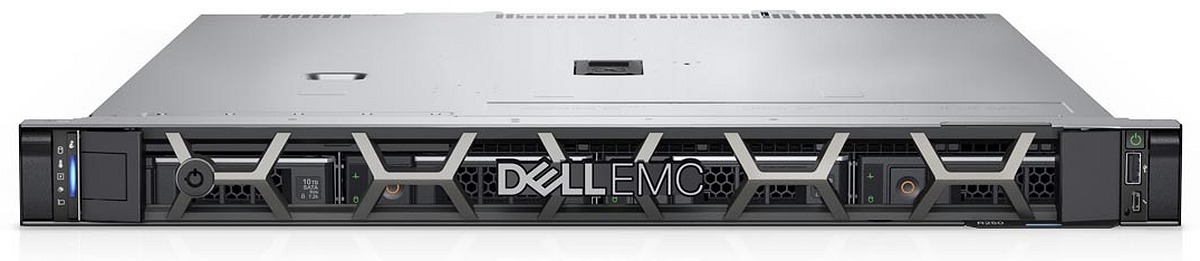
The Dell PowerEdge R250 is a single-socket platform with Intel Xeon E-2300 processors, four DDR4 UDIMM slots, and a maximum memory capacity of 128 GB. It supports configurations with two or four 3.5-inch SAS/SATA drives, two low-profile PCIe Gen4 slots, and embedded 1GbE interfaces.
An important limitation of the R250 is its single non-redundant power supply. Its modest RAM capacity, limited drive configuration, and restricted expansion make it unsuitable as a general-purpose foundation for a production cluster.
The R250 is a sensible option when an affordable host is needed for a few small VMs and automatic failover is not required. Before purchase, confirm that its memory, network ports, and storage options will remain sufficient throughout the planned service life.
Best for: labs, training, development, small standalone VM hosts, and non-critical edge services.
For a new project with a similar purpose, consider the PowerEdge R260 or R360. These are still entry-level single-socket systems, however, rather than replacements for a full cluster node.
Dell PowerEdge R550 — 2U Platform with Additional Drive Capacity
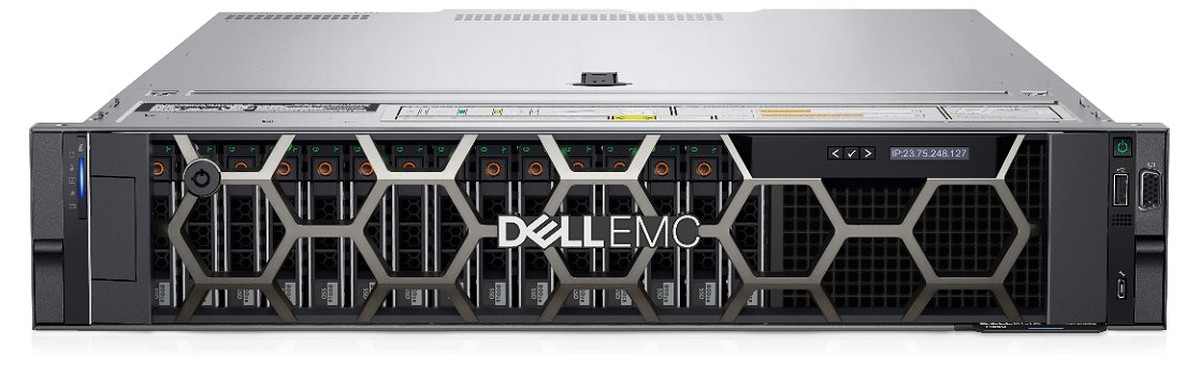
The Dell PowerEdge R550 is a dual-socket 2U server based on 3rd Generation Intel Xeon Scalable processors. It has 16 DDR4 DIMM slots and supports up to 1 TB of RAM. Available configurations include 8 or 16 SFF drives or 8 LFF SAS/SATA drives, OCP 3.0, several PCIe Gen4 slots, various PERC/HBA options, and redundant power supplies.
The R550 provides more room for drives and adapters than 1U models, but the exact configuration depends on the backplane and riser. A 2U chassis does not mean that every R550 supports NVMe, the required number of NICs, or a particular HBA.
As a refurbished, value-oriented platform, the R550 suits environments where DDR4 and PCIe Gen4 are sufficient and drive density matters more than the maximum memory bandwidth of a newer generation.
Best for: small and medium VM environments, local RAID, infrastructure VMs, test clusters, and production workloads after separate CPU, RAM, and storage sizing.
Current alternatives are the Dell PowerEdge R760 and R770. They provide modern CPUs, DDR5, PCIe Gen5, and a broader selection of NVMe/EDSFF configurations, but may increase both hardware and licensing costs.
Dell PowerEdge T550 — Tower Server for an Office or Branch Location
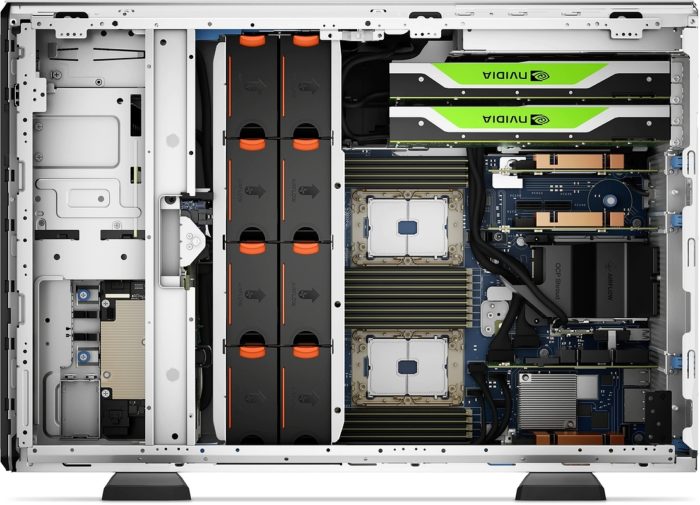
The Dell PowerEdge T550 is a dual-socket tower server based on 3rd Generation Intel Xeon Scalable processors. It has 16 DDR4 DIMM slots, supports up to 1 TB of RAM, up to six PCIe Gen4 cards, and various SFF, LFF, and NVMe drive configurations. OCP NIC, RAID/HBA, and redundant power-supply options are available.
A tower chassis is convenient where no rack is available, but it is inaccurate to assume that such a server will always be quiet. Actual noise depends on the CPUs, number of drives, PCIe cards, GPUs, fans, and cooling profile.
The T550 can support certain GPUs, but a particular card must be checked against the riser, PSU capacity, airflow, and official compatibility matrix. A PCIe slot alone does not confirm GPU support.
Best for: offices, branch locations, labs, or local server rooms without a rack that need substantial RAM, several VMs, and flexible expansion.
The current alternative is the Dell PowerEdge T560 with 4th or 5th Generation Intel Xeon Scalable processors, DDR5, and PCIe Gen5.
Best HPE ProLiant Servers for Virtualization: Current and Refurbished Models
For a new project, HPE's main general-purpose platforms are the ProLiant Compute DL360 Gen12, DL380 Gen12, and ML350 Gen12.
HPE ProLiant Compute DL360 Gen12 is a dual-socket 1U server with Intel Xeon 6 processors, 32 DIMM slots, and up to 8 TB of memory. It supports various SFF and EDSFF configurations, PCIe Gen5, OCP 3.0, and redundant power supplies. The compact chassis suits dense deployment, but the number of PCIe cards and available drive options depend on the selected chassis. Details are provided in the HPE DL360 Gen12 QuickSpecs.
HPE ProLiant Compute DL380 Gen12 is a dual-socket 2U server with Intel Xeon 6 processors, 32 DIMM slots, and up to 8 TB of memory. Compared with a 1U platform, it offers more SFF, LFF, EDSFF, PCIe, and GPU options, but exact support depends on the backplane, riser, storage controller, PSU, and cooling kit. Available configurations are listed in the HPE DL380 Gen12 QuickSpecs.
HPE ProLiant Compute ML350 Gen12 is a dual-socket tower platform with 32 DIMM slots and up to 8 TB of memory. It supports multiple drive cages, SFF/LFF/EDSFF and NVMe drives, PCIe Gen5, OCP, and redundant power. It is an option for an office or branch location that requires rack-server-class expansion without a dedicated rack. Exact limits are provided in the HPE ML350 Gen12 QuickSpecs.
Gen11 remains a modern DDR5/PCIe Gen5 platform, while Gen10 and Gen10 Plus may offer better value as refurbished DDR4 servers.
HPE ProLiant DL320 Gen11 — Single-Socket 1U Host

HPE ProLiant DL320 Gen11 is a single-socket 1U server with a 4th or 5th Generation Intel Xeon Scalable processor, 16 DDR5 DIMM slots, and a maximum memory capacity of approximately 2 TB. The platform supports various SFF, LFF, and EDSFF configurations, PCIe Gen5, and OCP networking. Redundant power availability depends on the selected configuration.
The DL320 Gen11 is considerably more scalable than entry-level Xeon E servers, but it remains a single-socket platform. It can be a strong node for edge sites, labs, or small environments if its CPU, memory, and I/O match the workload.
Best for: edge virtualization, development, labs, containers, and small standalone VM environments.
For a new project, consider the DL320 Gen12 or move to a dual-socket DL360 Gen12 if greater RAM headroom, CPU capacity, and cluster scalability are important.
HPE ProLiant DL380 Gen11 — General-Purpose 2U Platform

HPE ProLiant DL380 Gen11 is a dual-socket 2U server with 4th or 5th Generation Intel Xeon Scalable processors, 32 DDR5 DIMM slots, and up to 8 TB of memory. SFF, LFF, and EDSFF chassis are available, together with NVMe, several PCIe Gen5 slots, OCP 3.0, various storage controllers, and redundant power supplies.
The DL380 Gen11 can serve as a compute node with external SAN/NAS, a local-RAID server, or an HCI platform, but these scenarios require different backplanes, NICs, HBAs, and drive configurations. The model name alone therefore does not determine whether the server is suitable for virtualization.
Best for: production VM hosts, HCI, shared-storage clusters, VDI, and mixed workloads after resource sizing.
The current alternative is the DL380 Gen12. For less demanding environments, a refurbished DL380 Gen10 Plus or Gen10 may offer a strong TCO, especially where DDR4 DIMMs and compatible drives are already in use.
HPE ProLiant ML350 Gen11 — Expandable Tower Server

HPE ProLiant ML350 Gen11 is a dual-socket tower server with 4th or 5th Generation Intel Xeon Scalable processors, 32 DDR5 DIMM slots, and a maximum memory capacity of up to 8 TB. The platform supports multiple drive cages, SFF/LFF/EDSFF and NVMe drives, PCIe Gen5, OCP 3.0, and redundant power supplies.
The ML350 Gen11 is suitable for a site without a rack that needs more RAM, storage, and PCIe expansion than entry-level tower servers can provide. It can also be converted for rack installation, although the DL380 is often a more space-efficient choice when the server will be deployed in a data center from the outset.
Best for: offices, branch locations, labs, and local server rooms that need several business systems, substantial memory, and flexible expansion.
The current alternative is the ML350 Gen12. Add a GPU only after checking official support for the card, riser, PSU, cooling kit, and selected hypervisor.
Choosing the Right Equipment
Our specialists will contact you and answer all your questions
Use Cases for Virtualization Servers
Development and Testing
Virtual machines make it possible to create isolated environments, clone templates, test updates, and quickly return to a known configuration. A lab can often use one entry-level host with local RAID and regular off-host backup.
If the lab is used to test a cluster, it needs a separate witness or third node in accordance with the platform's requirements. Two VMs running on one physical server do not simulate the failure of independent hosts.
Server Consolidation
Virtualization makes it possible to migrate several physical servers to a smaller number of more powerful hosts. Sizing must account for overlapping peaks: backup, reporting, updates, and batch jobs can raise CPU, storage, and network load at the same time.
Consolidation also increases the impact of a single failure. If one physical server now hosts ten critical systems, its redundancy and recovery become more important than before the migration.
Private Cloud and Clustered Virtualization
A private cloud typically requires several hosts, centralized management, automatic failover, VM templates, monitoring, backup, and managed storage. The hardware platform must match the selected hypervisor and data-storage model.
Disaster Recovery
Replicating VMs to another host or site helps reduce recovery time, but does not by itself guarantee that applications will start correctly. Define the recovery order, service dependencies, network addressing, access to DNS/AD, and acceptable data loss.
Edge Virtualization
At a remote site, one server may run network, industrial, analytics, and infrastructure VMs. Remote management, spare components, a suitable chassis, air filtration where required, and the ability to recover without an on-site specialist are especially important.
GPUs and Virtual Workstations
Not every virtualization environment needs a GPU. It is added for graphics-intensive VDI, CAD, media applications, compute, or AI when the workload profile justifies it.
Before selecting a GPU, check:
-
physical support for the card in the server;
-
the size and number of PCIe slots;
-
PSU capacity;
-
cooling configuration;
-
GPU passthrough, partitioning, or vGPU;
-
hypervisor compatibility;
-
driver and vGPU software licensing.
One Server or a Cluster of Two, Three, or More Nodes
| Architecture | Capabilities and limitations |
|---|---|
| One host | Minimum cost and simple management. Suitable for a lab, small office, or non-critical systems. A motherboard, RAM, controller, or hypervisor failure stops all VMs until the server is repaired or the VMs are recovered elsewhere. |
| Two nodes | Failover is possible, but a witness is usually required for quorum. Each node must have enough resources to absorb the other's critical workload. Limitations depend on the storage architecture and hypervisor. Maintenance during an additional failure carries particular risk. |
| Three nodes | A practical minimum architecture for many production clusters and HCI platforms. Quorum is easier to maintain and the workload can be distributed. With N+1, the two remaining nodes must accept the VMs from a failed server. |
| Four or more nodes | The loss of one node represents a smaller share of total capacity, and maintenance and horizontal growth become easier. At the same time, network, licensing, monitoring, and compatibility-management requirements increase. |
Important: Two redundant power supplies protect only against some power-related problems. They do not protect against a motherboard failure, software error, faulty update, shared-switch failure, storage damage, cyberattack, or administrative mistake.
Example Virtualization Server Calculation
Assume that an organization plans to migrate the following systems to a virtual platform:
-
two domain controllers;
-
an application server;
-
a database server;
-
a file server;
-
a monitoring system;
-
several small test VMs.
The sizing process is as follows:
-
Collect CPU, active memory, storage latency, IOPS, and network throughput metrics during normal operation and peak periods.
-
Separate assigned resources from actual consumption. A VM with 16 vCPUs and 64 GB of RAM may use only a small fraction of those resources most of the time.
-
Select an initial CPU overcommit ratio by workload type. Use a more conservative ratio for the database and allow a higher ratio for test VMs.
-
Add memory for the hypervisor, management services, storage cache, and growth headroom.
-
Compare the size of large VMs with the NUMA topology of the CPUs under consideration.
-
Calculate usable capacity, IOPS, and latency after RAID or HCI replication. Evaluate operation during a rebuild separately.
-
Select network interfaces for VM, storage, migration, and backup traffic. Allow for the failure of one NIC, cable, or switch.
-
If HA is required, repeat the calculation after the loss of one node. If CPU or RAM is insufficient, increase the configuration or the number of servers.
-
Check the hypervisor HCL, firmware, drivers, and live migration between the selected CPU generations.
-
Only then select the exact server model and configuration.
The result may be one powerful 2U host, two nodes with a witness, three balanced 1U servers, or an HCI cluster. None of these designs is inherently correct without reference to the workload and recovery requirements.
Why Refurbished Servers Are Suitable for Virtualization
Refurbished enterprise servers often provide a strong balance of capital cost and capability. They can support large amounts of ECC RAM, multiple processors, redundant power supplies, hardware RAID, OCP/NDC, remote management, and hot-swap components.
Dell R640/R740, R650/R750 and HPE DL360/DL380 Gen10, Gen10 Plus, and Gen11 remain useful for virtualization if:
-
the processors deliver the required performance;
-
the required amount of compatible RAM is available;
-
the server and its components are supported by the hypervisor;
-
firmware, drivers, and spare parts are available;
-
the drives meet latency, IOPS, and endurance requirements;
-
power consumption is acceptable;
-
software licensing costs do not eliminate the hardware saving;
-
there is headroom for growth and a node failure.
A DDR4 platform may be more sensible than a new server when the workload does not require maximum memory bandwidth, PCIe Gen5, or the latest accelerators. For infrastructure VMs, development, file services, and moderately loaded business applications, for example, a properly configured R740 or DL380 Gen10 may remain sufficient.
For dense consolidation, large in-memory workloads, fast NVMe storage, or a long service life, on the other hand, newer DDR5 platforms may provide a better overall TCO despite the higher initial capital cost.
Servermall tests refurbished Dell and HPE systems before delivery. The company also provides a five-year onsite warranty. Confirm the applicable terms and service geography for the specific order.
Backup and Disaster Recovery
High availability, replication, and backup address different needs:
-
HA restarts a VM on another node after a host failure;
-
live migration moves a running VM for maintenance or load balancing;
-
replication creates a copy of a VM or its data on another node or site;
-
snapshot records the state of a VM at a specific point in time;
-
backup creates an independent copy for recovery after deletion, data corruption, an attack, or infrastructure failure.
Before designing the solution, define:
-
RPO — how much recent data can be lost;
-
RTO — how long recovery may take;
-
which VMs and applications must be restored first;
-
whether application-consistent backup is required;
-
whether an immutable or offline/offsite copy is required;
-
the bandwidth required for the backup network;
-
where the VM will run if the primary cluster fails completely.
Backups should be stored outside the production storage system. Critical systems may require an additional immutable or offsite copy. Test the recovery plan regularly: a successful backup-job status does not guarantee that the VM, database, and related services can actually be restored within the required time.
Conclusion
Selecting the best server for virtualization starts with a workload inventory, not a model name or VM count. Calculate CPU, RAM, NUMA, storage, network, and availability first; then choose the architecture and exact configuration.
1U servers suit high-density and clustered deployments when their drive and PCIe capabilities are sufficient. 2U servers are useful when additional drives, controllers, NICs, or GPUs are required. Tower servers make it possible to deploy virtualization in an office or branch location without a rack. The 1U vs 2U vs 4U Servers: Rack Unit Sizes Explained guide covers the differences in more detail.
For a new project, Dell PowerEdge 16G/17G and HPE ProLiant Gen12 provide modern CPUs, DDR5, PCIe Gen5, and newer storage options. Refurbished Dell 14G/15G and HPE Gen10/Gen10 Plus/Gen11 may be more cost-effective if they pass the HCL check, deliver the required performance, and make sense in terms of total cost of ownership.
The key rule: A server model is only a platform. Its actual suitability is determined by the CPUs, memory-channel population, backplane, RAID/HBA, drives, NICs, riser, PSUs, cooling, and the architecture of the entire cluster.
You can select a ready-to-deploy virtualization server after sizing the workload. If the source metrics are incomplete or the requirements conflict, Servermall specialists can compare configurations and check their suitability for the selected hypervisor and operating scenario.
Frequently Asked Questions
What Is the Best Server for Virtualization?
The best server is one that can sustain peak VM load, provides enough RAM, meets storage latency and IOPS requirements, supports the necessary NICs/HBAs, and retains headroom for growth or a node failure. Production environments commonly use dual-socket 1U/2U platforms or modern single-socket servers with many cores and memory channels. The exact choice still depends on the workload.
How Much RAM Does a Virtualization Server Need?
Add the actually active memory of the VMs, then include hypervisor overhead, cache, growth reserve, and HA capacity. Sizing only by total assigned RAM or the maximum memory supported by the server is not sufficient.
How Many Virtual Machines Can One Server Run?
There is no fixed number. One server may run many small infrastructure VMs or only a few large databases. The limiting factor may be CPU, RAM, NUMA, storage latency, IOPS, network throughput, hypervisor limits, or licensing.
What CPU Overcommit Ratio Is Considered Safe?
There is no universal value. For sensitive applications, start with a conservative ratio around 1:1; for mixed workloads, start at approximately 2:1–4:1. Then adjust the ratio based on CPU Ready, steal time, latency, and application metrics.
Which Is Better for Virtualization: 1U or 2U?
With comparable CPUs and RAM, both form factors can provide the same compute performance. A 1U server saves rack space, while a 2U server usually provides more drive bays, PCIe slots, and cooling capacity. The choice depends on storage, networking, and expansion requirements.
Is NVMe Required?
No. NVMe is required when the workload needs high performance and low latency. SAS or SATA SSDs may be sufficient for lightweight infrastructure VMs. Measured IOPS, latency, endurance, and the redundancy architecture matter more than the interface type alone.
Can a Two-Server Cluster Provide High Availability?
Yes, if the selected platform supports this architecture, witness/quorum is configured, storage remains available, and one node can absorb the other's critical load. A two-node cluster provides less headroom for simultaneous maintenance and an additional failure than a design with three or more nodes.
Are Refurbished Servers Suitable for Virtualization?
Yes, if they deliver the required performance, are supported by the hypervisor, and have suitable CPUs, RAM, storage, NICs, and PSUs. Power consumption, component availability, firmware, and software licensing costs must also be considered.
Do Snapshots Replace Backups?
No. A snapshot is usually stored with the source VM or depends on the same storage. It is useful for a short-term rollback, but does not protect against array failure, deletion, data corruption, or attack. Recovery requires an independent off-host backup copy.
Article updated on 31 August 2026. The update adds workload-sizing methodology, CPU overcommit and NUMA guidance, RAM and N+1 headroom, a comparison of local, shared, and HCI storage, network redundancy, one-, two-, three-, and multi-node designs, backup and disaster-recovery requirements, and current and refurbished Dell PowerEdge and HPE ProLiant models.
Choosing the Right Equipment
Our specialists will contact you and answer all your questions
Content:

Free shipping on orders over £500 in the EU, £500 in the UK, and $3,000 in the USA

Free shipping on orders over £500 in the EU, £500 in the UK, and $3,000 in the USA

Free shipping on orders over £500 in the EU, £500 in the UK, and $3,000 in the USA

Free shipping on orders over £500 in the EU, £500 in the UK, and $3,000 in the USA