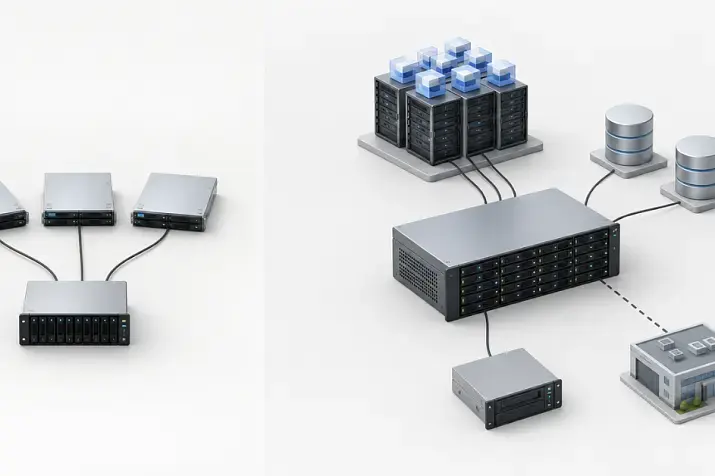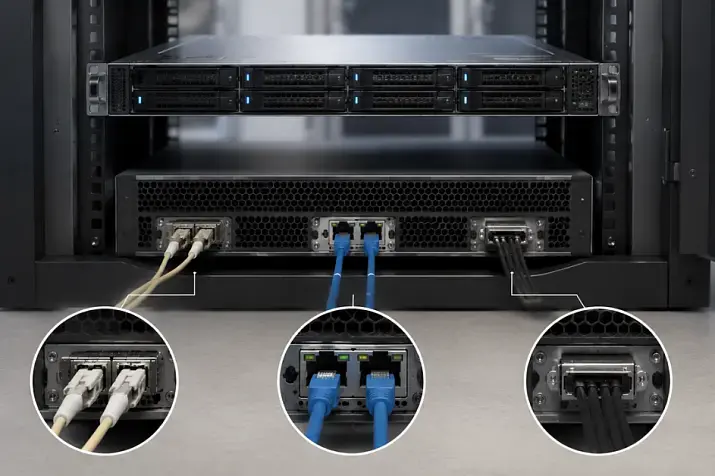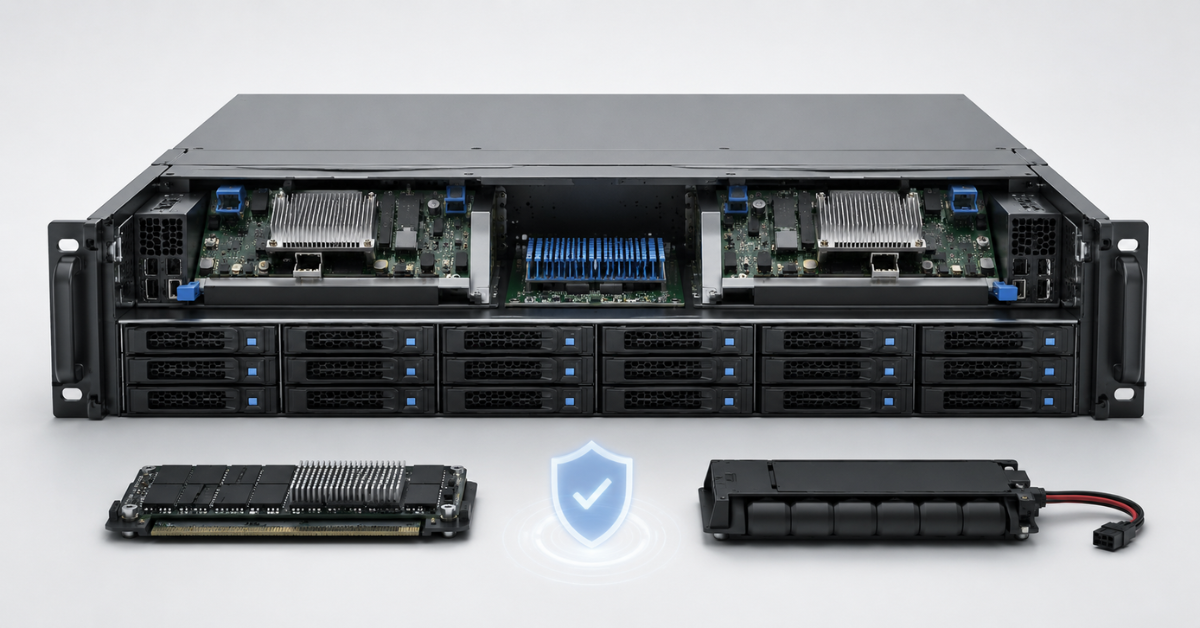
A storage array with two controllers, protected cache and a healthy BBU module or supercapacitor is more reliable than a basic array not because it has “more hardware”, but because it has redundant paths for data access and a mechanism for protecting write operations. For virtualization, databases, ERP, file storage and other critical services, it is better to choose a storage array with at least two controllers, but it is also essential to check the whole chain, not only the hardware bundle: controllers, cache, cache protection module, firmware, ports, multipathing and error logs.
Enterprise storage rarely fails “with one button”. More often, the problem starts with a single component: a controller, port, cable, cache battery, power supply, firmware or disk group. A good architecture is needed so that one such failure does not stop a business system.
That is why, when choosing a data storage system, it is important to look beyond capacity and the number of disks. Two storage arrays with the same capacity can differ greatly in real fault tolerance if one has two controllers, protected cache and verified paths to the servers, while the other has one controller and an unknown battery status.
Most popular servers
Free shipping on orders over 500 € in the EU, £500 in the UK, and $3,000 in the USA
Free shipping on orders over 500 € in the EU, £500 in the UK, and $3,000 in the USA
Free shipping on orders over 500 € in the EU, £500 in the UK, and $3,000 in the USA
Free shipping on orders over 500 € in the EU, £500 in the UK, and $3,000 in the USA
What a storage controller does
A controller is the management module of a storage system. It receives requests from servers, works with disks, RAID groups or pools, manages volumes, cache, external ports and the internal logic of the array.
Simply put, in a full-fledged storage array, a server does not “talk” to each disk directly. It communicates with the storage controller, and the controller decides how to process the request inside the array.
The controller is responsible for several important tasks:
- receiving read and write commands from servers;
- distributing operations across disks, SSDs, RAID groups or pools;
- managing volumes, snapshots, replication and other storage functions;
- servicing read and write cache;
- working with access ports, such as Fibre Channel, iSCSI, SAS or others;
- sending data to the management interface;
- recording errors in event logs;
- participating in firmware updates and workload failover.
Because of this, a controller should not be treated as an ordinary RAID card. In an enterprise storage array, it performs more functions and has a much stronger impact on data availability.
If there is only one controller, it becomes a potential single point of failure. The disks may be healthy and the power supplies may be working, but if the only controller fails, the servers will lose access to the volumes.
One controller or two: what the real difference is
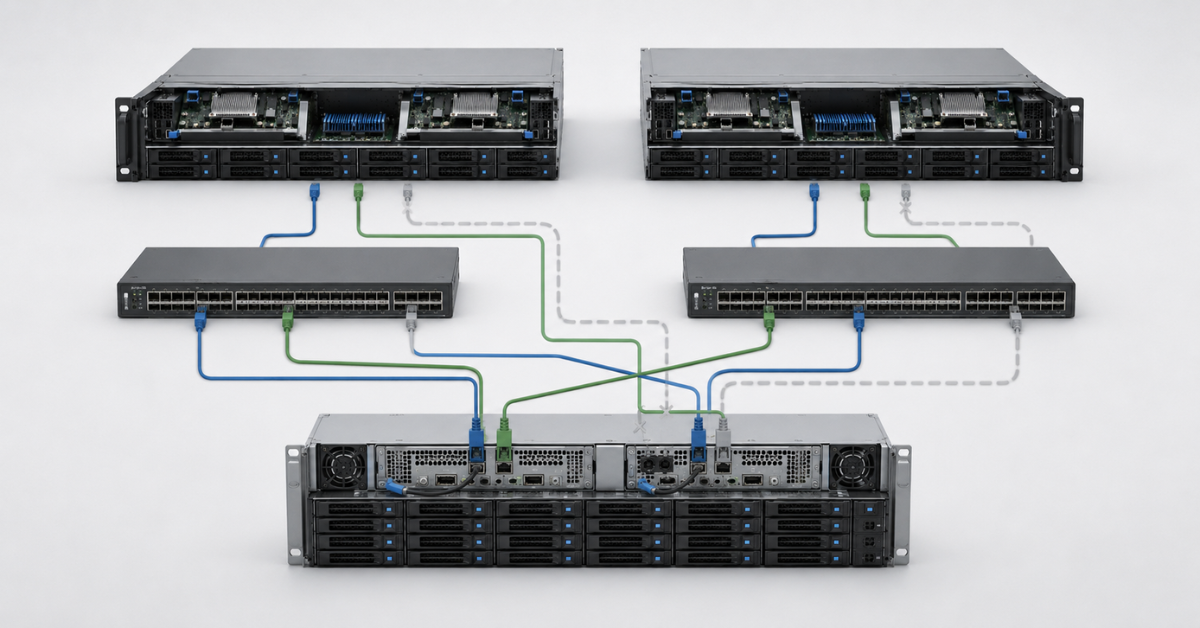
A single-controller storage array can be a reasonable option for non-critical tasks. For example, it may work for a test environment, a lab, a temporary archive or an additional storage tier where downtime is acceptable.
The advantages of this design are clear:
- lower cost;
- simpler configuration;
- fewer components to maintain;
- easier initial setup.
But the limitations are also serious:
- a controller failure often means downtime;
- a firmware update may require a shutdown;
- replacing a controller without affecting services is more difficult;
- it is impossible to build a full redundant-path design;
- some high-availability features are unavailable or limited.
A storage array with two controllers is designed differently. It has two management modules, and with the right configuration, the second controller can take over part of the workload or continue operating if the first controller fails.
Two controllers provide several advantages:
- servers can be connected to the storage array through different physical paths;
- the failure of one controller does not have to lead to loss of access to data;
- some maintenance operations can be performed without a full array shutdown;
- resilience to port, cable, adapter or switch failure increases;
- write cache can be mirrored between controllers.
For example, in many Dell EMC storage systems, fault tolerance is built around two controllers, several ports and a correct connection design to servers. But the phrase dual controller alone does not guarantee continuous operation. If a server is connected with one cable to only one controller, the second controller physically exists, but the path to it is not used.
Dual controller does not protect against everything. It does not replace backups and does not save you from:
- user data deletion;
- file system corruption;
- ransomware;
- administrator error;
- an incorrect firmware update;
- a disk group failure beyond the tolerable RAID level;
- incorrect path configuration on the server.
It is more accurate to treat two controllers as the foundation for a fault-tolerant design, not as a ready-made guarantee of zero downtime.
What happens when a controller fails
The clearest scenario is the failure of one of two controllers. It can be a hardware fault, a hang, a firmware failure or a forced reboot during maintenance.
In a correctly configured design, the process looks like this:
- One controller stops servicing operations.
- The storage array transfers its resources to the remaining controller.
- Servers continue to see the volumes through other available paths.
- Multipathing on the server side selects a working path.
- Applications may notice a pause or increased latency, but they should not completely lose access to data.
In practice, much depends on the connection design. If each server has two adapters, two independent paths and the correct path selection policy, the failure of one controller usually does not cause full downtime. But if the server was connected only to the failed controller, the second controller will not help automatically: there is no physical route to it.
The same applies to maintenance. In dual-controller arrays, it is often possible to replace or reboot controllers one by one. For example, in the Dell PowerVault ME5 documentation, the controller module replacement procedure includes checking controller status, confirming that it is ready for removal and labeling cables before disconnecting them. This is a good example of why even “hot” maintenance requires discipline and should not be done at random: Dell PowerVault ME5: replacing a controller.
Before replacing or updating a controller, it is worth checking:
- whether servers see all paths to the volumes;
- whether there are already errors on the second controller;
- whether the cache is synchronized;
- whether firmware versions match;
- whether there are warnings for power supplies, fans and disks;
- whether an up-to-date backup exists;
- whether a low-load maintenance window has been chosen.
Even if the vendor allows maintenance without a full shutdown, it is still reasonable to plan a maintenance window. A fault-tolerant architecture reduces the risk of downtime, but it does not make every operation safe by default.
Path loss: cable, port, adapter or switch
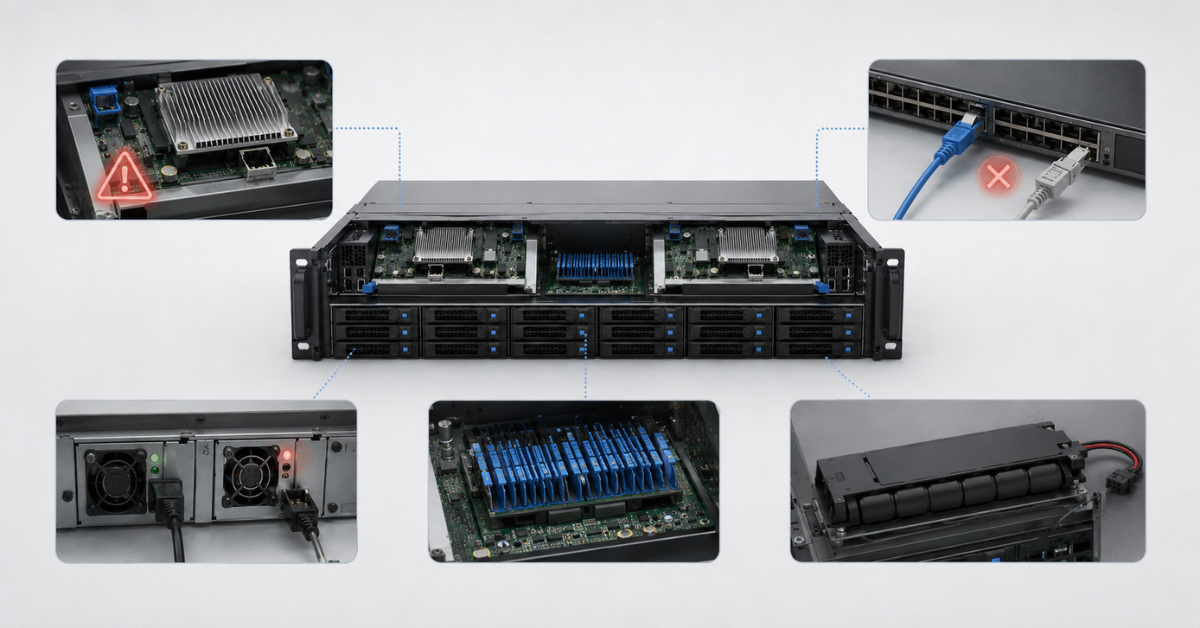
In real infrastructure, it is more common for a separate path to fail than for an entire controller to fail. For example:
- an SFP module fails;
- a cable is damaged;
- a port on the controller fails;
- a SAN switch hangs;
- there is a problem with the server network adapter;
- the VLAN or iSCSI network configuration changes.
If the paths are built correctly, the server continues to access the same volume through another route. This is done with multipathing: a mechanism in which the operating system or hypervisor sees several physical paths to one storage system and treats them as one logical disk.
For Fibre Channel, a typical design looks like this:
- the server has two HBA adapters;
- there are two independent SAN switches;
- each server is connected to both fabrics;
- the storage array has ports on controller A and controller B;
- the volume is available through several paths.
For iSCSI, the logic is similar, but classic network interfaces and isolated networks are used instead of FC fabrics:
- at least two network ports on the server;
- two separate iSCSI networks or VLANs;
- different switches;
- different storage ports;
- MPIO enabled on Windows, Linux or the hypervisor side.
Microsoft notes that MPIO helps provide high availability and fault tolerance for storage in Hyper-V, clustering and virtualization environments, but configuration errors can lead to path loss, performance problems and unexpected downtime.
Common mistakes in such designs include:
- both cables are connected to one controller;
- both paths go through one switch;
- MPIO is not installed or not enabled;
- the server sees one volume as several different disks;
- the path selection policy is configured at random;
- iSCSI traffic runs together with the regular user network;
- jumbo frames are enabled only on part of the route;
- one controller is overloaded, while the second one is almost unused.
That is why dual controller must be evaluated together with paths. Two controllers in a storage array and one cable to the server are not a fault-tolerant design; they are only a potential opportunity to build one later.
Our most popular storage systems
Free shipping on orders over 500 € in the EU, £500 in the UK, and $3,000 in the USA

Free shipping on orders over 500 € in the EU, £500 in the UK, and $3,000 in the USA

Free shipping on orders over 500 € in the EU, £500 in the UK, and $3,000 in the USA

Free shipping on orders over 500 € in the EU, £500 in the UK, and $3,000 in the USA
Choosing the Right Equipment
Our specialists will contact you and answer all your questions
Active-active, active-passive and ALUA in simple terms
Storage array descriptions often mention active-active and active-passive. These terms are better understood not as marketing labels, but as a description of how controllers serve volumes.
In active-active mode, both controllers can participate in processing operations. This is useful because the array resources are used more fully. But it does not always mean that every path is equally good for every volume. In some storage arrays, a volume still has a preferred controller through which operations are performed faster.
In active-passive mode, one controller actively serves the volume, while the second waits for a failure or role switch. This design is simpler, but the failover may be more noticeable. Performance depends on where the volume owner is located and how the paths are configured.
ALUA is a mechanism that helps the server understand which paths to a volume are optimal and which are available but less preferred. For example, the server can see the same volume through both controllers, but the best path will go through the controller that currently owns that volume.
Broadcom VMware notes that when ALUA is supported, the Round Robin policy uses active optimized paths by default, while forcing the use of non-optimized paths can degrade performance.
In practice, this means the following:
- not all visible paths are equally useful;
- I/O should not be blindly distributed across all paths;
- for VMware, Windows and Linux, the storage vendor’s specific recommendations should be studied;
- when the controller that owns a volume changes, the path policy must respond correctly;
- ALUA errors may look like “strange” latency without an obvious failure.
If performance after connecting a dual-controller storage array is lower than expected, it is worth checking not only disks and the network, but also which paths are actually carrying the workload.
Why a storage array needs cache
Cache is fast memory inside the controller. It is needed to smooth the difference between server speed and disk subsystem speed.
Cache can be used for reads, when frequently used data is served directly from cache, but write cache is even more interesting.
Servers can send many small write operations. For disks, and even for some SSDs, such operations are not always fast: they create random workload, queues and latency. The storage controller accepts these operations, temporarily places them in cache and then writes them to media more efficiently.
Cache helps to:
- acknowledge write operations faster;
- combine small writes into operations that are more convenient for the array;
- smooth workload peaks;
- accelerate repeated reads;
- reduce latency during short bursts of activity;
- maintain more stable operation for virtual machines and databases.
But cache does not make a slow disk group infinitely fast. If the workload exceeds the disks’ capabilities for a long time, the cache fills up and the storage array starts working at the real speed of the array. Therefore, cache is especially useful with variable workloads: when there are peaks, queues, many small operations and periodic write bursts.
For databases, virtualization and file services, write cache is often more important than it may appear from dry specifications. Two storage arrays with similar disks can behave differently if one has more cache, the cache is protected and it works in the correct mode, while in the other array cache is disabled because of a battery error.
Write-back and write-through: why cache mode matters so much
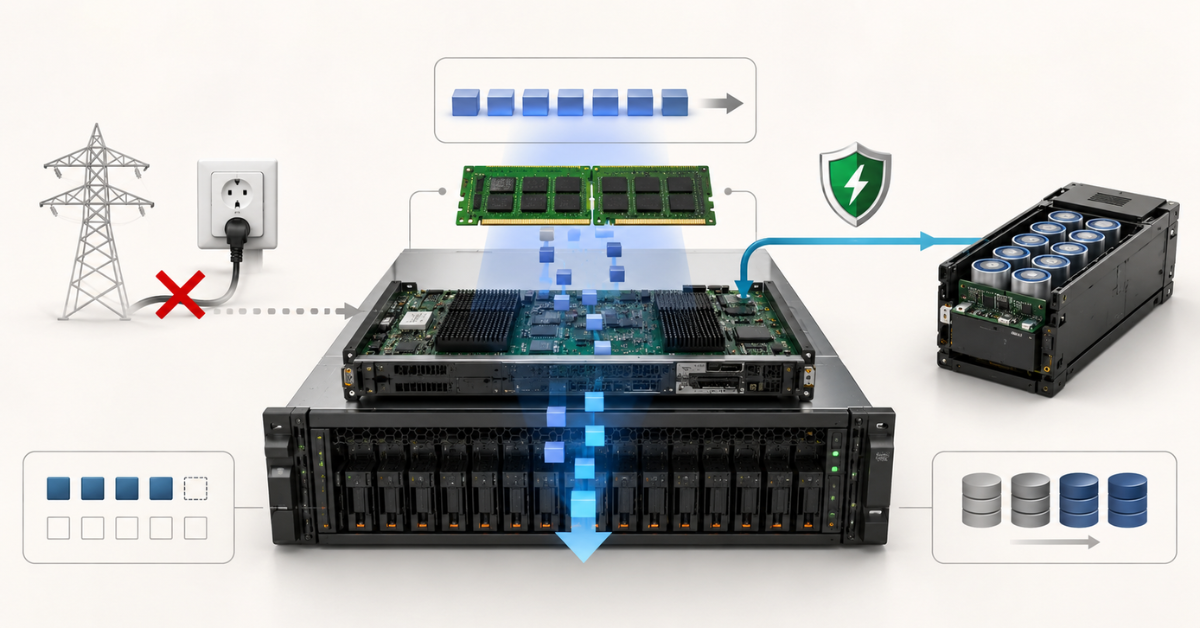
Storage arrays usually have two basic write modes: write-through and write-back.
Write-through is the more cautious mode. The storage array acknowledges the write to the server only after the data has actually been written to disks or SSDs. This is safe, but slower.
Write-back is the higher-performance mode. The storage array acknowledges the write after the data has reached the controller cache. The physical write to disks happens later. This mode accelerates operation, but it requires protected cache.
| Cache mode | How it works | Write performance | Risk | When it is appropriate |
|---|---|---|---|---|
| Write-through | The storage array acknowledges the write only after it is written to media | Lower | Minimal risk of losing already acknowledged data | When cache is not protected, the BBU module is faulty or safety is more important |
| Write-back | The storage array acknowledges the write after the data reaches cache | Higher | Requires protected cache | For workloads with active writes, if cache is protected and controlled by the system |
| Write-back without protection | Writes are acknowledged quickly, but data can be lost during a power failure | High, but dangerous | High | Not suitable for critical data |
The Dell PowerVault ME5 documentation states that in a dual-controller system with both controllers working, write-back is enabled by default, while with one controller or a controller failure, write-through is used as the safer mode. The same documentation explains the role of a supercapacitor in cache protection during power loss.
The difference between the modes is especially noticeable under write-heavy workloads:
- databases;
- virtualization;
- application logs;
- terminal servers;
- VDI;
- file servers with many users;
- backup with deduplication;
- video surveillance with a constant write stream.
If the cache is protected, write-back usually provides better responsiveness. If cache protection is faulty, the array may automatically switch to write-through. From an administrator’s point of view, this looks like a sharp drop in write speed. But from the storage array’s point of view, it is not a “whim”; it is a protective response: the system stops acknowledging writes quickly until it is sure that data in cache will not be lost.
BBU, supercapacitor and CacheVault: what they protect
BBU, or Battery Backup Unit, is a cache backup power module. Older systems more often used batteries, while newer ones use supercapacitors and non-volatile memory. The purpose is the same: to protect data that has already been accepted by the storage array but has not yet been written to media.
It is important to understand that a BBU does not power the entire storage array and does not replace a UPS. It is not needed so that the array can continue working for hours after a power outage. Its task is narrower: to preserve the contents of write cache or give the controller time to move this data to non-volatile memory.
A classic battery:
- powers cache during a failure;
- has a limited service life;
- degrades over time;
- may require replacement;
- often disables write-back when it is in error.
Today, supercapacitors are more often used instead of batteries, and they work slightly differently:
- they provide a short energy reserve;
- they help quickly save data from cache;
- they are usually not designed for long-term power supply;
- they are often used together with flash memory;
- they last longer than batteries, but still require regular checks and replacement when necessary.
CacheVault is one of these cache protection options, where, in the event of power loss, data is transferred from cache RAM to non-volatile flash memory. After power is restored, the controller can restore the data and correctly complete the write.
HPE’s description of Smart Storage Battery links the battery module to data protection support in cache for controllers and storage devices.
When buying or maintaining a storage array, it is important to look not only at the name of the technology, but also at the actual state:
- whether the cache is protected or not;
- whether the battery is charged or in error;
- whether the supercapacitor passes diagnostics;
- whether there are events about switching to write-through;
- whether there are dirty cache messages;
- whether controller firmware versions match;
- whether the module can be replaced without long downtime;
- whether a compatible spare part is available.
If the BBU is faulty, the storage array may continue to work, but it is no longer the same configuration that was paid for at purchase. Formally, the volumes are available, but write performance may decrease, and some cache modes will be unavailable.
Cache mirroring between controllers
In dual-controller storage arrays, write cache is often duplicated between controllers. This is needed to protect against a situation where one controller accepts data into cache, acknowledges the write to the server, but does not have time to move the data to disks.
The process can be represented as follows:
- The server sends a write to controller A.
- Controller A places the data in its cache.
- The data is copied to the cache of controller B.
- The storage array acknowledges the write to the server.
- If controller A fails, controller B completes the operation.
This is why, in a fault-tolerant storage array, what matters is not only two controllers as physical boards, but also a healthy connection between them. If cache is not synchronized, if one controller is in error, if firmware versions differ or if the inter-controller channel is unstable, fault tolerance becomes questionable.
Event logs should be checked for:
- cache synchronization errors;
- dirty cache messages;
- battery or supercapacitor warnings;
- switches to write-through;
- controller restarts;
- loss of communication between controllers;
- port and path errors.
For refurbished storage arrays, this is especially important. An array may power on, show disks and even pass a basic test while still having a history of critical cache events. This risk cannot be detected just by looking at a photo of the front panel.
Power failure: what the BBU saves and what the UPS should save
A power failure should be divided into several levels.
- Power for the entire rack or server room. UPS units, two power feeds, different PDUs, correct phase loading and a proper shutdown procedure help here.
- Power for the storage array itself. Two power supplies connected to different sources are important here. If both power supplies are plugged into one PDU, the real redundancy is lower than it appears.
- Data in cache. This is exactly where a BBU, supercapacitor or similar protection is needed.
If power is lost completely, the storage array stops accepting new operations. But for data that has already been acknowledged to the server and is still in cache, the critical question is different: can the controller preserve it until power is restored?
BBU and UPS do not replace each other:
- a UPS protects infrastructure from an instant power outage;
- a BBU protects controller cache;
- two power supplies protect against the failure of one PSU or one power line;
- a backup protects against logical errors and data corruption.
A reliable design uses all these levels. It is dangerous to think that if there is a UPS in the rack, the BBU status in the storage array does not matter. The UPS can be overloaded, connected incorrectly, discharged or disconnected during maintenance. Cache protection is local, inside the array.
BBU failure and a drop in write performance
One common non-obvious case is when a storage array suddenly starts writing slowly, even though the disks are healthy, the network is not overloaded and the servers are working normally.
The cause may be cache. If the battery or supercapacitor fails a check, the storage array may disable write-back and switch writes to write-through. In this mode, each write must be acknowledged only after it has actually been written to media, so latency increases.
This is especially noticeable where there are many small writes:
- database logs;
- virtual machines with active disks;
- terminal farms;
- VDI;
- accounting systems;
- file shares with many users;
- backup with a large amount of metadata.
From the outside, this can look like:
- users complain about “freezes”;
- virtual machines respond more slowly;
- the database commits transactions more slowly;
- write latency charts rise;
- disk utilization looks high, even though this problem did not exist before.
In such a situation, it is not worth immediately replacing disks or upgrading the network. First, check:
- the battery or supercapacitor status;
- the cache mode on volumes;
- auto write-through events;
- dirty cache errors;
- the state of both controllers;
- cache synchronization;
- recent firmware updates.
If the storage array has disabled write-back by itself, it is better to eliminate the cause rather than force-enable the high-performance mode at any cost. Fast writes without cache protection can be more dangerous than temporary degradation because they can lead to invalid data.
Firmware updates and maintenance without downtime
Two controllers help maintenance be performed more carefully. But this does not mean that firmware can be updated at any time during a working day.
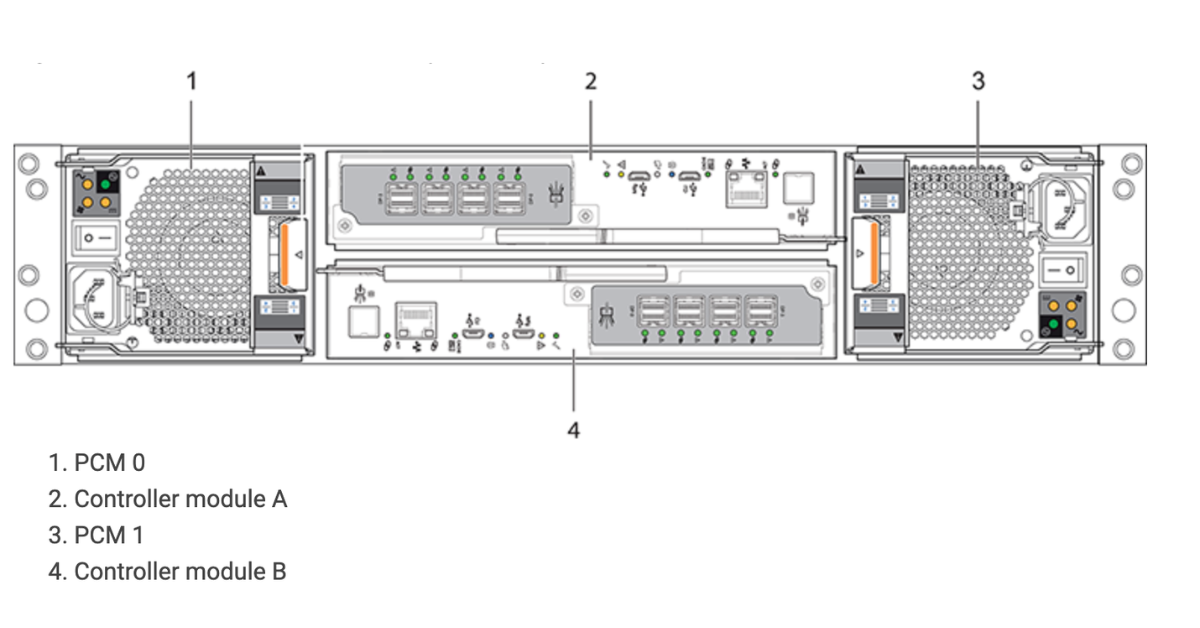
Rear panel of a storage array. Image source: DELL documentation
During an update, one controller may reboot and the workload temporarily moves to the other. Then the process is repeated for the second controller. On paper, services continue to work. In practice, there can be pauses, increased latency, path reconnections and errors if multipathing is configured incorrectly.
Before an update, it is worth checking:
- whether there are active errors on the storage array;
- whether both controllers are healthy;
- whether the cache is synchronized;
- whether the BBU or supercapacitor is healthy;
- whether all paths are visible on the servers;
- whether drivers and DSM/MPIO modules are compatible;
- whether there is an up-to-date backup;
- whether there is a rollback plan or vendor instructions.
Updating firmware on an already degraded storage array is risky. If one controller has long been in warning status, the battery is faulty, some paths are unavailable and the logs are full of errors, you should first investigate the state of the array. Otherwise, planned maintenance can easily turn into emergency recovery.
Choosing the Right Equipment
Our specialists will contact you and answer all your questions
How to tell whether a storage array is truly fault-tolerant
Fault tolerance is not a single checkbox in a specification. It is built from several layers.
A good configuration usually includes:
- two controllers;
- two power supplies;
- protected write cache;
- a healthy BBU or supercapacitor;
- disk redundancy at the RAID or pool level;
- two independent paths from each server;
- two SAN switches or two isolated iSCSI networks;
- enabled multipathing;
- the correct path selection policy;
- current and compatible firmware;
- event monitoring;
- regular log checks;
- tested failover;
- backups.
Any configuration that looks perfect on paper cannot be considered reliable until failure drills and tests have been performed.
A poor configuration also often looks familiar:
- the storage array has two controllers, but the server is connected with one cable;
- both cables go to one switch;
- the second controller is installed, but does not participate in volume servicing;
- write-back is disabled, but the administrator has not noticed it;
- the BBU is in warning status;
- controller firmware versions differ;
- some ports have not been checked;
- logs were not exported after delivery;
- a path disconnection test has never been performed.
Therefore, when choosing a storage array for business, it is useful to ask not “does it have dual controller?”, but “how exactly is the entire chain of data access built?”.
Checking a refurbished storage array before purchase
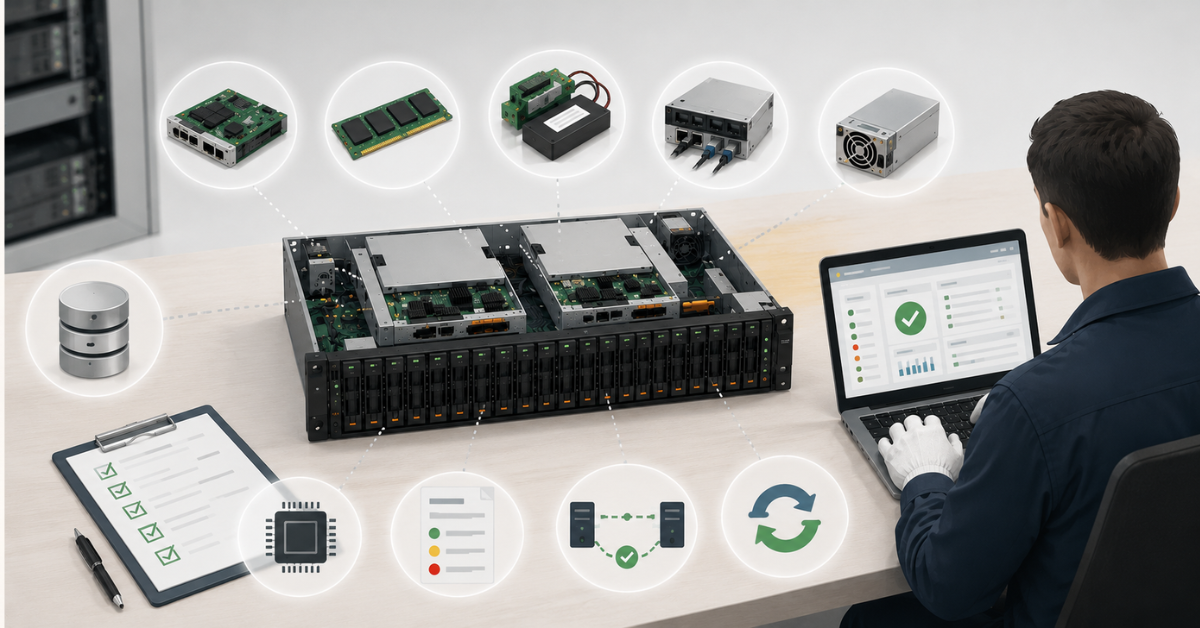
When buying a refurbished storage array, you should not rely only on the model, number of disks and price. For such systems, the condition of components responsible for fault tolerance is especially important: controllers, cache, protection modules, ports, firmware and error logs.
| What to check | Why it matters | What to request from the seller |
|---|---|---|
| Two controllers | Without the second controller, there is no full failover during a failure | Rear-panel photo, specification, status of both controllers |
| BBU or supercapacitor | If it is in error, the fast write mode may be disabled | Screenshot of battery, supercapacitor or CacheVault status |
| Cache status | Cache errors can indicate unfinished or risky operations | Cache clean/healthy status, absence of dirty cache |
| Firmware | Incompatible versions increase the risk of failures | Firmware versions for controllers, disks and shelves |
| FC, iSCSI or SAS ports | A faulty port breaks path redundancy | Link status, list of active ports, photos of ports and SFP modules |
| Event logs | Old critical errors can recur; a cleared log is a warning sign | Event log after testing |
| Power supplies and fans | Power and cooling directly affect availability | PSU/FAN status, no warnings |
| Disks and shelves | Controllers may be healthy, but the pool may already be degraded | Disk Health/SMART data, RAID or pool status |
| Licenses and features | Some capabilities may depend on licenses | List of active features |
| Path failover test | Checks whether multipathing really works | Result of disconnecting one path or port |
| Controller test | Checks whether the storage array survives a management module failure | Result of the failover test, if it was performed |
For refurbished storage arrays, small details are especially important. For example, an array may have two controllers, but one port may be faulty. Or a battery may be installed, but no longer hold charge. Or cache may formally be enabled, but the logs may contain regular events about switching to safe mode.
Before purchase, it is worth clarifying:
- Does the storage array have one controller or two?
- Do both controllers pass diagnostics?
- Do firmware versions match?
- What is the cache status?
- Is write-back enabled?
- If write-back is disabled, why?
- What is the status of the BBU, supercapacitor or CacheVault?
- Are there dirty cache errors?
- Have all ports been checked?
- Is there an event log after testing?
- Was a single-path disconnection test performed?
- Was a controller disconnection test performed?
- Is there a warranty for controllers and battery modules?
- Can the BBU, PSU, fan or controller be replaced separately?
- Which components are new and which are refurbished?
For entry-level and mid-range tasks, companies often consider HP storage arrays, Dell PowerVault, Dell Unity, NetApp and other platforms. But the brand itself does not solve the reliability question. The specific condition of the unit, its configuration and diagnostic results matter more.
Virtualization servers
Free shipping on orders over 500 € in the EU, £500 in the UK, and $3,000 in the USA
Free shipping on orders over 500 € in the EU, £500 in the UK, and $3,000 in the USA

Free shipping on orders over 500 € in the EU, £500 in the UK, and $3,000 in the USA
Free shipping on orders over 500 € in the EU, £500 in the UK, and $3,000 in the USA
Which tasks especially need two controllers
Dual controller should be treated as almost mandatory where downtime quickly becomes expensive.
Such tasks include:
- virtualization;
- database clusters;
- ERP and accounting systems;
- terminal servers;
- business file storage;
- VDI;
- video surveillance with constant recording;
- backup, if the storage array is the main backup storage site;
- production systems;
- medical, financial and accounting applications.
In these scenarios, service availability is just as important as data preservation. Sometimes loss of access to storage for 10–15 minutes is already enough to stop a department, interrupt a shift or violate an SLA.
A single-controller storage array may be acceptable for:
- test benches;
- labs;
- temporary storage;
- archives without strict availability requirements;
- a third backup tier;
- tasks where downtime has already been accepted as a permissible risk.
But if the array will host production virtual machines, databases, user profiles or company shared folders, saving money on the second controller often looks questionable.
Why two controllers do not always mean more speed
A common misconception is that if there are two controllers, the storage array must work twice as fast. Sometimes the second controller really helps distribute the workload, but the performance gain depends on the architecture of the array.
Performance is influenced by:
- the type of disks or SSDs;
- the RAID level or pool structure;
- the cache size and mode;
- the number of ports;
- network or SAN speed;
- the multipathing policy;
- volume distribution between controllers;
- the workload profile;
- the state of the battery or supercapacitor.
If all volumes are effectively served by one controller, the second one may sit idle. If paths are configured incorrectly, some operations may go through a non-optimized route. If write-back is disabled, writes may be slow even on good disks.
Therefore, when diagnosing performance, you should look not only at “hardware”, but also at the logic of operation:
- which controller owns the volume;
- which paths are active;
- which paths are optimized;
- how I/O is distributed;
- whether write cache is enabled;
- whether there are cache protection errors;
- whether a specific port is overloaded.
Two controllers are a tool for fault tolerance and balancing, not an automatic guarantee of doubled speed.
Common misconceptions about dual controller, cache and BBU
“Dual controller protects data from loss”
It increases availability, but it does not replace backups. If a user deletes a file, a database is logically corrupted or ransomware encrypts a shared resource, the second controller will not bring the data back. For that, you need backups, snapshots, replication and recovery procedures.
“If there is a UPS, the cache battery is not needed”
UPS and BBU solve different tasks. A UPS supports equipment power. A BBU or supercapacitor protects data that has already been acknowledged to the server and is still in cache. A reliable design uses both layers.
“Write-back is always better”
Write-back is faster, but only with protected cache. If cache protection is faulty, it is safer to work more slowly in write-through than to acknowledge writes quickly without a guarantee of data preservation and integrity (!).
“Refurbished storage arrays are dangerous by definition”
The risk depends not on the word refurbished, but on diagnostics. A refurbished storage array with tested controllers, healthy cache, clean logs and a warranty can be a reasonable option. But buying such an array without checking the BBU, firmware and ports is a bad idea.
“It is enough to buy a storage array with two controllers”
No. You still need to connect servers correctly, configure multipathing, check ALUA, test path and controller failure, make sure the cache is healthy and monitor logs.
How to describe fault tolerance correctly in a specification
The phrase “the storage array is fault-tolerant because it has dual controller” is too general. It says nothing about how the array is connected, whether the cache is protected, whether the ports are healthy or whether paths are configured.
A more accurate wording would be:
“The storage array is equipped with two controllers, two power supplies, protected write cache and a healthy BBU or supercapacitor module. Servers are connected to the array through two independent paths with configured multipathing. Before commissioning, controller failure, path loss, cache status, firmware versions and event logs are checked”.
This wording reflects reality better. Fault tolerance is not a separate component, but the result of the entire design: storage array, servers, adapters, switches, cables, firmware and operating system settings.
What to check first
If you need to assess a storage array quickly, start not with capacity, but with questions about failure risks.
Check:
- whether two controllers are installed;
- whether both controllers are healthy;
- whether write cache is protected;
- which mode the cache is running in;
- whether the BBU or supercapacitor is healthy;
- whether there is any dirty cache;
- whether firmware versions match;
- whether all ports work;
- whether there are two independent paths from the servers;
- whether multipathing is configured;
- whether a path failure test has been performed;
- whether there are fresh logs without critical errors.
For critical services, it is better to choose an array with lower capacity but two healthy controllers, protected cache and a verified connection design than a larger storage system with an unclear battery, port and event log status. In data storage, reliability is determined not only by the number of terabytes, but by what happens at the moment of failure.
Choosing the Right Equipment
Our specialists will contact you and answer all your questions
Content:

Free shipping on orders over 500 € in the EU, £500 in the UK, and $3,000 in the USA

Free shipping on orders over 500 € in the EU, £500 in the UK, and $3,000 in the USA
Free shipping on orders over 500 € in the EU, £500 in the UK, and $3,000 in the USA
Free shipping on orders over 500 € in the EU, £500 in the UK, and $3,000 in the USA
Free shipping on orders over 500 € in the EU, £500 in the UK, and $3,000 in the USA

Free shipping on orders over 500 € in the EU, £500 in the UK, and $3,000 in the USA