
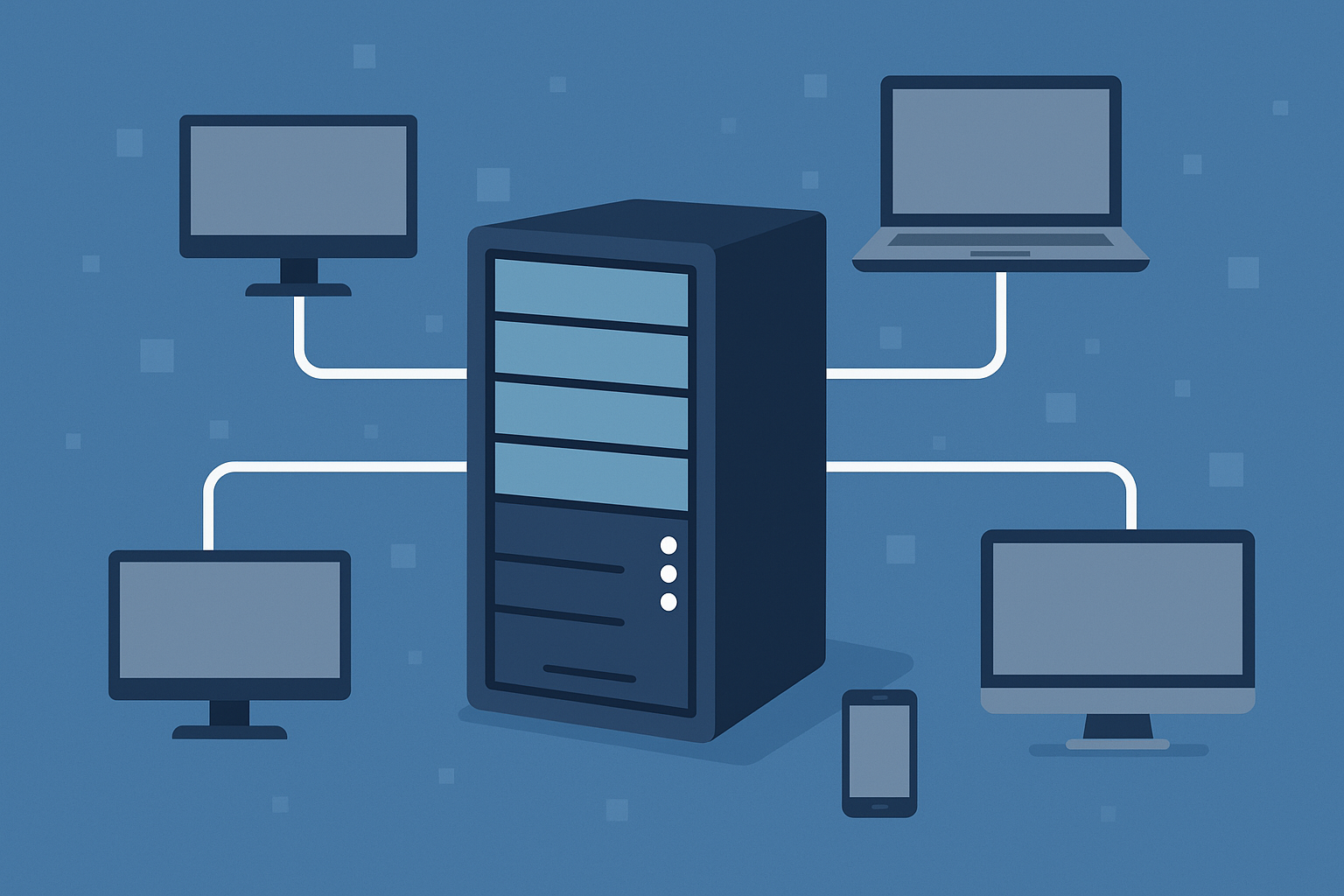
A server is a computing system or software program that provides data, applications or services to other devices over a network. Its clients may be computers, smartphones, other servers or individual applications. A server can be located in an office, a data center or the cloud and can perform several tasks at the same time.
Servers power websites, corporate email, shared file storage, databases and business applications. This article explains how the client-server model works, how server hardware differs from a standard PC and the main ways in which servers are classified.
What Is a Computer Server?
The word server is used in two related senses:
-
A software service or role. For example, a web server accepts HTTP requests, a DNS server maps domain names to IP addresses, and a file server gives users access to shared folders.
-
A physical or virtual computing system. This may be hardware or a virtual machine running one or more server services.
In the client-server model, the server provides a resource and the client requests it. The client may be a browser, a mobile application, an employee workstation or another server program.
A computer does not necessarily perform only one function. For example, a small-office server may store files, manage printing and run an internal application at the same time. A more powerful physical host can run several virtual machines, each with a separate role.
A standard PC can also become a server if the appropriate software is installed and configured. However, specialized server hardware is generally preferred for continuous operation, critical applications and large numbers of users.
How Does a Server Work?
A server waits for client requests, processes them and returns a result. In simplified form, the exchange works as follows:
Request flow: client → request over a network protocol → server → processing → response to the client.
Consider a familiar example. When a user enters a website address in a browser, a DNS request may be performed first. The DNS server finds the IP address associated with the domain name. The browser then contacts the web server over HTTP or HTTPS.
The web server accepts the request, determines what data the client needs and returns an HTML page, image, file or API response. If the website is generated dynamically, the web server may pass the request to an application server, which then queries a database.
Other server roles follow the same general principle. A file server, for example, receives a request to open a document and transfers the file to the user over SMB or NFS. A mail server receives, forwards and stores messages using email protocols.
A server can process many requests concurrently. The supported load depends on the software, processors, memory, storage subsystem, network and application architecture.
What Does a Server Look Like?
A server’s appearance depends on its form factor and installation location. It may resemble a conventional desktop tower, look like a flat metal chassis designed for a rack or take the form of a compact compute module inside a shared enclosure.
Tower Server
A tower server resembles a large desktop computer. It stands vertically, does not require a server rack and is typically suitable for a small office, branch location or local infrastructure.
Rack Server
A rack server is a flat horizontal chassis installed in a standard 19-inch rack. The front panel usually contains drive bays, status indicators, a power button and service ports. Network ports, power supply units and primary interfaces are normally located at the rear.
Blade or Modular Server
A blade server is a narrow compute module installed in a shared chassis. The chassis supplies power, cooling, network connections and management facilities. Modern modular systems may differ from traditional blade platforms, but the underlying principle is the same: several compute nodes share the enclosure’s infrastructure.
Server vs Desktop Computer: What Is the Difference?
Any modern computer can provide network services, so there is no absolute boundary between a server as a role and a PC. The main differences lie in hardware design, operating conditions and serviceability.
| Characteristic | Server | Desktop Computer |
|---|---|---|
| Main purpose | Continuously provide services to multiple users or applications | Perform interactive tasks for one user |
| Operating mode | Usually designed for predictable 24/7 workloads | Usually designed for intermittent user workloads |
| Memory | Often uses ECC memory that detects and corrects errors | ECC is usually absent, although exceptions exist |
| Management | May include dedicated remote-management interfaces such as iDRAC or iLO | Usually managed through the installed operating system |
| Serviceability | May support hot-swap drives, fans and power supplies | Replacing components usually requires shutdown and opening the case |
| Power | May have redundant power supply units | Typically has one power supply unit |
| Storage and drive connectivity | RAID or HBA controllers, drive backplanes and advanced monitoring are available | Usually relies on the motherboard’s integrated controller |
| Installation | Tower, rack, blade or modular chassis | Primarily a desktop chassis |
Note: A specific server does not necessarily include every feature listed above. An entry-level model may have one power supply, a limited number of drive bays or a simplified remote-management system. Always check the specifications of the selected model and configuration.
Server hardware is chosen for more than performance alone. ECC memory, power redundancy, hot-swappable components and remote diagnostics can reduce downtime risk and speed up maintenance. A standard PC may be fast—even faster than some servers—but its design is not usually intended to meet the same availability and recovery requirements.
Choosing the Right Equipment
Our specialists will contact you and answer all your questions
Server Software and Operating Systems
Hardware alone does not deliver websites, files or databases to users. The operating system and installed server applications perform this work.
A server operating system may be Microsoft Windows Server, Ubuntu Server, Red Hat Enterprise Linux or another Linux- or Unix-like system. In some scenarios, server software can run on a standard desktop operating system, although such a configuration is not always suitable for production use.
The operating system manages processors, memory, storage, network interfaces and access rights. Specific services run on top of it:
-
Apache HTTP Server, Nginx or Microsoft IIS processes web requests;
-
MySQL, PostgreSQL, Oracle Database or Microsoft SQL Server handles databases;
-
Windows file services or Samba provides shared folders;
-
mail software receives, stores and forwards messages.
The term web server can therefore refer either to the software that answers HTTP requests or to the system on which that software runs. The intended meaning is usually clear from context.
Several services may run on one physical server at the same time. Critical roles, however, are often separated across different virtual machines or physical nodes. This simplifies updates, limits the impact of failures and allows resources to be allocated independently between applications.
Server services are managed through configuration files, a command line, web interfaces, APIs or specialist consoles. Physical hardware may also include independent remote-management tools that allow administrators to check system status or reboot the machine even when the primary operating system is unavailable.
Types of Servers by Role
Servers can be classified according to the resource or service they provide to clients. This classification describes their purpose, not their chassis or deployment model.
-
Web server: provides web pages, files and API responses to browsers and applications over HTTP or HTTPS.
-
File server: stores shared files and gives users and applications access to them, for example over SMB or NFS.
-
Database server: stores structured data and processes queries and transactions from applications.
-
Application server: executes business logic and makes it available to client applications, web interfaces or other services.
-
Mail server: receives, sends and stores email for users and other mail systems.
-
DNS server: answers domain-name queries and returns the corresponding IP addresses and other DNS records.
-
Proxy server: accepts requests from clients and forwards them to other servers, optionally providing filtering, caching or access control.
-
Print server: manages network printers and queues jobs submitted from users’ computers.
-
Virtualization server: provides processor cores, memory, storage and network resources to virtual machines through a hypervisor.
More specialized roles also exist, including game servers, backup servers, video-surveillance systems and directory servers. One physical node may still perform several roles. In a small office, for example, file and print services may run on the same machine, whereas a large infrastructure will usually separate them.
Physical, Virtual and Cloud Servers: What Is the Difference?
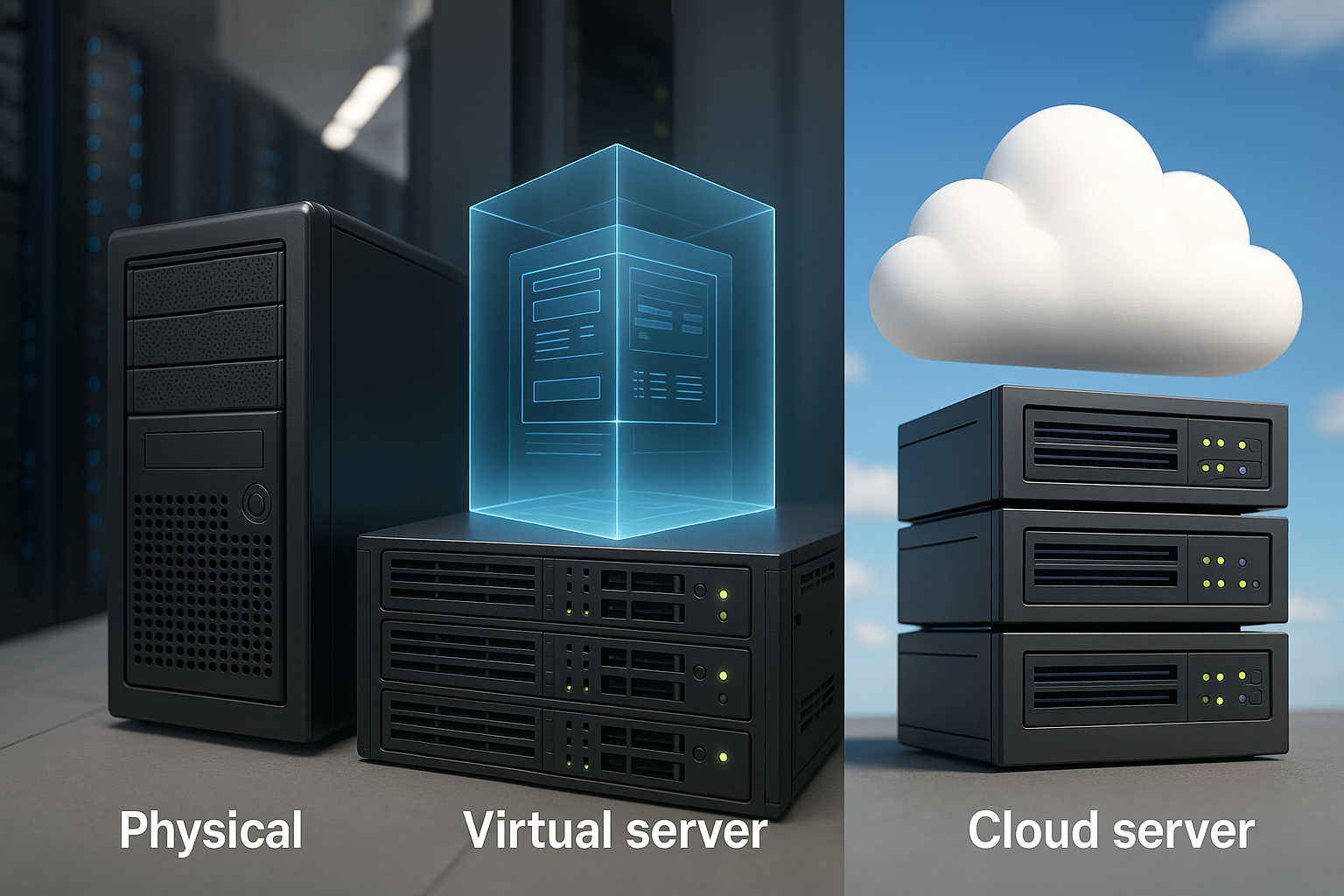
Physical, virtual and cloud servers differ not by purpose but by how computing resources are provided.
Physical Server
A physical server is a separate hardware system with its own processors, memory, drives, network interfaces and other components. An operating system and applications can run directly on it, or a hypervisor can be installed to create virtual machines.
This server may be located in an office, a company server room, a data center or a hosting provider’s facility. Owning the physical system provides greater control over the hardware, but the organization must arrange power, cooling, networking, monitoring and maintenance.
Virtual Server
A virtual server, or virtual machine, is an isolated, software-defined computing environment running on a physical host. It has virtual processors, memory, drives and network adapters, as well as its own guest operating system.
Several virtual servers can share the resources of one physical host. A hypervisor distributes processor time, memory and devices among the virtual machines. This approach makes it possible to run different applications and operating systems on the same hardware.
A virtual server should not be confused with a virtualization server: the former is a virtual machine, while the latter is the host that provides its resources.
Cloud Server
A cloud server is a computing resource delivered through a cloud platform. It is usually implemented as a virtual machine in a provider’s infrastructure, although cloud services may also provide dedicated physical nodes.
The user manages the server through a control panel, API or automation tools and can select a resource allocation within the service’s limits. The provider maintains the physical infrastructure, but responsibility for the operating system, applications, access, data and backups depends on the service model and contract terms.
Important: Backups are not an automatic feature of every cloud server. They may be a separate service, a configurable option or entirely the customer’s responsibility.
Dedicated Server and Bare Metal
A dedicated server is a physical machine whose resources are not shared with other tenants. The term bare metal server usually emphasizes direct access to physical hardware without a mandatory provider-managed virtualization layer.
A dedicated server may be located in a company’s own data center or at a service provider’s facility. Applications can run directly in the operating system, or the customer can install a hypervisor.
These concepts therefore overlap but are not interchangeable:
-
physical describes the system’s hardware nature;
-
virtual describes a software-isolated computing environment;
-
cloud describes how resources are delivered and managed;
-
dedicated/bare metal describes the allocation of a physical machine to one customer or environment.
Server Form Factors
A form factor describes the construction and physical installation of the hardware. It does not define the server’s role: a web server, file server or virtualization host can use a tower, rack or modular form factor.
Tower Servers
Tower servers are installed as standalone systems and do not require a rack. They suit offices and branch locations with a small amount of equipment. A larger chassis usually makes cooling easier and provides space for additional drives or expansion cards.
Their main limitations are the floor space they occupy and less convenient scaling as the number of servers grows.
Rack Servers
Rack servers are installed horizontally in a standard rack. Their height is measured in rack units, such as 1U, 2U or 4U. One rack unit equals 44.45 mm or 1.75 inches, but height is not the only consideration: chassis depth, rails, cooling, power and cable space must also be taken into account.
The article What Is U (Rack Unit) in a Server Rack explains rack dimensions and installation rules in detail.
The rack form factor is convenient when equipment is installed in a server room or data center and high installation density is required. Compact 1U models, however, may be noisier and offer fewer expansion options than larger 2U or 4U systems.
Blade and Modular Servers
Blade or modular nodes are installed in a shared chassis that provides power, cooling, networking and centralized management. This approach increases installation density and simplifies maintenance for large numbers of similar nodes.
However, the chassis increases initial costs and may tie the infrastructure to a particular vendor platform. Modular systems are therefore generally chosen for large-scale or specialized environments rather than for one or two servers.
How to Choose the Right Server
Server selection begins not with a processor model or chassis shape but with a description of the workload. Determine which applications will run on the server, how many users will connect to them and what the consequences of downtime would be.
Purpose and Workload Profile
File storage, databases, mail systems and virtualization hosts use processors, memory, drives and networking in different ways. A file server, for example, may require high usable capacity and a reliable storage subsystem, while a database server may need low storage latency, sufficient memory and appropriate per-core performance.
If the server is intended for a company’s local workloads, start with the dedicated guide to choosing an office server.
Number of Users and Peak Load
Consider not only the average number of connections but also concurrent user activity, request volume and the most demanding operations. A system that performs well under normal load may slow down during a mass employee login, report generation or backup operation.
Sizing is best based on current application metrics or load-testing results. There is no universal ratio between user count and processor cores.
Choosing the Right Equipment
Our specialists will contact you and answer all your questions
Performance and Capacity
When selecting a configuration, assess:
-
the application’s requirements for core count and processor frequency;
-
the required memory capacity and expansion options;
-
the storage system’s usable capacity, performance and fault tolerance;
-
network bandwidth and connection redundancy;
-
the number of drive bays and PCIe slots;
-
headroom for expected workload growth.
For virtualization, memory capacity, the number of available cores, shared-storage performance and network interfaces are particularly important. The article Best Server for Virtual Machines examines hardware selection for this type of environment in detail.
Availability and Recovery
If an application outage affects the business, define the acceptable downtime and potential data loss in advance. These targets determine requirements for redundant power supplies, RAID, hot-swappable components, spare parts, backups and clustering.
Important: RAID improves the resilience of the storage subsystem, but it does not replace a backup. Critical systems also need a tested recovery plan.
Security
Consider access control, operating system and application updates, network segmentation, encryption, logging and the physical protection of equipment. Remote-management interfaces should be placed on a separate protected network instead of being exposed directly to the Internet.
Industry standards or legal requirements may affect where data is stored, which cloud platform is selected and how responsibility is divided between the company and provider.
Location
An on-premises physical server provides direct control over the hardware and can deliver predictable latency for office applications. Colocation in a data center provides professional power, cooling and network infrastructure. A cloud platform simplifies resource provisioning and automation, but requires careful consideration of the charging model, network dependency and the boundaries of responsibility.
Many companies use a hybrid approach: some applications run on their own hardware, while other services operate in the cloud.
Budget and Support
Do not compare only the server’s purchase price. The calculation should also include drives, memory, network equipment, licenses, a rack, uninterruptible power, electricity, cooling, backups and specialist labor.
It is also important to check the warranty period, spare-parts availability and access to support in the required region. A refurbished enterprise server may sometimes be more practical than a new entry-level device, but only when its condition is clear, it has been properly tested and the warranty is sufficient.
Once the requirements have been defined, you can browse the main Servers catalog and then compare suitable Rack Servers and Tower Servers.
Our most popular servers

Free shipping on orders over £500 in the EU, £500 in the UK, and $3,000 in the USA
Free shipping on orders over £500 in the EU, £500 in the UK, and $3,000 in the USA
Free shipping on orders over £500 in the EU, £500 in the UK, and $3,000 in the USA

Free shipping on orders over £500 in the EU, £500 in the UK, and $3,000 in the USA
The Future of Server Technology
The fundamental role of servers remains unchanged: they provide computing resources and services to clients. What changes are the types of workloads and the ways in which infrastructure is built. Three trends are especially relevant in practice.
Growth in GPU and AI Nodes
Model training, inference, rendering and large-scale data processing are increasing demand for servers with GPUs and other accelerators. For these systems, performance depends not only on compute throughput but also on accelerator memory capacity, interconnect bandwidth, power, cooling, networking and scalability.
Disaggregated and Composable Infrastructure
In a traditional server, processors, memory, storage devices and network adapters are assigned to one system. Disaggregated and composable infrastructure makes it possible to pool separate resources and allocate them to workloads through software.
This approach can improve flexibility in large data centers, but it requires a compatible hardware platform, high-speed interconnects and sophisticated management tools. It does not replace conventional servers in every scenario.
Hybrid Environments
Companies increasingly treat physical servers, virtual machines and cloud services as parts of one architecture. Applications that are sensitive to latency or data-location requirements, for example, may run on premises, while temporary workloads and external services operate in the cloud.
The main goal of hybrid infrastructure is not to move everything into one environment, but to establish a clear distribution of applications, data, security controls and operational responsibility.
Frequently Asked Questions
What Is a Server in Simple Terms?
A server is a system that receives requests from other devices or programs and provides the data or service they need. For example, it may send a web page to a browser, store a shared file or process a database query.
Can a Standard PC Be Used as a Server?
Yes. If the necessary software is installed and made available over the network, a standard PC can perform a server role. For 24/7 operation and critical applications, however, specialized hardware is generally more practical because of features such as ECC memory, remote management, redundancy and serviceable components.
Is a Server Hardware or Software?
Both answers are correct. The term server can mean a software service that responds to client requests, as well as the physical or virtual system on which that service runs. The precise meaning depends on context.
Does a Server Need an Internet Connection?
No. A server needs a network only if clients access it over a network, and that may be a closed local network with no Internet access. An internal file server or industrial-system server, for example, may serve only the company’s own devices.
Key Takeaways
-
The term server can refer both to a software service and to the physical or virtual system on which it runs.
-
A server receives requests from clients, processes them and returns data or the result of an operation.
-
One physical host can run several services or virtual machines at the same time.
-
Purpose, deployment model and form factor are three separate classifications and should not be confused.
-
Server hardware may support ECC memory, remote management, hot-swap components and redundant power supplies, but the available features depend on the model and configuration.
-
A server does not necessarily need an Internet connection: many systems operate only within a local network.
Updated 26 August 2026. The definition of a computer server has been clarified, and the term’s two meanings—a software service and a computing system—have been separated. The classification has been reorganized by role, deployment model and form factor. New sections explain what servers look like, dedicated and bare-metal systems, hardware selection and frequently asked questions. The desktop comparison now includes specific hardware characteristics, while the general forecast has been replaced by practical trends: GPU and AI nodes, composable infrastructure and hybrid environments.
Choosing the Right Equipment
Our specialists will contact you and answer all your questions

Free shipping on orders over £500 in the EU, £500 in the UK, and $3,000 in the USA

Free shipping on orders over £500 in the EU, £500 in the UK, and $3,000 in the USA
Free shipping on orders over £500 in the EU, £500 in the UK, and $3,000 in the USA

Free shipping on orders over £500 in the EU, £500 in the UK, and $3,000 in the USA


