Table of Contents
How CPU Choice Shapes Data Center Economics
When modernizing IT infrastructure, companies often face a strategic choice: upgrade servers and virtualization clusters with AMD EPYC or Intel Xeon. On paper, both options meet technical requirements — core count, memory support, and interfaces appear similar. But real-world testing often reveals significant differences in performance.
This raises a key question for decision-makers: if specs are comparable, why can TCO, virtualization efficiency, or database performance differ by tens of percent?
The reason is that the CPU is the heart of a data center, not just another component. Differences in core design, memory architecture, I/O, and built-in accelerators directly affect VM density, database scalability, and AI workload efficiency.
A poor choice here can ripple through the system: higher operational costs, budget overruns, technical bottlenecks, slower business growth, and even SLA breaches for critical services.
To make the right decision, it’s essential to understand which architectural differences between EPYC and Xeon matter most and how they perform under real workloads.
Key Architectural Differences
Understanding how each CPU behaves in practice starts with the architecture.
Chiplet vs. monolithic design
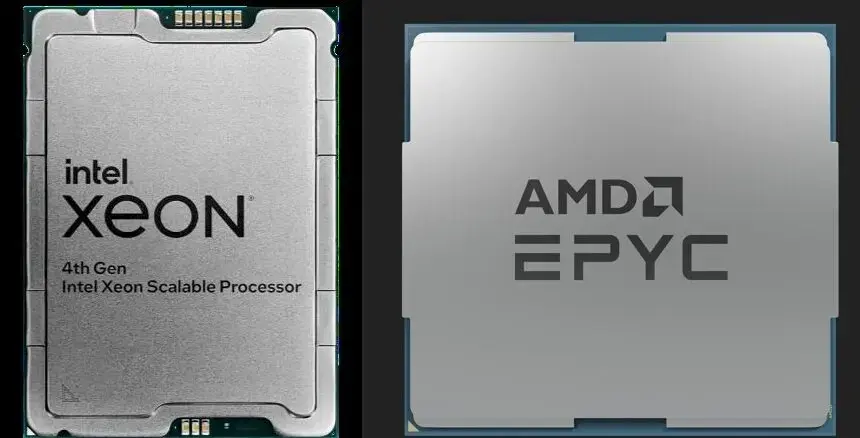
AMD EPYC uses a modular chiplet approach, allowing extremely high core density. Zen 5c models optimized for cloud workloads offer up to 192 cores per socket, while previous-generation Zen 4 EPYC 9654 provides 96 cores (192 threads).
Intel Xeon focuses on a monolithic, optimized design, supporting up to 144 cores in standard Sierra Forest-SP models and up to 288 in specialized Sierra Forest-AP systems. Xeon integrates accelerators such as QAT (compression/encryption) and AMX (AI matrix operations).
Memory
EPYC supports 12 DDR5 memory channels. The new Intel Xeon 6 (Granite Rapids) also offers 12 channels, matching EPYC in peak bandwidth and narrowing the historical gap from earlier 8-channel Xeon generations.
I/O and PCIe
EPYC typically provides more PCIe lanes: up to 128 per socket (single-socket) and 160 in dual-socket systems. This simplifies building GPU-heavy systems or large NVMe arrays without extra motherboard switches, reducing cost, complexity, and latency.
These architectural differences aren’t just technical — they directly influence business outcomes. They determine how many VMs can fit in a rack, how quickly reports run, and how effectively AI services scale. In short, CPU choice sets the practical ceiling for performance and TCO.
Comparing EPYC and Xeon Across Workloads
|
Workload |
EPYC Advantages |
Xeon Advantages |
Business Scenario |
|
Virtualization (high density) |
Up to 192 cores, large L3 cache; AMD SEV |
Predictable performance; up to 288 cores; Intel TDX |
Maximize VM density and reduce footprint; secure multi-tenant environments |
|
Databases (OLAP/in-memory) |
High bandwidth via 12 DDR5 channels |
Strong per-core performance for complex queries |
Data warehouses, BI, analytics platforms |
|
Databases (OLTP/transactional) |
High core counts for parallel requests |
High per-core frequency and low-latency inter-core communication |
Online banking, ERP, CRM, transaction-heavy systems |
|
AI & Inference |
High general AI throughput |
AMX accelerators for CPU-based inference |
Run inference on CPU to reduce GPU dependency |
|
HPC & GPU-centric |
Many PCIe 5.0 lanes; AVX-512 support |
Mature AVX-512 for scientific workloads |
High-performance clusters, GPU pools, scientific computing |
Choosing the Right Equipment
Our specialists will contact you and answer all your questions
Choosing the Right CPU for Your Workload
Core counts and memory channels matter, but real-world performance under actual workloads is what shapes TCO and efficiency.
Virtualization
EPYC excels at high-density VM deployment, while Xeon is stable for many small VMs and offers extreme-core versions (up to 288). Both support hardware-based VM isolation.
Databases and storage
EPYC scales better for memory-intensive, parallel workloads (OLAP). Xeon outperforms in low-latency transactional workloads (OLTP).
AI and parallel processing
Xeon relies on AMX for CPU-based inference. EPYC suits GPU-heavy setups where the CPU orchestrates multiple GPUs. Both support AVX-512, but Zen 5 maintains higher frequency under load — an HPC advantage.
The right question isn’t “which CPU is faster?” — it’s “which CPU reduces risk and cost for your critical business applications?” Decisions must align with your workload profile, not abstract specs.

EPYC vs Xeon: A Long-Term Data Center Strategy
When CPU choice is part of a multi-year strategy rather than a one-off purchase, priorities shift from benchmarks to TCO, ecosystem compatibility, and future workloads. Three factors have the biggest impact:
TCO and licensing
EPYC’s higher core count can reduce hardware needs but requires careful per-core licensing analysis. For example, the Oracle Database Standard Edition 2 license change (effective March 2025) clarified what counts as a “processor” in multi-chip modules. EPYC 9654’s 12 chiplets plus I/O die could require 12 socket licenses, while a Xeon server with four compute dies may require only four.
Compatibility and ecosystem
Xeon historically had an advantage, but by 2024–2025 EPYC reached parity in vendor support. It now powers over 900 cloud instance types, showing maturity.
AI workload strategy
If inference will run mainly on CPUs, Xeon with AMX provides predictable growth. For GPU-centric setups, EPYC offers more flexible PCIe topologies.
Choosing a CPU today sets your data center trajectory for years. One platform favors maximum compute density and GPU flexibility; the other emphasizes ecosystem integration and hardware acceleration for specialized tasks.
Choosing the Right Equipment
Our specialists will contact you and answer all your questions
Content:
Free shipping on orders over 500 € in the EU, £500 in the UK, and $3,000 in the USA

Free shipping on orders over 500 € in the EU, £500 in the UK, and $3,000 in the USA

Free shipping on orders over 500 € in the EU, £500 in the UK, and $3,000 in the USA
Free shipping on orders over 500 € in the EU, £500 in the UK, and $3,000 in the USA

Free shipping on orders over 500 € in the EU, £500 in the UK, and $3,000 in the USA

Free shipping on orders over 500 € in the EU, £500 in the UK, and $3,000 in the USA