For a new project with a five-to-seven-year service life, Dell PowerEdge R770 is the most sensible choice: it provides the greatest headroom in CPU cores, PCIe 5.0, NVMe and modern GPUs. PowerEdge R760 remains the most balanced option for most companies — a full-featured platform with DDR5 and current Xeon processors without the premium price of the 17th generation. PowerEdge R750 is worth considering when budget, access to refurbished equipment, expansion of an existing fleet and a predictable workload that can run comfortably on DDR4 and PCIe 4.0 are the priorities.
Comparing servers by model number alone is misleading. The final result depends on the processors, memory population, drive-bay configuration, expansion cards, cooling and licences. An entry-level R770 may be less suitable than a well-equipped R760, while a refurbished R750 may offer better value than a new server for a stable workload.
Dell PowerEdge R770, R760, R750, R740
Free shipping on orders over £500 in the EU, £500 in the UK, and $3,000 in the USA

Free shipping on orders over £500 in the EU, £500 in the UK, and $3,000 in the USA
Free shipping on orders over £500 in the EU, £500 in the UK, and $3,000 in the USA

Free shipping on orders over £500 in the EU, £500 in the UK, and $3,000 in the USA
What exactly is being compared
R750, R760 and R770 are standard 2U, dual-socket general-purpose servers. They belong to the 15th, 16th and 17th Dell PowerEdge generations respectively. The same form factor does not mean the same platform: the socket, memory type, PCIe generation, drive bays, remote management controller and supported accelerators differ between them.
When choosing a server, it is important not to mix the specifications of the base models with those of specialised variants:
- R750xa and R760xa are designed for denser GPU installation and use a different internal layout;
- R760xs is an optimised version with a reduced feature set;
- R770AP uses a different processor platform and is intended for other workload classes;
- XE-series servers are designed for intensive computing and training large models with several powerful accelerators.
The capabilities of the R760xa therefore cannot be applied to the standard R760. This article compares the standard models only, without specialised variants.
Key differences between Dell PowerEdge R750, R760 and R770
| Parameter | PowerEdge R750 | PowerEdge R760 | PowerEdge R770 |
|---|---|---|---|
| Generation | 15G | 16G | 17G |
| Processors | 3rd Generation Intel Xeon Scalable | 4th and 5th Generation Intel Xeon Scalable | Intel Xeon 6 with Performance-cores or Efficient-cores |
| Maximum cores per processor | Up to 40 | Up to 64 | Up to 86 Performance-cores or 144 Efficient-cores |
| Memory | 32 DDR4 slots, up to 3200 MT/s | 32 DDR5 slots, up to 5600 MT/s | 32 DDR5 slots, up to 6400 MT/s |
| Maximum memory capacity | Up to 8 TB of conventional memory | Up to 8 TB | Up to 8 TB; the supported module set depends on the Xeon 6 type |
| PCIe | 4.0 | 4.0 and 5.0 | 5.0 |
| Local storage | Up to 24 NVMe drives in selected configurations | Up to 24 2.5-inch drives or up to 16 front E3.S drives | Up to 40 E3.S NVMe drives in selected configurations |
| GPU | Up to two 300 W double-width accelerators | Up to two 350 W double-width accelerators | Up to two 450 W double-width accelerators |
| Remote management | iDRAC9 | iDRAC9 | iDRAC10 |
| Most logical role in 2026 | Affordable, mature platform | Versatile modern server | New projects with substantial growth headroom |
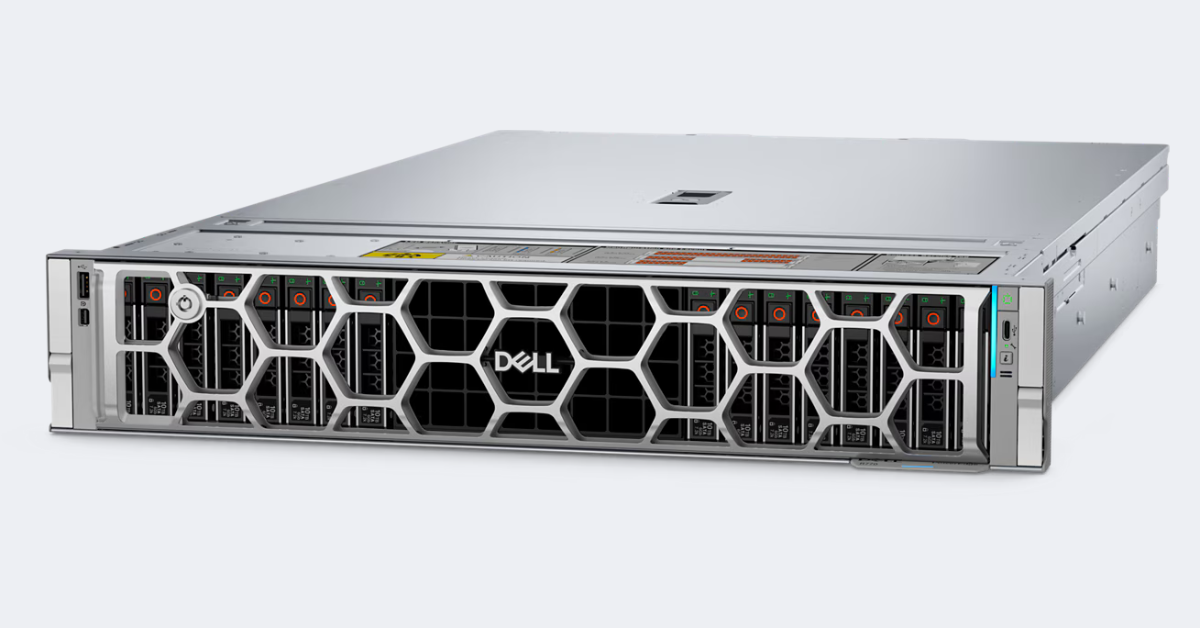
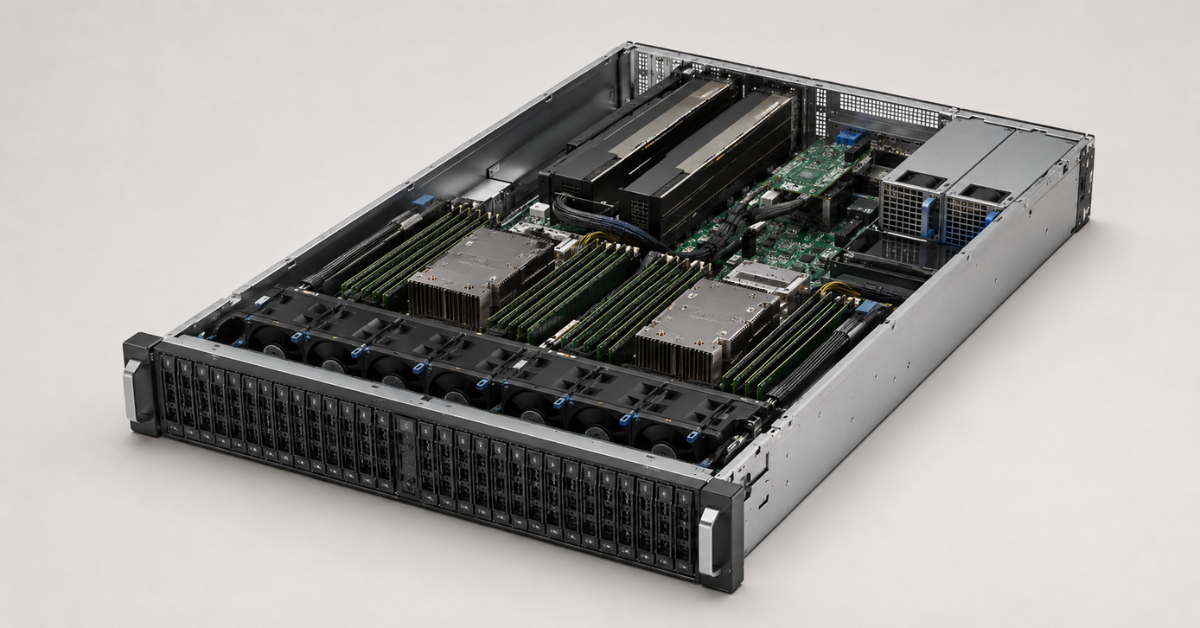
DELL PowerEdge R770.
Image source: dell.com
All maximum values in the table apply to specific chassis configurations. You cannot automatically combine 40 drives, eight PCIe cards and two powerful GPUs in one system: the drive bay, risers, controllers and cooling compete for PCIe lanes and physical space. The R750 and R760 specifications are confirmed by Dell's official technical documentation.
Processors: generation matters, but the CPU model matters more
R750 and 3rd Generation Intel Xeon Scalable
PowerEdge R750 supports up to two 3rd Generation Intel Xeon Scalable processors, with up to 40 cores per socket. This performance is still sufficient for file services, backup, application servers, moderate virtualisation, ERP and test environments.
The main limitation of the R750 in 2026 is its smaller growth margin: lower core density, memory bandwidth and peripheral capabilities. If the workload has been measured and is not expected to grow, these differences may have little practical impact.
Choosing the Right Equipment
Our specialists will contact you and answer all your questions
R760 and two Xeon generations
PowerEdge R760 supports 4th and 5th Generation Intel Xeon Scalable processors, with up to 56 and 64 cores per processor respectively. Together with DDR5 and PCIe 5.0, this makes it a versatile platform for databases, virtualisation, analytics and VDI.
The R760 chassis alone does not guarantee that it will outperform an R750. A server with entry-level Xeon processors, limited memory and slow drives may lose to an R750 with high-frequency Xeon Gold CPUs. Core count, frequency, cache capacity and thermal design power all matter in a comparison.
Maximum core density is not suitable for every workload. When SQL Server, Oracle, Windows Server or other software is licensed per core, licence costs can outweigh the benefits of consolidation.
R770 and the two Xeon 6 core types
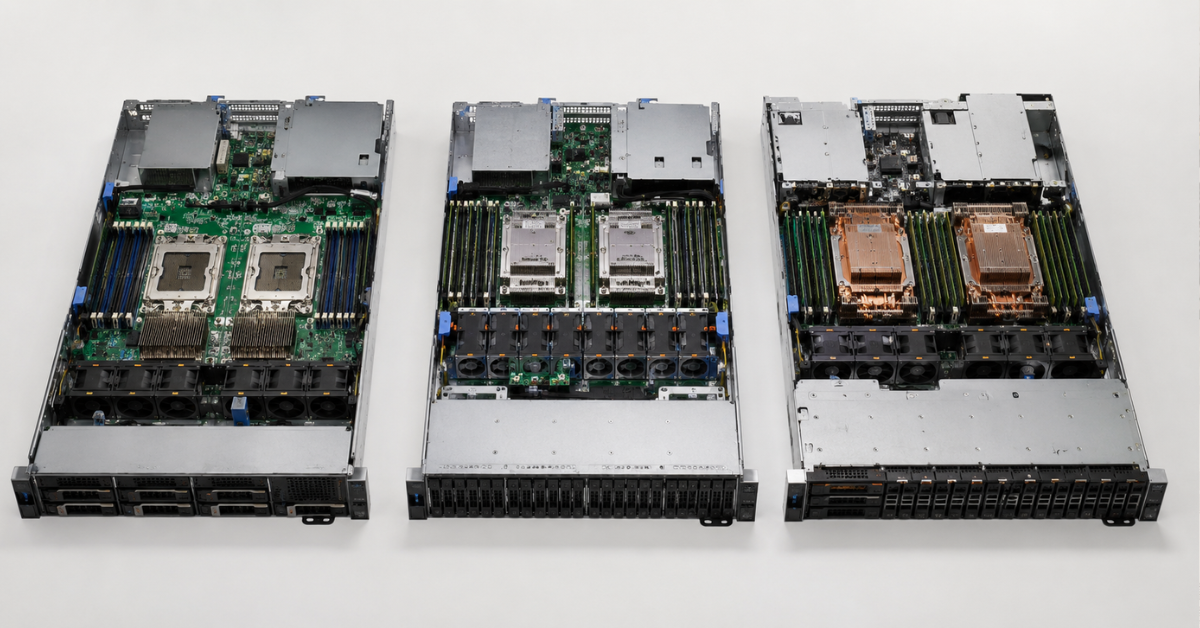
R770 uses two types of Intel Xeon 6 processors. Performance-cores (P-cores) are designed for high per-core performance, complex queries, ERP, VDI and latency-sensitive applications. Efficient-cores (E-cores) provide greater density and suit large numbers of parallel tasks, including containers, web services and scale-out storage.
Having 144 Efficient-cores does not mean that an individual virtual machine will run faster. For a transactional database or ERP system, fewer but faster cores may be preferable, with higher performance and more predictable licensing costs. Intel positions Performance-cores for compute-intensive workloads and Efficient-cores for high-density parallel processing.
Before purchasing, check whether the selected Xeon 6 branch is supported by the operating system and hypervisor. For example, Dell lists Windows Server with Hyper-V only for R770 systems with Performance-cores. The current R770 platform supports up to 86 Performance-cores or 144 Efficient-cores, DDR5 at up to 6400 MT/s and up to 40 E3.S drives in selected chassis configurations.
Memory: the same 8 TB does not mean the same speed
All three servers have 32 memory slots, and the maximum capacity of conventional RAM reaches 8 TB. However, memory subsystem performance differs significantly:
- R750 uses DDR4 at up to 3200 MT/s;
- R760 moves to DDR5: up to 4800 MT/s with 4th Generation Xeon and up to 5600 MT/s with 5th Generation Xeon;
- R770 supports DDR5 at up to 6400 MT/s.
The stated speed is achievable only with specific population rules. It depends on the processor, module type and the number of DIMMs per channel. Dense or uneven population can reduce frequency and bandwidth.
For databases or dense virtualisation, populate the channels with identical modules and, in a dual-CPU system, fill both processor sides symmetrically.
DDR4 from an R750 cannot be installed in an R760 or R770. Even DDR5 should not be moved between platforms without checking the part number and Dell compatibility matrix: supported capacities and fault-tolerance modes differ between Xeon 6 variants.
PCIe, NVMe and drive-bay selection
Where PCIe 5.0 makes a noticeable difference
R750 uses PCIe 4.0. This is sufficient for 10/25 Gb/s network cards, standard RAID controllers and most enterprise SSDs. PCIe 5.0 becomes important for fast NVMe drives, GPUs, 100/200 Gb/s adapters, DPUs and other accelerators.
R760 configurations can include both PCIe 4.0 and 5.0 slots, so you cannot assume that all eight slots are Gen5. The exact set depends on the riser configuration. R770 uses PCIe 5.0, but the number and width of its slots also vary with the layout.
U.2 and E3.S
R750 is designed around 2.5-inch drives, including U.2 NVMe. R760 retains 2.5-inch options and adds support for up to 16 front E3.S NVMe drives. Selected R770 chassis support up to 40 E3.S drives.
E3.S increases NVMe density, but the form factor alone does not guarantee high performance. Consider:
- the PCIe generation and number of lanes per drive;
- direct attachment or operation through a controller;
- RAID and compatibility with specific SSDs;
- write endurance and sustained performance;
- cooling with a densely populated drive bay.
Why the chassis must be selected in advance
The front drive bay determines the backplanes, cables, controllers, available PCIe lanes and GPU compatibility. Additional rear drives may also occupy space intended for expansion cards.
Converting a SAS/SATA chassis into a dense NVMe configuration often requires replacing the drive bay, backplane, cables, controller and fans. The storage layout should therefore be defined before ordering.
For boot storage, R750 commonly uses BOSS-S2, while R760 and R770 use BOSS-N1 with two M.2 NVMe drives, leaving the main bays available for data.
GPUs and on-premises artificial intelligence
Standard R750, R760 and R770 servers can run pre-trained models, computer vision, graphical desktops and moderate compute workloads. Their limits differ:
- R750 — up to two double-width GPUs rated at up to 300 W each;
- R760 — up to two 350 W double-width GPUs;
- R770 — up to two 450 W double-width GPUs.
Configurations with more cards are possible when compact single-width accelerators are used. However, a physically available slot does not automatically mean compatibility. A high-power GPU requires suitable risers, auxiliary power cables, power supplies, an air shroud and the correct class of fans.
R770 is better prepared for newer accelerators and, in selected configurations, supports NVIDIA H200 NVL and RTX PRO 6000. Dell limits these cards to 450 W, while the list of supported operating systems is narrower than for the L4 or L40S. The GPU model should therefore be selected together with the operating system and chassis rather than added later to an already configured server.
Two large GPUs may block adjacent slots and reduce the number of available network or storage adapters. If a project requires four to eight powerful accelerators or training a large model, a standard R770 is not a substitute for an R760xa or an XE-series server.
Power consumption and cooling
Power-supply rating should not be used as a measure of constant consumption. A server with two 3200 W power supplies does not continuously consume 6400 W: the units are sized for peaks, redundancy and the installed hardware. Compare the consumption of the specific configuration under typical and maximum load.
R770 can replace several older nodes and reduce total rack consumption. However, a configuration with two top-tier Xeon processors, dozens of NVMe drives and two GPUs still requires substantial power and cooling.
Before ordering, assess rack power capacity, socket and PDU types, inlet temperature, fan class, rail depth and acceptable noise. Direct liquid cooling is available for selected configurations.
iDRAC can monitor consumption and set a power cap. However, a strict limit may reduce CPU or GPU frequencies, so it should not be applied without testing its effect on application performance.
iDRAC, security and software compatibility
R750 and R760 use iDRAC9, while R770 uses iDRAC10. For routine administration, the core capabilities are similar: remote console access, inventory, firmware updates, event logs, Redfish and OpenManage integration. The difference becomes more important over a long lifecycle, when new security mechanisms, automation and the duration of update support must be considered.
An R760 with the familiar iDRAC9 is easier to add to a 15G/16G fleet. For a new infrastructure designed with five to seven years of headroom, R770 and iDRAC10 are more logical, provided that the automation has already been validated with the new version.
Before deployment, match not only the server model but the complete combination of:
- the VMware ESXi, Windows Server, Red Hat, SUSE or Ubuntu version;
- processor type and model number;
- network adapters and DPUs;
- RAID controller or direct-attached NVMe;
- GPU model and driver;
- required iDRAC licence;
- OpenManage version and automated update workflows.
For new CPUs and GPUs, hardware support may become available before the hypervisor or application is certified.
Which server suits different workloads
| Scenario | Primary choice | When another generation is preferable |
|---|---|---|
| Virtualisation | R760 | R770 for high density; R750 for a budget cluster |
| Databases | R770 with Performance-cores or a high-frequency R760 | R750 for a known, moderate workload |
| ERP | R760 | R770 for a major new deployment; R750 for a stable system |
| VDI | R760 or R770 | R750 for a small user base and compatible GPUs |
| AI model inference | R770 | R760 for a moderate workload; R750 for a low-cost test system |
| Test environment | R750 | R760 when the test environment must mirror a modern production platform |
| Consolidation | R770 | R760 if 17G does not pay for itself through the number of retired nodes |
Choosing the Right Equipment
Our specialists will contact you and answer all your questions
Virtualisation
For most new clusters, R760 is the most balanced choice: it offers enough cores, DDR5, modern NVMe and a mature software ecosystem. R750 suits small Proxmox, Hyper-V or VMware clusters where the savings make it possible to buy an additional node for fault tolerance.
R770 is attractive for high-density virtual machines and containers. When selecting an Efficient-core Xeon, check single-VM performance and licensing: a large number of lightly loaded cores may prove expensive.
Databases and ERP
For SQL Server, Oracle, PostgreSQL and analytics, core performance, cache, memory and NVMe latency matter. An R770 with Performance-cores provides substantial headroom, but an R760 with high-frequency Xeon processors is often more cost-effective overall. R750 is suitable when the workload is known and is not constrained by DDR4 or PCIe 4.0.
ERP systems also often depend more on single-core performance than on the total number of cores. R770 is a sensible choice for a major new deployment, R760 for most existing systems, and R750 for migrating a stable ERP environment without rapid growth.
VDI and on-premises AI
VDI sizing must account for concurrent users, memory per profile and graphics load. R760 covers most enterprise projects, R770 leaves more headroom for newer GPUs, and R750 suits a smaller environment with compatible accelerators from previous generations.
For running models, R770 is the most future-ready option because of PCIe 5.0 and support for more powerful GPUs. R760 is suitable for accelerators such as L4 and L40S and similar workloads. R750 can be used for computer vision, document processing and lab systems if the required risers, power and cooling are already included.
Test environments and consolidation
R750 is cost-effective for labs, development and a secondary site, but it does not support the latest technologies such as DDR5, PCIe 5.0 and Xeon 6. If the test system must exactly reproduce an R760 or R770 production environment, saving money on an older generation reduces the value of the testing.
For consolidation, compare not one R770 with one R750, but the number of older nodes that can be retired. Licences, networking, consumption and cooling must all be included. The cluster must also retain N+1 capacity: after one server fails, the remaining nodes must be able to absorb its workload.
Costs that are not visible in the server price
Moving between generations affects more than the chassis and processors. The budget may need to include:
- new DDR5 instead of existing DDR4;
- different drives, bays, carriers and E3.S backplanes;
- a new PERC and/or BOSS;
- a riser kit and GPU power cables;
- high-performance fans and an air shroud;
- power supplies, power cables and new PDUs;
- rails and a cable-management arm;
- an operating system or hypervisor upgrade;
- additional licences because of the higher core count;
- testing firmware, drivers and recovery from backup.
Incomplete offers are particularly risky. A cheap server without the required riser, controller, iDRAC Enterprise licence or GPU cables may cost more than a complete configuration from another supplier.
When PowerEdge R750 remains a sensible purchase
R750 should not automatically be considered obsolete. It suits predictable virtualisation, ERP, file services, backup and test environments. In the refurbished market, large amounts of DDR4 and local storage are often available at a moderate price.
Dell PowerEdge R750 makes sense when several conditions are met:
- the workload has been measured and does not require rapid growth;
- PCIe 4.0 and DDR4 do not create a bottleneck;
- the server costs substantially less than an R760;
- warranty coverage and rapid component replacement are available;
- the equipment operates in a cluster rather than remaining the only critical node;
- an existing server fleet makes parts compatibility an important selection factor;
- there are no plans to install the latest high-power GPUs.
The value of a refurbished server depends on the complete specification: Service Tag, SSD condition, matched memory modules, RAID controller, iDRAC licence, drive carriers, risers and updatable firmware. A cheap empty chassis does not always produce a low-cost finished solution.
When the R770 premium will not pay off
PowerEdge R770 does not always deliver an economic benefit. The premium may remain unused when:
- the application uses only a small number of cores;
- average server utilisation will be below 30%;
- there are no fast NVMe drives, GPUs or network adapters capable of using PCIe 5.0;
- the equipment is scheduled for replacement in two to three years;
- database or ERP licensing becomes more expensive with every core;
- the rack is constrained by power and cooling;
- the current infrastructure is certified only for a specific iDRAC9, hypervisor or driver version.
Under these conditions, a correctly configured Dell PowerEdge R760 often delivers the same user outcome at a lower total cost. For a completely stable workload, R750 may offer even better value.
What to choose in 2026
Dell PowerEdge R770
Choose Dell PowerEdge R770 for a new project with a five-to-seven-year lifecycle when high compute density, new GPUs, fast E3.S NVMe or 100–200 Gb/s networking are required. It is the most future-ready platform of the three, but it should be purchased as a complete configuration rather than for the model number alone.
For a large purchase, it is useful to compare the entire 17th Generation Dell PowerEdge range: an adjacent model may better match the requirements for form factor, processor count or storage.
Dell PowerEdge R760
R760 is the most balanced choice for most enterprise projects in 2026. It suits virtualisation, databases, ERP, VDI and moderate on-premises AI, offering DDR5 and PCIe 5.0 without requiring a move to Xeon 6 and iDRAC10.
A comparison with other 16th Generation Dell PowerEdge servers is useful when R760 is excessive: some workloads need only a single-socket model or a 1U server.
Dell PowerEdge R750
R750 is a rational choice for a limited budget, the refurbished market and well-characterised workloads. It offers less headroom in memory, PCIe and GPU support but continues to serve mature enterprise systems effectively.
R770 is best for new projects and a long lifecycle, R760 for a modern general-purpose server without the highest premium, and R750 for cost-efficient infrastructure that genuinely needs no more than DDR4 and PCIe 4.0.
Choosing the Right Equipment
Our specialists will contact you and answer all your questions
Free shipping on orders over £500 in the EU, £500 in the UK, and $3,000 in the USA
Free shipping on orders over £500 in the EU, £500 in the UK, and $3,000 in the USA
Free shipping on orders over £500 in the EU, £500 in the UK, and $3,000 in the USA
Free shipping on orders over £500 in the EU, £500 in the UK, and $3,000 in the USA