HPE ProLiant DL380 Gen12 is the right choice for new projects with an operating horizon of five years or more, high compute density, fast NVMe storage or modern accelerators. DL380 Gen11 suits most companies as the best-balanced option in terms of relevance, capabilities and price. DL380 Gen10 Plus is a sensible refurbished purchase for stable workloads when DDR4 and PCIe 4.0 are sufficient and reducing upfront costs matters more than maximum expansion headroom.
Comparing generation names alone is not enough. A DL380's capabilities are determined by its processors, memory population scheme, drive chassis, risers, RAID controller, network adapters, cooling and power supplies. Two servers from the same generation can differ significantly in performance, available slots and total cost of ownership.
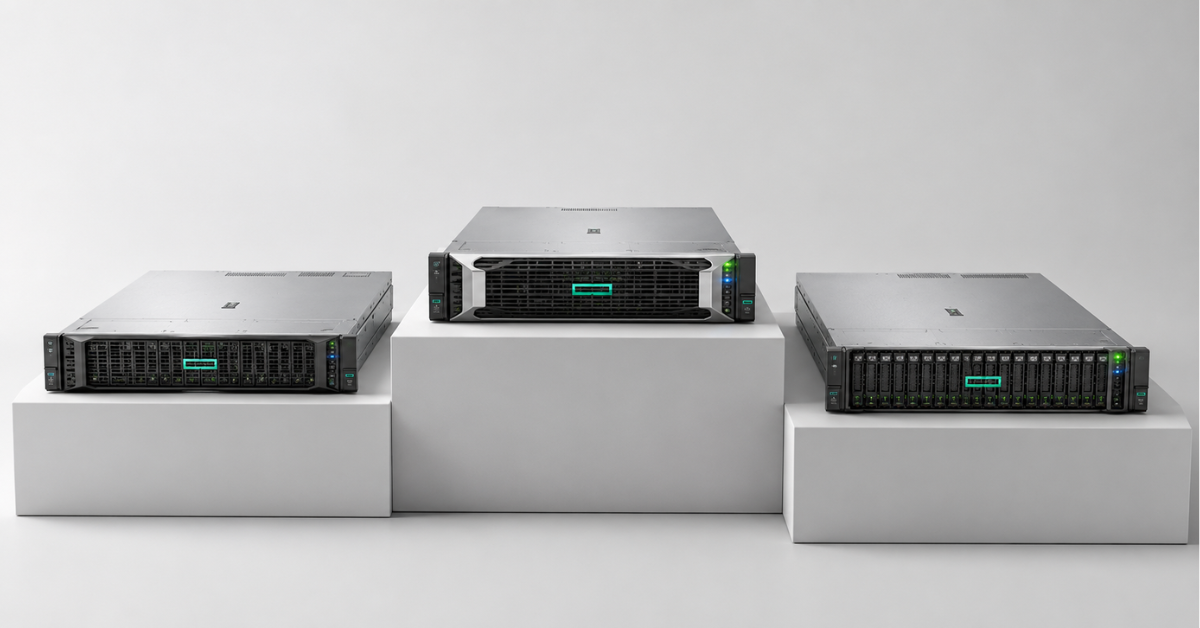
Popular HPE ProLiant DL380 servers
Free shipping on orders over £500 in the EU, £500 in the UK, and $3,000 in the USA

Free shipping on orders over £500 in the EU, £500 in the UK, and $3,000 in the USA
Free shipping on orders over £500 in the EU, £500 in the UK, and $3,000 in the USA

Free shipping on orders over £500 in the EU, £500 in the UK, and $3,000 in the USA
Why the three DL380 generations are three different platforms
All the models considered are versatile dual-socket 2U rack servers. This form factor suits mixed enterprise workloads: the chassis can accommodate large amounts of memory, drives, network cards and several accelerators. However, chassis continuity does not mean component compatibility.
The transition from Gen10 Plus to Gen11 brought the following changes:
- DDR4 was replaced by DDR5;
- PCIe 4.0 was replaced by PCIe 5.0;
- EDSFF configurations became available;
- iLO 5 gave way to iLO 6;
- core counts, memory bandwidth and cooling requirements increased.
Gen12 moved to Intel Xeon 6, introduced iLO 7, faster DDR5 and support for current accelerators. The main difference in the processor platform is the choice between models with performance and efficiency cores.
All generations retain several common features:
- up to two processors;
- 32 memory slots;
- several drive-cage options;
- expansion through risers;
- a dedicated remote-management interface.
The similarity ends when the server is configured. Additional slots may depend on the second processor, a rear drive cage may occupy expansion-card space, and a powerful GPU may require a different set of fans, heat sinks and power supplies.
Key differences between DL380 Gen12, Gen11 and Gen10 Plus
| Parameter | DL380 Gen12 | DL380 Gen11 | DL380 Gen10 Plus |
|---|---|---|---|
| Processors | Intel Xeon 6 | 4th- and 5th-generation Intel Xeon Scalable | 3rd-generation Intel Xeon Scalable |
| Maximum cores per processor | Up to 144 efficiency cores or up to 86 performance cores | Up to 64 | Up to 40 |
| Memory | DDR5, up to 8 TB, up to 6400 MT/s with one DIMM per channel | DDR5, up to 8 TB, up to 5600 MT/s | DDR4-3200, up to 8 TB with LRDIMMs or up to 2 TB with RDIMMs |
| PCIe | PCIe 5.0, up to eight slots | PCIe 5.0, up to eight slots | PCIe 4.0, up to eight slots |
| Drives | SFF, LFF, NVMe, up to 36 EDSFF drives | SFF, LFF, NVMe, up to 36 EDSFF drives | SFF, LFF and NVMe |
| Management | iLO 7 | iLO 6 | iLO 5 |
| Cooling | Air and direct liquid cooling | Air and direct liquid cooling in supported configurations | Primarily air cooling |
| Status in 2026 | Platform for new projects | Mature current generation | Discontinued generation, secondary market |
The parameters are based on HPE's official specifications for the three DL380 generations.
Maximum values cannot automatically be combined in a single server. A dense drive configuration may limit the number of expansion cards or memory modules. Some risers work only with the second processor. DDR5 speed depends on the CPU and the number of DIMMs per channel. GPU support is determined not only by an available slot but also by the chassis, heat sinks, fans, power supplies and ambient temperature.
Processors: core count is not the only factor
Intel Xeon 6 in the DL380 Gen12
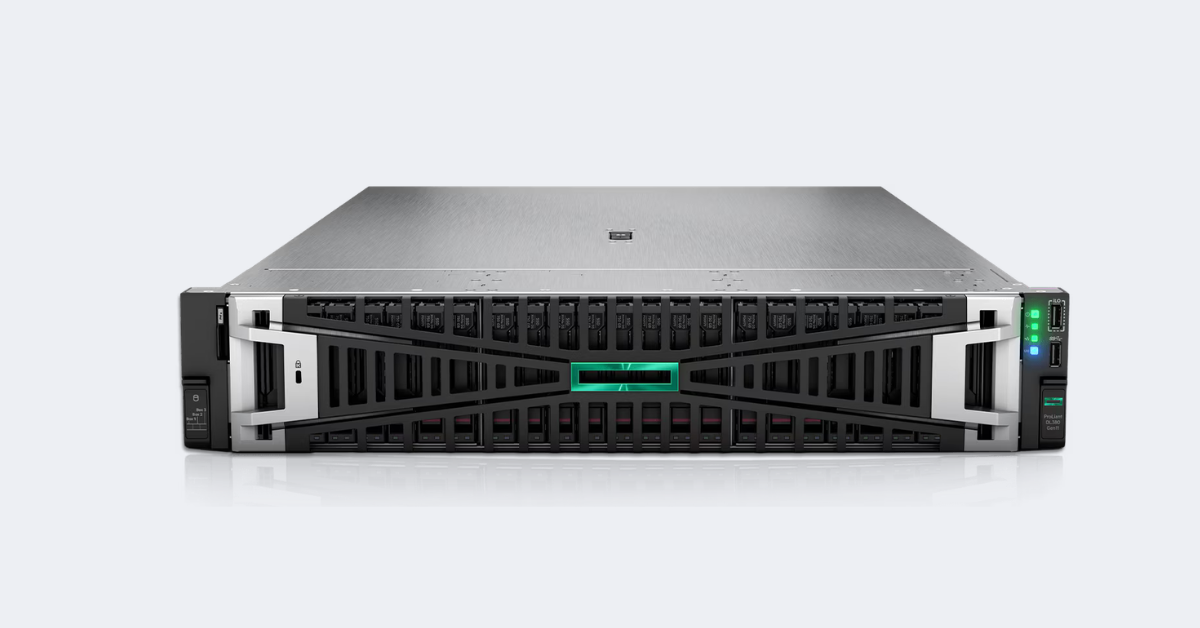
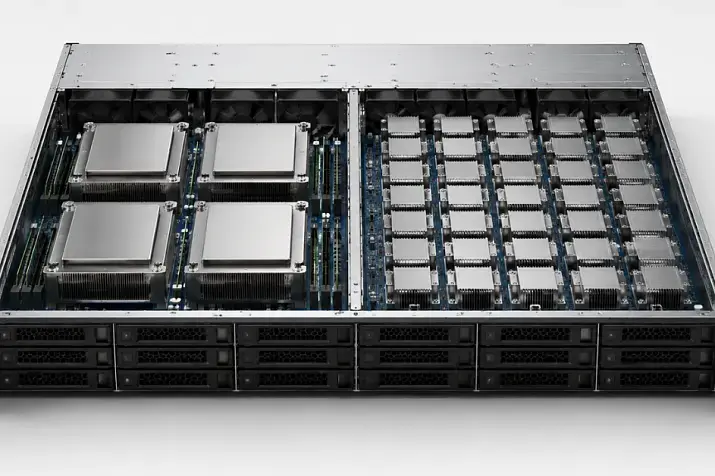
HPE ProLiant DL380.
Image source: hpe.com
Gen12 offers two approaches. Xeon processors with performance cores (P-cores) target high single-thread speed, complex computing and transactional databases. Models with efficiency cores (E-cores) are designed for large numbers of parallel tasks and high service density. Intel positions them in a similar way: performance cores for compute-intensive workloads and efficiency cores for parallel, scalable workloads.
The maximum core count does not guarantee the best result. For ERP, some databases and legacy application software, frequency, memory latency and per-core performance matter. In virtualization, the outcome depends on the VM profile: many small, similar instances and a few large systems have different requirements.
Software licensing by core or processor must also be considered. A high-core-count configuration can therefore increase spending on Windows Server, a DBMS, a hypervisor or an application platform by more than the higher server density reduces hardware costs.
Choosing the Right Equipment
Our specialists will contact you and answer all your questions
Why Gen11 remains relevant
DL380 Gen11 supports a broad range of 4th- and 5th-generation Xeon Scalable processors. You can choose the required balance of frequency, core count and power consumption without moving to the newest platform.
Gen11 is particularly attractive when:
- DDR5 and PCIe 5.0 are already required;
- the maximum density of Gen12 will not be used;
- the purchase needs to cost less;
- a mature firmware and component ecosystem matters;
- the server fleet is already based on Gen11 and spare-part compatibility is important.
A Gen11 server supplied with a 4th-generation Xeon cannot automatically be assumed to support a simple CPU swap to a 5th-generation model. Such an upgrade depends on the system board and firmware, and HPE does not support an in-field upgrade between these processor generations.
Where Gen10 Plus is still sufficient
A maximum of 40 cores per processor is sufficient for small and medium virtualization clusters, infrastructure services, file servers, backup systems, test environments and even moderately loaded ERP systems.
Before purchasing, it is useful to compare available Intel Xeon servers with the same amount of memory and storage, comparable warranty cover and a similar level of performance.
Memory: the same 8 TB can perform differently
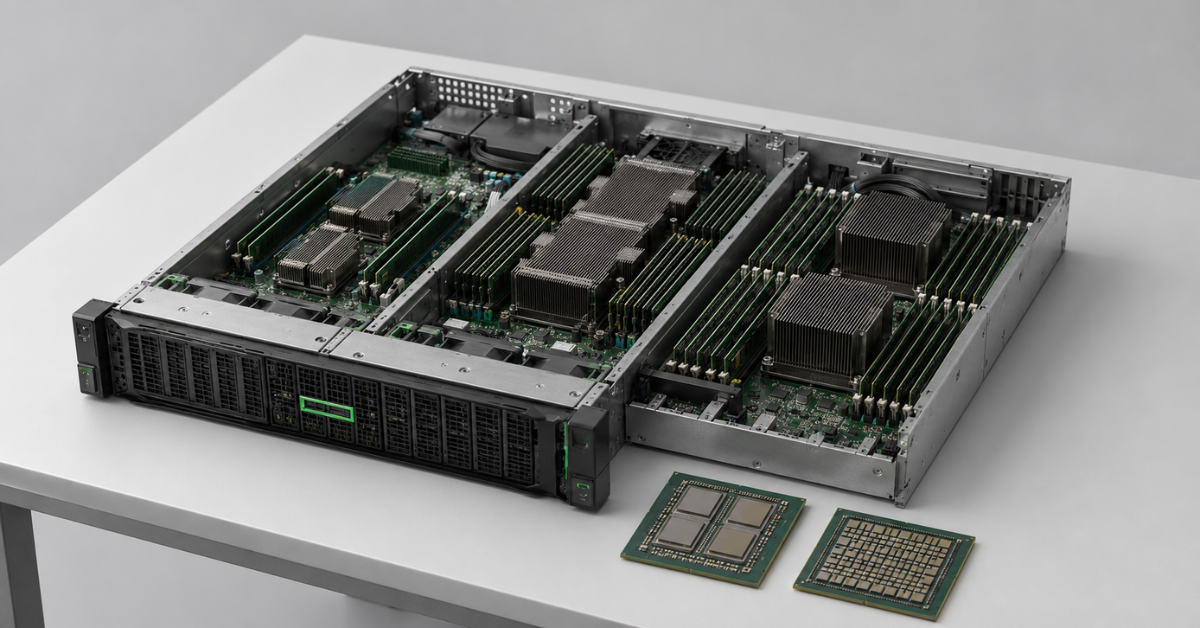
Gen10 Plus uses DDR4-3200 and reaches 8 TB with LRDIMMs; the limit is lower with standard RDIMMs. Gen11 and Gen12 use DDR5, naturally providing higher bandwidth.
For virtualization, total memory capacity per node is generally important, but the channels should be populated evenly. In a dual-socket system, memory should be distributed between both CPUs; otherwise, remote NUMA access increases latency.
For databases and analytics, the following matter:
- enough capacity to keep the working set in memory;
- memory-channel bandwidth;
- latency between processors and local DIMMs.
Gen12 does not reach its maximum memory speed with every population scheme: it is higher with one DIMM per channel than with two. CPU selection also limits the speed. A configuration with the maximum number of modules optimizes capacity, but not necessarily performance.
On Gen11, some 24 SFF chassis options limit the number of DIMMs even though the system board has 32 slots. The final layout should therefore be checked in the configurator rather than inferred from the general table.
PCIe, NVMe and drives: constraints appear at chassis level
When PCIe 5.0 is needed
PCIe 5.0 in Gen11 and Gen12 increases bandwidth for NVMe, fast network adapters and GPUs. A typical file server with several SAS drives and 10 or 25 Gb/s networking rarely benefits from a PCIe generation change alone.
The advantage becomes noticeable when several NVMe drives operate simultaneously, when 100 Gb/s or faster networking is used, or when accelerators and storage controllers are installed.
A physical x16 slot does not guarantee sixteen electrical lanes. In some configurations it is wired as x8: the card remains compatible, but its performance may be lower than expected.
Second processor and risers
Additional risers are often connected to the second CPU. A single-processor server may have empty slots that cannot be used. This matters when a GPU, network adapter and controller may be added later.
Determine the following in advance:
- the number of full-speed slots;
- which processors the slots are connected to;
- the effect of drives in the rear cage;
- the required enablement cables;
- space for future expansion.
SFF, LFF and EDSFF
LFF (3.5-inch) is suitable for high-capacity HDD storage, including archives, file services and backups. Adapters also allow 2.5-inch SAS/SATA drives and SSDs to be installed, making an LFF platform fairly versatile, although the device count is usually limited to 12.
SFF (2.5-inch) can combine SAS, SATA and NVMe SSDs. The drive cages support more devices, allowing both hybrid and all-flash high-performance arrays to be built.
EDSFF is designed for dense NVMe placement and more predictable cooling of fast drives. Support for up to 36 devices in Gen11 and Gen12 is useful for analytics, high-performance databases and software-defined storage, but is often excessive for a typical ERP system.
Direct-attached NVMe reduces latency and suits software-defined storage systems, but changes the approach to resilience. Hardware RAID is more familiar for SAS and SATA, although performance depends on the controller, cache and number of PCIe lanes.
GPU and cooling: an empty slot is not enough
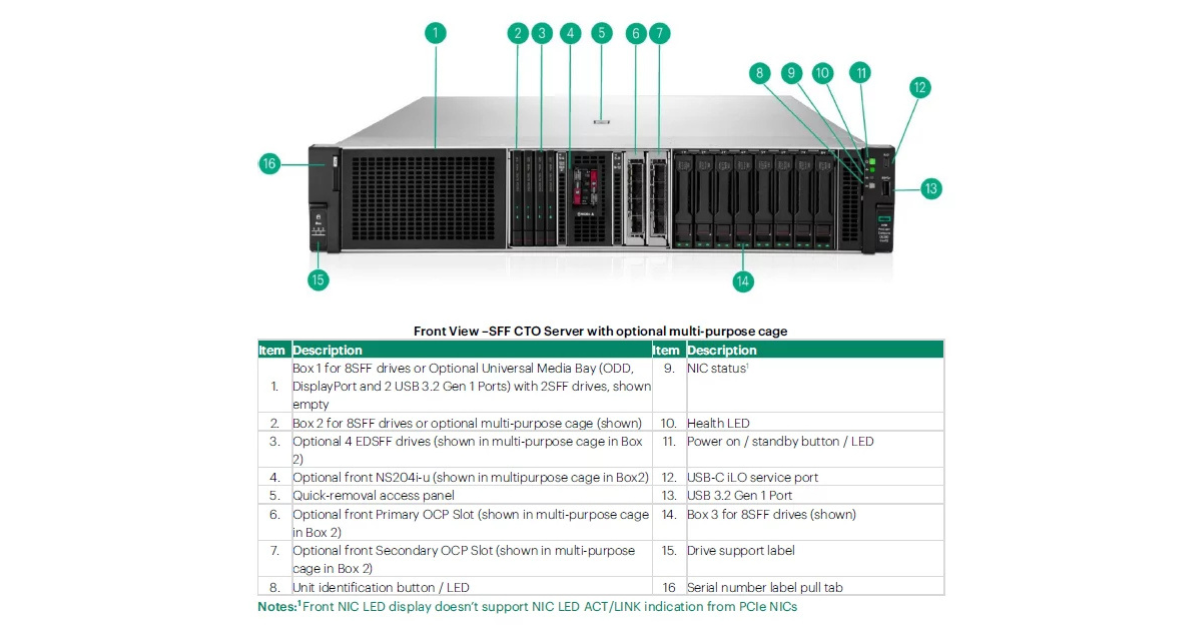
HPE ProLiant DL380 Gen12. Front view — SFF CTO server with an optional multipurpose bay.
Image source: hpe.com
The DL380 can be used for VDI, visualization, transcoding and selected machine-learning workloads. The number and type of accelerators are determined by the complete configuration.
When adding GPUs, consider:
- card width and length;
- the number of PCIe lanes;
- power cables;
- power-supply capacity;
- CPU heat-sink type;
- the fan set;
- ambient temperature;
- compatibility with the drive cages.
A dual-slot card may block the adjacent slot. Multiple accelerators can exclude certain drive cages or require direct liquid cooling for the processors. Support for three GPUs therefore does not mean they can be added to every base configuration.
Gen12 is better suited to new accelerators and a long service life. Gen11 remains a strong option for enterprise VDI and visualization. Gen10 Plus makes sense with compatible previous-generation accelerators and moderate requirements.
Despite its versatility, the DL380 does not always replace the DL380a. The model with the letter ‘a’ is designed for denser accelerator configurations. When several of the most powerful GPUs are required, a specialized platform may be simpler and more reliable.
Management and service life
iLO enables remote power control, hardware-health monitoring, firmware installation, log collection and diagnostics. The three generations use iLO 5, iLO 6 and iLO 7.
For real-world operation, the following matter more than the version number:
- feature availability under the selected licence;
- current firmware packages;
- compatibility with centralized management;
- spare-parts availability;
- the duration and level of support.
HPE already classifies Gen10 Plus as a discontinued platform, so it is logically considered as a refurbished server. In good condition, with current firmware and a warranty, it can continue handling stable workloads for several more years. However, building a new critical system with a seven-year horizon on Gen10 Plus is riskier than using Gen11 or Gen12.
Power consumption and total cost of ownership
A power supply's wattage rating is not its constant power draw. A 1600 W or 2200 W unit indicates the supported load, while actual consumption depends on the CPUs, memory, drives, GPUs, network cards, fans and utilization.
Generations should be compared while delivering the same amount of useful work. One Gen12 server may consume more power than one Gen11 server but replace several older nodes. The relevant metric is then energy consumption per virtual machine, transaction, user or processed terabyte.
Total cost of ownership includes:
purchase + support + electricity + cooling + licences + migration + maintenance + expected downtime losses − residual value.
A three- or five-year calculation should account for average utilization, electricity prices, data-centre cooling costs, the number of nodes after consolidation, per-core licensing, migration, warranty cover and spare parts.
Power consumption is best calculated for the specific processors, drives, network adapters and accelerators with the official HPE Power Advisor rather than from the installed power supply's rating or average figures quoted in reviews.
Gen12 can provide better density and performance per watt, but it costs more. Gen11 often benefits from a lower price while retaining DDR5 and PCIe 5.0. Gen10 Plus may be the most cost-effective option for moderate workloads when purchased refurbished with a warranty and without requiring expensive upgrades.
Which generation to choose for virtualization
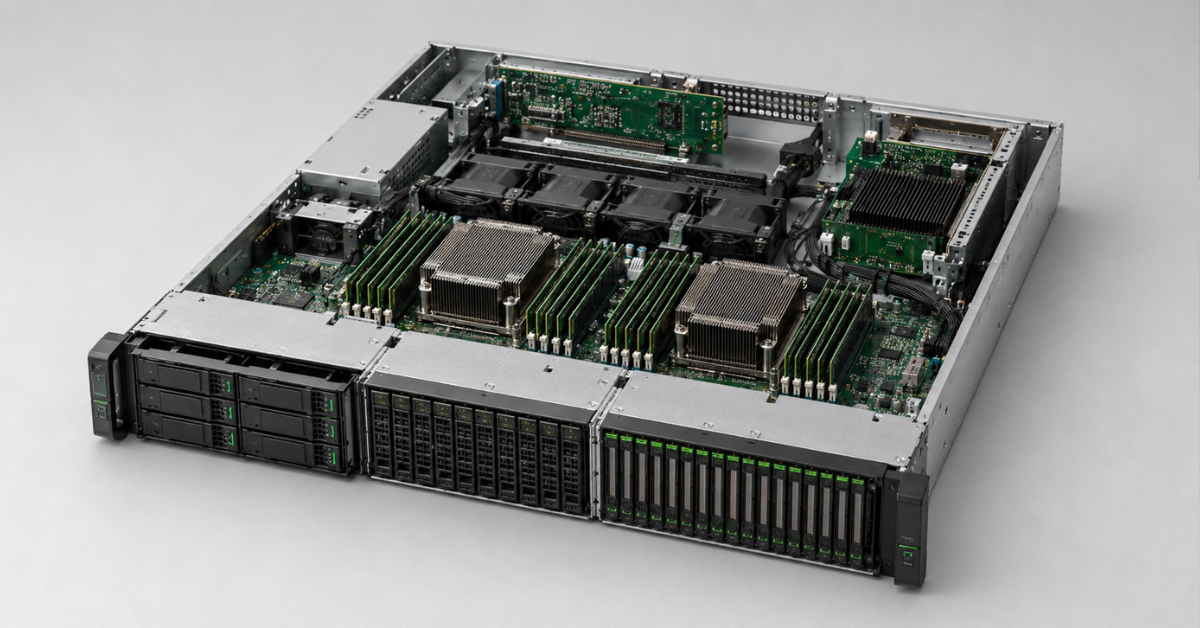
For virtualization, compare memory capacity, VM profiles, network traffic, local storage, NUMA and licensing.
Gen12 is justified for a new five- to seven-year cluster, high consolidation density, fast networking and NVMe. However, a large number of efficiency cores does not always mean a low cost: licensing can make such a configuration more expensive.
Gen11 is the primary choice for most new clusters. It supports DDR5, PCIe 5.0 and fast I/O, but usually costs less than Gen12.
Gen10 Plus is suitable for stable virtual machines, a disaster-recovery site, a lab or expansion of an existing homogeneous fleet. A cheap empty chassis may lose its price advantage after proprietary drive cages, controllers and memory are purchased.
Choosing the Right Equipment
Our specialists will contact you and answer all your questions
Databases and ERP
Databases
For a transactional database, per-core performance, memory and storage latency generally matter more than the maximum core count. Gen12 with performance cores suits new intensive systems with fast NVMe storage.
Gen11 offers a good balance for most production databases. Gen10 Plus is reasonable for replicas, archives, test environments and internal applications with predictable workloads.
Analytics depends more heavily on memory bandwidth, thread count and data-read speed. The advantages of Gen12 are more apparent here. However, replacing the server will not help if the bottleneck is an external array or poorly optimized queries.
ERP
For ERP, predictable latency, OS and DBMS certification, vendor support, resilience and licensing matter.
Gen11 provides the best balance for most projects. Gen12 should be chosen for a large new system with user growth, analytics and a long operating horizon. Gen10 Plus suits an existing ERP system with a known workload when the software stack is supported and sufficient capacity remains.
VDI, file services and backup
VDI
Office applications and graphics-intensive workloads have different requirements. Sizing should account for memory per user, CPU frequency, GPU, video memory, login peaks, network capacity and profile storage.
Gen12 suits high-density deployments and modern accelerators. Gen11 is the versatile choice for enterprise VDI. Gen10 Plus can be cost-effective for office desktops without demanding graphics after compatible GPUs and cooling have been verified.
File services
For a file server, the newest processor is rarely the main advantage: disks, RAID and the network are more often the limiting factors.
Gen10 Plus with LFF is suitable for high-capacity HDD storage. Gen11 is appropriate for fast networks, flash cache, large user counts or combined roles. Gen12 is justified for high-performance software-defined storage and long-term projects.
Backup
Data-ingest speed and restore speed should be considered separately. High HDD capacity does not guarantee that systems can be returned to service quickly.
Gen10 Plus is suitable for an affordable LFF repository. Gen11 is better for deduplication, compression, fast networking and SSD cache. Gen12 makes sense in large new systems with multiple streams and strict recovery requirements.
Migration between generations
Migration rarely comes down to moving the drives. Processors and memory are incompatible, while risers, heat sinks, fans, controllers and drive cages should not be treated as transferable without checking part numbers.
An existing array may depend on a specific RAID controller, firmware version and operating mode. Even when the drives are physically compatible, a backup copy of the data and a tested migration procedure are required.
At the software level, consider:
- OS and hypervisor support;
- network-adapter and controller drivers;
- boot mode;
- licences;
- backup and monitoring agents;
- NUMA changes.
Migration includes testing, a maintenance window, data transfer, documentation updates and keeping spare parts for several generations. In some cases, adding another Gen10 Plus to an existing homogeneous cluster is safer than a partial move to Gen11. For new infrastructure, however, such savings may lock the organization into an older platform for too long.
Choosing a generation by use case
| Use case | Primary choice | Alternative | Reason |
|---|---|---|---|
| New infrastructure for 5–7 years | Gen12 | Gen11 | Modern platform and expansion headroom |
| Typical virtualization | Gen11 | Gen12 or Gen10 Plus | Balance of price, DDR5 and PCIe 5.0 |
| High-load database | Gen12 with performance cores | Gen11 | Core performance, memory and NVMe |
| Mid-size ERP | Gen11 | Gen10 Plus | Maturity and reasonable cost |
| VDI with GPU | Gen11 or Gen12 | Gen10 Plus for light profiles | Accelerator support |
| File server | Gen10 Plus | Gen11 | Performance is more often limited by storage and network |
| Backup | Gen10 Plus or Gen11 | Gen12 for large systems | Capacity and stream throughput |
| Limited budget | Gen10 Plus | Gen11 from previous stock | Price of a refurbished configuration |
| High density of NVMe or new GPUs | Gen12 | Gen11 | Modern I/O |
What to choose in 2026
DL380 Gen12 is intended for a new long-term project that can use the advantages of Intel Xeon 6, faster memory, dense NVMe storage and modern accelerators. The purchase is justified when the platform reduces the number of physical nodes or avoids an early upgrade.
DL380 Gen11 is the most versatile recommendation for virtualization, production databases, ERP, VDI and fast file systems. It supports modern interfaces and usually costs less than Gen12.
DL380 Gen10 Plus remains a sensible refurbished option, particularly for file services, backup, infrastructure roles and stable applications. Its value depends on condition, warranty and complete configuration: a cheap chassis without the required drive cages, controller and memory may cost more than a ready-to-use Gen11 server.
The final decision should be based on the exact specification and total cost of ownership. The generation defines the platform's limits, but real value comes from a configuration without unnecessary cores, unused interfaces or expensive headroom that the company will not have time to use.
Choosing the Right Equipment
Our specialists will contact you and answer all your questions
Free shipping on orders over £500 in the EU, £500 in the UK, and $3,000 in the USA
Free shipping on orders over £500 in the EU, £500 in the UK, and $3,000 in the USA
Free shipping on orders over £500 in the EU, £500 in the UK, and $3,000 in the USA
Free shipping on orders over £500 in the EU, £500 in the UK, and $3,000 in the USA