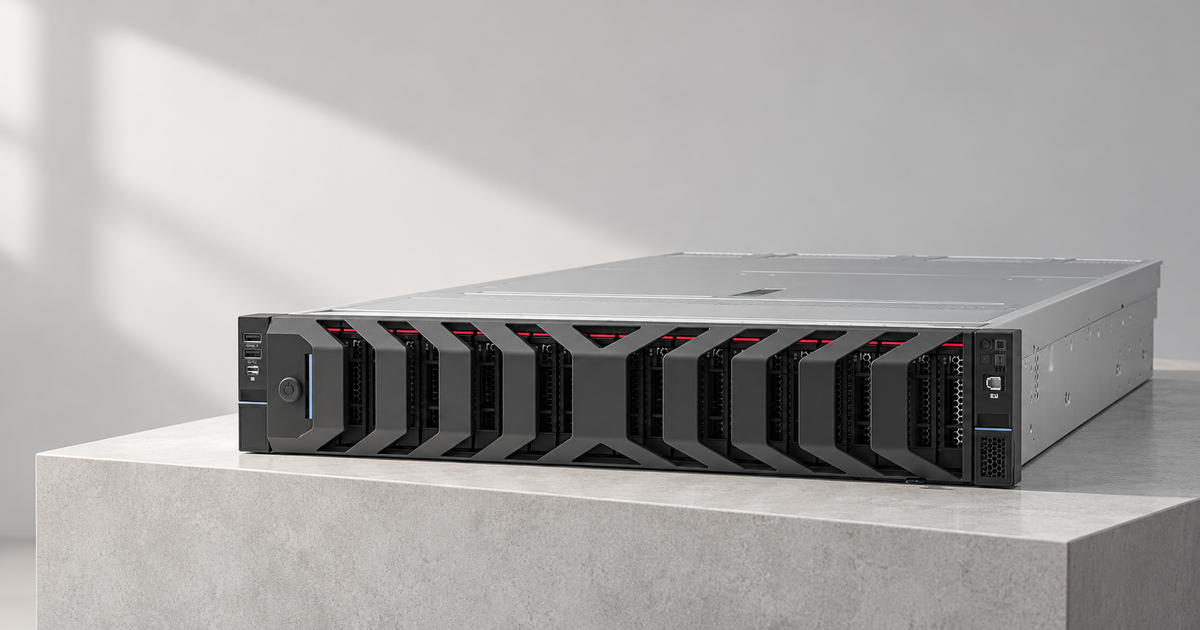
The Lenovo ThinkSystem SR650 is a dual-socket 2U server for virtualisation, databases and enterprise applications, with extensive local storage and expansion card options. For an existing DDR4 infrastructure, consider the original SR650 and the second generation (V2); choose V3 for a new platform with DDR5 and PCIe 5.0, and V4 where there is a clear need for Xeon 6 and newer memory technologies. Drives, expansion cards, power and cooling must be selected together: the maximum specifications listed in different sections cannot automatically be combined.
What the 2U form factor offers in the Lenovo SR650
The SR650's main advantage over a comparable 1U platform is the extra space for drives, controllers, network cards and GPUs. This is useful for compute workloads, local storage and connections to external storage arrays.
The 2U form factor is particularly useful in three situations:
- Many local drives. The operating system boot volume, production data and other workloads can be assigned to separate groups of drives.
- Several expansion cards. When network adapters, storage connectivity, a storage controller and an accelerator are required.
- Planned upgrades. Space must be left for new devices while retaining the required drive layout.
With external storage and few additional cards, a 1U server may deliver greater node density in the rack. A 2U chassis does not make an application faster by itself.
How the SR650, V2, V3 and V4 differ
The SR650 name covers different hardware platforms. Replacing the processors cannot turn the original generation into a V3: sockets, memory and I/O capabilities all change.
| Specification | SR650 | SR650 V2 | SR650 V3 | SR650 V4 |
|---|---|---|---|---|
| Processors | 1st and 2nd Gen Xeon Scalable | 3rd Gen Xeon Scalable | 4th and 5th Gen Xeon Scalable | Xeon 6500P and 6700P with performance cores (P-cores) |
| Memory | DDR4, 24 DIMMs | DDR4, 32 DIMMs | DDR5, 32 DIMMs | DDR5, up to 32 DIMMs; selected MRDIMM and CXL options |
| Memory channels per processor | 6 | 8 | 8 | 8 |
| PCIe generation | 3.0 | 4.0 | Up to 5.0 | Up to 5.0 |
| Main drive options | SFF/LFF, SAS/SATA, NVMe, AnyBay | SFF/LFF, SAS/SATA, NVMe, AnyBay | SFF/LFF, SAS/SATA, NVMe, AnyBay | SFF/LFF, SAS/SATA, NVMe, AnyBay; E3.S also available |
| Management controller | XCC | XCC | XCC2 | XCC3 |
This comparison is based on Lenovo Press guides LP1050, LP1392, LP1601 and LP2127. DIMM counts assume two CPUs and, for V4, depend on the cooling configuration. PCIe 5.0 support does not mean that every slot in a particular server operates at that generation.
The original SR650 and V2: DDR4 platforms
The original SR650 is suitable for infrastructure services and VMs with moderate requirements. In guide LP1050, Lenovo specifies up to 3 TB of conventional RAM using 24 modules of 128 GB each. Reaching this capacity requires processors with the appropriate per-socket memory limit.
In V2, the move to 3rd Gen Xeon Scalable increases memory channels from six to eight per processor and introduces PCIe 4.0. This is useful where the original SR650's memory and I/O capabilities are limiting factors.
For V2, Lenovo specifies up to 8 TB of conventional memory: 32 modules of 256 GB 3DS RDIMM with two processors. This maximum applies to a particular configuration.
The original SR650 with suitable processors, and V2, support Intel Optane Persistent Memory modules. Their capacity must be considered separately from DDR4: adding DRAM and Optane together does not give the amount of conventional RAM.
Choosing the Right Equipment
Our specialists will contact you and answer all your questions
SR650 V3: capabilities of the DDR5 platform
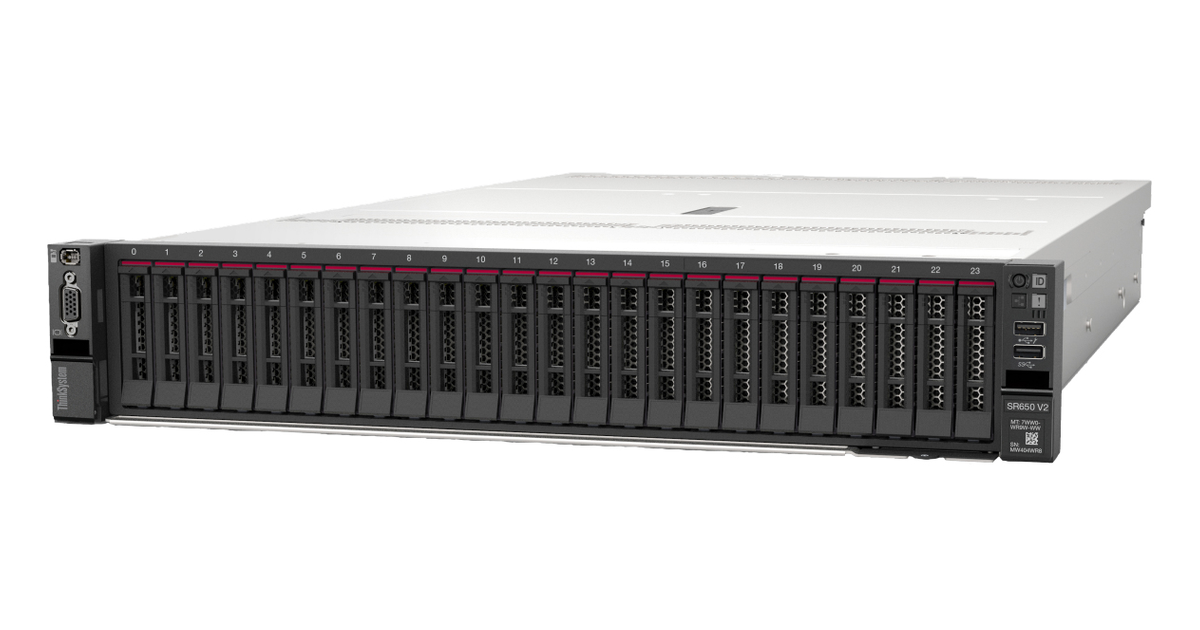
Lenovo ThinkSystem SR650 V2. Source: Lenovo Press.
The Lenovo ThinkSystem SR650 V3 supports 4th and 5th Gen Xeon Scalable processors. Describing V3 solely in terms of early configurations with 4th Gen processors is inaccurate. Lenovo Press guide LP1601 confirms support for DDR5, PCIe 5.0 and XCC2.
When choosing a Lenovo SR650 V3, establish the right balance of resources:
- Processors: clock speed and core count must suit the applications and licensing model.
- Memory: capacity, channel population and the supported CPU and DIMM combination all matter.
- Drives: the number of drive bays alone does not determine how many NVMe drives can be connected.
- Cards: available slots depend on the installed risers and drive cages.
For example, selected 5th Gen processors can support memory speeds of up to 5600 million transfers per second with one DIMM per channel. Installing a second module per channel or choosing different DIMMs may reduce the speed.
SR650 V4: Xeon 6 and new expansion capabilities
The Lenovo SR650 V4 uses Xeon 6500P and 6700P processors with performance cores. It would be inaccurate to attribute the efficiency cores (E-cores) found in other Xeon 6 families to this platform. Its management controller has been upgraded to XCC3.
Lenovo Press guide LP2127 describes two further developments in memory:
- MRDIMM increases bandwidth, but is not supported by every processor and requires one module per channel.
- CXL allows additional memory modules to be connected through the corresponding interface. In the SR650 V4, these occupy front E3.S 2T bays, affecting the storage layout.
Lenovo lists software compatibility restrictions for CXL, including a lack of support for Windows Server and VMware ESXi. It should not be included in a project simply because the bays are present. The configuration with Compute Complex Neptune Core cooling for the processors and memory provides 16 DIMM slots per dual-processor server instead of 32.
Processors and memory: avoiding an unbalanced configuration
Additional cores are useful for many independent virtual machines. Where parallelism is limited, individual core performance and memory and storage latency matter more.
With licensing based on cores and sockets, an oversized processor configuration increases software costs. Compare the cost of the server together with its licences.
The same amount of RAM does not guarantee the same performance: channel population matters. In a dual-processor system, accessing memory attached to the other socket has different latency.
It is useful to divide the sizing process into three parts:
- Calculate the memory required by applications, the operating system and the hypervisor, allowing for peaks.
- Select DIMMs and channel population according to the rules for the generation.
- Allow for growth without having to replace large numbers of DIMMs.
Account for the selected CPU's memory limit, the DIMM type and the speed supported with the chosen channel population.
How the storage subsystem is organised
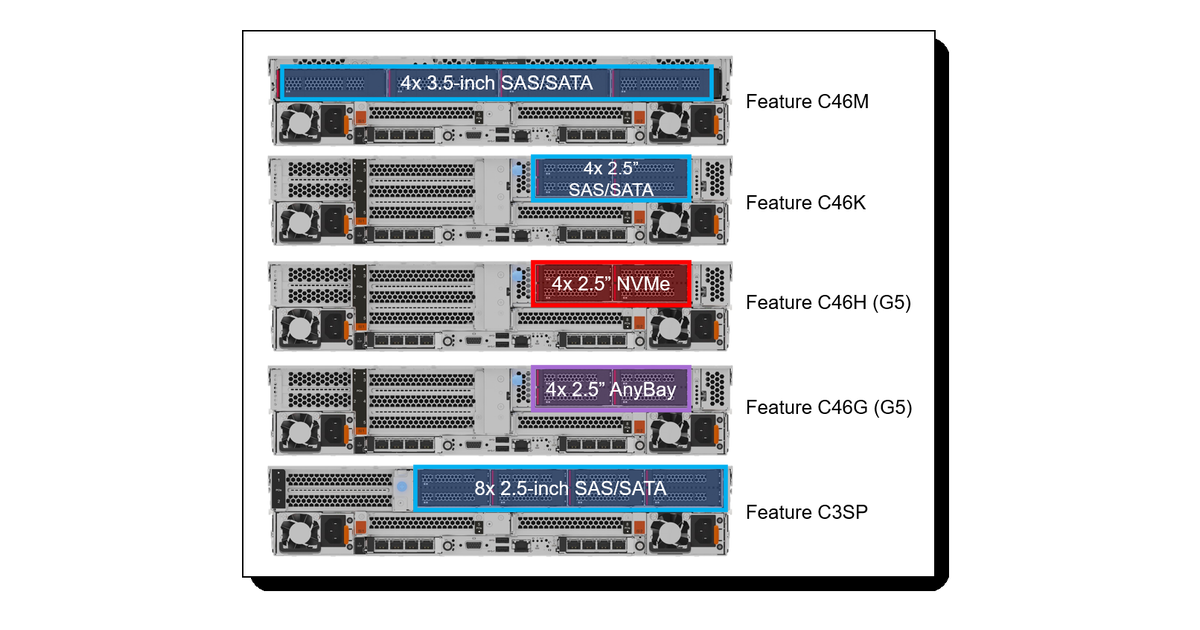
Alternative rear drive bay layouts for the Lenovo ThinkSystem SR650 V4. These are separate configurations. Source: Lenovo Press.
The SR650's drive layout is often more important than the processor generation or performance. Similar-looking chassis may be designed for high-capacity HDDs or a fast SSD array and use different connections.
SFF, LFF, NVMe and AnyBay
SFF refers to bays for 2.5-inch drives, while LFF refers to 3.5-inch bays. The interface must be checked separately: bay size does not indicate whether it is connected to SAS, SATA or PCIe for NVMe.
Choose the layout according to the workload:
- Capacity first. LFF bays with hard drives suit large volumes of mostly sequential data. With random access, many users may encounter a disk latency bottleneck.
- Response time and IOPS first. SFF bays with SSDs suit virtual machines and active databases. Consider NVMe where its performance is needed and an appropriate connection path is available.
- Different drive types. AnyBay provides SAS/SATA/NVMe support in the relevant bays, but the actual set of interfaces depends on the backplane, cables and controllers.
The label “24 SFF” does not mean “24 NVMe”. A suitable drive connection board, or backplane, cables and available system-side connections are required.
The Lenovo diagrams in this version of the article show the SR650 V4: alternative rear drive layouts and a rear panel with ten PCIe slots. All the capabilities shown cannot automatically be combined.
Internal and rear drive cages can take up expansion card space and change fan requirements. For upgrades, establish whether unused bays can be connected without replacing other components.
RAID, HBAs and boot drives
A RAID controller presents arrays to the operating system. An HBA is used when software-defined storage manages individual drives.
For a database, assess the following together:
- transaction log write latency;
- random access performance for active data;
- SSD endurance and power-loss protection;
- array behaviour during drive failure and rebuild.
For NVMe, choose the array implementation separately. An installed adapter's support for SAS/SATA RAID does not imply support for connected NVMe drives; the available solutions and licences depend on the generation and controller.
A pair of compatible M.2 boot drives with supported mirroring leaves the main bays available for data. Having two M.2 drives does not by itself guarantee RAID 1 or hot-swap support. Plan backups independently of RAID.
GPU and PCIe: constraints to consider
A riser is a board that carries expansion slots; its design determines the available slots and lane counts. A physical x16 slot does not guarantee a connection with sixteen lanes.
GPU installation depends on several conditions:
- card dimensions and the number of slots it occupies;
- support for the particular accelerator model;
- risers and the slot's connection to an installed CPU;
- the availability of auxiliary power cables;
- power supply capacity, fans and permitted ambient temperature;
- space shared with rear and internal drive cages.
Some connections are available only with a second processor: an apparently empty slot may not work in a single-processor build.
The separate Lenovo SR650a V4 platform is designed for dense accelerator configurations. It is a distinct model, rather than a configuration of the SR650 V4. It is relevant when GPUs determine the server architecture.
Choosing the Right Equipment
Our specialists will contact you and answer all your questions
Management, power and cooling
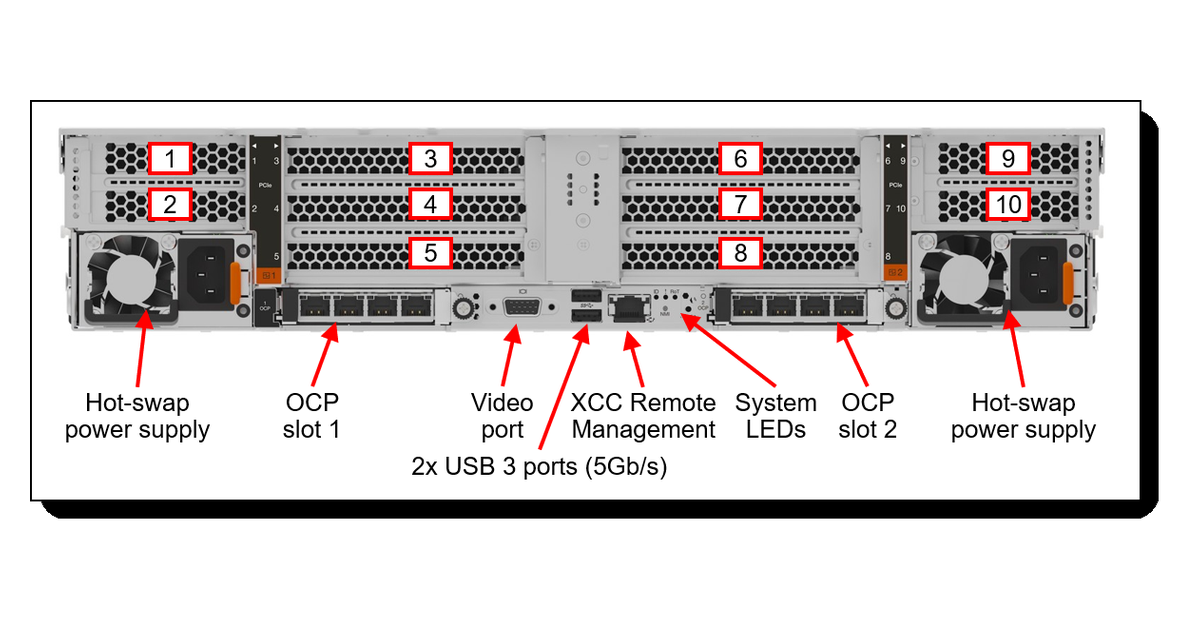
Rear view of the Lenovo ThinkSystem SR650 V4 in a ten-slot configuration. Actual slot availability depends on the build. Source: Lenovo Press.
XClarity Controller (XCC) handles hardware monitoring and server management. However, access to its web interface does not guarantee that all remote console functions are available. For V3, for example, Lenovo places remote screen, keyboard and mouse control and virtual media mounting under the XCC2 Platinum licence. Other generations have different licensing packages. For more detail, see Servermall's article “Lenovo XClarity: remote management of ThinkSystem servers”.
For redundant power, the power supply remaining after a failure must be able to handle the required load. Independent power feeds must be provided at rack level.
Hot-swap support depends on the component: servicing procedures may differ for a front drive, an internal M.2 drive and an additional drive cage.
Before installation, account for chassis depth including cables, rail compatibility, rear access, rack loading and heat removal. High-power processors, GPUs and dense drive cages increase cooling requirements. A 2U form factor does not imply quiet operation in an office alongside staff.
Neptune is an option for selected configurations. Versions with an external liquid cooling loop require suitable cooling infrastructure; this system should not be treated as standard equipment across the range. Select the operating system and hypervisor using Lenovo's compatibility matrices, taking account of the version, controllers and other devices.
Configurations for virtualisation, databases and VDI
Performance depends on RAM, the storage array and the network as well as core count. Select the configuration according to the resource that limits the workload.
| Workload | Key resources | Configuration constraints |
|---|---|---|
| Virtualisation | RAM for concurrently running VMs, cores, networking, shared or local storage performance | Insufficient memory, disk latency, networking; spare capacity for VM migration after a node failure |
| Databases | Core performance, memory for active data, fast SSDs, predictable log writes | Licensing, write latency, array rebuilds, database edition limits |
| Virtual desktops — VDI | RAM and CPU per user, storage performance; GPUs for graphics workloads | Concurrent user logins, video memory capacity, software support and licensing |
For virtualisation, calculate peak VM memory requirements. In a cluster, reserve capacity to host the VMs after a single node fails.
For databases, two volumes on the same overloaded drive group do not provide independent resources for data and logs. With external storage, assess the array, storage network and connection paths as well.
For VDI, account for peaks when many desktops boot simultaneously. Select GPUs according to the applications, video memory and graphics virtualisation support: a more powerful CPU cannot compensate for a shortage of these resources.
How to choose an SR650 generation
You can start comparing options in Servermall's Lenovo server selection, then move on to a specific SR650 configuration. Choose the generation according to the workload:
- The original SR650 — for a familiar workload that can run within DDR4 and available I/O capabilities, with confirmed software compatibility.
- SR650 V2 — when a DDR4 platform with eight memory channels per CPU and PCIe 4.0 is required.
- SR650 V3 — for a move to DDR5 and PCIe 5.0, with a choice of 4th or 5th Gen Xeon Scalable processors.
- SR650 V4 — when Xeon 6, MRDIMM, CXL or a particular new layout delivers a measurable benefit to the project.
A newer generation is justified when it removes a bottleneck or provides the required expansion. If latency comes from an external storage array, replacing the compute node may make almost no difference to query performance.
System specification and room for expansion
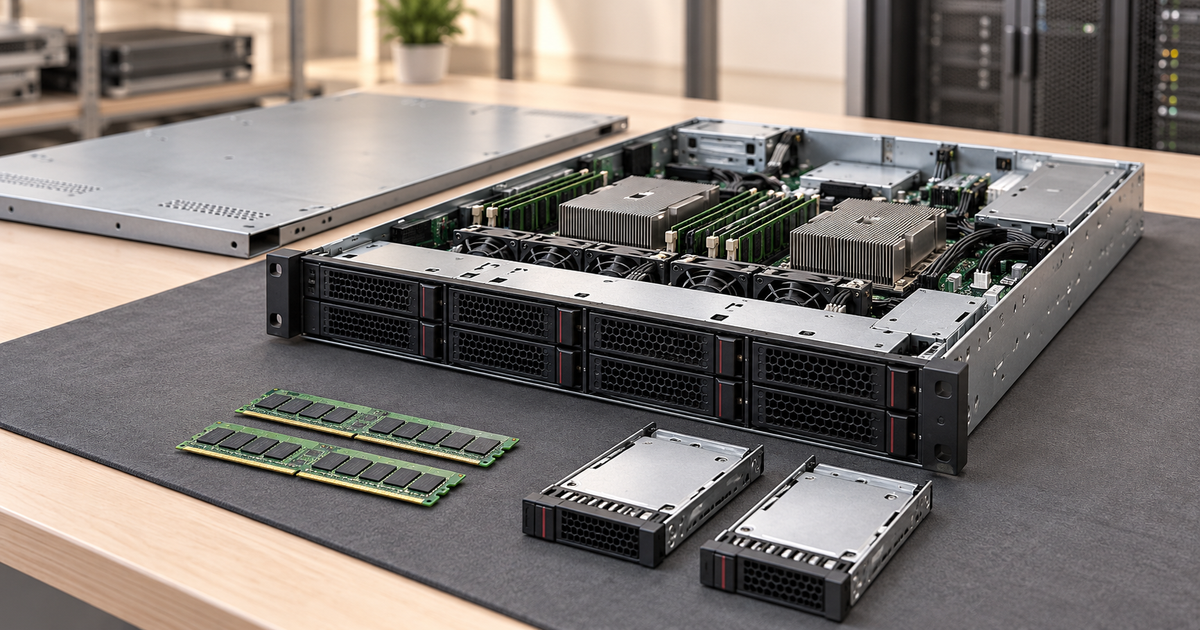
The order should specify the system's components, rather than just the SR650 name and memory capacity. For storage, list the drive cages, backplanes, controllers, cables and drive caddies. For expansion, specify installed risers, available PCIe lanes and the space remaining after drives are installed.
An SR650 V2 8SFF configurator illustrates how to select a particular V2 version with eight 2.5-inch bays. It does not describe every V2 configuration, let alone the entire range. The English site provides a Lenovo server configurator section; confirm the availability of the required V2 configuration separately. Lenovo's documentation defines the platform's capabilities, while component availability and the scope of delivery are governed by the specification agreed with the seller.
Define expansion capacity in specific terms: adding a particular number of NVMe drives, installing a second network adapter or increasing memory without replacing existing modules. This makes it clear which connections, slots, power and cooling must be included in the initial build. This approach allows the advantages of the 2U chassis to be used throughout the server's service life.
Choosing the Right Equipment
Our specialists will contact you and answer all your questions