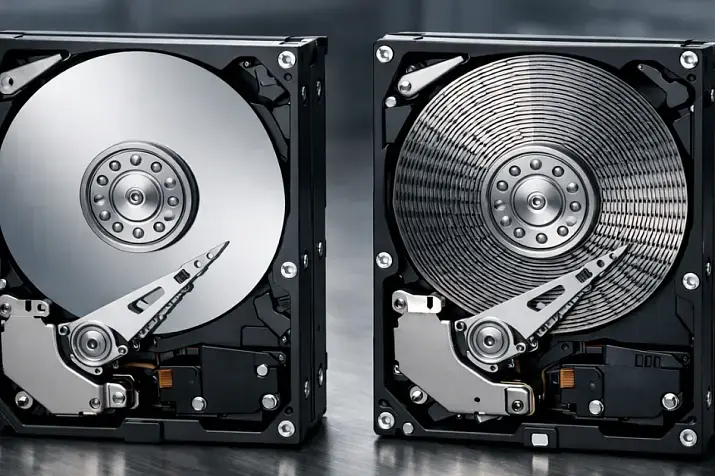
On an SSD product card from a vendor, you usually see the interface, capacity, and peak speed figures such as “up to 7 GB/s” or “up to 1 million IOPS.” For a server, that is not enough. In practice, a drive is chosen not by how it looks in a short benchmark, but by what happens to writes before they are committed to NAND, how the drive behaves during a sudden power loss, and how predictable its latency remains under sustained mixed workloads. That is why write cache, PLP, and QoS should be evaluated together, not separately. NVMe has long become mainstream, but the difference between client and data center SSDs has not disappeared: it shows up not in a nice-looking test start, but in flush, mixed workload, steady state, and power-event behavior.
What write cache in SSDs is and why it is not the same as “safe write”
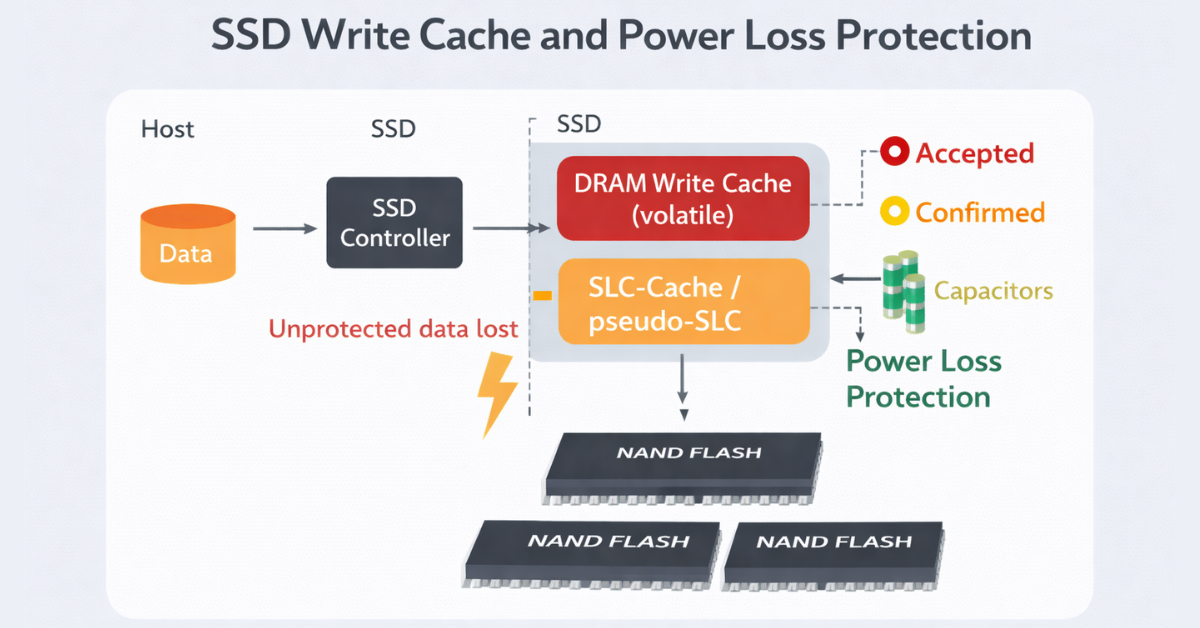
Write cache is the buffering of writes before data is finally placed into non-volatile memory. In practice, “fast SSD write speed” may hide several mechanisms at once: buffering in the controller, DRAM for mapping tables and metadata, SLC cache or pseudo-SLC, as well as FTL logic that remaps actual physical writes. The user sees the resulting speed, but not the main thing: at what moment the data actually became non-volatile. NVMe separately defines volatile write cache and the Flush command, which is needed to guarantee that data is flushed from the volatile part onto stable media.
Here it is important to distinguish four different states:
- the SSD has accepted the data;
- acceptance of the data has been acknowledged;
- the data has been written to NAND;
- the data is protected against sudden power loss.
These are not the same thing. A drive may acknowledge a write quickly because it has accepted it into cache, but that does not yet mean that the write will survive a power loss. So write cache in itself is not bad: the problem begins where the cache is volatile, the SSD acknowledges the write early, and the upper stack — the OS, RAID, hypervisor, or DBMS — assumes stronger durability guarantees. Microsoft explicitly emphasizes the importance of write-through/FUA for durable writes: an application may require a write to be considered complete only after it reaches stable media, not merely after it passes through an intermediate cache.
What may be hiding behind high SSD write speed:
- an SLC buffer that runs out quickly during long writes;
- aggressive caching with early write acknowledgment;
- low actual sustained write speed after leaving burst mode;
- strong dependence on free space;
- performance drops due to temperature, garbage collection, and background FTL operations.
This leads to the main practical conclusion: a fast burst and a reliable commit operation are different things. DRAM and SLC cache can significantly improve responsiveness, but by themselves they do not guarantee the safety of acknowledged writes.
Most popular refurbished servers

Free shipping on orders over 500 € in the EU, £500 in the UK, and $3,000 in the USA

Free shipping on orders over 500 € in the EU, £500 in the UK, and $3,000 in the USA

Free shipping on orders over 500 € in the EU, £500 in the UK, and $3,000 in the USA

Free shipping on orders over 500 € in the EU, £500 in the UK, and $3,000 in the USA
PLP: what exactly it protects and why the phrase “has power-loss protection” can be misleading

PLP, or Power Loss Protection, is an SSD protection mechanism for sudden power failure. But there is a critically important distinction here between data at rest and data in flight. Data at rest is data that has already been written to non-volatile memory. Data in flight is data that has already traveled part of the path and may even have been acknowledged to the host, but has not yet been fully and safely committed to NAND.
This is where the real boundary lies between many consumer/client SSDs and full-fledged data center SSDs. Micron clearly shows that client-level protection is often aimed primarily at data already written, while data center PLP is designed to bring acknowledged but not yet completed writes into a safe state as well. In other words, the presence of protection-related components on the board does not automatically mean the same level of guarantees.
| Protection type | What it preserves | What it does not guarantee | Where it is usually found | Suitable for production write-heavy workloads |
|---|---|---|---|---|
| No declared protection | Only what has already been safely written | Cache safety, mapping safety, acknowledged in-flight writes | Budget consumer SSDs | No |
| Data-at-rest protection | Data already written to NAND | Safety of acknowledged but not completed writes | Client/prosumer models | Limited |
| Partial power-loss handling | Some service data and part of unfinished operations | Full guarantees for committed writes | Transitional models | More of a compromise |
| Full enterprise PLP | Data at rest and data in flight within the declared model | Does not eliminate upper-stack requirements and proper flush/FUA behavior | Data center SSDs | Yes |
Choosing the Right Equipment
Our specialists will contact you and answer all your questions
That is why phrases such as “power-loss management,” “power-loss signal support,” or even “data-at-rest protection” should not automatically be treated as equivalent to enterprise PLP. For a boot drive or a read-mostly scenario, that may still be a reasonable compromise. But for WAL, redo, transaction log, metadata-heavy storage, write-back RAID, ZFS intent log, Ceph journaling, and similar tasks, the absence of full PLP is already an architectural risk, not a minor omission in the specification.
QoS SSD: why this is not marketing, but a real metric for server workloads
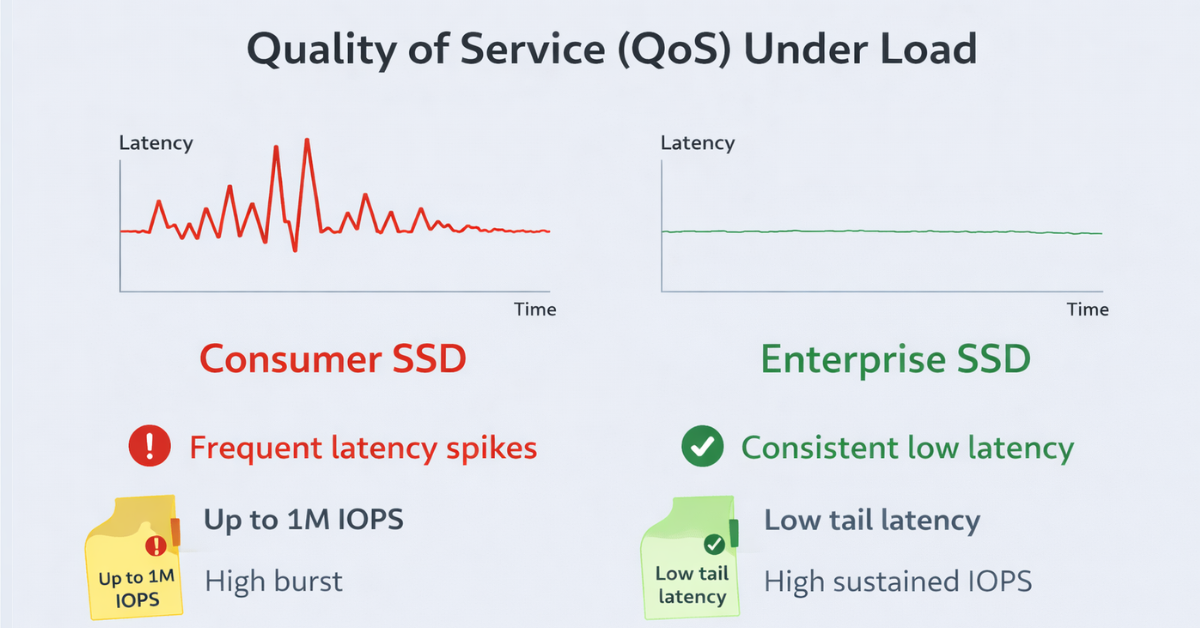
In the SSD context, QoS is not an abstract “quality of service,” but the predictability of latency. What matters most here is not average latency, but high-percentile latency: 99%, 99.9%, 99.99%, 99.999%. Those figures show how often a drive produces rare but very long stalls — tail latency.
For production, this is critical. A database, hypervisor, or storage node more often suffers not because average latency rose from 80 to 110 microseconds, but because rare operations suddenly start taking milliseconds precisely under load. KIOXIA, for example, highlights in its materials on data center NVMe not only peak IOPS, but also 99.999th-percentile latency in real-world scenarios, including mixed OLTP-like workloads. This is a good sign of a mature product: the vendor shows not only the maximum, but also how predictable the drive is over the long run.
Why QoS breaks down:
- garbage collection and data relocation inside the SSD;
- drive fill level and shrinking of the free block pool;
- SLC cache exhaustion;
- thermal throttling;
- mixed read/write workloads instead of “lab-style” 100% read;
- background FTL operations;
- thread contention and noisy neighbors in a virtualized environment.
What to look at in the specification and tests:
- percentile latency, not just average latency;
- steady state, not just burst performance;
- mixed workload, not only a single 100% read mode;
- QD1/QD4 and realistic queue depths;
- behavior after the drive has been filled;
- consistency under sustained load.
High IOPS without good QoS may turn out to be useless in production. The SSD passes a short synthetic benchmark beautifully, but during a long real workload it starts producing tail latencies that hurt transactions, replication, and overall service responsiveness.
How write cache, PLP, and QoS are connected
These three things cannot be evaluated separately.
- Write cache determines how the drive accelerates writes.
- PLP determines whether acknowledged writes can be trusted during power loss.
- QoS determines how predictably all of this works under real load.
From this comes a simple scheme:
- Fast does not mean reliable.
- Reliable does not mean stable in terms of latency.
- Stable in burst does not mean stable in steady state.
- The presence of NVMe does not mean enterprise-grade behavior.
Aggressive write cache can sharply improve instant metrics. But if the drive lacks full PLP, that model becomes risky wherever the application depends on durable writes. And if the SSD has weak QoS, then even with formal reliability the write path starts behaving unevenly: not failing outright, but sawing through the whole system with tail latencies.
Where SSD selection mistakes happen most often
SSDs for databases and logs
WAL, redo log, and transaction log are sensitive specifically to acknowledged writes and tail latency. Both PLP and low tail latency matter here. Attractive peak IOPS alone mean little if commit sometimes stretches into milliseconds or if a write is acknowledged before it actually becomes safe.
SSDs for virtualization
Virtualization has mixed workloads, lots of small IO, and competition between neighbors. Average performance may look decent, but weak QoS quickly appears as “random slowdowns” in individual VMs. That is why for VM storage, predictability is almost always more valuable than a peak result in a single benchmark.
SSDs for Ceph, SDS, and storage nodes
Replication does not eliminate local drive requirements. One SSD with poor tail latency can worsen the response time of the whole cluster, especially during recovery, rebalance, and mixed read/write streams. It is a mistake to think that “the cluster will smooth everything out.”
SSDs for RAID and ZFS
Here the issue is not only speed, but also consistency of write guarantees. Home experience with consumer NVMe cannot automatically be transferred into a production array. If the storage stack depends on correct flush/FUA behavior and the drive is strong only in burst metrics, the problem will surface at the worst possible moments — during degradation, rebuild, and intensive background activity.
SSDs for boot, read-mostly, and cold data
This is where compromise is possible most often. But even here, a server boot SSD is not always just “any cheap consumer drive.” You still need clear workload, temperature, and expected write-profile limits.
Which marketing claims most often mislead buyers
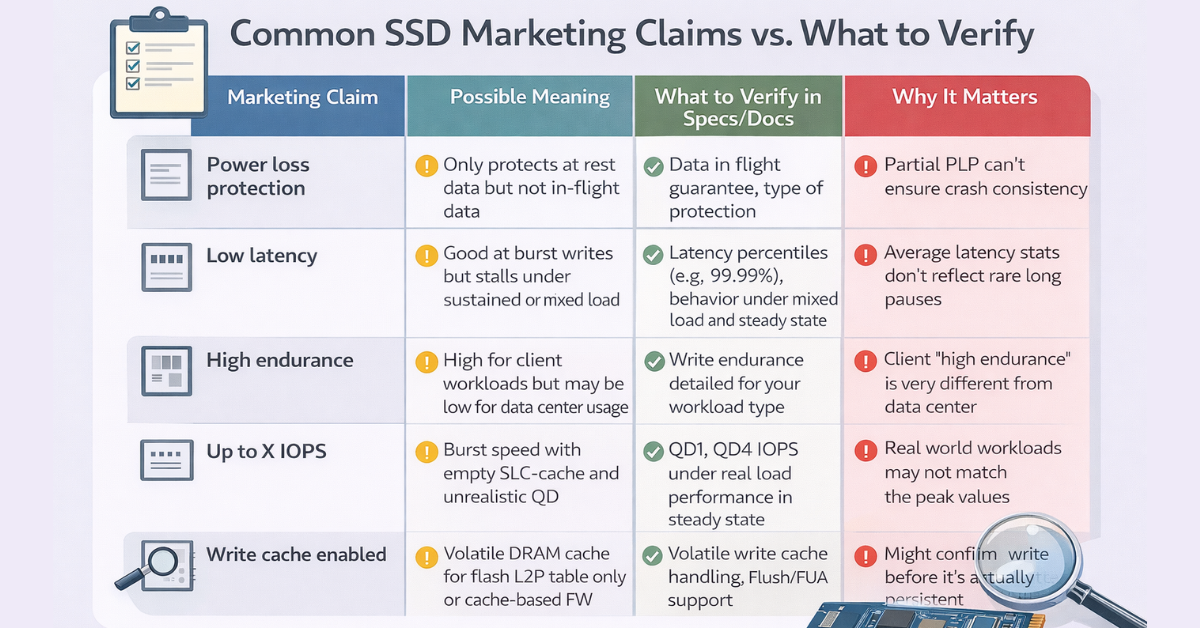
The most common specification-reading mistakes are simple: DRAM is mistaken for PLP, SLC cache for stable sustained write speed, and high IOPS for a guarantee of good QoS.
How to choose SSDs correctly when not only speed, but also write reliability matters
Practical checklist:
- Clarify whether there is full PLP, not just vague power-loss protection.
- Check whether the documentation explicitly states protection for data in flight, not only data at rest.
- See whether the vendor publishes latency percentile and QoS metrics.
- Look for steady-state data in the documentation, not only figures for a fresh empty drive.
- Check whether there are results for mixed workloads, not only 100% read.
- Understand the device class: client, prosumer, read-intensive data center, mixed-use, or write-intensive.
- Take the size and behavior of the SLC cache into account.
- Check the risk of thermal throttling in a real server chassis.
- See how performance changes as the drive fills up.
- Plan for free space and overprovisioning wherever consistency matters.
Storage systems

Free shipping on orders over 500 € in the EU, £500 in the UK, and $3,000 in the USA

Free shipping on orders over 500 € in the EU, £500 in the UK, and $3,000 in the USA

Free shipping on orders over 500 € in the EU, £500 in the UK, and $3,000 in the USA

Free shipping on orders over 500 € in the EU, £500 in the UK, and $3,000 in the USA
Choosing the Right Equipment
Our specialists will contact you and answer all your questions
When compromise is acceptable and when it is better not to save money
Saving money may be justified in lab, dev/test, and read-mostly scenarios, in backup repositories with low sensitivity to latency, and sometimes in the role of a boot drive when the limits are clearly understood.
Saving money is risky wherever durable writes and predictable latency matter to the application: OLTP, VM storage, Ceph/SDS, metadata-intensive storage, write-heavy RAID/ZFS, and any critical systems where loss of an acknowledged write or long tail latencies are unacceptable.
Not every server requires the most expensive SSDs. But misunderstanding the write path and write guarantees usually costs more than the price difference between a drive that is “fast on paper” and one that is actually suitable.
Conclusion
Choosing SSDs only by interface and peak figures is a mistake. For server scenarios, you need to look at three things at once: how the drive accelerates writes, what happens during power loss, and how predictable latency is under real workloads.
The formula here is simple: write cache defines the write acceleration model, PLP defines trust in acknowledged writes, and QoS defines how predictable system behavior is in reality. That is why two SSDs with similar specification speeds can behave completely differently in a server.
Sources: NVMe Base Specification, Micron: Client vs. Data Center SSDs, Micron: How SSDs Handle Unexpected Power Loss, KIOXIA on data center latency/QoS, Microsoft SQL Server storage guide.
Choosing the Right Equipment
Our specialists will contact you and answer all your questions
Content:
What write cache in SSDs is and why it is not the same as “safe write”
PLP: what exactly it protects and why the phrase “has power-loss protection” can be misleading
QoS SSD: why this is not marketing, but a real metric for server workloads
How to choose SSDs correctly when not only speed, but also write reliability matters
When compromise is acceptable and when it is better not to save money

Free shipping on orders over 500 € in the EU, £500 in the UK, and $3,000 in the USA

Free shipping on orders over 500 € in the EU, £500 in the UK, and $3,000 in the USA

Free shipping on orders over 500 € in the EU, £500 in the UK, and $3,000 in the USA

Free shipping on orders over 500 € in the EU, £500 in the UK, and $3,000 in the USA

Free shipping on orders over 500 € in the EU, £500 in the UK, and $3,000 in the USA

Free shipping on orders over 500 € in the EU, £500 in the UK, and $3,000 in the USA