ZFS is a file system and storage manager that combines drives into a pool, checks data integrity and supports snapshots. It is suitable for file servers, backup storage and virtualization, where detecting corruption and recovering data easily matter. For a small server, you can start with a mirror; for a high-capacity storage system with several large HDDs, consider RAID-Z2. Neither ZFS redundancy nor snapshots replace a separate backup.
What is ZFS?
ZFS manages drives and files together: it knows where blocks are stored, checks their contents and repairs corruption when a healthy copy is available.
OpenZFS, TrueNAS and Linux support
Linux and FreeBSD use OpenZFS, the open-source implementation of ZFS. It is available in Proxmox VE and provides the storage foundation for TrueNAS. These products add their own management interfaces.
As of 13 October 2026, the latest stable version in the OpenZFS release list is 2.4.4. Your distribution may provide a different supported version.
ZFS is not included in the mainline Linux kernel because the CDDL and GPLv2 licences are incompatible. It is loaded as a separate module.
How ZFS works
Pools, vdevs, datasets and zvols
- Drives are physical HDDs, SSDs or dedicated partitions.
- A vdev is a single drive or a group of drives: a mirror, RAID-Z or dRAID. Redundancy is configured at this level.
- A pool is shared storage made up of one or more vdevs. It is managed with zpool.
- Datasets are file systems within a pool. They have their own quotas, compression settings and snapshots.
- A zvol is a block volume within a pool, such as a virtual disk for a VM. It is an alternative to a file-system dataset.
Datasets share the pool’s free space without dividing it into fixed-size partitions. For example, you can set different quotas for documents and backups. Physical partitions on drives are still permitted.
Redundancy applies within each vdev. A pool consisting of two mirrors can survive one drive failure in each mirror, but losing an entire mirror means losing the pool. Adding a single drive also introduces a point of failure.
Copy-on-Write, checksums and scrub
Copy-on-Write saves a modified block in a new location and then updates the references. The structure remains consistent, but the most recent asynchronous writes may be lost during a power failure.
Checksums for data and metadata allow corruption to be detected during reads. ZFS recovers a block from a healthy mirror copy or RAID-Z parity, provided sufficient redundancy remains. On a single drive, an error can be detected, but there is often no other copy available to repair it.
A scrub checks allocated blocks, including data that has not been read for a long time. Pool architecture and the protection mechanism are described in the OpenZFS documentation.
RAID in ZFS: mirrors, RAID-Z and dRAID
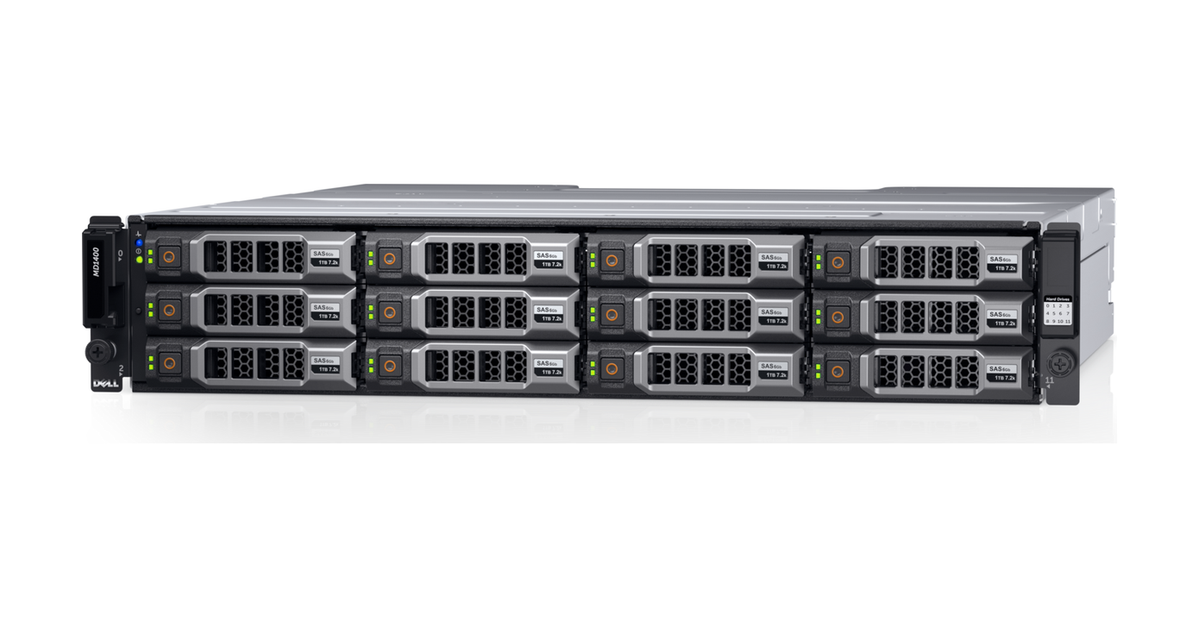
Dell PowerVault MD1400 disk enclosure. Source: Dell Technologies.
SAS/SATA drives require direct access through an HBA, a host bus adapter, usually in IT mode. A controller with a fully featured HBA mode is also suitable. NVMe drives are often connected directly to PCIe.
Do not create a hardware RAID array beneath ZFS: it hides the drives and adds a separate recovery mechanism. To expand storage, use JBOD disk enclosures with a compatible HBA. One example is the Dell PowerVault MD1400; HBA and cable compatibility must be confirmed for the specific configuration. Equipment selection is discussed in Servermall’s article “HBA vs RAID Controller”.
| Layout | Protection within a single vdev | Suitable uses |
|---|---|---|
| mirror | An N-drive mirror tolerates N−1 drive failures as long as a healthy copy remains | Virtual machines, databases and small storage systems |
| RAID-Z1 | One drive failure | Non-critical data with a separate backup and acceptable downtime |
| RAID-Z2 | Two drive failures | High-capacity HDD file storage |
| RAID-Z3 | Three drive failures | Storage with higher redundancy requirements |
| dRAID | One, two or three drive failures, depending on the parity level | Large arrays where fast recovery onto distributed spare capacity matters |
Choosing the Right Equipment
Our specialists will contact you and answer all your questions
In dRAID, spare capacity is distributed across the drives. After a failure, recovery uses those drives together rather than being limited by writes to a single spare drive.
RAID-Z distributes parity across all drives. There is no permanent “parity drive” or “checksum drive”: parity reconstructs data, while checksums verify integrity.
With identical drives, RAID-Z capacity is approximately (N − P) × drive capacity, where P is the parity level. Storage overhead and the free-space reserve further reduce the available capacity.
Mirrors are generally better suited to small random accesses, while RAID-Z provides greater capacity efficiency. Reads from a mirror can use several drives; conventional RAID 5 performance formulas cannot be applied to RAID-Z.
RAID-Z1 or RAID-Z2: which should you choose?
After a drive failure, RAID-Z1 has no remaining redundancy margin. A second failure in the same vdev during recovery makes the data unavailable; an unreadable block on a remaining drive may result in the loss of the affected data.
Large HDDs under heavy load take a long time to recover. RAID-Z2 retains protection against another failure, so it is usually preferable for production file storage. Choose RAID-Z1 with a clear understanding of acceptable downtime and the backup recovery procedure.
Since OpenZFS 2.3, RAID-Z can be expanded by adding a drive if the pool supports the feature. RAID-Z1 does not become RAID-Z2, and existing blocks retain their original data-to-parity ratio. This affects the available capacity. Shrinking the vdev by removing a drive is not supported.
Cache and memory: ARC, L2ARC and SLOG
These acceleration mechanisms serve different purposes:
- ARC stores frequently accessed data and metadata in RAM.
- L2ARC is an additional read cache on an SSD. It is useful for repeated reads of data that does not fit in ARC. It requires memory to track cached blocks and does not accelerate writes.
- SLOG is a separate device for the ZIL intent log. It can speed up acknowledgement of synchronous writes, which must be stored reliably before the application continues.
SLOG does not accelerate ordinary asynchronous writes. Without it, the ZIL is stored in the main pool. A SLOG requires a low-latency drive with power-loss protection; critical systems should use a mirror. Disabling synchronous writes to increase speed changes the guarantees of data durability.
ZFS has no universal 8 GB minimum or mandatory memory-per-terabyte rule. Requirements depend on applications, the working set and storage features. In the TrueNAS guide, the 8 GB minimum applies to the entire TrueNAS system.
ECC is desirable but not mandatory: it corrects certain RAM errors. When using the Servermall configurator, allow memory for applications and ARC, and check that the motherboard and processor support ECC. L2ARC does not replace sufficient RAM.
Snapshots, compression and deduplication
Snapshots
A snapshot captures the state of a dataset or zvol. It retains references to existing blocks without making a complete copy of the data. Space usage grows as changes occur: old blocks must be retained for the snapshot.
A snapshot helps restore a file or roll back a dataset after an update. However, it cannot survive the loss of the pool and does not replace a backup.
Snapshots can be transferred to separate storage using zfs send and zfs receive, sending only the changes. To obtain a consistent database or VM snapshot, stop writes or use the application’s own consistency mechanism.
Compression and deduplication
lz4 is a fast initial compression choice with a low CPU overhead. zstd lets you balance compression ratio against computational cost. Archives and video compress less effectively than text.
Compression is configured per dataset and applies to new writes. Existing blocks are not automatically recompressed. The compressratio property shows the result.
Deduplication stores identical blocks only once, but requires resources for a table that tracks their use. Before enabling it, assess the amount of duplicate data, memory requirements and the storage speed for the table. For a small server, it is more sensible to start with compression without deduplication.
Installing and configuring ZFS
The hardware configuration matters for a data pool: drive bays, HBA, cables, cooling and direct access to drives. When choosing a rack server, check these capabilities rather than relying solely on the model name.
Installation depends on the operating system:
- Ubuntu: enable the universe repository, then run sudo apt update and sudo apt install zfsutils-linux. Distribution packages provide the module for the standard kernel.
- Debian: enable contrib, install the headers for the kernel in use, then run sudo apt install zfs-dkms zfsutils-linux. With Secure Boot, the module must be signed correctly and authorised to load.
- FreeBSD: ZFS is included in the base system. If necessary, load the module with kldload zfs and enable the service with sysrc zfs_enable="YES".
The example below shows a separate data pool in Linux. FreeBSD uses different device names; the procedure is described in the official handbook.
Creating a pool and datasets
Match persistent /dev/disk/by-id/ names to drive serial numbers. Unlike /dev/sda, these names do not depend on the order in which devices are detected.
This example creates a mirror from two empty drives. Replace DISK_A and DISK_B with actual identifiers. Creating a pool changes the partition layout of the selected drives and does not preserve their existing data.
sudo zpool create -o ashift=12 tank mirror \
   /dev/disk/by-id/DISK_A \
   /dev/disk/by-id/DISK_B

 sudo zfs create -o compression=lz4 \
   -o mountpoint=/srv/documents tank/documents
 sudo zfs set quota=500G tank/documents

 sudo zpool status tank
 sudo zfs list
ashift=12 corresponds to a 4096-byte sector, including on 512e drives. For a larger physical sector, choose a different value. It cannot simply be changed on an existing vdev.
Importing a pool on another server
The configuration is stored on the drives: a pool can be moved to a compatible server without the original HBA.
On the original server, stop the applications and export the pool:
sudo zpool export tankOn the new server, discover and import the pool:
sudo zpool import -d /dev/disk/by-id
 sudo zpool import -d /dev/disk/by-id tank
The new host must support the pool’s active features; encrypted datasets require their keys. Importing an ordinary pool on two servers simultaneously for writing is not permitted.
Drive replacement and recovery
Checking integrity
Check allocated blocks and view the result:
sudo zpool scrub tank
 sudo zpool status -v tank
Schedule regular scrubs during less busy hours. If errors recur, investigate the drives, cables, power supply, HBA and memory.
Replacing a drive
Identify the failed member using zpool status and match it to the physical drive. After connecting a new drive, perform the replacement:
sudo zpool replace tank OLD_DEVICE \
   /dev/disk/by-id/NEW_DISK
 sudo zpool status tank
OLD_DEVICE is the name or numeric identifier shown in the pool status; NEW_DISK is the identifier of the new empty drive. Its available capacity must be sufficient for the replacement.
A resilver reconstructs data on the new drive; until it finishes, the redundancy margin is reduced. A scrub checks existing blocks, while a resilver reconstructs copies. If insufficient redundancy remains, a backup is needed.
Rolling back to a snapshot
Create a snapshot and subsequently roll back to it:
sudo zfs snapshot tank/documents@before-change
 sudo zfs rollback tank/documents@before-change
Rolling back after stopping the applications discards all changes made since the snapshot. For a single file, it is better to copy just that file. Newer snapshots prevent an ordinary rollback to an older one; forcibly deleting them requires a separate decision.
Choosing the Right Equipment
Our specialists will contact you and answer all your questions
ZFS in Proxmox VE
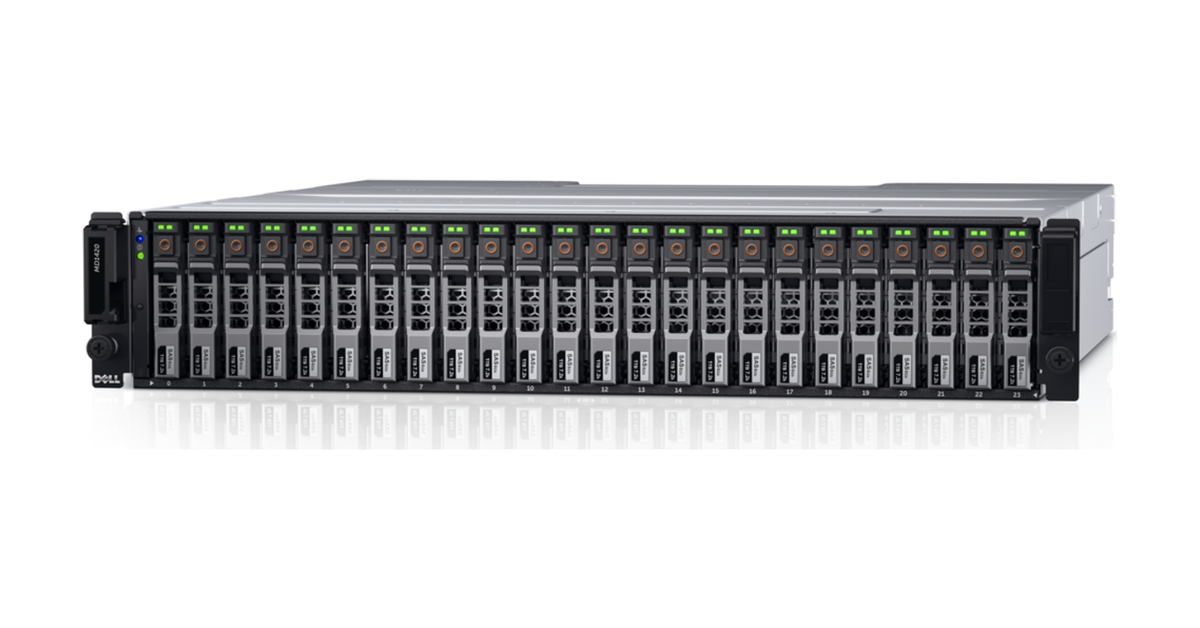
Dell PowerVault MD1420 enclosure with hot-swappable drive bays. Source: Dell Technologies.
The Proxmox VE installer offers ZFS with mirrors, RAID-Z1, RAID-Z2 or RAID-Z3. Do not create hardware RAID beforehand. VMs use zvols, while containers use file-system datasets.
For new installations from Proxmox VE 8.1 onwards, the ARC limit is 10% of physical memory, up to a maximum of 16 GiB. An upgraded older system may have a different setting. The value is stored in /etc/modprobe.d/zfs.conf.
When choosing VM storage, consider the requirements:
- ZFS is useful when you need checksums, its own drive redundancy, snapshots and replication between hosts.
- ext4 and LVM-thin are suitable when you want a familiar Linux storage stack and the features of ZFS do not justify the additional configuration. In this setup, LVM-thin provides virtual disk snapshots, rather than ext4.
ZFS is not universally faster or slower than ext4. Compare the same drives, VM workload and synchronous write guarantees, taking compression, space usage and block size into account. Memory settings are described in the Proxmox VE guide.
Platform selection is covered in Servermall’s article “Best Used Server for Virtualization”. When choosing a virtualization server, consider the drive layout, number of VMs and working set.
ZFS vs ext4: what is the difference?
The features of ext4 can be supplemented with separate RAID, volume management and backup tools.
| Feature | ZFS | ext4 |
|---|---|---|
| Drive management | Built-in pools and vdevs | RAID and volumes are managed separately |
| Integrity checking | Checksums for data and metadata | Protection for some metadata; no built-in integrity checking of all file contents |
| Corruption repair | From a healthy copy or parity when redundancy is available | Requires tools at other layers and backups |
| Snapshots | Built in for datasets and zvols | Requires another layer, such as LVM |
| Compression | Built in, configured per dataset | No built-in transparent compression |
| Transferring changes | Transfers between snapshots using send/receive | External copying tools |
| Linux support | Separate module and compatible packages | Included in the mainline Linux kernel |
An ext4 file system cannot be converted to ZFS in place. Move the data to another storage device, create the pool and copy it back, or migrate to a new server. This requires temporary storage capacity and time.
Drawbacks and when ZFS is unnecessary
Changing a pool layout is more difficult than changing dataset properties. The main limitations are:
- ARC competes with applications for memory.
- The administrator needs to understand vdevs, pool features and recovery.
- A RAID-Z vdev cannot be removed from a pool. Expanding it by adding a drive does not allow you to shrink it later or change the parity level.
- Copy-on-Write needs a reserve of free space. Filling the pool makes maintenance more difficult and reduces performance.
ZFS may be unnecessary for a small VM with a single virtual disk, a system partition or reproducible temporary data. If ext4 and backups meet the requirements, there is no need to complicate storage.
ZFS is justified when you need integrity checking, redundancy, snapshots and incremental transfers together. Start with a straightforward drive layout, compression and separate backups, and choose additional devices based on the actual workload.
Choosing the Right Equipment
Our specialists will contact you and answer all your questions