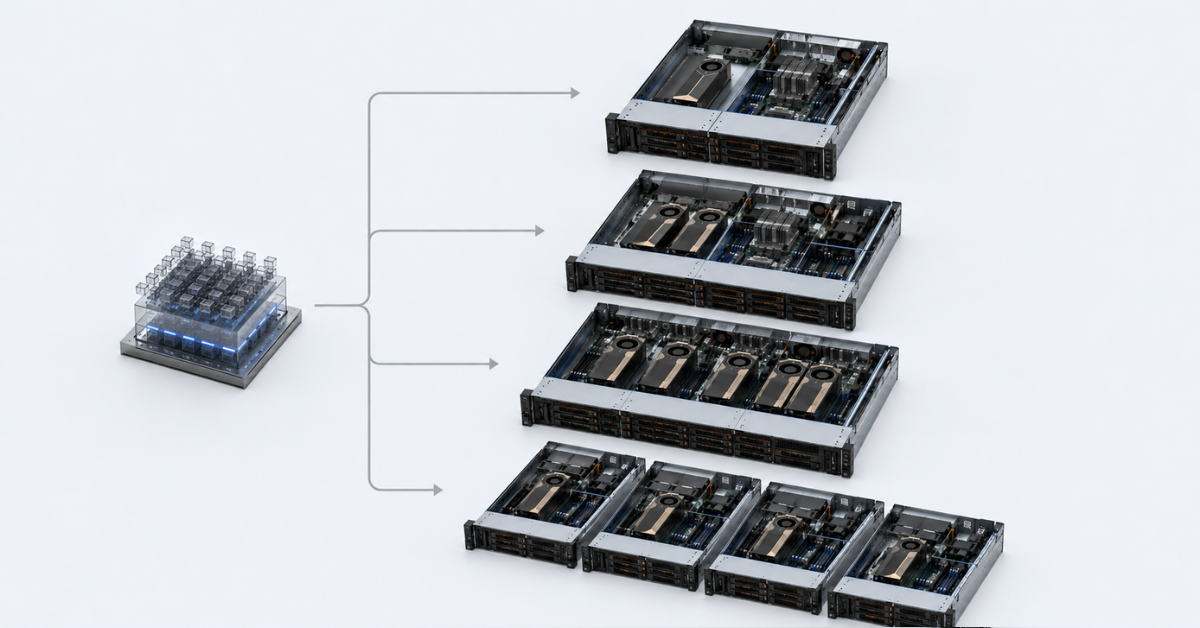
If the model, scene, or workload fits into the memory of one graphics card and does not require constant parallel processing, 1 GPU is usually enough. 2 GPUs are useful as the first step toward scaling, 4 GPUs usually become the most balanced option for inference, fine-tuning, rendering, and mixed workloads, while 8 GPUs should be chosen only when the task can actually use all cards and the server infrastructure is ready for the power, cooling, topology, and licensing requirements of such a system.
The number of graphics cards in a server does not guarantee performance by itself. An 8-GPU server can be slower or more expensive per unit of useful work than a 4-GPU server if the model does not split well across cards, data runs into a PCIe bottleneck, some GPUs remain idle, or cooling does not allow the system to maintain stable frequencies.
The right choice starts not with the question “how many GPUs can fit into the chassis,” but with other questions:
- does the model, scene, or user profile fit into the memory of one GPU;
- is minimum response latency more important, or is total request throughput more important;
- can the task be split across several GPUs without major losses;
- is fast GPU-to-GPU communication via NVLink or NVSwitch required;
- will the load be constant or irregular;
- is one large server more cost-effective, or are several smaller nodes better.
To choose specific cards, you can look at NVIDIA server GPUs, but the number of GPUs should be calculated after workload analysis, not before it.
Most popular GPU

Free shipping on orders over 500 € in the EU, £500 in the UK, and $3,000 in the USA
Free shipping on orders over 500 € in the EU, £500 in the UK, and $3,000 in the USA
Free shipping on orders over 500 € in the EU, £500 in the UK, and $3,000 in the USA
Free shipping on orders over 500 € in the EU, £500 in the UK, and $3,000 in the USA
When to choose 1, 2, 4, or 8 GPUs
| Configuration | When it fits | Typical tasks | Main risk |
|---|---|---|---|
| 1 GPU | The model or scene fits into the memory of one card, and the load is moderate | test LLM inference, development, small-scale rendering, pilot VDI | not enough VRAM or bandwidth as the load grows |
| 2 GPUs | You need more memory headroom or a higher number of simultaneous tasks | two model copies, fine-tuning, rendering, two independent services | weak GPU-to-GPU communication or no multi-GPU support in the software |
| 4 GPUs | You need several parallel tasks and more flexible resource allocation | batch inference, fine-tuning, render farm, VDI, work of several teams | some GPUs may remain idle without a scheduler and monitoring |
| 8 GPUs | One heavy task or a constant queue of tasks actually uses all cards | large-scale training, large LLMs, dense inference, HGX systems | high cost, power, cooling, operational complexity |
| Several servers | The load can be easily split into independent parts, and there is a low-latency network between hosts | render farm, several inference services, VDI pools | cluster, network, and update management becomes more complex |
This table helps with quick orientation, but it does not replace a proper calculation. For example, 8 GPUs are useful for training a large model that is split across cards and actively exchanges data between them. But for a render farm, where frames are calculated independently, several 2–4 GPU servers may be easier to operate and more resilient to failures.
The opposite can also happen: one powerful GPU with a large amount of VRAM may be better than two weaker cards. If the model cannot be distributed efficiently across GPUs, adding a second card will not solve the memory problem and may add data-transfer latency.
How to make the decision
Does the model, scene, or user profile fit into the memory of one GPU?
If yes, you can usually start with one card. This is especially reasonable for:
- LLM prototypes;
- an internal assistant with moderate load;
- a test bench for fine-tuning;
- one 3D specialist;
- a pilot VDI project;
- a small rendering queue.
If it does not fit, you need to understand exactly why memory is insufficient. Sometimes lowering precision, optimizing the model, reducing context length, or working with data more carefully can help. But if the model physically does not fit into one GPU, you will need to consider cards with more memory or a multi-GPU configuration.
For large LLMs, the memory capacity and memory speed are often more important than the number of cards alone. For example, NVIDIA H200 is interesting exactly where the model and long context run into VRAM capacity and memory bandwidth limits. NVIDIA’s official description of H200 lists 141 GB of HBM3e and high memory bandwidth, which is why such cards are considered for large LLM and HPC workloads: NVIDIA H200.
Is single-request latency or total task throughput more important?
For LLM inference, this is one of the key questions.
If minimum response latency is important, splitting one model across several GPUs is not always beneficial. Data transfer between cards can add latency, especially if communication goes only through PCIe. In that case, it may be better to choose one more powerful GPU with a larger amount of VRAM, or 2 GPUs with a good topology.
If total request throughput is more important, the situation changes. You can run several copies of the model on different GPUs, batch requests, and distribute users across cards. In this case, 4 GPUs can deliver a good improvement because each card serves its own part of the workload.
Is the load independent or tightly coupled?
Independent tasks scale more easily. They include:
- rendering individual frames;
- several independent models;
- separate inference services;
- different development teams;
- VDI users with different profiles;
- test and production workloads that can be separated across different GPUs.
For such scenarios, one large 8-GPU server is not always required. Sometimes it is more cost-effective to use 2–4 GPUs in one server, or several separate nodes with 1 GPU each.
Tightly coupled tasks are more difficult. These include training one large model, splitting an LLM across several GPUs, or running inference for a model that does not fit into one card. Here, GPUs constantly exchange data, so the important factor is not only the power of the cards, but also how they are connected to each other. NVIDIA separately describes the role of NVLink and NVSwitch as high-speed communication between GPUs for tasks where data exchange is critical: NVIDIA NVLink.
One large server or several smaller ones?
One large server is better if:
- the model has to run as a single task;
- fast GPU-to-GPU communication is required;
- 4–8 GPUs with NVSwitch are used;
- latency between nodes is critical;
- the team can administer a dense GPU platform.
Several smaller servers are better if:
- tasks are independent;
- fault tolerance is required;
- the load grows gradually;
- different teams use different GPU profiles;
- rendering or inference can be scaled horizontally;
- rack power or cooling is limited.
For rendering, VDI, and several independent inference services, horizontal scaling is often more convenient. For training one large model or running heavy LLM inference, one server with the right GPU interconnect can be more efficient.
How different tasks use several GPUs
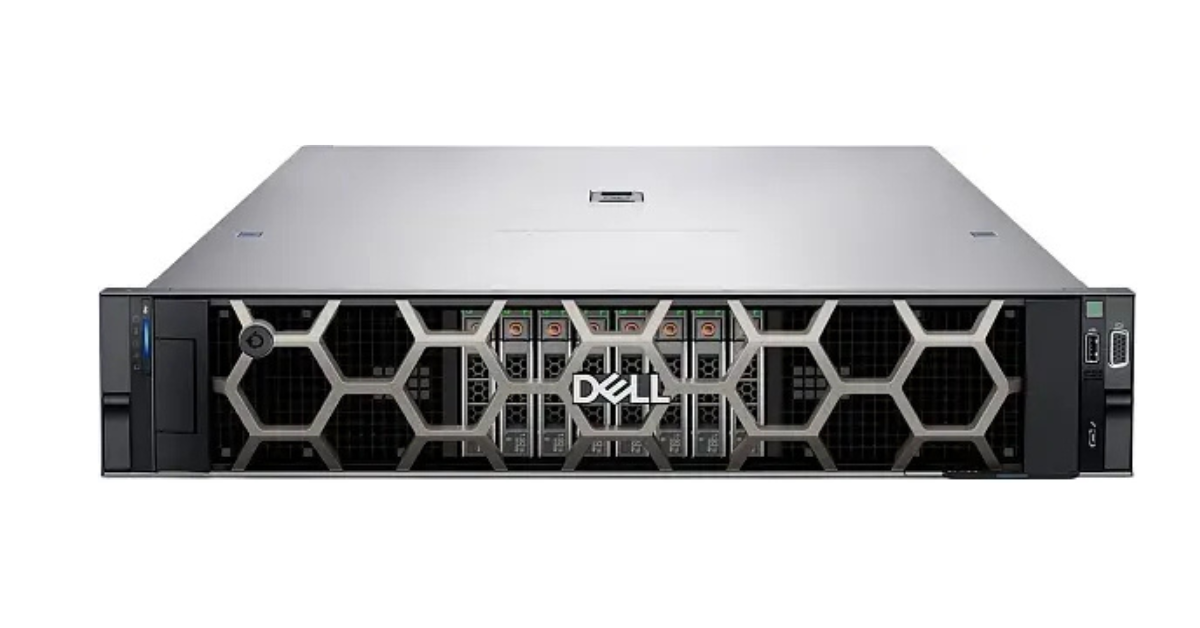
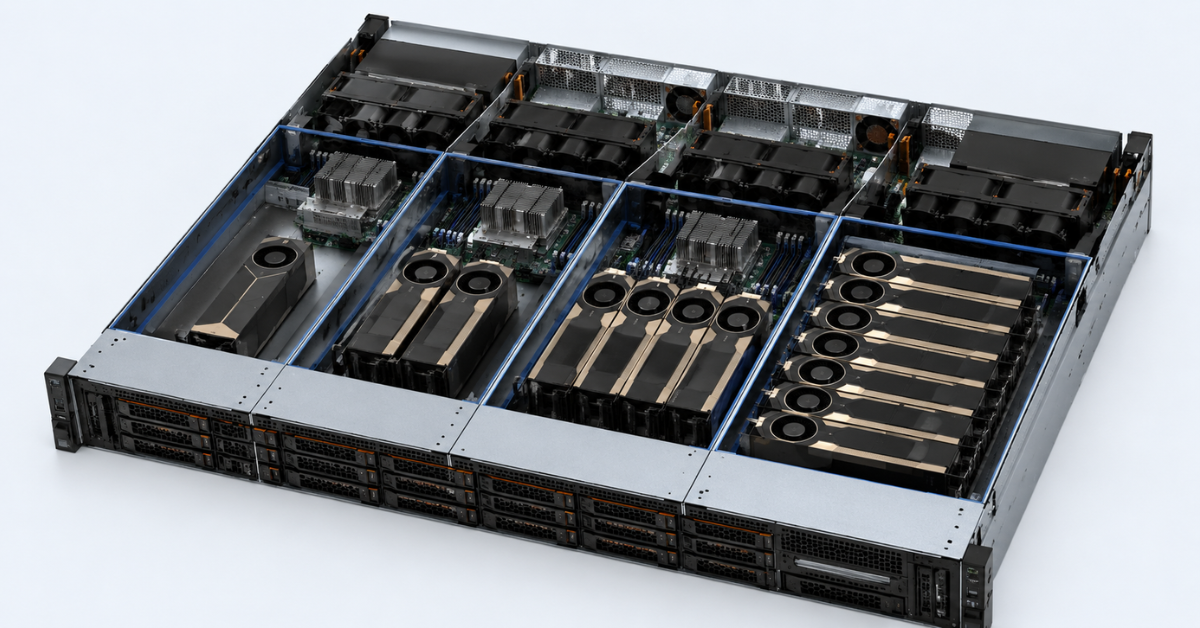
PowerEdge R760xa. Image source: ServerMall
Dell describes the PowerEdge R760xa as an air-cooled server for AI/ML training, inferencing, analytics, and VDI.
Choosing the Right Equipment
Our specialists will contact you and answer all your questions
LLM inference
Inference is the process of running an already trained model: chatbot responses, document analysis, code generation, classification, and knowledge-base search. For LLMs, compute is not the only important factor. Memory also matters: the model, context, and intermediate data all need to be placed somewhere.
The number of GPUs depends on:
- model size;
- context length;
- number of simultaneous users;
- response latency requirements;
- VRAM capacity;
- memory speed;
- the ability to run several copies of the model;
- support for request batching.
1 GPU is suitable if the model fits into the card’s memory, there are not many users, and latency is more important than maximum throughput. This is a good option for an internal assistant, pilot project, or service with irregular load.
2 GPUs are needed if the model almost fits into one card, extra memory headroom is required, or you need to run two independent copies of the service. But here it is important to check whether the selected software supports model splitting across GPUs.
4 GPUs are usually convenient for production inference where there are several models, a stable request flow, or different user groups. One GPU can be assigned to one model, the second to another, the third to tests, and the fourth to reserve capacity or peak load.
8 GPUs are justified for large models and dense inference when there is a constant request queue and the software can distribute the model across cards. The NVIDIA Triton and TensorRT-LLM documentation separately discusses multi-GPU and multi-node deployment of large language models in Kubernetes.
Model training and fine-tuning
Training from scratch is the heaviest type of GPU workload. Fine-tuning usually requires fewer resources, but it can still run into VRAM limits, GPU-to-GPU communication speed, and data-preparation bottlenecks.
There are several ways to scale.
Data parallelism.
Each GPU receives its own part of the data, calculates the result, and then parameters are synchronized. This is a clear and common approach, but as the number of GPUs grows, data exchange can start limiting acceleration.
Model parallelism.
The model is split into parts. This approach is needed when it does not fit into the memory of one card. NVLink, NVSwitch, and the correct server topology are especially important here.
Pipeline execution.
Different parts of the model run on different GPUs one after another. This helps with large models, but it requires careful configuration. Otherwise, some cards will wait while others finish their stage.
For experiments and small fine-tuning jobs, 1 GPU is often enough. For the first multi-GPU tests and larger batches, 2 GPUs can be used. For a team that fine-tunes models regularly, 4 GPUs often become the practical minimum. 8 GPUs are needed where there are constant heavy experiments, large datasets, and a clear method for distributing the load.
Cards such as NVIDIA A100 80GB are often considered a universal option for inference, fine-tuning, and workloads where HBM memory matters. For heavier training and LLM inference scenarios, it is worth looking at H100/H200. NVIDIA’s official H100 specifications list SXM and PCIe variants, MIG support, and NVLink, so when choosing a GPU it is important to look not only at the GPU name, but also at the exact form factor.
Rendering
Rendering scales differently from LLM workloads. If a project can be split into independent frames or scenes, several separate GPUs or servers may be more cost-effective than one dense 8-GPU node.
1 GPU is suitable for one specialist, a small studio, or a server where scenes fit into the card’s memory. 2 GPUs can speed up rendering if the engine can use several cards efficiently. 4 GPUs are a good option for a small farm where tasks can be distributed. 8 GPUs are justified under constant load, but they require serious attention to power, cooling, and render-engine licensing.
Rendering has an important limitation: if a scene does not fit into the memory of one GPU, adding a second card does not always solve the problem. In some engines, each GPU must have the full scene dataset in its own memory. Before buying hardware, you therefore need to check exactly how the selected software works with several GPUs.
For mixed workloads — rendering, visualization, inference, graphics, and engineering applications — cards such as NVIDIA L40S 48GB or NVIDIA RTX PRO 6000 Blackwell Server Edition can be suitable. Such GPUs are often interesting not only for neural networks, but also for graphics workloads.
VDI and multi-user workloads
VDI means virtual desktops where users connect to remote desktops or virtual workstations. In such projects, GPU performance is not the only important factor. Predictability matters too: one user should not be able to take all resources away from others.
For VDI, you need to consider:
- user profiles;
- application types: office apps, CAD, 3D, engineering, visualization;
- the ability to share GPUs between users;
- vGPU support;
- licenses;
- hypervisor compatibility;
- per-user load monitoring.
1 GPU is suitable for a pilot or a small group. 2 GPUs make it possible to separate different user profiles. 4 GPUs already provide a denser VDI server. 8 GPUs make sense for a large platform, but only if licenses, profiles, and real load have been calculated in advance. NVIDIA documentation describes licensed products and licensing setup for vGPU scenarios.
What limits a multi-GPU server
| Limitation | Why it matters | What to check before buying |
|---|---|---|
| VRAM | The model, scene, or user profile may not fit into one GPU | memory capacity, memory type, model optimization options |
| NVLink/NVSwitch | Required for fast GPU-to-GPU data exchange | which GPUs are connected directly, whether NVSwitch is available |
| PCIe topology | Not all slots are equal in speed and latency | slot diagram, root complex, NUMA, PCIe switch |
| CPU lanes | GPUs need enough PCIe lanes | processor, chipset, lane distribution across slots |
| RAM | CPU memory is needed for data, cache, and task preparation | RAM capacity, frequency, NUMA placement |
| Storage | GPUs remain idle if data is delivered too slowly | NVMe, RAID, dataset speed, storage network |
| Power | 4–8 GPUs sharply increase PSU requirements | total TDP, power headroom, redundancy |
| Cooling | When GPUs overheat, they lower their frequencies | server form factor, airflow, passive or active cards |
| Network | For several servers, communication between nodes matters | 25/100/200/400 GbE, InfiniBand, latency |
| Licenses | VDI and professional software may be licensed separately | vGPU, render engines, hypervisor, task scheduler |
A multi-GPU server is not just a chassis with several graphics cards. It is a connected system where GPU, CPU, memory, disks, network, power, cooling, and software must match one another. If one component is much weaker than the others, expensive GPUs will wait for data, overheat, remain idle, or run below the expected level.
GPU servers
Free shipping on orders over 500 € in the EU, £500 in the UK, and $3,000 in the USA
Free shipping on orders over 500 € in the EU, £500 in the UK, and $3,000 in the USA

Free shipping on orders over 500 € in the EU, £500 in the UK, and $3,000 in the USA
Free shipping on orders over 500 € in the EU, £500 in the UK, and $3,000 in the USA
1 GPU: when one graphics card is enough
A server with 1 GPU is not necessarily a weak option. For many tasks, it is the most rational starting point, especially if the project has not yet reached a stable load pattern.
1 GPU is suitable for:
- LLM prototyping;
- test inference;
- an internal chatbot;
- fine-tuning small models;
- one 3D specialist;
- a VDI pilot;
- tasks where simplicity and price matter.
Advantages of this configuration:
- drivers and the environment are easier to configure;
- server requirements are lower;
- power consumption is lower;
- cooling is easier;
- compatibility risks are lower;
- it is easier to understand the real load profile.
The limitations are also clear:
- one GPU can quickly run into VRAM limits;
- one service can occupy the whole card;
- there is no reserve for load growth;
- it is harder to serve several teams or projects.
If a project is just starting, 1 GPU often gives the best balance between price and manageability. At the same time, it is important not to take “just any card,” but to choose one that fits the memory, cooling, form factor, and software-support requirements.
2 GPUs: the first step toward scaling
2 GPUs are a good intermediate option between a simple server and a full multi-GPU system. This configuration fits cases where one card is no longer enough, but moving to 4 or 8 GPUs is not yet justified.
2 GPUs are useful if you need to:
- run two independent models;
- increase the number of simultaneous requests;
- split a large model across two cards;
- speed up rendering;
- test multi-GPU training;
- separate production and experimental workloads.
Before buying, you need to check:
- whether identical GPUs will be used;
- whether NVLink is available for the specific pair of cards;
- whether there are enough PCIe lanes;
- whether the GPUs are behind different CPUs without accounting for NUMA;
- whether the software supports two-GPU operation;
- whether one card with more VRAM would be more cost-effective.
2 GPUs can deliver a noticeable improvement if the tasks are independent or the software parallelizes the load well. But if the model does not split efficiently, the second card may not solve the problem. Moreover, GPU-to-GPU communication sometimes adds latency, and the final configuration may not work as fast as expected.
4 GPUs: a balanced option for many tasks
4 GPUs often become the most practical configuration for companies that already need serious performance but do not yet need the complexity of an 8-GPU platform.
Such a server is suitable for:
- batch inference;
- several LLM services;
- fine-tuning medium and large models;
- an ML development team;
- a small render farm;
- VDI with several user profiles;
- a mixed workload where some GPUs are used for inference and others for experiments.
Advantages of 4 GPUs:
- resources are easier to distribute between tasks;
- the risk of buying an excessive system is lower;
- it is easier to keep all cards busy with useful work;
- power and cooling requirements are lower than with 8 GPUs;
- GPUs can be used as one shared pool or as independent devices.
Disadvantages:
- PCIe topology already matters;
- load monitoring is required;
- task queues need to be planned;
- load-allocation mistakes lead to idle GPUs;
- without operational discipline, the server quickly turns into a “shared box” where nobody knows who is using what.
If a company has several models for inference, periodic fine-tuning, and separate graphics tasks, 4 GPUs are often more useful than 8 GPUs. They are easier to load evenly, easier to maintain, and easier to scale further.
8 GPUs: when this is truly justified
8 GPUs are not a universal “best option,” but a specialized configuration for tasks that can use a dense multi-GPU system.
8 GPUs are needed when there is:
- large-model training;
- heavy fine-tuning;
- large LLMs that require splitting across GPUs;
- a constant flow of inference requests;
- HPC workloads;
- HGX systems with NVSwitch;
- a team that knows how to administer such servers.
Before choosing 8 GPUs, you need to check:
- card form factor: PCIe or SXM;
- whether NVLink or NVSwitch is available;
- which GPUs are connected directly;
- rack and power requirements;
- heat output;
- server compatibility with specific GPUs;
- network requirements if the server will be part of a cluster;
- software licenses;
- temperature, memory, utilization, and error monitoring.
An 8-GPU server makes sense when the task is either one large workload that parallelizes well, or when there is a constant queue of independent tasks. If the load is irregular, some cards will remain idle, while the total cost of ownership will stay high.
For dense AI workloads such as training and large-scale inference, NVIDIA H100 80GB is often considered, but when choosing a platform it is important to compare not only the GPU, but the whole system: interconnect, power, cooling, driver support, and the planned operating mode.
Why 8 GPUs are not always faster or more cost-effective than 4 GPUs
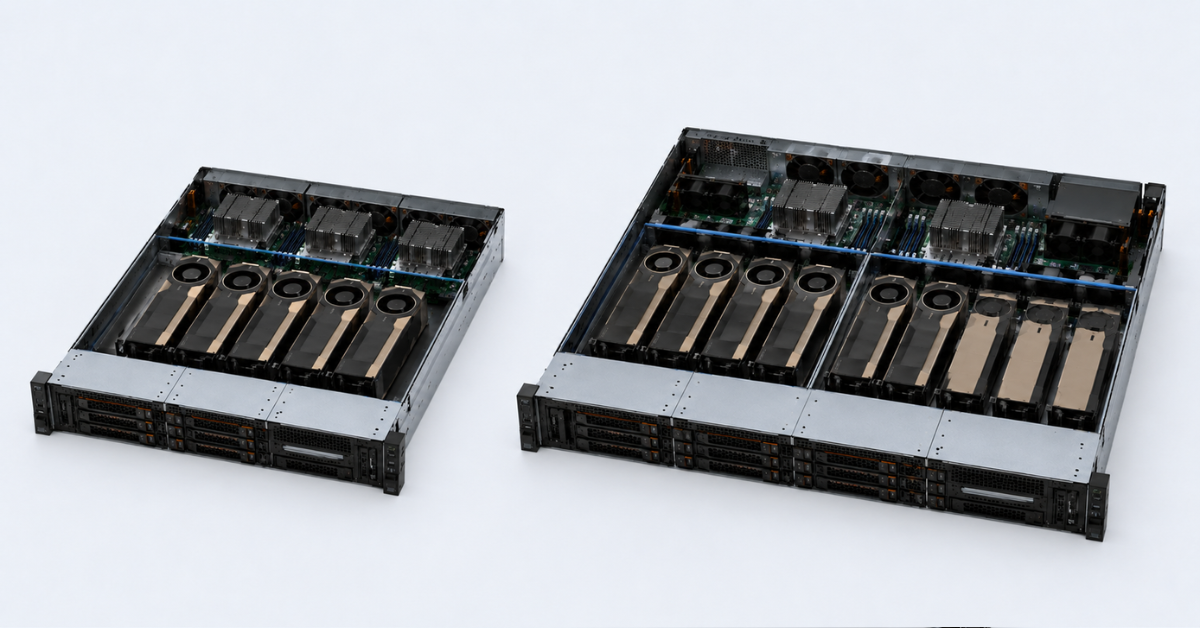
Acceleration does not grow linearly
If the number of GPUs doubles, the task does not automatically run twice as fast. In practice, part of the time is spent on:
- synchronization;
- data transfer between GPUs;
- waiting for the CPU;
- data preparation;
- memory operations;
- internal framework limitations.
The more GPUs participate in one task, the more important communication between them becomes. If the connection is slow, part of the acceleration is lost.
The model may not use all cards
A small model does not become better just because it is launched on 8 GPUs. If it fits into one card and does not require a huge request flow, the remaining GPUs will be idle or will process tasks that are too small.
For inference, it is often more efficient to run several model copies on separate GPUs than to try to stretch one model across all cards. But this works only when there are enough requests.
VRAM does not add up automatically
You cannot simply multiply 8 GPUs by 80 GB and assume you now have one 640 GB graphics card. Each GPU has its own memory. To use several cards as one resource, you need special approaches to model splitting, framework support, and the right topology.
If the task cannot work with distributed memory, adding GPUs will not solve the memory shortage.
The server becomes more expensive to operate
An 8-GPU server is not only more expensive to buy. Ongoing costs also grow:
- electricity;
- cooling;
- rack requirements;
- cost of downtime;
- diagnostics complexity;
- cost of configuration mistakes;
- administrator skill requirements.
If one 8-GPU system is idle or runs at 30–40% utilization, it can be economically worse than several smaller servers.
Several servers are sometimes more reliable
For independent tasks, several 2–4 GPU servers may be more convenient than one large node. If one server fails, the others continue working. Hardware can be added gradually, teams can be separated, and maintenance can be planned more easily.
One large server wins where dense GPU-to-GPU communication is required. Several servers win where the workload can be easily split.
Choosing the Right Equipment
Our specialists will contact you and answer all your questions
When several servers are better than one large server
Several servers are worth considering if:
- tasks are independent;
- there are many small inference services;
- rendering is split by frame;
- VDI users can be distributed across pools;
- fault tolerance is required;
- hardware is purchased gradually;
- different teams use different GPU profiles.
One large server is better if:
- the model does not fit into one GPU;
- fast communication between cards is required;
- NVSwitch is used;
- one large model is being trained;
- latency between nodes is critical;
- there is a team that can operate such a platform.
For example, for a render farm, four 2-GPU servers may be more practical than one 8-GPU server. Jobs are independent, a failure of one node does not stop the whole farm, and scaling can be gradual. For training one large LLM, one 8-GPU server with the correct topology can be better because data is constantly transferred between GPUs.
Example configurations for real tasks
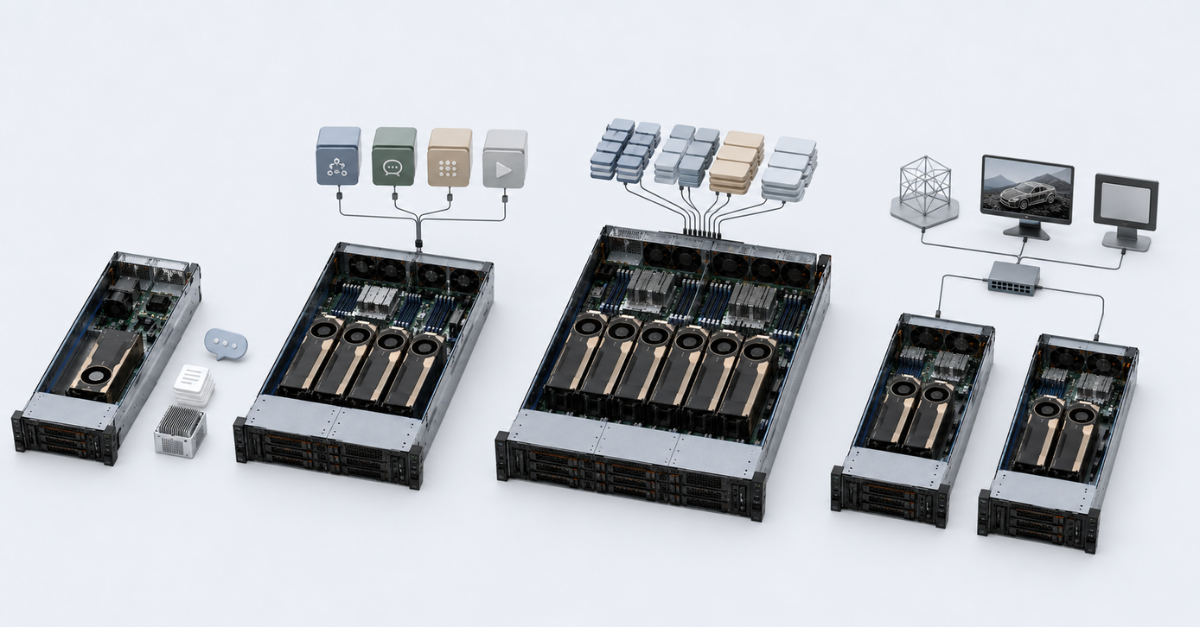
Internal LLM assistant
For an internal company assistant, it is usually not necessary to buy 8 GPUs right away. At the start, it is enough to understand the model, the number of users, and latency requirements.
Approach:
- 1 GPU — if the model is compact and there are not many users;
- 2 GPUs — if you need memory headroom or more parallel requests;
- 4 GPUs — if there are several models, stable load, and different assistants for different departments;
- several servers — if the services are independent and fault tolerance is required.
What to check:
- context length;
- peak number of requests;
- latency requirements;
- model optimization options;
- load growth over 6–12 months.
Inference of several models in a product
If a product uses several models, one large GPU is not always more convenient. It is often better to distribute models across different cards and manage queues.
Approach:
- 2 GPUs — for two independent models or production/test separation;
- 4 GPUs — as a baseline option for several services;
- 8 GPUs — only under high and constant load;
- several servers — if the models are independent and horizontal scaling is needed.
What to check:
- whether several model copies can be launched;
- whether client isolation is required;
- how requests are distributed;
- whether there is a task scheduler;
- how to calculate the cost of one request.
LLM fine-tuning
Fine-tuning can be light or very heavy — it all depends on the model size, data, and adaptation method.
Approach:
- 1 GPU — experiments and small models;
- 2 GPUs — first multi-GPU tests;
- 4 GPUs — a working configuration for a team;
- 8 GPUs — constant heavy experiments and large models.
What to check:
- data volume;
- batch size;
- compute precision requirements;
- GPU-to-GPU communication speed;
- RAM capacity;
- NVMe speed;
- data pipeline readiness.
Rendering and 3D graphics
For rendering, it is important to know how a specific engine uses several GPUs. Some tasks split well by frame, while others run into the memory limit of a single card.
Approach:
- 1 GPU — workstation or small server;
- 2 GPUs — render acceleration if the engine supports it;
- 4 GPUs — a small farm;
- several servers — if jobs are independent;
- 8 GPUs — only under constant load and with prepared infrastructure.
What to check:
- whether the engine supports several GPUs;
- whether the scene fits into one card’s memory;
- whether there are licensing limits;
- how frames are distributed;
- whether interactive mode is needed, or only final rendering.
VDI and virtual workstations
For VDI, peak benchmarks are not the main factor. Per-user stability is more important. The server must handle a working day, different applications, and uneven load.
Approach:
- 1 GPU — pilot;
- 2 GPUs — separation of user profiles;
- 4 GPUs — a production VDI server;
- 8 GPUs — a large user pool with profiles calculated in advance.
What to check:
- user types;
- requirements of CAD, 3D, and engineering applications;
- vGPU licenses;
- hypervisor compatibility;
- per-user load monitoring;
- resource-limit rules.
Checklist before buying a GPU server
Workload
- What is the main workload: inference, training, rendering, VDI, or a mixed scenario?
- Does the model or scene fit into the memory of one GPU?
- Is latency or total task throughput more important?
- Is the load constant or irregular?
- Can the task be split across GPUs without a large efficiency loss?
- Is isolation between teams, clients, or users required?
Server
- How many PCIe lanes are available?
- What is the GPU topology?
- Is NVLink or NVSwitch available?
- Is there enough RAM?
- Are NVMe capacity and storage speed sufficient?
- Are the power supplies sufficient?
- Does the chassis support the required cooling?
- Is there enough rack, power, and noise headroom?
Software
- Does the framework support multi-GPU operation?
- Are vGPU licenses required?
- Are there limitations in the render engine?
- Is there a task scheduler?
- How will GPU utilization be measured?
- How will the cost of a GPU-hour or one request be calculated?
Operations
- Who will monitor GPUs, and how?
- How will drivers be updated?
- What happens if one card fails?
- How will the system scale in a year?
- What is cheaper: adding GPUs to one server or buying a second node?
- Is there power and cooling reserve?
FAQ
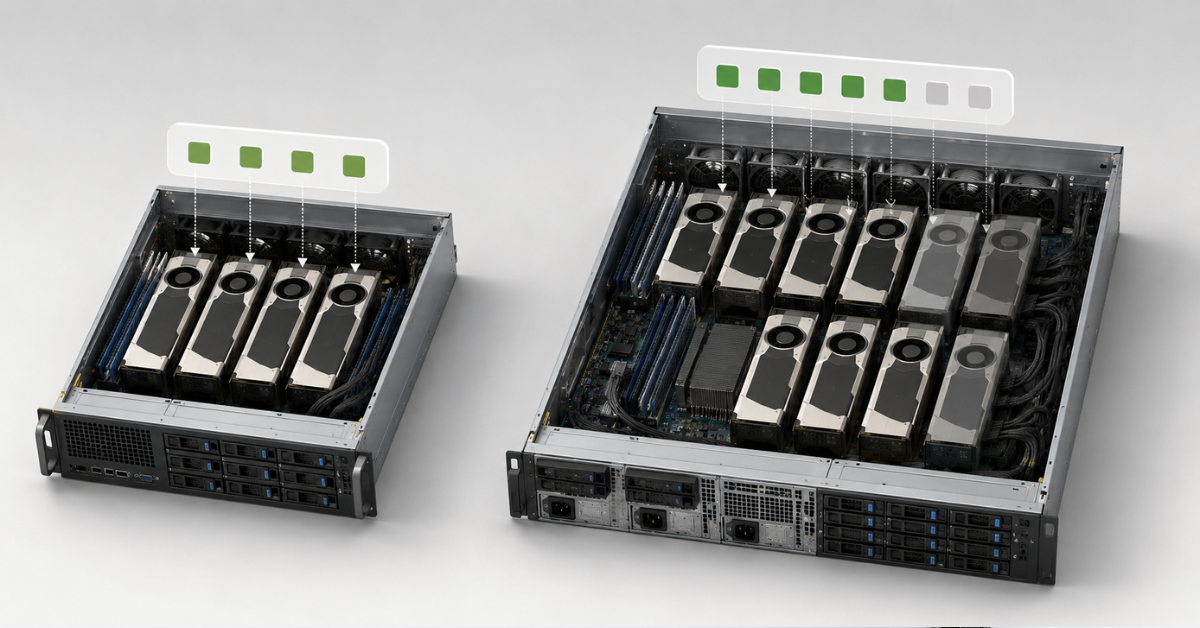
Do I need 8 GPUs for an LLM?
Not always. If the model fits into one GPU and there are not many requests, 8 GPUs will remain idle. 8 GPUs are needed for large models, dense inference, or training where real multi-GPU scaling is used.
Does the VRAM of several GPUs add up?
Not automatically. Each GPU has its own memory. Several cards can be used as one resource only with proper model splitting and framework support.
What is better: 4 GPUs in one server or 4 servers with 1 GPU each?
For independent tasks, several servers are often more convenient. For one large model or training, one server with fast GPU-to-GPU communication is better.
When is NVLink or NVSwitch needed?
When GPUs need to exchange data often: training, model splitting, and heavy LLM inference. For independent tasks, such as rendering separate frames, NVLink may be less critical.
Is 1 GPU suitable for rendering?
Yes, if scenes fit into GPU memory and there is no constant task queue. For a farm, it is better to consider 2–4 GPUs or several separate servers.
What matters more for LLMs: the number of GPUs or VRAM?
VRAM comes first. If the model does not fit, the number of GPUs helps only with proper model splitting. If the model fits, the number of GPUs matters more for throughput and parallel request processing.
Can different GPUs be mixed in one server?
Technically, this is sometimes possible, but for training, inference, and rendering it often creates problems: different memory capacities, different speeds, driver nuances, and uneven utilization. For production workloads, it is usually safer to use identical GPUs or separate different cards for different tasks in advance.
How to choose the number of GPUs
1 GPU should be chosen if the task fits into the memory of one card, the load is moderate, and simplicity matters more than maximum scalability.
2 GPUs are suitable when you need the first step toward scaling: more simultaneous requests, two independent models, faster rendering, or testing a multi-GPU approach.
4 GPUs are the most universal option for many companies. This configuration is suitable for inference, fine-tuning, rendering, VDI, and mixed workloads if there is a scheduler and clear load allocation.
8 GPUs are needed for tasks that really use a dense multi-GPU system: large-scale training, large LLMs, constant batch inference, and HGX platforms with the right topology and prepared infrastructure.
Several servers are better if the load is independent, fault tolerance is required, and the company wants to scale gradually.
The best GPU server is not the one with the highest number of graphics cards. It is the one where every GPU is consistently busy doing useful work and does not run into memory, network, power, cooling, or software limitations.
Choosing the Right Equipment
Our specialists will contact you and answer all your questions

Free shipping on orders over 500 € in the EU, £500 in the UK, and $3,000 in the USA

Free shipping on orders over 500 € in the EU, £500 in the UK, and $3,000 in the USA

Free shipping on orders over 500 € in the EU, £500 in the UK, and $3,000 in the USA

Free shipping on orders over 500 € in the EU, £500 in the UK, and $3,000 in the USA

Free shipping on orders over 500 € in the EU, £500 in the UK, and $3,000 in the USA

Free shipping on orders over 500 € in the EU, £500 in the UK, and $3,000 in the USA