TL;DR: Choose tower models DELL PowerEdge T150 and DELL PowerEdge T350 for quiet home setups — easy to place, energy‑efficient, and no rack required. For compact rackmount, DELL PowerEdge R250 and DELL PowerEdge R350 are excellent 1U platforms for Proxmox/ESXi and CI/CD. Need fast NVMe and room to grow? Pick the DELL PowerEdge R640 (refurb) — a proven enterprise 1U workhorse.
These five models cover the typical home‑lab spectrum: hypervisors, Kubernetes/Docker, NAS with ZFS, DevOps training and certification practice. Below you’ll find a quick comparison, then concise reviews with practical tips on noise, power, networking and storage layout.
Key idea: for home labs it’s not “maximum cores” but the right balance of noise, watts and flexibility: iDRAC 9 for remote access, ECC memory, BOSS for clean boot, and NVMe/RAID where it truly matters for the workload.
Introduction
A home lab is a safe sandbox for virtualization, CI/CD, network experiments, container platforms and new services. You want a server that is reliable (ECC, monitoring), remotely manageable (iDRAC 9), compact and quiet. DELL PowerEdge stands out with broad hypervisor support, spare parts availability and mature tooling.
We hand‑picked only DELL models optimised for “value per watt and decibel”: two towers (T150/T350), two compact 1U units (R250/R350) and one enterprise 1U (R640) for high‑IOPS NVMe pools. Each subsection provides an image, a link to the configurator, key specs, ideal use cases and actionable tips.
Jump straight to the comparison table or read on for selection advice including power saving, noise tuning, 2.5/10GbE options and storage choices (SATA/SAS/NVMe, ZFS).
Comparison Table
| Model | CPU | RAM | Storage | Best for |
|---|---|---|---|---|
| DELL PowerEdge T150 | Intel Xeon E‑2300 / Pentium | Up to 128 GB DDR4 ECC | 4×3.5" SATA/SAS, BOSS‑S1 | Quiet tower: file server, hypervisor, Docker |
| DELL PowerEdge T350 | Intel Xeon E‑2300 | Up to 128 GB DDR4 ECC | Up to 8×3.5" / 8×2.5" | Quiet growth: more drive bays & PCIe |
| DELL PowerEdge R250 | Intel Xeon E‑2300 | Up to 128 GB DDR4 ECC | Up to 4×3.5" (hot‑swap) | Compact 1U: Proxmox/ESXi, GitLab, VPN |
| DELL PowerEdge R350 | Intel Xeon E‑2300 | Up to 128 GB DDR4 ECC | 8×2.5" or 4×3.5" | 1U with PCIe headroom: NVMe cache, 10GbE |
| DELL PowerEdge R640 | 2× Intel Xeon Scalable (up to 28C) | Up to 1.5–3 TB DDR4 ECC* | Up to 10×2.5" (NVMe/SAS/SATA) + 2×rear | High‑IOPS NVMe, virt stacks, Ceph/Gluster |
*Depends on memory type (RDIMM/LRDIMM) and platform revision.
Short Reviews
DELL PowerEdge T150

DELL PowerEdge T150 is a quiet entry‑level tower with ECC memory, iDRAC 9 and up to four 3.5" bays. Perfect for a ZFS NAS, a handful of VMs and a Docker stack for home services.
- CPU: Intel Xeon E‑2300 / Pentium (up to 8 cores).
- RAM: 4× DDR4 UDIMM up to 128 GB ECC.
- Storage: 4×3.5" cabled; optional BOSS‑S1 (2×M.2 RAID1 boot).
- Networking: 2×1GbE; PCIe options for 2.5/10GbE.
- Mgmt: iDRAC 9 (remote KVM, power, sensors).
Best for: NAS, media server, backups, small k3s cluster, training VMs.
Tips: boot the hypervisor from BOSS (M.2 RAID1) and keep data pools separate — easier backups and rollbacks. Enable iDRAC Power Capping around 200–250 W to tame peak noise and power without hurting typical home workloads.
Choosing the Right Equipment
Our specialists will contact you and answer all your questions
DELL PowerEdge T350

DELL PowerEdge T350 scales the quiet‑tower idea: more bays (up to 8), more PCIe and power budget. Great for larger storage pools and multiple memory‑hungry VMs.
- CPU: Intel Xeon E‑2300.
- RAM: up to 128 GB DDR4 ECC.
- Storage: up to 8×3.5" or 8×2.5"; BOSS‑S2 for boot.
- Networking: 2×1GbE + PCIe 10GbE options.
- Mgmt: iDRAC 9, OpenManage.
Best for: big media/file servers, backup targets, lab AD/IDP + CI/CD, learning clusters.
Tips: on ZFS, pair two SSDs for SLOG + L2ARC (if your workload has frequent sync writes). Turn on iDRAC email alerts to catch thermal and drive issues early.
DELL PowerEdge R250

DELL PowerEdge R250 is a compact 1U generalist for Proxmox/ESXi and small CI/CD chains. Predictable power draw, BOSS/SD boot options, easy in deep racks or short rails.
- CPU: Intel Xeon E‑2300 (up to 8C).
- RAM: 4× UDIMM up to 128 GB ECC.
- Storage: up to 4×3.5" hot‑swap; RAID S150/H345/H755.
- Networking: 2×1GbE; PCIe for 10GbE SFP+/Base‑T.
- Mgmt: iDRAC 9, Redfish API.
Best for: 6–12 light VMs, GitLab Runner/Harbor, VPN/firewall, DNS/DHCP, test databases.
Tips: keep the boot device on BOSS and your VM datasets on separate RAID1/10 — upgrades and migrations become painless. For 10GbE, SFP+ with DAC cables is cheaper, cooler and quieter than Base‑T.
DELL PowerEdge R350
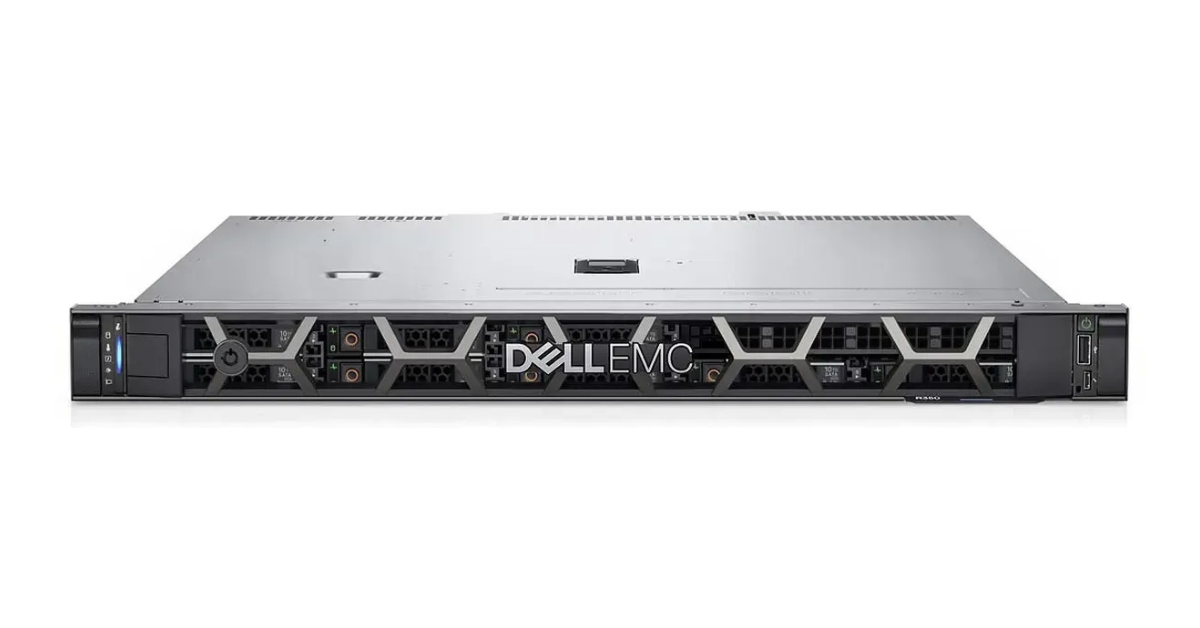
DELL PowerEdge R350 offers more PCIe flexibility and drive options than R250: up to 8×2.5" (incl. SSD) or 4×3.5". Ideal for NVMe caches, 10GbE networking and mixed workloads (VMs + containers + file services).
- CPU: Intel Xeon E‑2300.
- RAM: up to 128 GB ECC.
- Storage: 8×2.5" / 4×3.5"; broad PERC/HBA options.
- Networking: 2×1GbE; optional 10/25GbE.
- Mgmt: iDRAC 9, optional Quick Sync 2.
Best for: a versatile 1U lab box: mid‑sized VMs, fast cache and a clean storage layout.
Tips: boot on BOSS‑S2 and keep VM/storage pools on matched SSDs — ZFS balances better and delivers consistent performance.
DELL PowerEdge R640

DELL PowerEdge R640 is an enterprise‑grade 1U with NVMe support and many slots. A great fit for high‑IOPS databases, cache tiers, mini Ceph/Gluster, or labs with strict I/O and resiliency needs.
- CPU: up to 2× Intel Xeon Scalable.
- RAM: large RDIMM/LRDIMM footprint.
- Storage: up to 10×2.5" front + 2×2.5" rear; NVMe/SAS/SATA.
- Networking: flexible NDC/PCIe up to 25GbE.
- Mgmt: iDRAC 9, Redfish, OpenManage.
Best for: heavy VMs, high‑load DBs, object/block storage, small replicated clusters.
Tips: on mixed workloads, isolate a dedicated SSD pool for logs/transactions. Cap PL1/PL2 and use “Performance per Watt” fan profile — noticeably quieter and cooler without hurting SLA.
Selection Advice
Criteria
- Noise: towers (T150/T350) are far quieter than 1U. For rackmount, use a sound‑absorbing door and plan intake/exhaust.
- Power: for 24×7, Xeon E‑series hits the sweet spot; iDRAC Power Cap smooths peaks.
- Manageability: iDRAC 9 gives remote KVM, power, sensors, alerts and Redfish API for automation.
- Storage layout: BOSS for the hypervisor; separate HDD/SSD pools for data. Prefer matched SSDs for ZFS.
- Networking: 2.5/10GbE beats 1GbE for replication and backups. SFP+ with DAC is cooler and cheaper than Base‑T.
Which server for which job
- File server + backups: T150; need room to grow — T350.
- Learning hypervisor: R250; need PCIe and drive options — R350.
- High‑IOPS NVMe / mini‑Ceph: R640.
- Kubernetes/Docker: one tower as control‑plane + one 1U as worker, or a single R350 with separate pools.
Practical tips & tricks
- Boot on BOSS, keep data separate. Easier upgrades, quicker disaster recovery.
- Power Capping & fan profiles. In iDRAC, use “Performance per Watt” and a sensible cap for cooler, quieter operation.
- 10GbE via SFP+. DAC cables up to 3 m are cost‑effective and run cool and quiet.
- RAID vs ZFS. PERC RAID1/10 is simple for generic VMs; ZFS brings self‑healing, snapshots and bit‑rot protection.
- Backups that actually restore. Keep off‑site copies (rclone/Restic/Borg) and test restores monthly.
- UPS & graceful shutdown. A small line‑interactive UPS + agent/IPMI protects from power cuts.
- Home‑lab networking. Use VLANs for “unsafe” tests, a dedicated vSwitch for storage, and QoS on replication.
- Thermals & dust. Don’t block airflow, tidy cabling, clean filters regularly.
Our most popular servers

Free shipping on orders over £500 in the EU, £500 in the UK, and $3,000 in the USA
Free shipping on orders over £500 in the EU, £500 in the UK, and $3,000 in the USA
Free shipping on orders over £500 in the EU, £500 in the UK, and $3,000 in the USA

Free shipping on orders over £500 in the EU, £500 in the UK, and $3,000 in the USA
Extra Tips for a Stable & Quiet Home Lab
- Power plan: dedicate a breaker and monitor draw; keep the server and network gear on the same UPS for clean shutdown orchestration.
- Traffic separation: isolate storage on its own subnet and vSwitch; don’t mix it with user access and management.
- File protocols: NFS/SMB is fine for media; for containers/CI use NFSv4 with Kerberos or iSCSI for reliable locking.
- Monitoring: Prometheus + Grafana + node_exporter + smartctl_exporter gives early signals for drives and thermals.
- Snapshots: schedule frequent short snapshots and sparse long ones; test restore paths regularly.
- NIC strategy: one SFP+ 10GbE is often enough; only LACP if you truly saturate links concurrently.
- Updates: stage hypervisor/firmware updates on clone VMs, keep a clean boot USB image and export iDRAC settings.
- Thermals: avoid sealed cabinets; use low‑resistance dust filters and keep cabling out of the airflow path.
- Security: enable MFA on hypervisor & iDRAC, restrict by IP lists, rotate iDRAC passwords on schedule.
Choosing the Right Equipment
Our specialists will contact you and answer all your questions
Power and heat budget: a worked example
Before you place a server in a flat or small office, estimate the electrical load and the heat it will dump into the room. We plan for AC input power (what the circuit and the meter see), and we assume nearly all consumed power becomes heat.
Step 1. Measure or estimate the load
The best way is reading iDRAC → Power Monitoring at idle and under a typical workload. If you don’t have the server yet, a conservative estimate for a 1U dual‑CPU node with SSDs is ~110–150 W idle and ~280–350 W under moderate load. We’ll plan with a peak 320 W (DC) for a DELL PowerEdge R650‑class node.
Step 2. Convert to AC input
With PSU efficiency η (e.g., 94% for Platinum), the input power is:
PAC = PDC / η = 320 W / 0.94 ≈ 340 W
Branch current: I = P / V. At 230 V: 340 / 230 ≈ 1.48 A; at 120 V: 340 / 120 ≈ 2.83 A.
Step 3. Heat output (BTU/h)
Since almost all input power turns into heat, BTU/h = Watts × 3.412:
BTU/h ≈ 340 × 3.412 ≈ 1162
Three such nodes will add roughly 3.5 kBTU/h to the room, which helps size ventilation or AC.
Step 4. Average draw and monthly cost
Costs depend on average, not peak. If the node averages ~200 W:
Energy/month = 0.2 kW × 24 × 30 = 144 kWh
Cost = 144 × tariff (e.g., $0.15) ≈ $21.6
Use iDRAC’s weekly power graph or a smart UPS to capture a realistic average.
Step 5. Sizing a UPS for runtime
UPS selection is about watts vs. required minutes. For a ~340 W load and 10 min target, pick a UPS whose runtime curve guarantees ≥10 min at ~350 W. As a rule of thumb, many 1500 VA/900 W line‑interactive units provide 6–12 min at 300–350 W — check your model’s datasheet.
Step 6. Quick planning table
| Parameter | Value | Note |
|---|---|---|
| Planned peak (DC) | 320 W | 1U, dual CPU, SSDs |
| PSU efficiency | 94% | Platinum |
| PAC | ≈340 W | circuit planning |
| I@230V / I@120V | 1.48 A / 2.83 A | breaker check |
| Heat | ≈1162 BTU/h | per node |
| Average | ~200 W | typical VM hosting |
| Energy/month | 144 kWh | 0.2 kW × 720 h |
How to cut power without losing performance
- Enable Performance per Watt (DAPC) in iDRAC and set a Power Cap at ~90–95% of CPU TDP.
- Boot the hypervisor on BOSS‑S1/S2; keep data pools on efficient SSDs, use HDDs for cold storage.
- Keep average PSU loading around 35–55% for the sweet spot of efficiency and noise.
- Consolidate VMs off‑hours so some nodes can idle on schedule.
This gives you a quick, defensible electrical and thermal budget for a DELL home lab, preventing surprises with breakers, heat, or bills.
Conclusion
There’s no single “perfect” home‑lab server — only smart trade‑offs. If you want silence, pick T150/T350. For compact 1U, go R250/R350. If you need NVMe performance and expansion, R640 is the way to go. All models support iDRAC 9 and ECC, making them safe to run and easy to manage.
Ready to build your home lab? Open the configurators and choose parts for your workloads: T150, T350, R250, R350, R640.