Best small server for office in 2025: quick answer
For a small office server, pick the platform based on your primary workload: (1) file sharing + backups, (2) 1–3 business services (AD, accounting, CRM, ticketing), or (3) light virtualisation (2–6 small VMs). For most offices, the safest “one box that just works” choices are DELL PowerEdge R350 and HPE DL20 Gen11, thanks to ECC memory support, remote management (iDRAC/iLO), and clean upgrade paths.
Below you’ll find a comparison table (no pricing), short practical reviews of 5 models, and a selection checklist focused on real office constraints: noise, space, storage growth, and recovery.
Best small servers for office
- DELL PowerEdge R350 — versatile 1U for core office roles and light virtualisation.
- DELL PowerEdge R250 — compact 1U for AD/file services and a few small apps.
- DELL PowerEdge T150 — office‑friendly tower when you don’t have a rack.
- HPE DL20 Gen11 — modern 1U (DDR5/ECC) with iLO6 for “set‑and‑manage” operation.
- HPE MicroServer Gen10 Plus — ultra‑compact micro server for NAS/backup/edge.
Introduction
A “small office server” is not a mini PC and not a consumer NAS. In practice, it’s a platform designed for 24/7 uptime, predictable maintenance, and safe data handling: ECC memory, RAID options, proper remote management (iDRAC/iLO), and clear upgrade/servicing procedures. In many SMBs, one server ends up carrying the essentials—identity, file shares, a database, a line‑of‑business app—so the real goal is simple: keep it compact without painting yourself into a corner on RAM, storage, or management within a year.
The smartest approach is to size the server around workload and growth: number of users, data growth per month, whether you need Hyper‑V/VMware/Proxmox, the required storage profile (capacity vs IOPS), and your recovery plan (backup, restore time, and off‑site copies).
What problems an office server actually solves
- Centralised file storage: permissions, access control, shared folders, predictable performance.
- Identity and policies: AD/DNS/DHCP, user lifecycle, security baselines, device management.
- Business services: accounting, CRM/ERP, internal wiki, Git, monitoring, VPN gateway.
- Virtualisation: isolating roles, safer updates, test environments, fewer conflicts.
- Manageability: remote console, hardware logs, firmware lifecycle, faster troubleshooting.
Even for a small team, the value is immediate: fewer “mystery” outages, consistent access control, and a more professional posture around backups and recovery.
Comparison table
| Model | CPU | RAM | Storage | Best use |
|---|---|---|---|---|
| DELL PowerEdge R350 | Intel Xeon E‑2300 (up to 8 cores) | Up to 128 GB DDR4 ECC UDIMM | Up to 4×3.5" or up to 8×2.5" (SAS/SATA) | Files + AD + 1–3 services, light virtualisation |
| DELL PowerEdge R250 | Intel Xeon E‑2300 (up to 8 cores) | Up to 128 GB DDR4 ECC UDIMM | Up to 4×3.5" + flexible boot options (SD/USB/BOSS) | AD/DNS, file sharing, small databases |
| DELL PowerEdge T150 | Intel Xeon E‑2300 (up to 8 cores) | Up to 128 GB DDR4 ECC UDIMM | Up to 4×3.5" (cabled), office tower | Quiet office install: files/backup/core services |
| HPE DL20 Gen11 | Intel Xeon E‑2400 (4–8 cores) | Up to 128 GB DDR5 ECC | 2×LFF or 4+2×SFF configurations | Modern compact core server with iLO6 |
| HPE MicroServer Gen10 Plus | Intel Xeon E‑2300 / Pentium | Up to 64 GB DDR4 ECC | 4×LFF SATA or 4×SFF SATA | NAS/backup/edge server in a tiny chassis |
This table helps you choose a platform. Final suitability comes from your configuration choices: disk type, RAID strategy, memory size, and whether you run VMs.
DELL PowerEdge R350
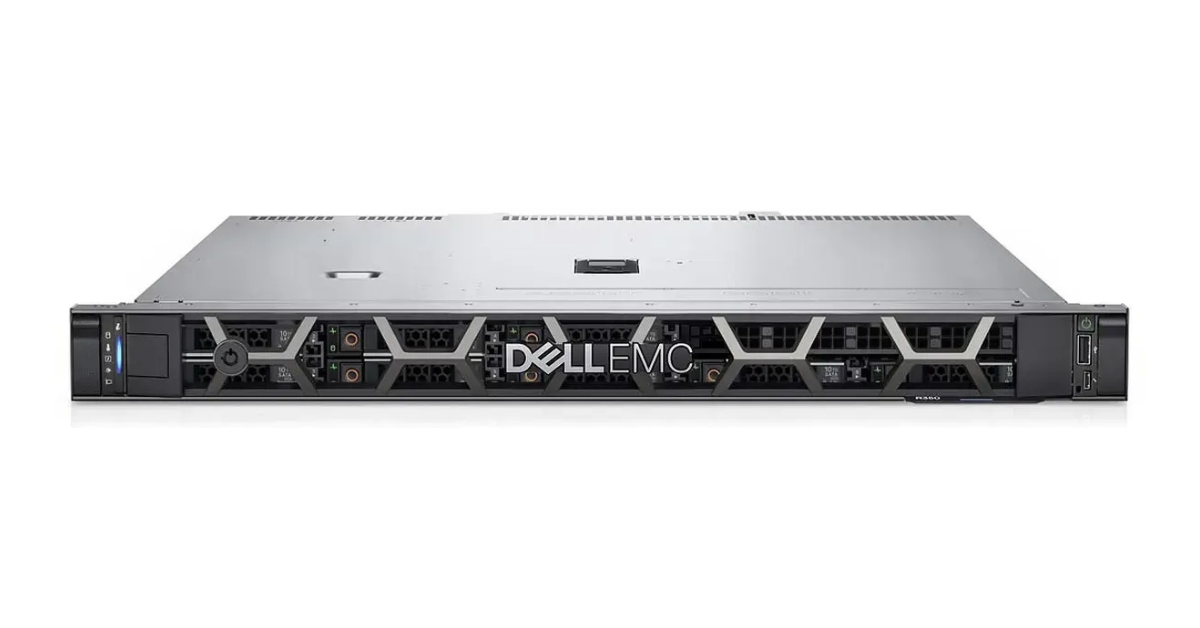
DELL PowerEdge R350 is a practical “small but serious” 1U office server. It’s a great default pick when you need a stable base for multiple roles (files + directory + a business app) and you want room to grow into a couple of VMs. See configurations on DELL PowerEdge R350.
Office‑friendly strengths
- ECC memory support for safer operation and fewer silent data issues.
- iDRAC9 remote management for console access, power control, logs, and lifecycle updates.
- Storage flexibility (3.5" capacity builds or 2.5" performance‑leaning builds).
- Clean upgrade path: CPU options and up to 128 GB RAM is often “enough for years” in SMB.
Specs snapshot (for office sizing)
- CPU: 1× Intel Xeon E‑2300 series or Pentium (configuration‑dependent).
- Memory: up to 128 GB DDR4 ECC UDIMM.
- Storage: up to 4×3.5" or up to 8×2.5" (SAS/SATA), RAID options depending on controller.
- Networking: 1GbE onboard, with expansion options depending on build.
Who it fits
Teams of ~10–60 users that want one server to cover core roles, with the option to virtualise or add services later. If you expect data growth or service sprawl, R350 usually keeps you out of trouble.
Practical configuration tip
For mixed workloads, prioritise RAM first, then SSDs for OS/VMs, and a separate data array for file shares. Most office slowdowns come from storage contention (AV scans, indexing, reporting, patching), not from “lack of CPU”.
DELL PowerEdge R250

DELL PowerEdge R250 is the compact 1U choice for basic office roles with proper server DNA. It’s a strong first server for AD/file shares and a small line‑of‑business app. More details: DELL PowerEdge R250.
Why it works
- 1U footprint for small racks and wall cabinets.
- Up to 4×3.5" bays for sensible capacity builds.
- iDRAC management helps a lot when you don’t have full‑time IT on site.
Specs snapshot
- CPU: 1× Intel Xeon E‑2300 (up to 8 cores) or Pentium.
- Memory: up to 128 GB DDR4 ECC UDIMM.
- Storage: up to 4×3.5" plus flexible boot options (SD/USB/BOSS depending on build).
- Networking: 2×1GbE LOM.
Who it fits
Small offices that need a reliable “core services” box without overpaying for extra bays/slots. If you don’t plan heavy virtualisation, R250 is often the most cost‑efficient office rack server.
What to watch
The main risk is under‑estimating growth. If you expect multiple VMs, more disk tiers, or larger databases within 12–18 months, stepping up to R350 can avoid a platform swap later.
DELL PowerEdge T150

DELL PowerEdge T150 is an office‑friendly tower server for teams without a rack. It’s easy to place, simple to service, and still provides ECC and iDRAC9. Product page: DELL PowerEdge T150.
Strengths
- Tower format: convenient for offices with no dedicated server room.
- Server‑grade management: iDRAC9 helps with remote troubleshooting and updates.
- Great fit for file services, backups, print services, and a couple of small applications.
Specs snapshot
- CPU: 1× Intel Xeon E‑2300 or Pentium.
- Memory: up to 128 GB DDR4 ECC UDIMM.
- Storage: up to 4×3.5" (cabled; depending on build emphasis is capacity and simplicity).
- Networking: 2×1GbE onboard.
Who it fits
Teams up to ~30–50 users that prefer a “quiet tower in the office” approach. It’s also a good option as a dedicated backup server next to a rack server, because it’s easy to place and maintain.
Operational note
Plan power and cooling: a UPS is not optional, and airflow matters even in small towers. Also, decide on backup strategy early: an on‑box RAID is not a backup. Use a separate backup target and validate restores.
HPE DL20 Gen11

HPE DL20 Gen11 is a modern compact 1U server built around Intel Xeon E‑2400 and DDR5 ECC memory, with management via HPE iLO6. It’s a solid “core” server for offices that value clean lifecycle management and current‑gen components. See HPE DL20 Gen11.
Why it’s office‑practical
- DDR5 ECC and current platform—good baseline for 2025 deployments.
- iLO6 helps you manage the server remotely and diagnose hardware events quickly.
- Flexible drive configurations for balancing capacity and performance.
Specs snapshot
- CPU: 1× Intel Xeon E‑2400 (4–8 cores depending on CPU choice).
- Memory: up to 128 GB DDR5 ECC.
- Storage: 2×LFF or 4+2×SFF configurations depending on chassis/bays.
- Management: HPE iLO6.
Who it fits
Offices that want a compact, manageable server with a modern memory platform. It’s also a strong choice for dedicated roles: VPN gateway, monitoring, backup repository, or a small hypervisor host.
Configuration tip
If you virtualise, allocate budget to RAM and SSDs first. Office performance problems often come from storage I/O saturation during updates, scans, and reporting—not from raw CPU limits.
HPE MicroServer Gen10 Plus

HPE MicroServer Gen10 Plus is an ultra‑compact micro tower designed for simple, space‑constrained deployments. It shines as a NAS/backup/edge box, or as a secondary server for local copies and resilience. See HPE MicroServer Gen10 Plus.
Strengths
- Very small footprint for offices without IT rooms.
- Four bays for straightforward capacity builds.
- ECC support (platform‑dependent) is a plus for file integrity and long‑running services.
Specs snapshot
- CPU: Intel Xeon E‑2300 or Pentium (depending on configuration).
- Memory: up to 64 GB DDR4 ECC UDIMM.
- Storage: 4×LFF SATA or 4×SFF SATA.
Who it fits
Small teams and branch offices that need dependable local storage and backup in a tiny chassis. It’s also useful as a dedicated backup target next to a primary rack or tower server.
Limitations to keep in mind
Micro servers are optimised for compactness and storage tasks. If your plan includes several always‑busy VMs or sustained database workloads, R350 or DL20 Gen11 will typically be a better long‑term fit.
How to choose the right small office server
1) Start with the workload
- File services + backups: prioritise drive bays and a sensible RAID layout.
- AD + 1–2 apps: aim for a balanced CPU and 32–64 GB RAM.
- Virtualisation: RAM and fast SSD storage matter most.
2) Don’t under‑size memory
For virtualisation, 64 GB is often the “comfortable baseline” for small environments. For pure file services, 16–32 GB may work, but security agents and indexing can consume more than people expect. Memory headroom is cheap compared to downtime and emergency upgrades.
3) Treat storage as a design decision
- Keep OS/hypervisor on RAID1.
- Use a separate data array for shares and app data.
- Use SSDs/NVMe where you need IOPS (VMs, databases, heavy indexing).
And remember: RAID is not backup. Build a backup plan with restore testing and at least one copy separated from the primary server.
4) Remote management saves money
iDRAC and iLO reduce operational friction: console access, firmware updates, hardware event logs, remote power control. In SMB environments where IT is part‑time or outsourced, this is often a bigger win than marginal spec increases.
5) Choose form factor based on your office reality
- 1U rack (R250/R350/DL20): best if you have a cabinet and want tidy scaling.
- Tower (T150): best if you need a quiet office‑side installation.
- Micro (MicroServer): best for minimal space and storage‑centric roles.
Conclusion
The best small server for an office is the one that handles today’s workload and still has headroom for growth. For a versatile “core box”, DELL PowerEdge R350 and HPE DL20 Gen11 are usually the safest picks. For a compact entry‑level rack server, DELL PowerEdge R250 is a strong choice. If you need a tower server for an office environment, consider DELL PowerEdge T150. For ultra‑compact NAS/backup and edge tasks, HPE MicroServer Gen10 Plus is hard to beat.
Browse more options and build the right configuration in the ServerMall server catalog.