Best tower servers for a home lab in 2025: what to buy and how to choose
If you’re building a home lab for virtualisation, DevOps tooling, and self-hosting, a tower server is often the most practical form factor: easier to place at home, usually quieter, and simpler to upgrade. For most people who want a single “do-it-all” box, DELL PowerEdge T350 is the safest pick in 2025: it gives you a balanced platform for a hypervisor + storage + services without hitting a hard ceiling too quickly. If you need a serious virtualisation lab with a large upgrade runway, DELL PowerEdge T550 is the “mini data-centre in a tower”. For a compact, modern, always-on setup, HPE ML30 Gen11 and HPE MicroServer Gen10 Plus are excellent choices when footprint and efficiency matter.
Below you’ll find a side-by-side comparison of 5 solid models, plus practical guidance on choosing CPU, RAM, storage, networking, and expansion for common home-lab workloads (Proxmox/VMware, containers/Kubernetes, NAS, backups, CI/CD, and “production-like” test environments).
Why a tower server is often the best home-lab form factor
A home lab lives in real life: near a desk, in a closet, or next to your router. That changes priorities compared to a server room. In practice, the winning tower server is the one that stays quiet, efficient, and easy to expand as your lab grows.
- Noise and placement. Tower chassis typically fit home environments better than rack gear.
- Storage-first growth. Home labs usually outgrow storage first: backups, VM images, media, build artifacts.
- All-in-one flexibility. One tower can run a hypervisor, a NAS stack, and a set of home services reliably.
- Friendly servicing. Drives, memory, and PCIe are easier to access and upgrade.
The trade-off is physical footprint and, sometimes, less “density” than a rack server. But for most home-lab owners, tower is the most comfortable long-term option.
Comparison table: 5 tower servers for a home lab
| Model | CPU | RAM | Storage | Best for |
|---|---|---|---|---|
| DELL PowerEdge T150 | Intel Xeon E-2300 / Pentium | up to 128 GB DDR4 UDIMM ECC | 4×3.5" (cabled), simple storage layout | first home lab, 1–3 services, light virtualisation |
| DELL PowerEdge T350 | Intel Xeon E-2300 / Pentium | up to 128 GB DDR4 UDIMM ECC | up to 8×3.5" + flexible options | balanced “one box”, hypervisor + NAS + services |
| DELL PowerEdge T550 | up to 2× Intel Xeon Scalable | up to 2 TB DDR4 RDIMM ECC | up to 8×3.5" + NVMe options, more PCIe | many VMs, heavy labs, “home data-centre” |
| HPE ML30 Gen11 | Intel Xeon E-2400 | up to 128 GB DDR5 ECC | 4 LFF SATA / up to 8 SFF, compact | modern efficient platform, always-on services + backups |
| HPE MicroServer Gen10 Plus | Intel Xeon E-2300 / Pentium | up to 64 GB DDR4 ECC | 4 LFF SATA, ultra micro tower | NAS, media, a few home services, low footprint |
Quick review of each server
DELL PowerEdge T150

DELL PowerEdge T150 is a clean entry-level tower for a home lab when you want stability, server-grade management, and a straightforward upgrade path. It’s a sensible choice for a first “real server” running a small hypervisor, a few core services (DNS/VPN, monitoring, Git, a small CI runner), and reliable backups.
If you want to compare configurations, see: DELL PowerEdge T150.
- CPU: Intel Xeon E-2300 (up to 8 cores) or Intel Pentium (up to 2 cores).
- Memory: 4 DDR4 slots, up to 128 GB, ECC UDIMM support.
- Storage: 4×3.5" cabled bays — simple layouts for RAID1/RAID10 or a small NAS pool.
- Storage controllers: options typically include server RAID/HBA choices depending on build.
- Remote management: iDRAC9 helps when you want “headless” operation.
Best for: a first home lab, light virtualisation, and a small set of always-on services where reliability matters more than maximum density.
DELL PowerEdge T350

DELL PowerEdge T350 is the balanced workhorse pick for a home lab: enough drive flexibility, enough memory headroom, and a sensible platform for “one box that runs everything”. In real life, this is where you can combine: a hypervisor (Proxmox/ESXi), storage (ZFS/RAID), and a stack of services (Home Assistant, Nextcloud, Jellyfin, GitLab, runners, small databases) without immediately running into a wall.
Product set page: DELL PowerEdge T350.
- CPU: Intel Xeon E-2300 / Pentium — pick based on how “VM-heavy” your plan is.
- Memory: up to 128 GB DDR4 ECC UDIMM — a comfortable range for many small and medium VMs.
- Storage growth: more flexibility than entry models, easier to build a “fast + bulk” layout.
- Networking: 1GbE baseline, practical to upgrade to 10GbE via PCIe later.
- Management: iDRAC9 improves day-2 operations (remote console, alerts, telemetry).
Best for: most home labs. If you’re unsure about your future needs, T350 is a safe choice that stays useful as your lab grows.
DELL PowerEdge T550
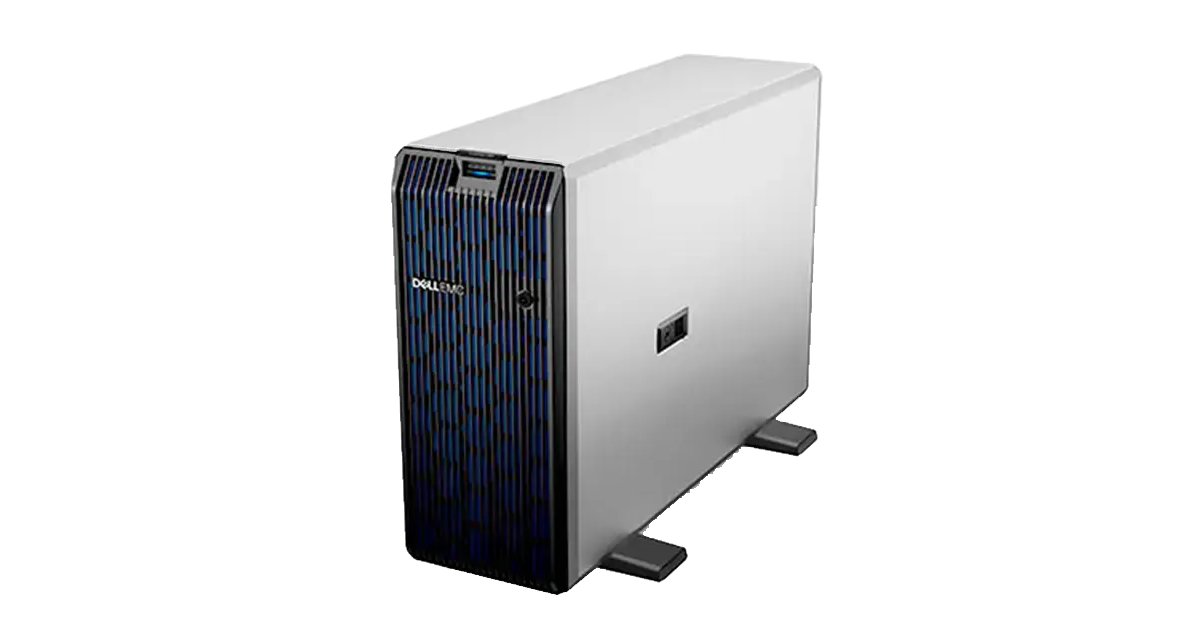
DELL PowerEdge T550 is what you buy when your home lab becomes “production-like”: lots of VMs, multiple isolated environments, heavy CI/CD, lab clusters, or serious storage plus network expansion. This is the tower you choose when you want the headroom of a small server room in one chassis.
See configurations here: DELL PowerEdge T550.
- CPU: up to two Intel Xeon Scalable processors — strong for parallel workloads and VM density.
- Memory: up to 2 TB DDR4 RDIMM ECC — a major advantage for virtualisation and memory-hungry labs.
- Storage options: easier to separate fast SSD/NVMe tiers from bulk HDD pools.
- Expansion: more PCIe slots for 10/25GbE, HBAs, additional NVMe, or specialised adapters.
- Approach: “I want a platform that won’t be the bottleneck next year.”
Best for: advanced home labs, heavy virtualisation, and people who want a long-lived platform with serious growth potential.
HPE ML30 Gen11

HPE ML30 Gen11 is a compact, modern tower platform (DDR5) that fits nicely into an always-on home environment. It’s a good choice when you care about efficiency and footprint but still want server-grade features and a clean upgrade path for a small-to-medium lab.
Set page: HPE ML30 Gen11.
- CPU: Intel Xeon E-2400 series (single-socket).
- Memory: DDR5 ECC, up to 128 GB (4 slots) — strong for a compact build.
- Storage: flexible LFF/SFF options depending on build, practical for “bulk + system SSD”.
- Networking: embedded 1GbE ports, easy to plan an upgrade path via add-on controllers.
- Management: HPE iLO for monitoring and remote administration.
Best for: compact home labs, modern always-on services, backups, and a moderate amount of virtualisation without the footprint of a bigger tower.
HPE MicroServer Gen10 Plus

HPE MicroServer Gen10 Plus is an ultra-compact “home server box” that shines as a NAS and home-services host. It’s the kind of device you place near your network gear and keep running 24/7: quiet, small, and focused on the basics.
Details here: HPE MicroServer Gen10 Plus.
- CPU: Intel Xeon E-2300 or Intel Pentium Gold, depending on configuration.
- Memory: up to 64 GB DDR4 ECC (2 slots) — plan around this ceiling.
- Storage: 4 LFF SATA bays — great for NAS layouts (mirrors, RAIDZ, RAID10).
- Form factor: ultra micro tower — minimal footprint.
- Typical stack: NAS + Nextcloud + media + DNS/VPN + backups.
Best for: a compact NAS-centric home lab with a handful of services. If you want many VMs or “multiple labs inside one box”, consider T350/T550 instead.
How to choose the right tower server for your home lab
1) Start with the scenario, not the spec sheet
The most common mistake is buying the biggest machine “just in case” and then using a small fraction of its capacity. In a home lab, matching the platform to your actual workload is what saves money and improves the day-to-day experience.
- Always-on NAS + self-hosting: prioritise quiet operation, drive bays, ECC, and efficiency. Consider HPE MicroServer Gen10 Plus or HPE ML30 Gen11.
- One-box lab (hypervisor + storage + services): choose a balanced platform with a clear storage growth path — DELL PowerEdge T350.
- Heavy virtualisation and “production-like” testing: CPU/RAM/PCIe headroom matters — DELL PowerEdge T550.
- First server to learn and validate needs: DELL PowerEdge T150 is a reasonable entry if you accept the simpler storage layout.
2) RAM and ECC: stability beats “paper performance”
Home-lab servers often run for weeks without reboots. Under long uptimes, memory reliability matters. ECC is not marketing; it’s a practical stability feature, especially if you run ZFS, databases, or store valuable data.
- For NAS + core services, a comfortable starting point is 32–64 GB.
- For a proper virtualisation lab, aim for 64–128 GB with an upgrade path.
- For multiple environments, CI/CD, and dense VM workloads, plan for 128 GB+ — where T550 becomes compelling.
3) Storage planning: design for growth and tiers
VM images, backups, media libraries, and build artifacts expand quickly. A practical home-lab storage strategy is tiered:
- Fast tier: SSD/NVMe for VMs, databases, and “hot” workloads.
- Bulk tier: HDD pool for archives, media, backups, and cold storage.
- Role separation: keep your hypervisor/system drives separate from bulk pools where possible.
Four LFF bays (MicroServer) is a great NAS baseline. If you expect growth, 6–8 bays and more flexible expansion (T350/T550) reduce painful rebuilds later.
4) Networking and expansion: plan for 10GbE
1GbE is fine for a start, but once you add fast storage and multiple active clients, 10GbE feels like a real upgrade. A tower server with PCIe headroom makes this easy: drop in a NIC now or later, add an HBA for storage, or attach additional fast devices as your lab evolves.
- NAS file transfers: 10GbE shines for large files and backups.
- Clusters: multiple nodes amplify the value of fast networking.
- “Like production” labs: extra NICs and segmentation are part of the learning.
5) Noise and power: a home-lab reality check
In a home environment, comfort matters. Avoid buying more machine than you need if it will mostly idle. Fewer watts at idle, fewer fans at high RPM, and a tidy airflow setup often matter more than an extra benchmark point.
- For always-on services, efficiency and acoustics are a priority.
- For heavy labs, accept higher power draw, but plan cooling and placement.
- Regular dust management improves both noise and stability.
Conclusion
In 2025, a tower server remains one of the most practical ways to build a capable home lab: easier to place, easier to expand, and better suited for an all-in-one setup. If you want a safe “default” choice, DELL PowerEdge T350 is hard to beat for balanced home-lab workloads. For serious VM density and long-term growth, DELL PowerEdge T550 delivers a true server-room-like headroom. If you prefer compact and efficient always-on infrastructure, HPE ML30 Gen11 and HPE MicroServer Gen10 Plus are excellent platform options.
Browse available configurations in the catalogue: server catalog.