A brief introduction to physics
As we remember from school physics classes, different substances have different boiling points (at constant pressure).

Some liquids boil at temperatures as low as 50–80 °C, and a parameter called latent heat of vaporization allows them to absorb 10–30 times more heat than simple liquid heating. Without diving too deep into physics, this is why steam burns are much more severe than burns from boiling water.
As a result, this approach gives us two-phase immersion cooling. The server is submerged in a special tank filled with a dielectric liquid (for example, 3M Novec 7100 or Engineered Fluids EC-100). When the liquid comes into contact with hot components, it starts boiling already at 50–60 °C. The vapor carries heat away from the components and rises to the condenser. At the top of the tank there is a heat exchanger, where the vapor is cooled (for example, by water from a cooling tower) and turns back into liquid. The condensate then flows back down to the servers. A closed loop, nice and simple.
If you remove boiling from the equation, you get single-phase immersion cooling. In this case, the liquid must continuously circulate through the server(s) — either forcibly, using pumps, or naturally via convection (if it’s sufficient).
Now, briefly, the pros and cons.
Advantages
-
A PUE close to 1.03 is realistically achievable only with this approach.
-
High density: servers can be placed very close together — no fans, no hot/cold aisles.
-
Silence: no coolers, only the hum of pumps.
-
Longevity: no dust, less oxidation of contacts.
-
No local overheating: vapor forms not across the entire surface of the bath, but exactly at the hottest spots (for example, around the CPU). The higher the temperature, the more intense the boiling, and the stronger the cooling effect.
Disadvantages
-
Extremely expensive liquids (for example, Novec costs $100–300 per liter).
-
Maintenance complexity: sealed tanks, difficult access to hardware, and hot-swap component replacement is questionable at best.
-
Vapor toxicity: some fluids require dedicated ventilation.
-
Limited compatibility: not all server components can be submerged long-term, even in dielectrics.
-
Warranty issues: standard servers from vendors like Dell and HPE lose their warranty once submerged (assuming the vendor finds out). If warranty matters, you need immersion-ready models designed for this use case.
Now let’s move on to other unconventional engineering solutions for cooling servers and data centers.
Most popular refurbished servers

Free shipping on orders over £500 in the EU, £500 in the UK, and $3,000 in the USA

Free shipping on orders over £500 in the EU, £500 in the UK, and $3,000 in the USA

Free shipping on orders over £500 in the EU, £500 in the UK, and $3,000 in the USA

Free shipping on orders over £500 in the EU, £500 in the UK, and $3,000 in the USA
Geothermal cooling: PUE 1.05–1.20 — not just about ecology, but about money
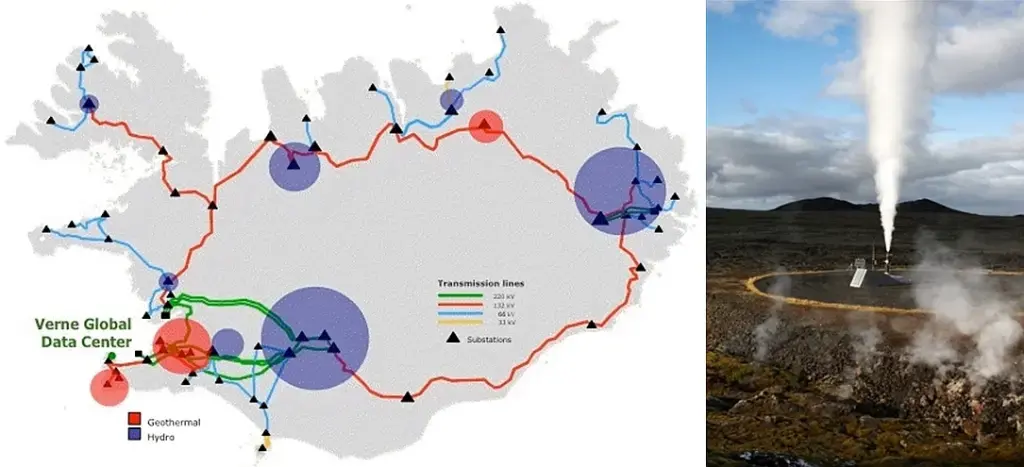
Thanks to its geothermal advantages, Iceland has become a network crossroads between continents.
This topic is broad and deserves a dedicated article (like all the previous ones), so I’ll keep it short.
In Germany, there is a data center that uses geothermal cooling without chillers. It belongs to the insurance company WWK and is located in an office building in Munich. In essence, the coolant here is groundwater (an underground river) and soil.
During construction, polyethylene collectors were embedded into the foundation, with a total length of several kilometers. The fluid in the external (glycol) loop maintains a temperature of around 12 °C year-round, then flows into a plate heat exchanger, where it cools the secondary circuit water to 14–16 °C.
The server equipment is located on the basement and third floors, and heat from the racks (rated at 8–16 kW each) is removed using Knürr CoolTherm water-cooled cabinets. The system operates in a closed loop, with a total cooling capacity of 400 kW, plus at least 100 kW of reserve.
For reliability, shut-off valves are installed in the pipelines — useful both during emergencies and maintenance. Pumps circulate a propylene glycol solution (freeze protection down to −10 °C) through the closed loop.
According to some estimates, eliminating chillers reduces cooling system energy consumption by 30–50%, which is a massive saving for data center owners. PUE approaches minimum values.
Similar solutions exist elsewhere. In Switzerland (Geneva), a data center is cooled using water from Lake Geneva. Google also uses seawater to cool its data center in Finland.
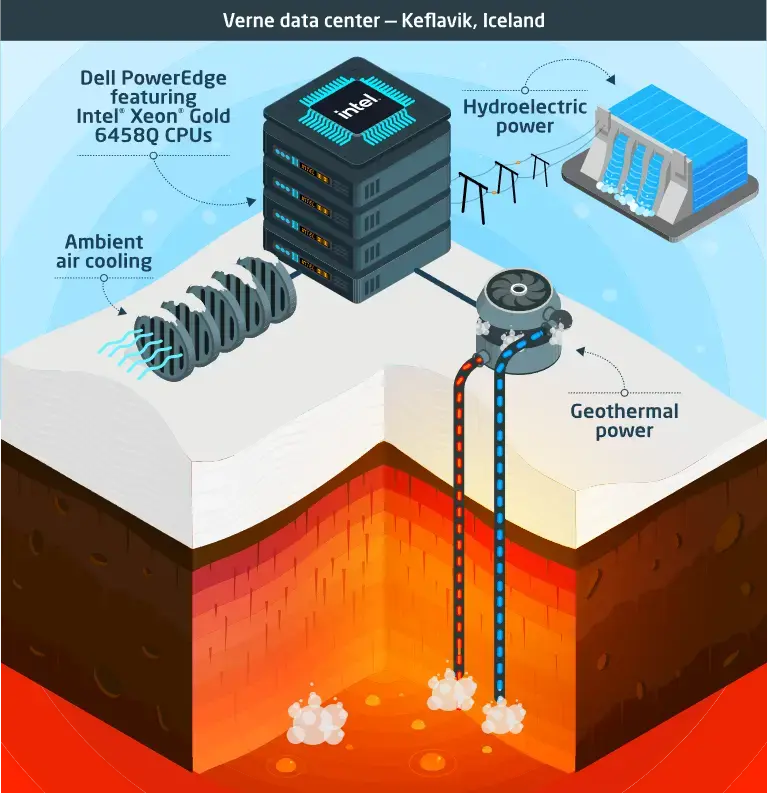
But there are even more interesting options. For example, Verne Global’s data center in Iceland (Keflavík) uses cheap renewable energy from geothermal and hydroelectric power plants, while the low ambient temperatures allow it to operate without traditional air conditioning. The same company recovers waste heat from its Helsinki data center and feeds it into the district heating system of nearby residential buildings.
So how does this work without air conditioning?
Free-cooling systems: PUE 1.1–1.3 — letting nature do the work
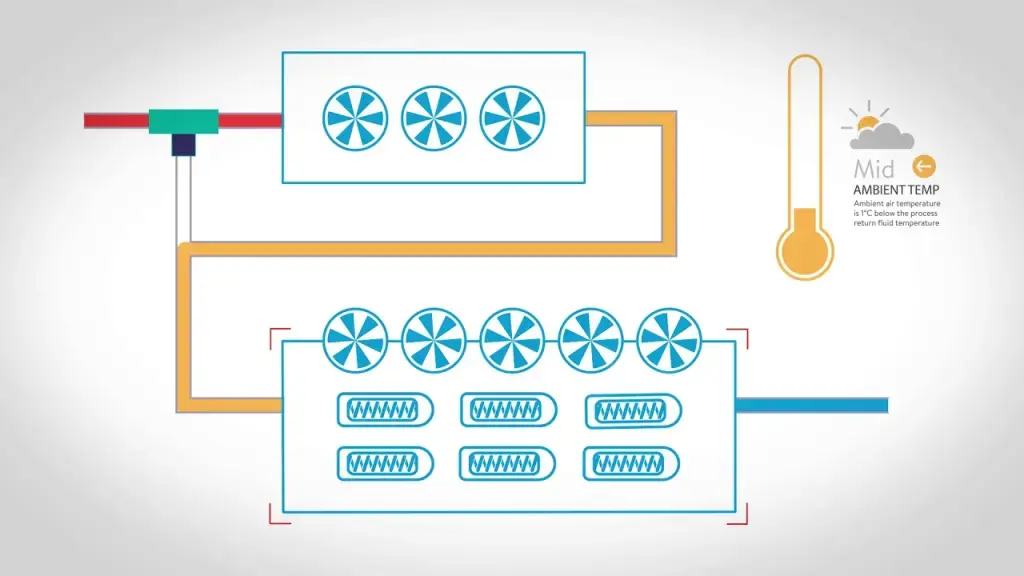
Free cooling is a technology that cools liquid in chillers using outside air. In winter, when temperatures drop, the compressor — the main energy hog — gets a break, and cooling is handled by a dry cooler, a special heat exchanger. Inside it, the liquid (usually an antifreeze solution) transfers heat to cold outdoor air, while fans simply push the air through the system. The savings? Up to 80% in winter and up to 50% during shoulder seasons.
There is also a special case of free cooling where cold outside air is supplied directly into the data center, without liquid intermediaries or heat exchangers. This approach was used year-round by Yandex’s former data center in Mäntsälä, Finland (now owned by Nebius, Arkady Volozh’s new company). This is the same data center that was disconnected from the grid in 2022 due to sanctions, when Nivos Energia Oy stopped supplying electricity and it ran on diesel generators for a while.
This method could be called the king of cross-drafts. The system draws cold air from outside via supply-and-exhaust ventilation. There are fans, but they rely mostly on natural draft with minimal support from axial fans. On hot days, the air is slightly humidified to enhance evaporative cooling (more on that later).
By the way, this is also an eco-friendly data center: it feeds server waste heat into the local district heating network, heating water for thousands of homes — up to 5,000 by some estimates. The result is up to one-third energy savings: utilities pay for the heat, while the data center cuts its costs. PUE stays around 1.1, which is an excellent result for air cooling.
Adiabatic cooling systems: PUE 1.1–1.25 — servers can sweat too
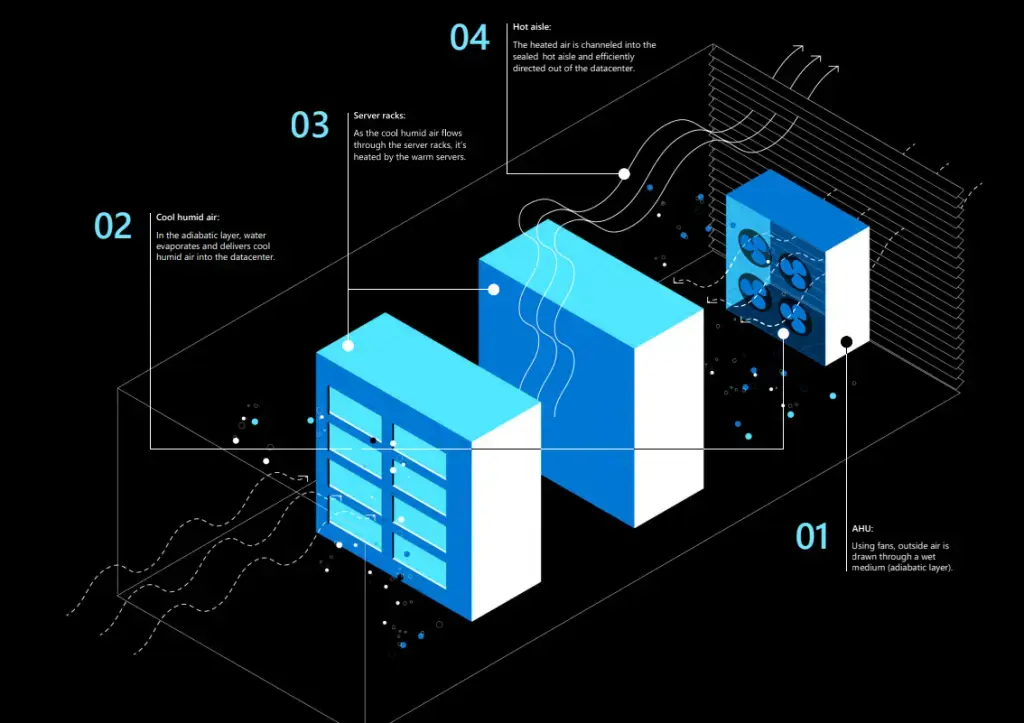
After immersing servers in liquids, water-based cooling shouldn’t be surprising. But earlier we talked about dielectrics — adiabatic systems use ordinary drinking water. I’ve heard stories of servers being wrapped in wet towels when air conditioners failed. It worked briefly, but I don’t recommend repeating it.
Adiabatic cooling reduces air temperature without heat exchange with the environment (from the Greek adiabatos, “impassable”). The temperature change occurs due to internal processes rather than heat removal. The main mechanism is water evaporation. The logic is the same as boiling: water transitions from liquid to vapor and absorbs heat from the surrounding air, lowering its temperature. Microsoft calls this Direct Evaporative Cooling (DEC).
And no, this does not kill servers or electronics, because water is not sprayed onto equipment. Instead, it evaporates within the airflow as it passes through a special wetted medium. This increases humidity, but only to safe levels — around 40–60%. No condensation occurs because server operating temperatures remain well above the dew point.

The idea itself is ancient. In hot regions of Ancient Egypt, Persia, and Greece, porous ceramic vessels were wrapped in wet cloth or simply soaked with water. As moisture evaporated, it absorbed heat, lowering the temperature inside the vessel below ambient. This allowed people to keep water, milk, and wine cool even in extreme heat.
Useful knowledge — in case you ever want chilled kombucha without a refrigerator.
The benefits are obvious: evaporative humidification requires no powerful compressors or expensive refrigerants. The process is natural, controlled, cheap, and energy-efficient.
But there are downsides. You need access to clean drinking water, and you must work with outdoor air — whose parameters are unstable (humidity, pressure, temperature, dust levels, etc.). And yes, you guessed it: this method is ineffective or barely effective in humid climates.
Underground and underwater data centers: PUE 1.05–1.15 — cold as a grave
Engineers have figured out how to humidify air, use free cooling, tap underground rivers and soil, and even submerge servers in dielectrics so that chips literally boil liquid.
What’s next? Bury servers underground or sink them to the ocean floor? Why not? The less dependence on external climate conditions, the more stable the ambient temperature and the better the energy efficiency.
Underground data centers
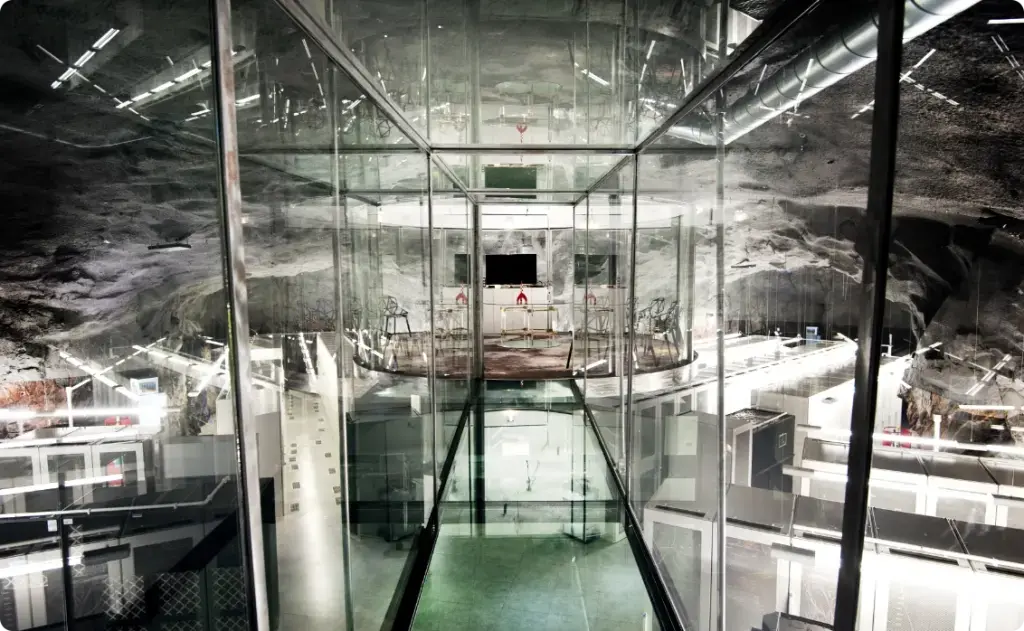
Soil is an excellent thermal stabilizer. Just a few meters below the surface, temperature fluctuations diminish significantly. In deep mines, caves, or bunkers — tens of meters underground — they almost disappear entirely. A natural thermostat.
For example, in Stockholm, the Pionen data center is located in a former Cold War nuclear bunker, 30 meters beneath granite rock in Vita Park. The internal temperature stays around 8–10 °C year-round, without artificial cooling. Water from underground sources is also used. Incidentally, WikiLeaks servers were once hosted there.
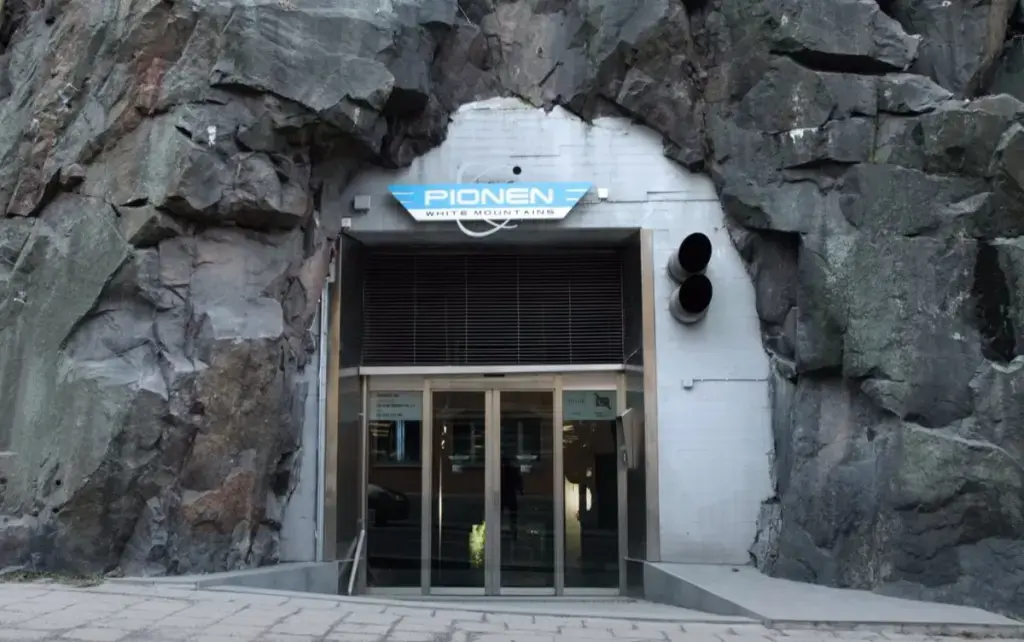
Pros: protection from nearly all external threats (storms, fires, temperature swings, even a direct hydrogen bomb strike or nuclear EMP), lower cooling costs, enhanced security.
Cons: the bunker wasn’t built for data centers, so infrastructure deployment is complex; ventilation systems must be redesigned; groundwater and heat buildup from dense server layouts must be considered.
Underwater data centers
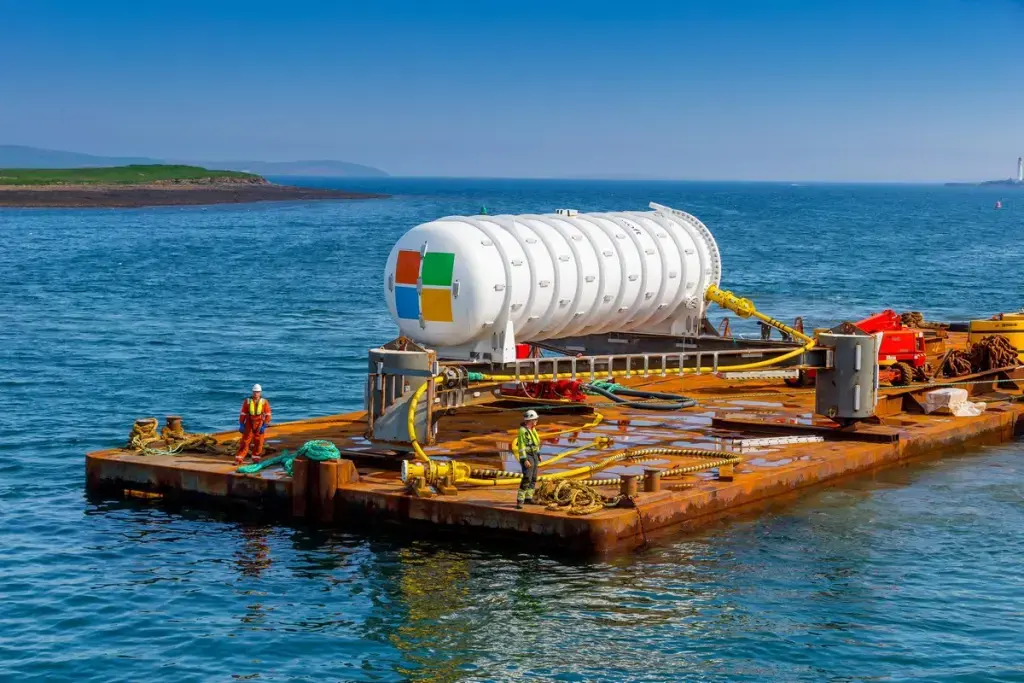
Microsoft tested this concept in Project Natick. A data center capsule was submerged 35 meters off the coast of Scotland. Water removes heat more efficiently than soil due to its high heat capacity. Ocean currents carry heat away from the container walls without fans or compressors. Inside, the capsule is filled with nitrogen to reduce corrosion risk.
Pros: excellent cooling, autonomy, infrastructure savings, protection from external factors.
Cons: upgrades and repairs at depth are complex, logistics are expensive, and environmental concerns arise (predictably). Microsoft claims the environmental impact is minimal.
Underwater data centers can drastically reduce cooling costs, but deployment is complex, expensive, and requires rare expertise. I don’t believe this solution will ever become mainstream.
Instead of conclusions: what about space?
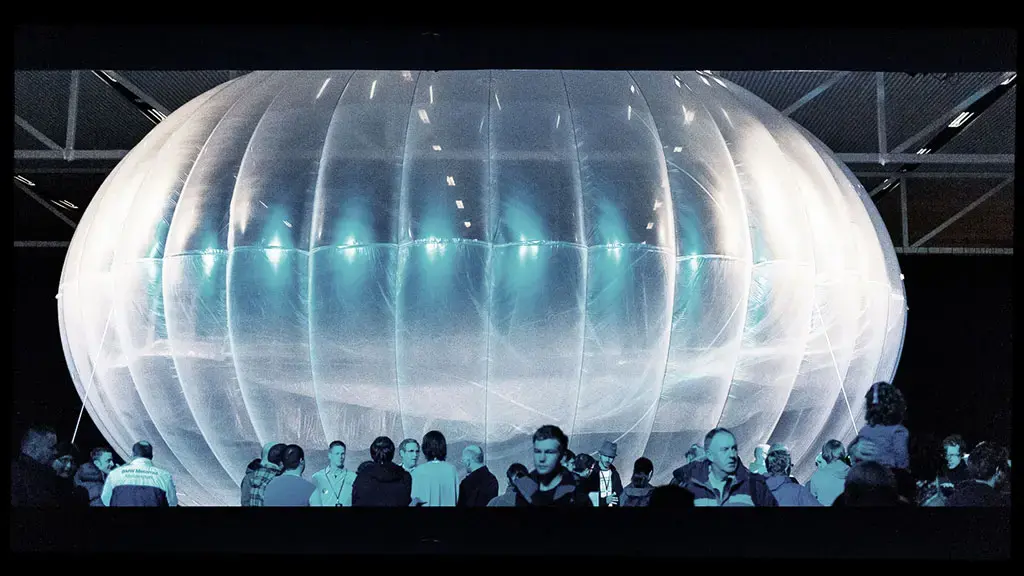
What if we move data centers higher? Platforms — airships or balloons filled with helium or hydrogen — at altitudes of 7–20 km, where temperatures drop to −50 °C. Cooling is free. Power could come from solar or wind (stratospheric winds are strong and stable). Logistics could be handled by drones, connectivity via satellites or lasers. Sounds promising.
But there are serious obstacles: servers are heavy, data centers weigh tens of tons, and 1 m³ of helium lifts only about 1 kg. Stratospheric winds can exceed 200 km/h, requiring engines and fuel for stabilization. Maintenance, upgrades, and staffing without downtime become extremely complex.
Google’s Loon project proved airborne platforms are viable — but those carried lightweight base stations, not servers. An airborne data center could theoretically reach PUE below 1.03, but all the associated operational costs would wipe out the gains.
Now space. In orbit, it’s −270 °C in the shade — sounds perfect. Plus, solar power around the clock. But heat dissipation is a nightmare: in vacuum, there’s no air or water to carry heat away. Only radiation remains — and it’s slow. Servers would still overheat, even at −270 °C. And once you calculate the cost of launching one ton into orbit and maintaining it with astronauts, the numbers become truly astronomical.
So for data centers, it’s better to dig into the ground rather than fly away from it. At least with the technologies we have today.Choosing the Right Equipment
Our specialists will contact you and answer all your questions
Content:

Free shipping on orders over £500 in the EU, £500 in the UK, and $3,000 in the USA

Free shipping on orders over £500 in the EU, £500 in the UK, and $3,000 in the USA

Free shipping on orders over £500 in the EU, £500 in the UK, and $3,000 in the USA

Free shipping on orders over £500 in the EU, £500 in the UK, and $3,000 in the USA


Free shipping on orders over £500 in the EU, £500 in the UK, and $3,000 in the USA