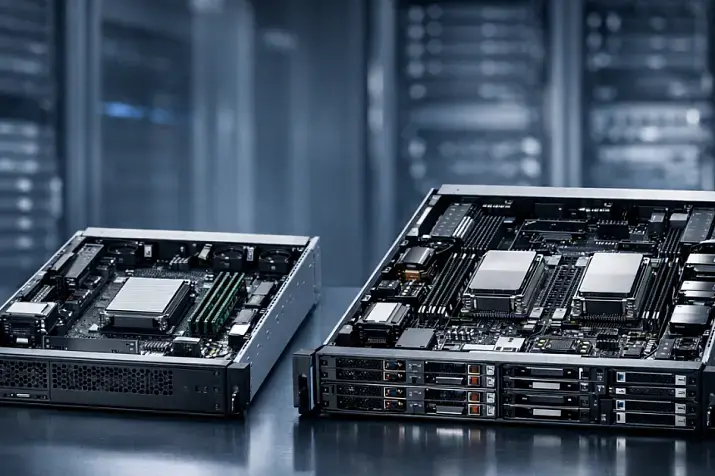
If you need a server focused on performance, dense SSD placement, and headroom for NVMe, SFF is usually the better direction. If the main priorities are large capacity, backups, file storage, archives, or video surveillance, LFF is usually more cost-effective. The choice between them is not an argument about drive size, but a decision about how your disk subsystem will grow, how much it will cost, and what limitations will surface during the next upgrade.
A mistake at this stage is expensive precisely because the server chassis is chosen for the long term. The processor, memory, network card, or controller can be replaced in a fairly predictable way. But an incorrectly chosen drive-bay layout often means that a year later the server formally still “works,” yet runs into capacity limits, drive-count limits, cooling limits, or the inability to add the required drives and expansion cards. With HPE DL380 Gen10, it is clearly visible that SFF and LFF options differ not only in the number of bays, but also in NVMe compatibility, rear cages, and risers.
What SFF and LFF mean in practice
In the server world, SFF usually means a chassis and drive bays for 2.5-inch drives, while LFF means 3.5-inch drives. But for real-world operation, it is more useful to understand the difference in another way.
SFF usually means:
-
more bays in the same server form factor;
-
a more convenient platform for SSDs;
-
more frequent NVMe compatibility;
-
higher operation density in 1U or 2U;
-
a better path for performance-oriented and mixed storage configurations.
LFF usually means:
-
higher capacity per drive;
-
better storage economics for large data sets;
-
a simpler path to high usable capacity without a large number of drives;
-
an obvious choice for volume-heavy but not especially I/O-intensive workloads.
-
At the same time, an LFF bay can usually accommodate SFF drives by using a special adapter.
This is very clear on real platforms. In the QuickSpecs for HPE DL380 Gen10, different variants are listed — 8 and 24 SFF, as well as 8 and 12 LFF. The same document notes that some NVMe options are available only for SFF chassis, while certain LFF layouts affect whether additional risers can be installed. In other words, the choice between SFF and LFF is a choice not only of drive size, but of the entire server expansion logic.
Most popular refurbished servers

Free shipping on orders over £500 in the EU, £500 in the UK, and $3,000 in the USA

Free shipping on orders over £500 in the EU, £500 in the UK, and $3,000 in the USA

Free shipping on orders over £500 in the EU, £500 in the UK, and $3,000 in the USA

Free shipping on orders over £500 in the EU, £500 in the UK, and $3,000 in the USA
Why you cannot choose based only on drive size
The most common mistake is thinking like this: “2.5 means fast, 3.5 means spacious; I’ll choose by that principle.” In practice, you need to calculate several things at once.
First, you need not raw capacity, but usable capacity. It is one thing to say, “I want 80 TB,” and quite another to say, “I need 80 TB after RAID setup, with headroom for growth and array rebuilds.”
Second, the workload profile matters. A server for backups, mail, virtualization, a database, and video surveillance behaves differently even with the same data volume. In some cases, the main parameter is IOPS; in others, sequential writes; in others, the cost of each terabyte.
Third, the planning horizon matters. Many servers are chosen “for the current task,” and then a year later it turns out that capacity could still have been increased, but performance has already hit the limit of available bays. Or the opposite: there are enough operations, but growing capacity now requires replacing not the drives, but the entire storage platform.
Fourth, you need to take into account not only the drives themselves, but also the chassis, backplane, cables, controller, risers, fans, and cooling mode. This is where the SFF-versus-LFF choice stops being cosmetic.
SFF and LFF: what matters more in real operation

| Parameter | SFF | LFF | Practical takeaway |
|---|---|---|---|
| Typical focus | SSD, density, IOPS | HDD, capacity, cost per TB | Define the workload first, then the form factor |
| Number of bays in typical servers | Usually higher | Usually lower | SFF is more convenient when flexibility in drive count matters |
| Convenience for SSD | Very high | Present, but usually not the main logic | SFF is usually more natural for SSD-oriented configurations |
| Convenience for NVMe | Often better | Depends on the chassis, often more limited | NVMe must be checked on the specific platform |
| Capacity per drive | Lower | Higher | LFF makes it easier to achieve high usable capacity |
| Cost of storing 1 TB | Usually higher | Usually lower | For archives and backups, LFF is almost always more cost-effective |
| Operation density | Usually higher | Usually lower in HDD scenarios | For active workloads, SFF is more often the better choice |
| Capacity growth | By adding many small drives | By installing high-capacity HDDs | Not only the ceiling matters, but also the path of growth |
| Typical scenarios | Virtualization, databases, active services | Archive, NAS, backups, video surveillance | There is no universal winner |
Choosing the Right Equipment
Our specialists will contact you and answer all your questions
When SFF is truly better
SFF usually wins where the disk subsystem must be not just spacious, but fast, flexible, and dense.
Virtualization and mixed server workloads
If one server runs several virtual machines, infrastructure services, databases, file roles, and part of the application workload, SFF more often wins. The reason is simple: here it is more useful to have more smaller-capacity drives, especially SSDs, than a few very large drives. That makes it easier to build an array that can handle more parallel operations and gives more freedom in layout.
Databases and active business systems
For databases, transactional systems, heavily loaded internal services, and platforms where storage responsiveness matters, SFF almost always looks more logical. Not because a “2.5-inch drive is inherently faster,” but because such a server is more often built around SSD and NVMe, and the platform itself is initially better suited to a high density of fast drives.
With Dell PowerEdge R640, this is visible in the chassis options themselves: configurations with 2.5-inch drives provide more ways to place SAS, SATA, and NVMe in the front bay area. In other words, the chassis form factor immediately affects how broadly you can deploy a high-performance disk subsystem inside one server.
When growth in performance matters, not only growth in capacity
If you already understand that within a year you may need to move from SAS SSD to NVMe, add a fast pool for logs, cache, or active databases, SFF is usually the safer investment. It more often leaves more options for future growth specifically in speed.
When LFF is truly better
LFF wins where the main task is to get a lot of usable capacity at a reasonable price and without unnecessary complexity.
File storage
If the server is needed for documents, shared folders, media materials, long-term storage of working data, and other tasks where there is a lot of data but only moderate I/O requirements, LFF is usually more cost-effective. Here, the cost per terabyte and the capacity ceiling per drive matter more than high SSD density.
Backups and archive
For backups and archive data, LFF is almost always better. In such scenarios, maximum random-load performance is rarely needed, while the following are almost always important:
-
low storage cost;
-
the ability to build large capacity quickly;
-
a simple and understandable expansion model;
-
less dependence on dense layouts and aggressive cooling.
Modern enterprise 3.5-inch HDDs still provide very high capacity per bay. The Toshiba MG Series includes models up to 24 TB, designed for 24/7 operation and heavy annual workloads, which is exactly what makes LFF a logical choice for high-capacity server storage.
Video surveillance and streaming storage scenarios
If the server stores large volumes of video streams, backup images, telemetry archives, or another streaming data set, LFF is usually the more rational option. Here, random read/write IOPS are usually not the main issue, while capacity density and predictable economics matter more.
Hybrid storage
Thanks to its versatility, LFF allows you to mix “fast” SSDs for hot data and cache with “slower” but high-capacity 3.5-inch HDDs within one chassis. For building high-capacity storage and hyperconverged systems, this can be an optimal choice in terms of price/performance/capacity.
Why the formula “SFF is faster, LFF is slower” oversimplifies reality

This approach is misleading because it mixes three different levels of comparison.
The first level is the performance of a single drive.
The second is the performance of an array built from several drives.
The third is the behavior of the entire storage subsystem inside a specific server.
If you compare one 2.5-inch HDD and one 3.5-inch HDD, that is one discussion. If you compare an array of eight SSDs in an SFF chassis and an array of four high-capacity HDDs in an LFF chassis, that is a completely different one. And if the discussion is about moving to NVMe, the question stops being a comparison of enclosure size at all and becomes a question of whether the server supports the required configuration.
So it is more accurate to say this:
-
SFF is more often convenient for a high density of fast drives;
-
LFF is more often convenient for large capacity;
-
SSD versus HDD matters more than simply 2.5 versus 3.5;
-
NVMe versus SAS/SATA is an even more important dividing line;
-
the final result depends on the number of drives, the array scheme, the controller, and chassis limitations.
How SSD, HDD, and NVMe affect the choice
This is the key point, because it shows why the question cannot be reduced to bay size.
HDD
If the main logic of the server is to store a lot of data cheaply and predictably, LFF with enterprise HDDs usually wins. Here, the 3.5-inch format gives more capacity per drive and lowers the cost of a usable terabyte.
SSD
As soon as a project includes a serious share of SSDs, the advantages of SFF become more noticeable. Drive density is higher, placement is more logical, and the number of bays more often helps you assemble an array that is not only fast, but also flexible for future development.
NVMe
NVMe often becomes the line where a superficial choice breaks down. Not every server with the “right” number of bays supports NVMe equally well. That depends on the chassis, backplane, PCIe lanes, cables, risers, and cooling requirements.
With HPE DL380 Gen10, some NVMe options are tied directly to the SFF chassis. With Kioxia enterprise SSDs, mixed and read-intensive workload profiles are highlighted separately, as is the presence of power-loss protection. This matters because an enterprise SSD is not just a fast drive, but a device with a pre-defined operating and reliability profile.
The practical conclusion is this: if you already see NVMe, fast journal storage, active databases, or a high share of SSDs in the project, platform compatibility checks should start specifically with the disk configuration, not be left for later.
Non-obvious limitations: bays, risers, rear drives, cooling
This is the point where the SFF-versus-LFF choice stops being theory and becomes a question of upgrade quality in the future.
The same HPE DL380 Gen10 states that some LFF configurations are compatible with a rear 2-SFF module, which in turn affects whether a secondary or tertiary riser can be used. The same document also states separately that some NVMe options are available only in an SFF chassis. In other words, the layout of front and rear bays is tied to which expansion cards and which drive types you will be able to install later at all.
This matters for several reasons.
First, a server rarely stays in its original configuration throughout its lifetime.
Second, upgrades for networking, HBA, RAID, accelerators, or NVMe often come later than the chassis purchase.
Third, it is the storage layout that can quietly “eat up” upgrade freedom, even when the server still looks modern in terms of CPU and memory.
In practice, this means the following:
an incorrectly chosen chassis can limit modernization more than choosing one processor generation over another.
Cooling, power consumption, and acoustics

This issue is often underestimated until a dense SSD or NVMe configuration appears.
When a server contains many SFF drives, especially fast ones, it is not just heat output that increases, but heat density in the front part of the chassis. With NVMe, this is especially noticeable. In the Dell technical guide for PowerEdge T550, it is explicitly stated that NVMe SSDs consume more power than SAS/SATA drives and can preheat components located farther downstream, which means the system requires a stronger airflow.
This leads to several important practical points:
-
moving to NVMe may require a higher-performance fan set;
-
the server may become noisier under load;
-
some configurations that are formally compatible with the drives will be less comfortable in terms of thermal conditions;
-
“it fits physically” does not mean “it will run optimally and quietly.”
LFF often looks simpler here in high-capacity HDD storage scenarios: there are fewer drives, the layout is more predictable, and the requirements for ultra-dense cooling are usually lower. But this does not mean LFF is always cooler — only that the cooling load is usually of a different type there.
RAID and fault tolerance: why form factor affects this too
With the same usable capacity, an array of many SFF drives and an array of fewer large LFF drives will behave differently.
An array with a larger number of drives usually has:
-
more flexibility in layout;
-
higher potential performance;
-
more points of failure;
-
greater dependence on controller quality and array planning.
An array with a small number of very high-capacity LFF drives usually has:
-
simpler economics;
-
higher capacity per slot;
-
longer and more sensitive rebuilds after a failure;
-
a higher cost of a mistake in RAID choice and in the failure scenario of a large drive.
That is why LFF cannot be seen as simply “a lot of space.” If we are talking about large HDDs, array rebuild time and the risk window after a drive failure become a very practical problem. And if we are talking about SFF with SSDs, not only the RAID scheme matters more, but also drive endurance, write profile, and behavior under sustained load.
Our most popular storage systems
Free shipping on orders over £500 in the EU, £500 in the UK, and $3,000 in the USA

Free shipping on orders over £500 in the EU, £500 in the UK, and $3,000 in the USA

Free shipping on orders over £500 in the EU, £500 in the UK, and $3,000 in the USA

Free shipping on orders over £500 in the EU, £500 in the UK, and $3,000 in the USA
Choosing the Right Equipment
Our specialists will contact you and answer all your questions
The economics of choice: cost per terabyte versus cost of performance
This is where the real dividing line between SFF and LFF runs.
LFF usually wins where the main metric is the cost of storing one terabyte. This is the typical logic for backups, archives, video surveillance, and file storage.
SFF usually wins where the following matter:
-
more operations on the same server;
-
a high share of SSDs;
-
growth without moving storage to an external system;
-
the ability to distribute drive roles more precisely inside one node.
But you should look not only at the purchase price. There is also the cost of growth. Sometimes LFF is cheaper at the start, but a year later it turns out that to speed things up you need to add a separate SSD tier or even change the architecture altogether. Sometimes SFF is more expensive at the start, but later provides more freedom without changing the chassis, or the opposite — limits that freedom because you cannot install high-capacity HDDs without buying additional storage.
The right question here is this:
what is more expensive in your project — a terabyte or latency?
Which form factor to choose for a specific task
| Scenario | Preferred option | Why | When a compromise is possible |
|---|---|---|---|
| Virtualization | Usually SFF | SSD, high I/O density, and flexibility are needed | LFF is possible with a calm workload and a strong focus on capacity |
| File storage | Usually LFF | Capacity and cost per TB matter | A hybrid setup with SSD for metadata and hot data |
| Backups | LFF | Large volumes and moderate I/O requirements | SFF only if compactness matters or there is a unified SSD strategy |
| Database | SFF or an NVMe-oriented platform | Latency and storage performance matter | LFF is acceptable only for undemanding and small systems |
| Video surveillance | LFF | Streaming writes and large capacity | A compromise is rarely needed |
| Universal server for a small business | Depends on the profile | You need to decide what matters more: capacity or responsiveness | LFF with SSD for the system and service roles is often justified |
Virtualization
If the server will run virtual machines, especially several roles at once, SFF is usually preferable. Here, not only capacity matters, but also responsiveness, SSD density, and the ability to move later to a faster storage configuration.
File storage
If the task is shared folders, documents, media files, and long-term storage, LFF is usually the more rational choice. For the same money, it is easier to reach the required capacity and keep a clear path for expansion.
Backups and archive
For backups, LFF is almost always the best first candidate. Here, the priority is not maximum IOPS, but reliable and inexpensive storage of large data sets.
Database
For an active database or a heavily loaded business system, SFF is more often needed, and in many cases a platform built around NVMe. Here, latency, write stability, and behavior under mixed load matter more than the cost of one terabyte.
Video surveillance
For storing video streams, LFF is usually a better fit. The main argument is high capacity at a predictable cost and sufficient performance for streaming writes.
Universal server for small business
If there is only one server and it will host several roles at once, the choice should depend on what is more critical: capacity or responsiveness. If there is a lot of data but the workload is calm, LFF with SSD for the system and service tasks is a sensible choice. If active databases, virtualization, and growth in speed are expected, it is safer to start with SFF.
Common mistakes when choosing SFF and LFF

Choosing by drive size instead of workload profile
This is the most typical mistake. Bay size does not decide anything by itself if it is not clear what data will sit on the server and how it will be used.
Looking only at raw capacity
“12 drives of 20 TB each” sounds impressive, but without calculating usable capacity, RAID, growth, and rebuild time, such a comparison is almost useless.
Not checking NVMe on the specific platform
NVMe support depends not on a nice phrase in a product card, but on the specific chassis configuration, bays, backplane, cables, and risers. With HPE, this is visible directly even within a single server model.
Underestimating cooling
A dense SSD or NVMe configuration can change noise, thermal conditions, and fan requirements. A build that is formally compatible is not always comfortable or optimal in real operation.
Buying a server “for today”
This is especially dangerous in small business. When there is little data, almost any decision seems right. But the chassis choice usually survives several cycles of drive replacement, and the mistake appears later, when changing it has already become more expensive.
What to choose: a practical algorithm
To avoid mistakes, it is better to proceed in this order.
-
First determine what matters more: capacity or performance.
-
Then calculate usable capacity after RAID, not the raw sum of drives.
-
After that, understand whether SSDs are needed and whether NVMe is in the planning horizon.
-
Next, evaluate growth over 2–3 years: more data, more operations, or both.
-
Then check the limitations of the specific chassis: front and rear bays, risers, NVMe support, and fans.
-
Only after that should you choose between SFF and LFF.
In exactly this order, not the other way around.
Conclusion
SFF should be chosen where the server must be not just spacious, but fast, flexible, and ready for a dense SSD or NVMe configuration. LFF should be chosen where the main task is to store large volumes of data at a reasonable price and without paying extra for performance that will not be needed. It is a mistake to think this is only a choice between 2.5 and 3.5 inches: in reality, you are choosing the development path of the entire disk subsystem, and with it the future capabilities of the server.
Selection checklist
-
What is your main priority: capacity or operations?
-
What usable capacity is required after RAID?
-
Will SSDs be mandatory from the start?
-
Will you need to move to NVMe later?
-
How many years should the server last without changing the chassis?
-
Has compatibility of bays, risers, and rear slots been checked?
-
Have cooling and fan requirements for a dense configuration been taken into account?
-
Will today’s savings become tomorrow’s overpayment at the next upgrade?
Sources
Choosing the Right Equipment
Our specialists will contact you and answer all your questions
Content:

Free shipping on orders over £500 in the EU, £500 in the UK, and $3,000 in the USA

Free shipping on orders over £500 in the EU, £500 in the UK, and $3,000 in the USA

Free shipping on orders over £500 in the EU, £500 in the UK, and $3,000 in the USA

Free shipping on orders over £500 in the EU, £500 in the UK, and $3,000 in the USA

Free shipping on orders over £500 in the EU, £500 in the UK, and $3,000 in the USA

Free shipping on orders over £500 in the EU, £500 in the UK, and $3,000 in the USA