Buying storage “by terabytes” almost always ends in one of two scenarios: either there is still free space, but the system is already hitting latency limits, or performance is sufficient, but usable capacity runs out faster than expected. The reason is that storage sizing is not about choosing a drive by the label; it is a calculation based on the real workload profile, taking into account block size, the read/write ratio, the target latency, the data protection scheme, snapshots, data growth, and reserve capacity for normal and emergency operations.
It is most practical to think in three dimensions at once: how many operations per second the application needs, how much data passes through the storage system per second, and how much usable space remains after all overhead is accounted for. That is why SNIA specifically emphasizes that IOPS, throughput, and latency cannot be substituted for one another, while in Azure and AWS the limits for IOPS and MB/s are explicitly treated together.
Where to Start: What Data to Gather Before Any Calculation
Before you get to formulas, you need to collect the input data. Without it, any sizing exercise turns into a neat-looking but random estimate.
What should be recorded in advance:
- current data volume;
- growth forecast for 6, 12, and 24 months;
- average and peak workload;
- read/write ratio;
- access pattern: random, sequential, or mixed;
- average I/O block size;
- target latency;
- peak load windows;
- whether snapshots, backup, replication, rebuild, and rebalancing are present;
- workload type: OLTP, virtualization, VDI, backup repository, file service, object storage, and others.
It is important not to confuse several things here. “Data at rest” is simply the amount of stored information, while “data in motion” is the amount that is actively read, rewritten, cloned, indexed, and backed up. Average workload is also rarely useful in isolation: storage is usually designed at least for the working peak, and ideally with p95 or p99 in mind. Another common mistake is to calculate only raw capacity, even though in practice usable capacity is more important: the space that remains after RAID, replication, snapshots, and reserves.
The more accurate the workload profile, the lower the risk of buying the “right” SSDs and ending up with the wrong system.
Core Concepts You Need for an Accurate Calculation

IOPS is the number of operations per second. Throughput is the amount of data per second. Latency is the response time for an operation. Queue depth is how many requests are simultaneously being processed or waiting. These metrics are related, but they are not interchangeable.
The simplest practical formula looks like this:
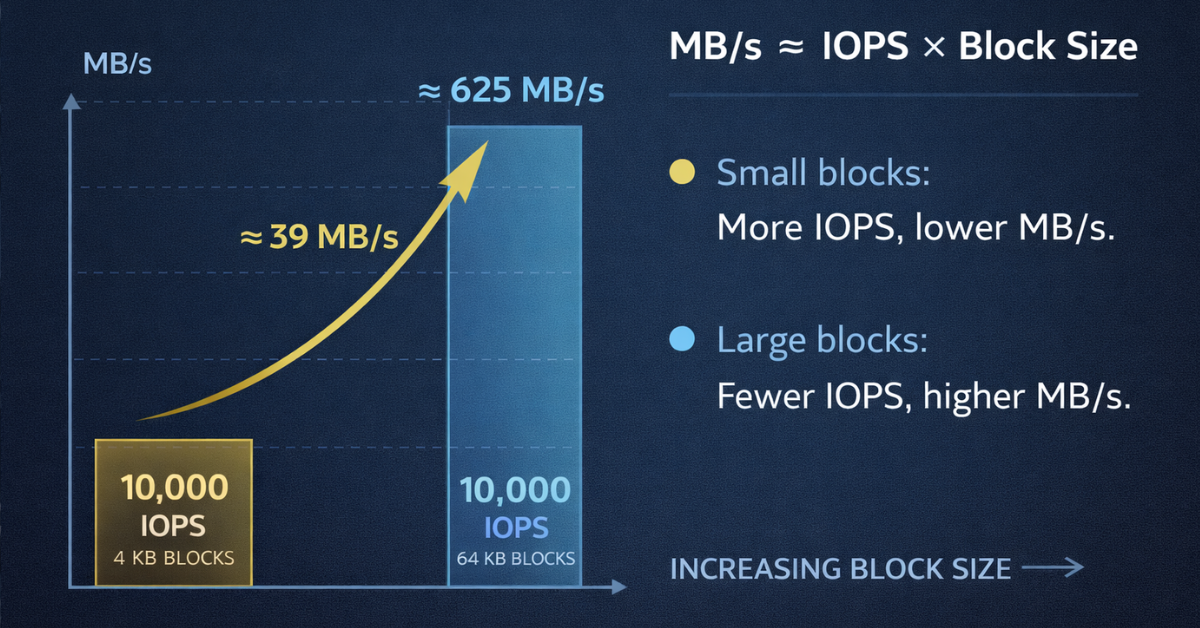
MB/s ≈ IOPS × block size
To simplify: 10,000 IOPS at 4K is about 39 MB/s, while the same 10,000 IOPS at 64K is already around 625 MB/s. On paper, the IOPS number is the same, but the workload profile and system requirements are completely different. In the first case, it is a story of small-block random I/O and sensitivity to latency; in the second, it is more about bandwidth.
That is why you cannot calculate IOPS “separately from block size.” Likewise, you cannot rely only on a drive’s maximum advertised performance. For transactional systems, a busy virtualization cluster, and VDI, what matters is not how many IOPS a benchmark showed in an ideal test, but at what latency they were achieved. If latency exceeds the limits required by the application, a high IOPS figure will no longer help.
| Metric | What it shows | What it affects | Where it most often becomes critical |
|---|---|---|---|
| IOPS | Number of operations per second | Ability to handle small and frequent I/O | OLTP, VDI, virtualization |
| Throughput / MB/s | Amount of data per second | Streaming transfer speed | Backup, media, analytics |
| Latency | I/O response time | Application responsiveness | Databases, logs, busy VM workloads |
| Queue depth | I/O queue depth | Device and controller saturation | Highly parallel workloads |
| Read/write mix | Read/write ratio | The real cost of operations, especially writes | Mixed workloads, databases, clusters |
| Block size | Size of a single operation | Relationship between IOPS and MB/s | Any storage sizing exercise |
First, define the I/O profile, and only then discuss “how many IOPS are needed.”
Step-by-Step Calculation of Required IOPS
Understand what exactly the workload is doing. Random read-heavy, random write-heavy, a mixed 70/30 or 50/50 profile, streaming sequential reads, short bursts — all of these require different solutions even with the same data volume.
Use the working peak, not the average value. If the system usually consumes 8,000 IOPS but rises to 18,000 for one hour a day, relying on the average is risky. In production, what matters is that storage can sustain the mode in which the application must remain stable, not that it “looks fine on average.”
Take block size into account. For small 4K or 8K I/O, latency and random-access efficiency usually matter more. For 128K and above, you more often hit MB/s, network, controller, or instance limits first. This is especially noticeable in the cloud, where the disk and the VM can have separate performance ceilings.
Include write penalty and the protection scheme. Reads and writes cost the system differently. For some RAID configurations and distributed systems, backend write load is significantly higher than the frontend I/O seen by the application. RAID 10 is usually more predictable for a write-heavy profile, while RAID 5/6 saves capacity but is more sensitive to writes and rebuilds. In distributed storage, you need to account not only for replication or erasure coding, but also for rebalancing, recovery, and background activity. In the Ceph documentation, this is directly tied to the practice of benchmarking under load rather than in laboratory isolation.
Add operational headroom. It is needed not “just in case,” but for specific processes:
- garbage collection and internal SSD operations;
- rebuild or resilver after a failure;
- snapshots and clone activity;
- background service workload;
- growth in capacity and workload;
- failover scenarios.
The practical logic looks like this:
required backend IOPS = frontend IOPS × data protection factor × peak factor × operational reserve
There is no universal coefficient for all systems, but the model itself is always the same: first calculate the application’s real workload, then add the cost of resilience and operations.
Example
Suppose a mixed virtualization workload reaches a peak of 20,000 IOPS with an 8K block size and a 70/30 read/write profile. If data protection increases the cost of writes, and the system must survive a rebuild without SLA degradation, the calculation “20,000 IOPS is enough” will almost certainly be optimistic. In practice, the target backend budget needs to be higher, because part of the resources will be consumed by service operations and work in degraded mode.
What you need to calculate is not “ideal IOPS under a clean workload,” but IOPS for real operational use.
How to Calculate Capacity: Raw, Usable, and Effective Capacity
The phrase “we have 20 TB of data” says almost nothing about the required array capacity. To the volume of useful data, you must add everything that consumes space in a real system:
- RAID, erasure coding, or replication;
- filesystem and metadata overhead;
- snapshots;
- thin provisioning risk;
- rebuild reserve;
- free-space policy;
- SSD overprovisioning;
- data growth;
- backup and restore windows, if they affect the local storage footprint.
A convenient way to calculate it is:
usable capacity = raw capacity − protection overhead − reserve − snapshots − service overhead
It is more accurate to start from the future state rather than the current one. First, take today’s data volume, then add projected growth, retention, local copies, snapshots, the minimum acceptable free space, and reserve for degraded mode. Only after that should you look at what the required raw capacity becomes.
It is also important not to size SSDs “to the brim.” The closer the system is to full, the worse background processes, garbage collection, and data redistribution usually behave. In enterprise SSDs and arrays, this affects not only capacity, but also latency stability. Micron specifically describes overprovisioning as the deliberate reduction of user-available capacity in exchange for more predictable drive behavior.
| Component | Affects IOPS / capacity / both | Typical calculation mistake | Should it be planned in advance |
|---|---|---|---|
| RAID / erasure coding | Both | Calculate only usable volume and forget the cost of writes | Yes |
| Replication | Both | Fail to multiply the storage footprint by the number of copies | Yes |
| Snapshots | Capacity | Treat them as “almost free” | Yes |
| Free space reserve | Both | Plan for utilization close to 100% | Yes |
| Rebuild reserve | Both | Do not account for degraded mode | Yes |
| Overprovisioning | Both | Use all physical SSD capacity for data | Yes |
| Data growth | Capacity | Calculate only today’s volume | Yes |
| Backup / restore window | Both | Ignore temporary spikes in I/O and space | Depends on the scenario |
Usable capacity is not what remains after RAID; it is what remains after all normal system-life processes.
The Main Mistakes in Sizing IOPS and Capacity

The most common mistakes look very familiar:
- calculate IOPS without block size;
- rely on a read-only benchmark for a mixed or write-heavy workload;
- ignore write penalty;
- use average workload instead of the working peak;
- ignore host, hypervisor, network, or VM limits;
- treat deduplication and compression as guaranteed savings in advance;
- calculate usable capacity without snapshots and rebuild reserve;
- not validate the calculation with a pilot test.
It is also worth remembering the cloud. Even if the selected disk can deliver the required IOPS and throughput, the instance itself may have a lower ceiling. This is explicitly stated in Azure and AWS documentation: the performance of the storage path is limited not only by the volume, but also by the machine it is attached to.
Storage sizing almost always breaks down not on the prettiest number itself, but on the forgotten limitation around it.
Practical Scenarios
For an OLTP database what usually matters is a small block size, low latency, and write resilience. Here, the mistake of “choosing a drive with high throughput” is often useless: the bottleneck appears in latency and the write path.
For a mixed workload of virtualization the combined profile of all VMs matters more than the specification of each one separately. Neighboring noisy workloads, snapshots, backup activity, and failover quickly consume headroom. Here, it is more useful to size conservatively and account for QoS logic from the start than to rely on “average” metrics.
For a backup repository or media storage the picture is reversed: throughput and the operation window are often more critical than maximum IOPS. A large block size, sequential access, and high capacity may matter more than extreme performance on small random I/O.
How to Validate That the Calculation Is Realistic
After sizing, the model must be validated. Before purchase or migration, it is worth collecting real metrics: IOPS, MB/s, latency, queue depth, utilization level, and peak behavior. Then reproduce a similar profile with a test, rather than running an abstract synthetic benchmark “to the max.”
You need to verify not only the achieved IOPS, but also the conditions under which they were achieved:
- at what latency;
- at what block size;
- at what queue depth;
- at what system fill level;
- with what level of background activity;
- in normal and degraded modes.
If the calculation does not pass this check, the problem is not necessarily in the disks. The bottleneck may be the controller, the CPU storage stack, the network, the hypervisor path, or a limit of a specific VM.
Final Validation Checklist for the Calculation

- Has the real workload profile been recorded, rather than only the average value?
- Are block size and read/write mix known?
- Have peak windows and p95/p99 been taken into account, if available?
- Has the cost of resilience been included: RAID, EC, replication?
- Is there reserve capacity for rebuild, snapshots, and background activity?
- Was usable capacity calculated, rather than only raw capacity?
- Have the limits of the host, network, controller, and VM/instance been checked?
- Has the calculation been confirmed by a test close to the real profile?
Conclusion
IOPS without workload context are almost useless. Capacity also cannot be calculated as “the amount of data today” or as raw capacity after RAID. Real-world sizing is built on the combination of the I/O profile, block size, read/write mix, latency target, the data protection scheme, data growth, and operational reserve. The closer the calculation is to the application’s real behavior, the lower the risk of overpaying for unnecessary characteristics — or, conversely, getting storage that looks great in the specification but performs poorly in production.