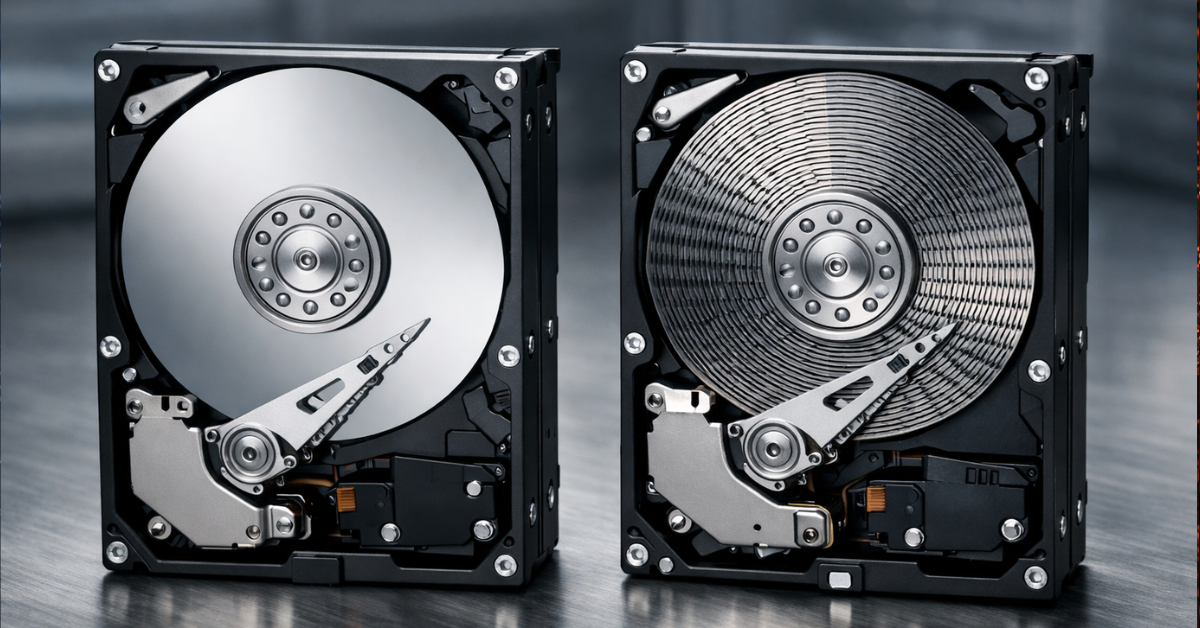
Two hard drives with the same capacity on paper can behave very differently inside an array. One handles prolonged writing, rebuilds, and background NAS activity without drama, while the other suddenly slows down, drags out recovery, and can even appear to the controller as if it has “hung.” That is exactly why the question of using SMR in RAID cannot be reduced to a simple “yes” or “no.”
SMR is not a flawed technology by itself. It emerged as a way to increase areal density and improve storage economics. But for RAID, what matters is not just cost per terabyte and not just speed on an empty drive. What matters more is how the drive behaves under prolonged overwrites, with limited idle time, during rebuild or resilver, and under mixed workloads. For a home NAS, an office array, a backup server, ZFS, mdadm, and hardware RAID, this is no longer a nuance but part of the architecture. The principle of SMR as a capacity-boosting technology based on overlapping tracks is described directly by SATA-IO, which separately notes that performance can depend on how the drive or the host manages it.
What CMR and SMR mean in practice
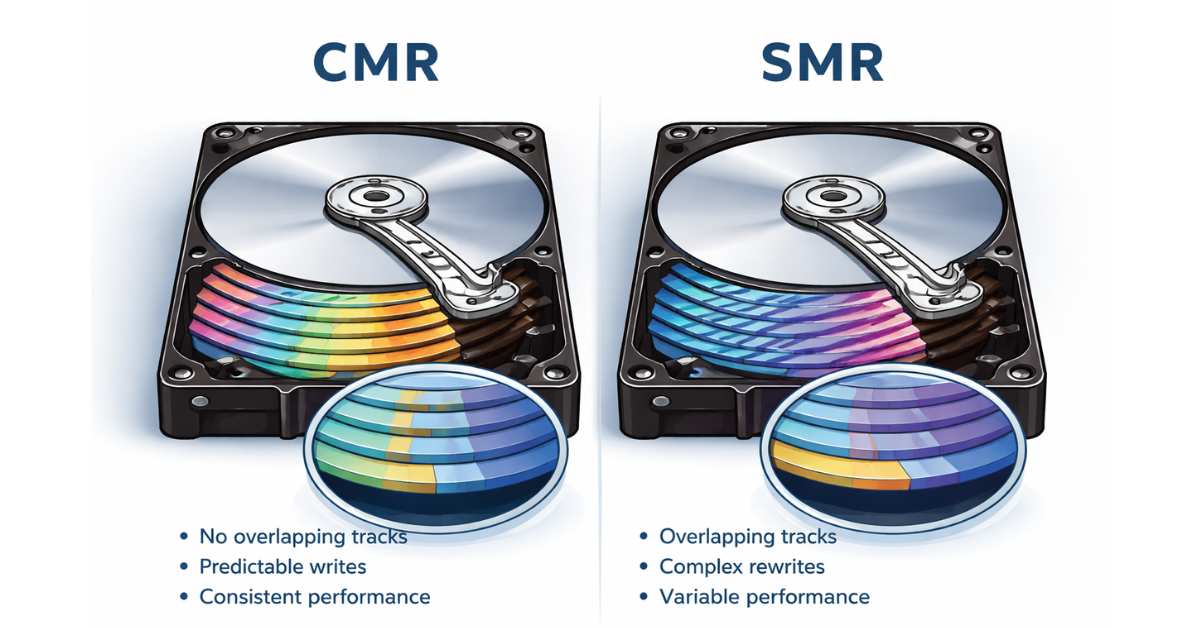
CMR (Conventional Magnetic Recording, sometimes also referred to as PMR — Perpendicular Magnetic Recording) is the classic recording method in which tracks are laid out without overlap. When the drive receives a command to overwrite a block, it can usually update the data locally and predictably. For RAID, this matters not because CMR is “always faster,” but because its behavior under writes and background operations is generally easier to predict.
SMR (Shingled Magnetic Recording) works differently: tracks partially overlap, which makes it possible to increase recording density and capacity. The price of that gain is more complex rewriting. Changing data in one area can require internal reorganization of adjacent regions, especially when the workload is not a clean sequential stream but prolonged or random writing. Externally, the drive may look like a regular SATA HDD, but inside its firmware may be performing extra operations the user cannot see directly. That is why it is more accurate to say not “SMR is slow, CMR is fast,” but rather “SMR and CMR differ in how predictable their behavior is under overwrites and sustained writing.” For RAID, that matters more than average read speed.
There is another important layer of differences here. SMR comes in device-managed, host-aware, and host-managed forms. In consumer and SMB scenarios, the most common type is device-managed SMR: the host sees a standard block device, while all complexity is hidden inside the drive. That is why problems often show up not in the specification sheet but under real workload. Host-managed SMR is a completely different class. In that case, the storage stack must work consciously with zones and sequential writes; zoned storage is not considered a plug-and-play replacement for standard drives and requires a special software model. This is reflected directly both in the Linux zoned storage documentation and in Western Digital materials.
Why RAID makes the difference between SMR and CMR so visible
RAID expects more from drives than just available capacity. It needs stable latency, predictable write response, no excessively long pauses, and sane behavior during rebuild, resilver, scrub, and other background operations. When a drive suddenly goes off to do internal data housekeeping, the array does not care why it happened: to the controller or storage layer, it simply looks like response latency.
With SMR, this is especially noticeable in several scenarios:
- during prolonged continuous writing;
- after the cache is exhausted and the drive shifts into heavy background reorganization;
- during rebuild or resilver, when the array is already operating under stress;
- during frequent small overwrites;
- in arrays serving VMs, databases, file shares, and active NAS workloads;
- when SMR and CMR are mixed in the same RAID.
The clearest test of whether a drive is suitable for RAID is array recovery. Large HDD rebuilds already take a long time, and during that period the array lives with elevated risk: another drive failure or serious performance degradation becomes much more painful. If, during recovery, the drive also drops into heavy internal data reorganization, the risk window stretches even further. This does not mean SMR will necessarily “break” the array, but it does mean its behavior under pressure is less predictable. Microchip explicitly states in its white paper on SMR in RAID that RAID caching and buffering can smooth out some of the effects, but they do not change the underlying nature of the drive or eliminate the need to choose appropriate operating modes.
Where SMR in RAID is almost always a bad idea

For an active NAS, where you have small writes, indexing, snapshots, client synchronization, backups, and background housekeeping activity, CMR is almost always the right default choice. What matters there is not nominal capacity but predictability under pressure.
The same applies to ZFS and RAIDZ under real working load. The problem is not that ZFS somehow “dislikes SMR” as a matter of doctrine. The issue is the workload profile: copy-on-write, resilver, scrub, and sustained-write patterns combine poorly with consumer device-managed SMR. Western Digital states in its documentation for WD Red that WD Red Plus and WD Red Pro are CMR and that these are the models recommended for use with ZFS; for DMSMR, it also separately notes that sustained random writes during ZFS re-silvering deprive the drive of idle time needed for internal data management tasks.
SMR is also usually a poor fit for hardware RAID in a production server. The controller expects reasonably even behavior, while long firmware pauses can lead to array degradation, a drive being dropped, or, at the very least, unpleasant surprises during a maintenance window. For storage serving VMs, mail systems, databases, and active file servers, choosing SMR is also usually saving money in the wrong place: cost per terabyte is lower, but total array ownership cost may end up higher because of rebuild time, loss of predictability, and additional operational risks.
When SMR is still acceptable
Saying that SMR in RAID is “never allowed” would be just as inaccurate. It is acceptable where the workload profile fits it. First of all, this includes archive and nearline scenarios: large sequential writes, then mostly reads, with rewrites happening rarely. In such workloads, the gain in capacity and cost per terabyte can be rational.
Another acceptable option is a backup repository with a predictable write window. If these are batch processes rather than constant random writes, SMR can be a workable compromise. But here it is important to look not at the “backup” label itself, but at the specifics: daily change rate, window duration, retention, concurrency, and the probability of frequent rewrites. A repository that receives one sequential data stream overnight and a repository with constant merges, synthetic fulls, and active housekeeping tasks are already two very different worlds.
Some surveillance, media, and cold storage scenarios can also be acceptable if the write profile is close to sequential. But this should not be automatically generalized to every video surveillance deployment: the specific drive model, its positioning, and its operating mode matter more than a nice marketing category.
Finally, hyperscale and object platforms really do use SMR. But that is not an argument in the sense of “therefore it is perfectly fine to put consumer SMR into a home RAID 5.” In data centers, this often involves a very different level of storage stack control, zoned-aware software, and an architecture where SMR limitations are taken into account from the start. Western Digital explicitly notes that zoned storage requires special software approaches, and the Linux ecosystem also emphasizes that such devices are not plug-and-play replacements for traditional drives.
Device-managed SMR in consumer arrays and host-managed SMR in data centers are not the same thing

This is the main source of confusion. When a small-office administrator or NAS owner buys an HDD, they are almost always dealing with device-managed SMR, which is supposed to look and behave like a normal block device. The convenience here is obvious: there is no need to change the software. But the risks are just as obvious: the drive hides internal complexity, and problems appear at the worst possible moments — under sustained writes and during rebuild.
Host-managed SMR is the opposite story. There, the host knows about zones, and the software writes to them deliberately. dm-zoned, zonefs, and other parts of the zoned ecosystem may be involved, but that is no longer “ordinary RAID out of the box.” That is why references to enterprise SMR without qualification are almost always misleading. For a regular RAID or NAS without a zoned-aware stack, CMR remains the baseline you should start from.
How to tell whether a drive is SMR
The problem is that the recording method is not always visible in the product listing. Sometimes you have to look it up in the datasheet, by exact model number, in the manufacturer’s official lists, or in support documentation. The series itself may not be a definitive indicator: what matters is the specific model number.
The market has already gone through a painful period of confusion around NAS drives. After that, Western Digital split the product lines and separately clarified that WD Red Plus and WD Red Pro are CMR, including for more write-intensive SMB scenarios and ZFS. Seagate, in turn, publishes a separate official list of CMR and SMR models. For RAID, that is a practical necessity rather than a formality.
Before buying a drive for RAID, it is worth checking:
- the exact model, not just the series;
- the recording type: CMR or SMR;
- the workload class and workload rating;
- the drive positioning: desktop, archive, NAS, or enterprise;
- the manufacturer’s recommendations for the specific scenario.
CMR and SMR by typical scenario
| Scenario | CMR | SMR | Comment |
|---|---|---|---|
| Home NAS with active access | recommended | not recommended | small writes and background tasks quickly expose the weaknesses of DM-SMR |
| SMB NAS / file server | recommended | not recommended | stable latency matters more than capacity alone |
| RAID for virtual machines | recommended | not recommended | random writes and rebuild are especially sensitive |
| RAID for a backup repository | recommended | conditionally acceptable | appropriate only with predictable batch writing |
| Archive / cold storage | recommended | conditionally acceptable | SMR can be rational when rewrites are rare |
| Video surveillance | recommended | conditionally acceptable | depends on the write mode and the specific drive model |
| ZFS / RAIDZ | recommended | not recommended | rebuild, scrub, and copy-on-write increase the risks |
| Hardware RAID in production | recommended | not recommended | long drive pauses are especially undesirable |
| Object / hyperscale archive storage | recommended | only with an adapted stack | this is where special software models are already in play |
Can you mix SMR and CMR in the same array?
Technically, the array may assemble and even initialize without visible problems. In practice, however, it will be constrained by the least predictable drive. During rebuild and sustained writes, the behavior of the entire array will begin to be dictated by the weakest link. For RAID, what matters is not just the same capacity and interface but also a similar latency profile. That is why mixing SMR and CMR in the same array is not recommended, even if “everything seems to work.”
What to do if you have already bought SMR drives

There is no need to panic and immediately write the drives off. But trying to stubbornly force them into being a universal foundation for production RAID is also a poor strategy.
Reasonable options include:
- moving them into the role of standalone backup or archive drives;
- using them outside write-heavy RAID;
- keeping them for cold reserve;
- limiting the workload to large sequential write windows;
- testing rebuild time and latency under real workload before any production deployment.
If SMR drives are already running in a NAS or RAID, it is worth at least monitoring rebuild times, tracking timeouts and drive drops, and planning a move to CMR during the next refresh cycle.
When to choose CMR and when SMR can be considered
CMR should be the default choice if the array is active, if there are frequent small writes, if this is NAS, ZFS, mdadm, or hardware RAID, if rebuild predictability matters, and if the environment is production.
SMR makes sense to consider if the main goal is capacity and lower cost per terabyte, writing is mostly sequential, data changes rarely, the scenario is closer to backup, archive, or a cold tier, and you understand that you will not get CMR-like behavior. A separate case is a specialized zoned-aware stack, where SMR limitations are not ignored but designed into the architecture.
Conclusion
For most ordinary RAID and NAS scenarios, the right choice is CMR. Not because SMR is “bad,” but because CMR is more predictable where the array runs under load, goes through rebuild, and simply needs to behave consistently.
SMR is acceptable not in general, but only in properly matched scenarios. Consumer device-managed SMR in traditional RAID is a compromise with the risk of unpleasant surprises under sustained writes and during recovery. Enterprise host-managed SMR is a separate architectural category, not a blanket justification for any SMR model.
If you need a RAID that should just work predictably, choose CMR. SMR should only be considered when you are consciously building an archival or specialized scenario around its limitations.