If a server supports two power supply units, the second PSU is needed primarily for fault tolerance: if one module fails or one power line is lost, the server should continue running. But the mere presence of two power supplies does not automatically guarantee redundancy. The PSUs must be compatible, the server must operate in the correct power mode, and the power cables should not be connected to the same extension lead or the same single source. They should be connected according to a thought-out power scheme: through separate branches, PDUs, UPS units, or A/B power lines.
What is a PSU in a server?
A PSU (Power Supply Unit) is the server’s power supply. It receives power from the mains and converts it into the voltages required by processors, memory, drives, controllers, fans, and other components. In everyday speech, it is often called simply a “power supply,” but in a server it is not a secondary part. It is part of the overall reliability architecture.
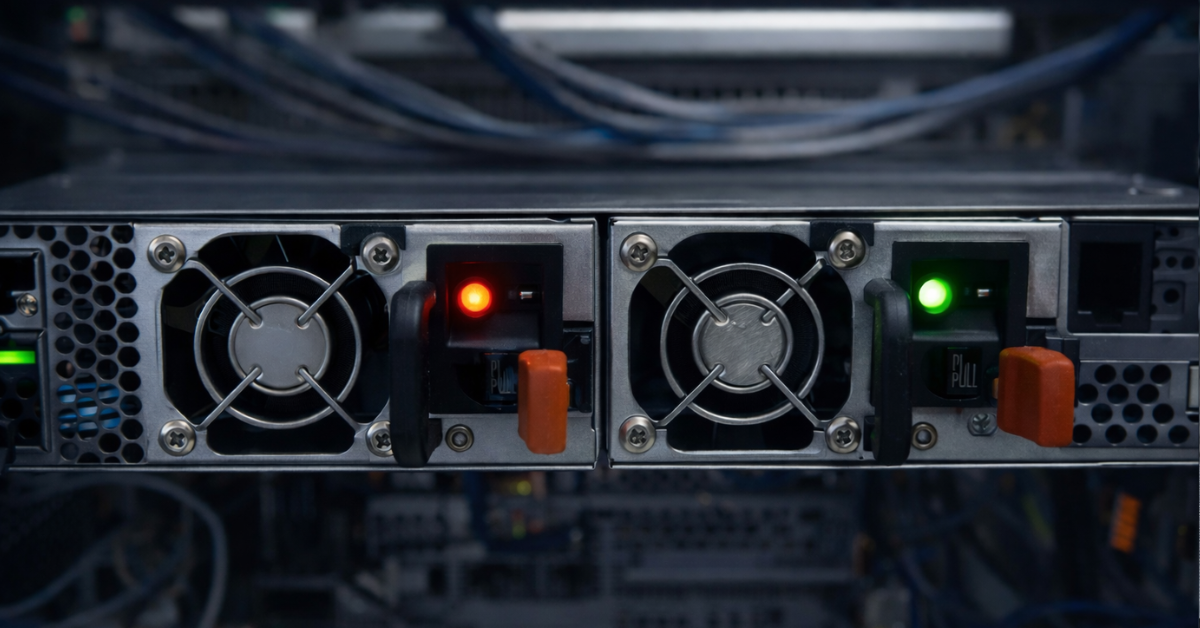
A server power supply differs from a regular PC power supply not only in its shape. It is designed for 24/7 operation, dense internal layout, high temperatures inside the chassis, strong airflow, and rack-based maintenance. In many server models, power supplies are made as separate modules: they are inserted from the rear of the server, locked with a latch, and connected with a separate power cable.
In many servers, these modules can be replaced without shutting down the machine. This is called hot swapping. But it is important not to generalize: hot swapping works only when it is supported by the specific server, the specific power supplies, and the current operating mode. If a server physically has two PSU bays, that does not mean any of the modules can be pulled out at any moment without consequences.
If there is only one power supply, its failure almost always stops the server. If there are two power supplies and redundancy is enabled, the server should continue operating if one module fails. That is why, in server infrastructure, a PSU is not treated as a disposable item “somewhere at the back of the chassis,” but as an important element of service availability.
Why does a server need two power supplies?
The main reason is protection against the failure of one power supply. Any component can fail: the fan inside the PSU, electronic elements, a connector, or power conversion circuits. If a server has only one PSU, such a fault usually means downtime. If two compatible PSUs are installed and the server is running in a redundant mode, the second unit continues to power the system.
The second reason is maintenance without shutdown. In a server with hot-swappable power supplies, a faulty module can be replaced while the server is running. For a regular office computer this rarely matters, but for a server running a database, virtual machines, file storage, or infrastructure services, it can be critical.
The third reason is connection to different power lines. In a correct scheme, one PSU is connected to one branch and the second PSU to another. For example, the first cable goes to one rack power distribution unit, while the second goes to another. If one power source is disconnected, the server remains powered from the second branch.
The fourth reason is reducing the risk of human error. In practice, servers stop not only because of major failures. Sometimes someone accidentally pulls out a cable, switches off the wrong breaker, overloads one PDU, or services a UPS without understanding what is connected to it. Two power supplies do not eliminate such mistakes, but they reduce the likelihood of an immediate server shutdown.
The fifth reason is the requirements of critical services. For virtualization, storage systems, database servers, network services, domain controllers, and platforms where downtime is expensive, a single power supply often becomes too weak a point. Even if the PSU itself is reliable, it remains a single point of failure.
But two power supplies do not make a server faster. They do not speed up applications, increase processor performance, or fix a weak disk subsystem. Their task is not speed, but power resilience.
How power supply redundancy works
In a typical server scheme, two identical or fully compatible power supplies are installed. In redundancy mode, each of them must be capable of powering the server on its own. While everything is working properly, the load may be distributed between the two units. In some modes, one PSU may be the primary unit, while the second remains in reserve or in an energy-saving state until it is needed.
If one PSU fails, loses input power, or is disconnected from its cable, the second PSU continues to power the server. From the point of view of applications and the operating system, this should not look like a shutdown. The server records the event: the indicator on the PSU changes, a warning appears in the management system, and an entry is added to the hardware log. The administrator sees that redundancy has been degraded, replaces the faulty module, and returns the server to normal operation.
It is important to understand that redundancy works not because there are physically two PSUs, but because one PSU is enough for the current server load. If the server consumes more power than the remaining unit can deliver, the failure of the second PSU may lead to an emergency shutdown, power limitation, or failure to start.
For Dell PowerEdge, for example, the documentation describes that with two identical power supplies the mode can be configured as 1+1 with redundancy or as 2+0 without redundancy, while with hot spare enabled one of the units can move into standby at low load to improve energy efficiency. The same documentation also states that when two power supplies are used, they must have the same maximum output power.
The simplest way to imagine it is this. One power supply is one bridge across a river. Two power supplies in a redundant configuration are two bridges: if one is closed, the other remains. But if both bridges lead to the same road and that road is destroyed, the reserve will not help. It is the same with a server: two PSUs connected to one faulty UPS or one cheap extension lead do not provide full fault tolerance.
How 1+0, 1+1, 2+0, and N+1 modes differ

One common mistake is assuming that if a server has two power supplies installed, redundancy already exists. In practice, everything depends on the mode.
1+0 is operation with one power supply. There is no redundancy. If the PSU or its power line fails, the server shuts down.
1+1 is the classic redundancy scheme for a server with two power supplies. Each PSU can fully power the server on its own. If one fails, the second takes over the load and the server continues running.
2+0 is a mode without full redundancy. Two PSUs are used as a combined power source. Such a scheme may be needed for a powerful configuration: for example, with many processors, memory modules, drives, or accelerators. But if one PSU is disconnected, the remaining unit may not provide enough power.
N+1 is a more general principle. There are N power supplies required for the system to operate, plus one additional spare unit. This approach is more common not in ordinary dual-PSU servers, but in large chassis, modular systems, and power infrastructure, although classic servers with 4 PSUs are no longer exactly exotic in the age of powerful GPUs.
| Mode | What it means | Is there redundancy? | What happens if one PSU fails? | Where it is used |
|---|---|---|---|---|
| 1+0 | One power supply is installed | No | The server shuts down | Simple servers, test stands |
| 1+1 | Two PSUs, each able to power the server alone | Yes | The server continues running | Most servers with two power supplies |
| 2+0 | Both PSUs are used for combined power | No or limited | Shutdown or power limitation is possible | Powerful configurations with high load |
| N+1 | One spare PSU beyond the required number | Yes | The system continues operating after one module fails | Chassis, large platforms, power infrastructure |
The main difference between 1+1 and 2+0 is not the number of power supplies, but the reserve margin. In 1+1, one PSU can temporarily replace the other. In 2+0, both PSUs are needed to power the load. Therefore, before purchasing or putting a server into operation, it is important to check not only that two modules are present, but also the power mode in BIOS/UEFI, the server management system, or the documentation for the specific model.
Why two power supplies do not always prevent shutdown
Two power supplies protect only against failures that are truly separated. If both PSUs are connected to the same source, that source remains a common point of failure. A common point of failure is an element whose failure brings down the entire system, even if the system itself has redundant components.
The simplest example: a server has two power supplies, but both cables are plugged into the same extension lead. Formally, there are two PSUs. In practice, switching off the extension lead will shut down the entire server. The same can happen if both PSUs are connected to one PDU, that PDU is connected to one UPS, and that UPS is connected to one outlet or one breaker on a single supply line.
There are other scenarios as well. The server may be configured in 2+0 mode while the administrator assumes it is running in 1+1 redundancy. One of the PSUs may have been faulty for a long time, but no one noticed the warning. After new drives, memory, or an accelerator are installed, the server may start consuming more power, and the old reserve may no longer be enough for operation on a single PSU. Sometimes the second power supply is installed, but it has a different wattage or is an incompatible model, which limits or disables redundancy.
That is why the phrase “a server with two power supplies” says very little on its own. You need to understand the whole scheme: which PSUs are installed, which mode is enabled, how much power the server consumes, where the cables go, whether there are two power lines, and whether monitoring is configured.
| Situation | Will the second PSU help? | Why |
|---|---|---|
| One power supply fails | Yes | The second PSU continues to power the server |
| One power cable is disconnected | Yes, if the second is connected correctly | The server remains on the other line |
| The only UPS shuts down | No | Both PSUs lose power if they are connected to it |
| One PDU fails | Yes, if the second PSU is connected to another PDU | The server retains the second power branch |
| The server consumes more than one PSU can provide | No or only partially | Redundancy cannot sustain the load |
| Power is lost in the entire building without a backup source | No | Both PSUs remain without input power |
| The second PSU is faulty, but no one noticed | No | The server is effectively already running without reserve |
How to connect a server with two power supplies correctly
Correct connection begins not with the server, but with understanding the entire power chain. It is not enough to insert two cables into two sockets. You need to understand where those cables lead.
In a small server room, the minimum reasonable scheme looks like this: the first PSU is connected to one source, and the second PSU to another, if one is available. For example, one cable goes to one UPS and the second to another. If there is no second UPS, it is still better not to plug both cables into the same household extension lead. This will not create full redundancy, but it will reduce some everyday risks: poor contact, accidental disconnection, or overload of one splitter.
In a full-scale data center, the scheme should be stricter. Two power paths are usually used: A and B. The first server PSU is connected to PDU A, and the second to PDU B. The PDUs themselves should be powered from different branches, different UPS units, or different inputs, as far as the specific infrastructure allows. In its power distribution guides, Eaton describes the use of rack PDUs, automatic transfer switches, and schemes where the load receives backup power through different sources or distribution devices.
Before connection, you need to check more than the number of outlets. It is important to know the server’s maximum power consumption, the wattage of each PSU, UPS capacity margin, PDU load, breaker rating, cable quality, and redundancy settings. If the UPS cannot withstand the load when one branch fails, the scheme will look reliable only on paper.
A separate practical point is labeling. Power cables should be labeled. In a rack with several servers, it is very easy to make a mistake and unplug the wrong cord. If the cables are marked as A and B, the risk of human error is lower.
What is A/B power?

A/B power is a scheme in which equipment receives power from two independent branches. Line A and line B may run through different PDUs, different UPS units, different breakers, and in more serious data centers, through different inputs and a more complex redundancy system.
A server with two power supplies is well suited to this scheme. The first PSU is connected to line A, the second to line B. If line A goes down, the server remains on line B. If line B is being serviced, the server continues running from line A.
This connection is especially important for virtualization, storage systems, network equipment, databases, infrastructure services, and servers in a data center. The more expensive downtime is, the more important not only the second PSU becomes, but also the independence of the entire power chain leading to it.
If a device has only one power supply, it is sometimes connected to two sources through an automatic transfer switch. This device quickly transfers the load from one source to another when the primary source fails. But it is a separate device that itself becomes part of the scheme and must be selected correctly. Vertiv describes such switches as a solution for equipment with a single power cable in small server rooms, edge sites, and racks where switching to a second source is required. Modern server power supplies are also often equipped with capacitors that provide enough reserve to avoid shutting down the server during a very brief power loss.
For a server with two power supplies, an automatic transfer switch is usually not needed: the server already has two power inputs. But the benefit appears only when those inputs are truly connected to different branches.
Can different power supplies be installed?
In most servers, it is better to use identical or strictly compatible power supplies. You should not rely only on the shape of the module: “it fits into the bay, so it must be suitable.” Wattage, server generation, part number, input power type, efficiency, firmware, compatibility with the power cage, and manufacturer requirements all matter.
If different PSUs are installed, the server may show a warning, disable redundancy, limit power, or refuse to start at all. Sometimes the system formally works, but some power functions are unavailable. This is especially dangerous: the administrator sees two installed PSUs and assumes everything is fine, although redundancy is already gone.
HPE states in its documentation for installing a redundant hot-plug power supply that all power supplies in the server must have the same output rating, as well as the same spare part number and color mark. This is a good practical principle for other server platforms as well: when in doubt, check the documentation for the specific model, not just the module’s external similarity.
After a server upgrade, this question should be checked again. For example, a server previously ran with two 750 W power supplies in redundant mode. Then more drives, memory, or an accelerator were added. Formally, the PSUs are the same, but the load has changed. It may turn out that one PSU can no longer safely power the entire configuration.
Hot-swapping a power supply
Hot swapping means that a faulty power supply can be replaced without shutting down the server. This is one of the important reasons why server PSUs are often made modular. But hot swapping is not an invitation to pull out a power supply without checking anything first.
Before replacement, you need to make sure that the second PSU is healthy and receiving power. You need to check that the server is really in a redundant mode and not operating in a combined-power scheme. You also need to understand that the current load fits within the capabilities of the remaining single PSU. Ideally, you should check the power status in the server management system: through iDRAC, iLO, BMC, or another interface, depending on the manufacturer.
After replacement, you need to check the indicator on the new PSU, the status in the management system, event logs, and the restoration of redundancy. If the warning does not disappear, the work cannot be considered complete. The cause may not be the PSU itself, but a cable, PDU, power mode setting, module incompatibility, or lack of power on one of the lines.
There are situations where hot swapping can cause an accident. For example, the server is running in 2+0 mode and needs both power supplies. Or the second PSU is already faulty, but no one has noticed. Or the second PSU is healthy, but its cable is connected to a disconnected line. In such cases, removing the “wrong” PSU can shut down the server.
The rule is simple: check first, replace later. In a production environment, such actions are best performed according to a procedure and, where possible, during a maintenance window.
How to understand whether redundancy really works

Checking redundancy is not just a matter of looking at the rear panel of the server. You need to make sure the system is genuinely ready to survive the failure of one PSU or one power line.
Several things are worth checking:
- both power supplies are installed and supported by the specific server model;
- the PSUs have identical or manufacturer-approved wattage;
- both PSUs are shown as healthy in the management system;
- there are no errors related to power, cables, input voltage, or incompatibility;
- a redundant mode is enabled, not a combined-power mode without reserve;
- one PSU can support the current server configuration;
- power cables are connected to different PDUs or different branches;
- UPS and PDU units are not overloaded;
- notifications about PSU faults are configured;
- the power scheme is documented.
You should not test redundancy by simply pulling a cable from a running production server without preparation or at least planned drills with business notification. Yes, such a test looks clear and practical, but if the scheme is assembled incorrectly, the result will be downtime. It is better to first study the settings, logs, load, and connection scheme, and to conduct tests according to a procedure.
Dell describes in PowerEdge power settings options where PSUs may operate without redundancy, in A/B Grid Redundant mode, or in PSU Redundant mode. It also states that disabling redundancy can allow the server to use additional power, but if one PSU fails, the server may experience downtime. This is exactly why you need to check not only the hardware, but also the mode.
When two power supplies are mandatory
Two power supplies are almost mandatory for servers whose downtime affects the business or infrastructure operation. These include virtualization servers, databases, storage systems, domain controllers, backup nodes, network services, monitoring servers, billing platforms, and other systems that are constantly accessed by users or other services.
Two power supplies are especially important in a data center rack where two power branches are already available. If the infrastructure provides A and B lines, but the server has only one PSU, part of the site’s fault-tolerance capability is simply unused. In this situation, two PSUs allow the server to be properly integrated into the overall redundancy scheme.
Another case is remote sites. If a server is located in an office, branch, or small server room without a permanent administrator on site, replacing a PSU with shutdown can turn into prolonged downtime. A hot-swappable redundant PSU reduces that risk.
But two power supplies are not always necessary. For a lab stand, test server, temporary machine, or node without a critical workload, one PSU may be an acceptable solution. If downtime is not a problem and the budget is limited, paying extra for redundancy may not be the main priority.
The question is not whether having one power supply is “good” or “bad.” The question is the acceptable level of risk. If a power failure means loss of money, data, service availability, or lengthy recovery, a second PSU is needed. If a failure only means a convenient reason to reboot a test stand, you can keep things simpler.
Common mistakes when choosing and connecting power supplies
- Assuming that two power supplies automatically provide full fault tolerance. In reality, they only provide the possibility of building redundancy. If they are connected incorrectly, the benefit is lost.
- Connecting both PSUs to one source. One extension lead, one PDU, one UPS, one breaker — all of these leave a common point of failure. If that section fails, both PSUs lose power at the same time.
- Not checking the mode. A server may be running in 2+0 mode, where both PSUs are needed for combined power. Visually, it looks like a server with redundant power, but if one PSU fails, it may shut down.
- Buying a second PSU that is “roughly the same.” For servers, this is a poor approach. Exact compatibility must be checked: wattage, part number, generation, input power type, and manufacturer requirements.
- Forgetting about load growth. A server may have been deployed with reserve capacity, but then a processor, drives, memory, controllers, or accelerators were added. After such an upgrade, you need to reassess whether one PSU can power the entire system.
- Not configuring notifications. If one PSU fails, the server may continue running, which creates a false sense of safety. But at that moment the reserve is already lost. The next failure becomes critical.
- Not documenting power connections. After a year, no one remembers which cable goes to which PDU, which PDU is connected to which UPS, and where the corresponding breaker is located. In an incident, this uncertainty is costly.
Checklist before putting a server into operation

Before putting a server with two power supplies into production, it is worth going through a short check.
- Make sure both power supplies are suitable for the specific server model.
- Check that the PSUs have the same wattage or are approved by the manufacturer for joint operation.
- Make sure both PSUs are visible in the management system.
- Check that there are no power warnings.
- Confirm the operating mode: 1+1, 2+0, A/B redundancy, or another option.
- Calculate the maximum power consumption of the current configuration.
- Check whether one PSU can support the server if the second fails.
- Connect the PSUs to different PDUs or different power branches.
- Check the UPS power reserve.
- Make sure the PDUs and breakers are not overloaded.
- Label the power cables.
- Configure notifications about PSU faults.
- Document the connection scheme.
- Check the hot-swap procedure.
- Recalculate power after a server upgrade.
This checklist may look simple, but it is often what separates real redundancy from decorative redundancy.
Conclusion
Two power supplies in a server are needed not for speed and not for an abstract “reserve,” but for fault tolerance. In a correct scheme, the server continues running if one power supply fails, one cable is disconnected, or one power line is lost. But this is possible only when each PSU can power the server on its own, the correct mode is enabled, and the cables are connected to independent power branches.
The mere presence of two modules does not make a server protected. If both PSUs are connected to one extension lead, one PDU, or one UPS, the entire system still depends on a single point of failure. If the server is running in 2+0 mode, the second PSU may not be a reserve, but part of the total power capacity. If one PSU has long been faulty and monitoring is not configured, the server is already living without protection.
For critical servers, two power supplies are usually justified: they allow the system to survive a module failure, service power without shutdown, and connect the server to A/B power lines. For test and non-critical tasks, one PSU may be an acceptable compromise. The main question before purchasing and connecting a server should not be “are there two power supplies?” but rather: what will happen if one PSU or one power line disappears right now?