
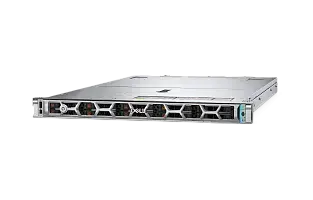
DELL PowerEdge R670 Server
You might be interested in



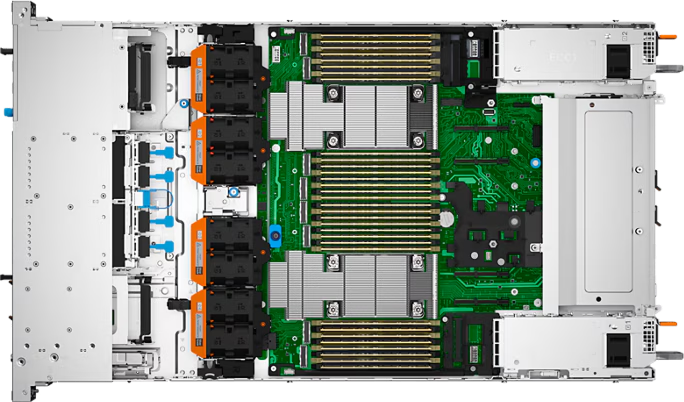
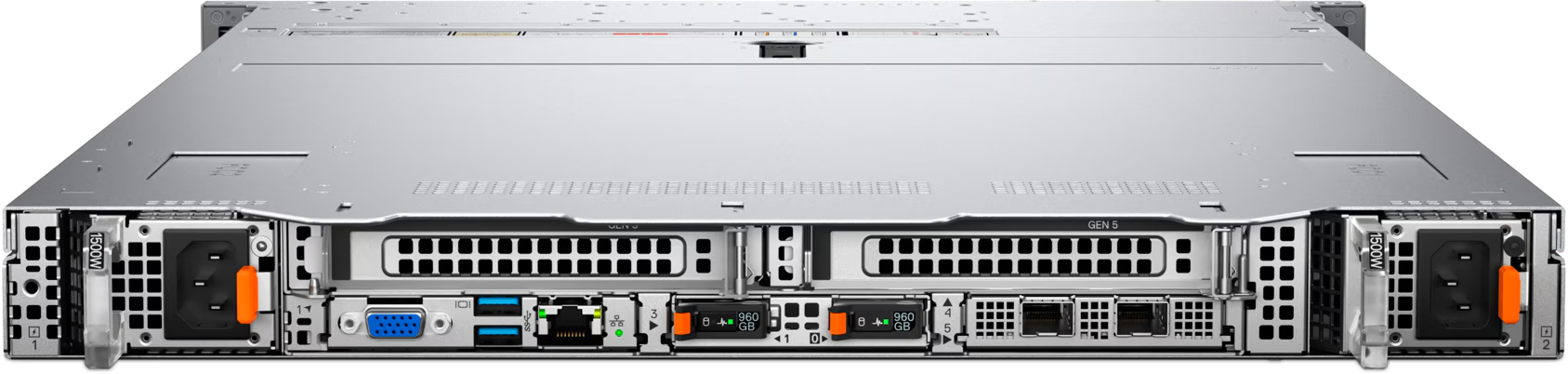
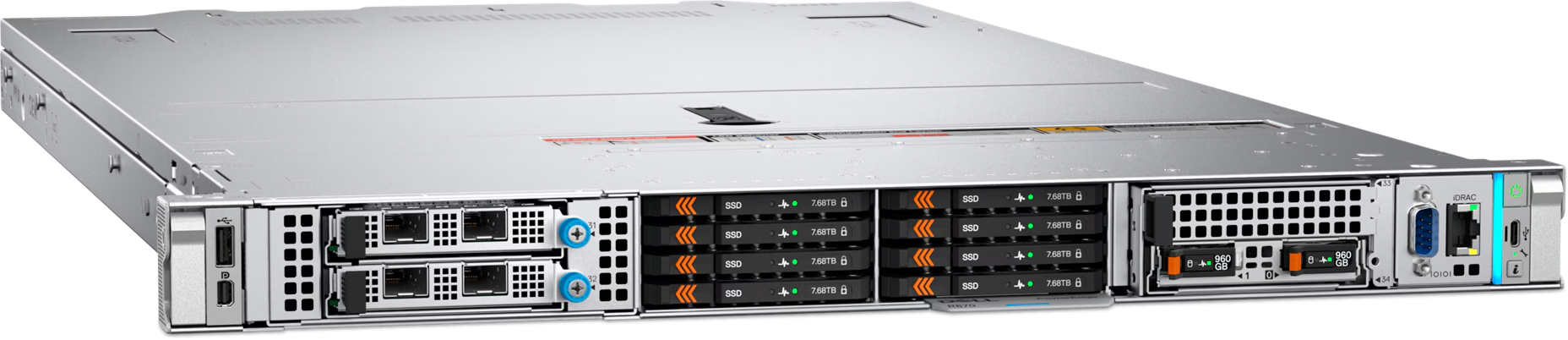
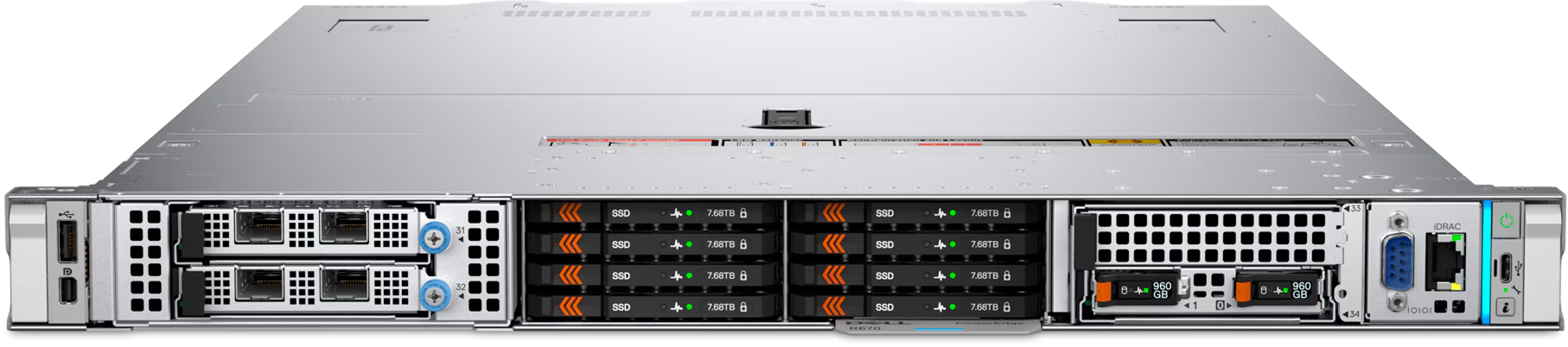

-
Condition
Refurbished
-
CPU
2×8GB DDR4 RDIMM 2133MHz
-
RAM
noHDD (up to 8 HDD 2.5'' SFF)
-
Condition
Refurbished
-
CPU
2×8GB DDR4 RDIMM 2133MHz
-
RAM
noHDD (up to 8 HDD 2.5'' SFF)
-
Condition
Refurbished
-
CPU
2×8GB DDR4 RDIMM 2133MHz
-
RAM
noHDD (up to 8 HDD 2.5'' SFF)
-
Condition
Refurbished
-
CPU
2×8GB DDR4 RDIMM 2133MHz
-
RAM
noHDD (up to 8 HDD 2.5'' SFF)

- Processor
- Two Intel Xeon 6 Processors with up to 144 E-cores or 86 P-cores per processor
- Memory
- 32 DDR5 DIMM slots, supports RDIMM 8 TB max, speeds up to 6400 MT/s
- Supports registered ECC DDR5 DIMMs only
- Storage controllers
- Internal Boot: Boot Optimized Storage Subsystem (BOSS-N1 DC-MHS): HWRAID 1,
2 x M.2 NVMe SSDs or M.2 Interposer board (DC-MHS):
2 x M.2 NVMe SSDs or USB - Internal controllers: Front PERC H965i, Front PERC H975i, Front PERC H365i
- Internal Boot: Boot Optimized Storage Subsystem (BOSS-N1 DC-MHS): HWRAID 1,
- Drive Bays
- Front bays:
- No Backplane configuration
- Up to 8 x EDSFF E3.S NVMe max 491.52 TB also with FIO configuration Up to 16 x EDSFF E3.S Gen5 NVMe max 983.04 TB
- Up to 20 x EDSFF E3.S Gen5 NVMe max 1228.8 TB
- Up to 8 x 2.5 inch SATA/NVMe Direct/NVMe Raid max 491.52 TB
- 8 x 2.5-inch Universal 491.52 TB
- Up to 10 x 2.5 inch SATA max 38.4 TB
- Up to 2 x EDSFF E3.S Gen5 NVMe in the rear max 122.88 TB
- Hot swap Power Supplies
- 1500 W Titanium 100—240 VAC or 240 VDC
- 1100 W Titanium 100—240 VAC or 240 VDC
- 800 W Titanium 100—240 VAC or 240 VDC
- 1100 W Platinum 100—240 VAC or 240 VDC
- 800 W Platinum 100—240 VAC or 240 VDC
- 1800 W HLAC Titanium 200—240 VAC or 240 VDC*
- 1500 W 277 VAC or 336 VDC*
- 1400 W LVDC -48 — -60 VDC
- Cooling Options
- Air cooling and Direct Liquid Cooling
- Note : DLC is a rack solution and requires rack manifolds and a cooling distribution unit (CDU) to operate.
- Fans
- High performance Silver (HPR SLVR) or Standard (STD) fans
- Up to 4 sets (dual fan module) hot swappable fans
- Dimensions and Weight
- Height – 42.8 mm (1.69 inches)
- Width – 482 mm (18.98 inches)
- Weight – 20.42 kg (45.02 pounds)
- 816.92 mm (32.20 inches) with bezel
- 815.14 mm (32.09 inches) without bezel
- 829.44 mm (32.66 inches) without bezel
- Form Factor
- 1U rack server
- Embedded Management
- iDRAC
- iDRAC Direct
- iDRAC RESTful API with Redfish
- RACADM CLI
- iDRAC Service Module (iSM)
- Quick Sync 2 wireless module
- NativeEdge Endpoint*
- NativeEdge Orchestrator*
- Bezel
- Optional security bezel
- OpenManage Consoles
- Cryptographically signed firmware
- Data at Rest Encryption (SEDs with local or external key mgmt)
- Secure Boot
- Secured Component Verification (Hardware integrity check)
- Secure Erase
- Silicon Root of Trust
- System Lockdown
- TPM 2.0 FIPS, CC-TCG certified
- Chassis Intrusion Detection
- Network options
- 2 x OCP NIC 3.0 cards (optional) and 1GbE, 10GbE, 25GbE, 100GbE and 400GbE* Slot 31 1 x16 OCP 3.0 on front riser Slot 32 1 x16 OCP 3.0 on front riser Slot 2 1 x16 OCP 3.0 Slot 5 1 x8 Gen5 OCP 3.0 or 1 x16 Gen5 OCP 3.0
- BOSS
- Slot 34: Front BOSS slot or Slot 3: Rear BOSS slot
- GPU options
- Up to 3 x 75 W SW
- Ports
- Front Ports:
- 1 x USB 2.0 Type C port
- 1 x USB 2.0 Type A port (optional)
- 1 x Mini-DisplayPort (optional)
- 1 x DB9 Serial (with front I/O configuration)
- 1 x Dedicated ethernet port for iDRAC management
- 1 x Dedicated ethernet port for iDRAC management
- 1 x VGA
- 2 x USB 3.1 Type A ports
- 1 x USB 3.1 Type A port
- Operating System and Hypervisors
- Canonical Ubuntu Server LTS
- Microsoft Windows Server with Hyper-V (P-Core only)
- Red Hat Enterprise Linux
- SUSE Linux Enterprise Server
- VMware ESXi
- Dell NativeEdge OS*
- PCIe
- Up to 2 x16 Gen5 PCIe slots
- Slot 31 1 x16 Full Height - Half Length or Full Height - Full Length or 1 x16 OCP 3.0 on front riser
- Slot 32 1 x16 Full Height - Half Length or Full Height - Full Length or 1 x16 OCP 3.0 on front riser
- Up to 3 x16 or 2 x8 Gen5 PCIe slots
- Slot 1 1 x16 Full Height - Half Length or Full Height - Full Length or 3 x16 or 1 x8 Low Profile - Half Length
- Slot 2 1 x16 or 1 x8 Low Profile - Half Length or 1 x16 OCP 3.0
- Slot 4 1 x16 Full Height - Half Length or 1 x16 Low Profile - Half Length
Dell PowerEdge R670 overview
Dell PowerEdge R670 is a 1U dual-socket rack server for virtualization, AI inference, web and microservices, hyperscale workloads, scale-out databases and high-density infrastructure nodes. It is designed for environments that need high 1U compute density, front or rear I/O flexibility, EDSFF NVMe performance and selected 75 W accelerator support.
The Dell PowerEdge R670 server is based on two Intel Xeon 6 processors with up to 144 E-Cores or up to 86 P-Cores per processor. It supports 32 DDR5 RDIMM slots, registered ECC DDR5 up to 6400 MT/s at 1DPC and 5200 MT/s at 2DPC, iDRAC10 and Dell OpenManage, PCIe Gen5 expansion and Dell PowerEdge cyber-resilient architecture.
The Dell PowerEdge R670 server is suitable for virtualization, AI inference, web and microservices, hyperscale workloads, scale-out databases and high-density infrastructure nodes. It should be treated as a mainstream PowerEdge rack platform matched to its processor family and form factor, not as an entry-level server or a direct substitute for every adjacent model.
When to choose Dell PowerEdge R670
Choose Dell PowerEdge R670 when the workload needs high 1U compute density, front or rear I/O flexibility, EDSFF NVMe performance and selected 75 W accelerator support in a validated Dell PowerEdge rack platform. It is a good fit for virtualization, AI inference, web and microservices, hyperscale workloads, scale-out databases and high-density infrastructure nodes where compute, RAM, local storage, networking and power must be sized as one configuration.
Compared with Dell PowerEdge R470, Dell PowerEdge R670 should be selected when its processor platform, rack size, I/O placement and drive layout match the project better. Compared with Dell PowerEdge R770, validate whether the workload needs Intel or AMD processors, 1U or 2U space, and the required storage or accelerator limits.
The Dell PowerEdge R670 configuration should be validated carefully for processor type, memory population, drive bay layout, storage controller, BOSS or M.2 boot, OCP networking, risers, GPU or DPU support, power supplies, fan type and cooling.
Chassis and drive bay options
Dell PowerEdge R670 supports several rack chassis and drive bay layouts. The right option depends on whether the server is being configured for balanced virtualization, high-density NVMe storage, capacity-oriented local storage, front or rear I/O serviceability or accelerator-heavy workloads.
| Chassis option | Best for | Comment |
|---|---|---|
| Dell PowerEdge R670 8SFF / 8 x 2.5-inch SATA/NVMe or Universal | dense 1U virtualization, applications and mixed SATA/NVMe storage | Supports up to 8 x 2.5-inch SATA/NVMe or Universal drives with official maximum capacity up to 491.52 TB depending on drive type. |
| Dell PowerEdge R670 10 x 2.5-inch SATA | compact SATA SSD storage and cost-controlled 1U builds | Supports up to 10 x 2.5-inch SATA drives with official maximum capacity up to 38.4 TB. |
| Dell PowerEdge R670 8 / 16 / 20 EDSFF E3.S NVMe | high-density 1U NVMe, AI inference, databases and high-I/O services | Supports up to 8, 16 or 20 EDSFF E3.S NVMe drives. Official maximum front EDSFF capacity reaches up to 1228.8 TB with 20 drives. |
| Dell PowerEdge front I/O or rear I/O configurations with rear EDSFF option | cold-aisle serviceability, rear service models and compact rear NVMe expansion | Front I/O and rear I/O are different design choices. Selected configurations support rear EDSFF NVMe drives and affect riser, OCP and BOSS layout. |
| Dell PowerEdge BOSS-N1 DC-MHS / M.2 boot options | separating OS or hypervisor boot from front data drives | BOSS-N1 DC-MHS can provide hardware RAID 1 boot using 2 x M.2 NVMe SSDs, typically 480 GB or 960 GB. M.2 interposer options depend on model and configuration. |
For balanced enterprise deployments, SFF or Universal drive configurations are usually the practical starting point. For capacity workloads, use the model-specific LFF or high-count SATA layouts where available. For latency-sensitive databases, high-I/O virtualization, analytics and AI data pipelines, EDSFF E3.S Gen5 NVMe should be considered.
Final drive compatibility depends on the selected chassis, backplane, controller, BOSS or M.2 boot option, risers, front or rear I/O choice, GPU or DPU configuration, power supply and Dell support matrix. NVMe and EDSFF support should not be assumed from the server model name alone.
Recommended Dell PowerEdge R670 configurations by workload
| Workload | Recommended focus |
|---|---|
| Virtualization / private cloud | Balanced CPU configuration, DDR5 memory pool, SSD or NVMe storage where needed, redundant networking and room for growth. |
| AI inference / accelerator workloads | Validated accelerator model, riser and power planning, sufficient memory, fast local NVMe storage and thermal validation. |
| Containers / Kubernetes | Balanced CPU and RAM, reliable boot media, local SSD or NVMe where needed and redundant network connectivity. |
| Databases / data management | Processor choice matched to licensing and query profile, enough RAM for cache, low-latency storage and protected design. |
| Backup / archive | Capacity-oriented drive layout, moderate CPU/RAM and network throughput sized for backup windows. |
| Software-defined storage / HCI | Drive layout, HBA/JBOD or controller mode, network bandwidth and CPU/RAM sized for the SDS platform. |
| Web / microservices / scale-out | Power-efficient CPU selection, fast networking, predictable boot and storage design and repeatable node configuration. |
| Mixed enterprise workloads | Balanced CPU, RAM, storage and NIC choices, with headroom for failover, maintenance and growth. |
The Dell PowerEdge R670 configuration should be chosen around the main reason for selecting this platform: high 1U compute density, front or rear I/O flexibility, EDSFF NVMe performance and selected 75 W accelerator support, Dell PowerEdge management and a storage layout matched to the workload.
How to choose CPU, RAM, RAID and storage
Dell PowerEdge R670 uses two Intel Xeon 6 processors with up to 144 E-Cores or up to 86 P-Cores per processor. E-core CPUs prioritize high core density and performance per watt, while P-core CPUs are better for per-core performance, CXL-capable designs and broad enterprise software compatibility. CPU selection should account for software licensing, thermal limits and whether the workload benefits more from core density or per-core performance.
RAM planning should start with VM density, database cache, container scheduling and future growth. Dell PowerEdge R670 supports 32 DDR5 RDIMM slots, registered ECC DDR5 up to 6400 MT/s at 1DPC and 5200 MT/s at 2DPC. DIMM capacities and operating speeds depend on CPU type and population rules.
For storage, select the drive layout around capacity, latency and serviceability. SFF or Universal layouts are balanced, LFF or high-count SATA layouts are capacity-oriented, and EDSFF E3.S Gen5 NVMe is the best fit for dense flash and low-latency workloads.
Hardware RAID should be selected around the validated PERC or HBA controller options for the chosen drive type. BOSS-N1 DC-MHS or M.2 interposer boot can separate OS or hypervisor boot from the main data drives. Mixed SAS, SATA and NVMe designs must follow Dell controller rules.
Networking, PCIe, GPU, DPU and power must be validated together. OCP NIC 3.0, PCIe Gen5 risers, accelerator support, Direct Liquid Cooling, fan type and PSU choice can all affect the final supported configuration.
Dell PowerEdge R670 vs related Dell PowerEdge models
| Model | When to consider |
|---|---|
| Dell PowerEdge R470 | Choose R470 when a single-socket 1U platform is preferred for power-efficient scale-out and data services. |
| Dell PowerEdge R770 | Choose R770 when a 2U Intel Xeon 6 platform is needed for broader storage, PCIe and GPU flexibility. |
| Dell PowerEdge R660 | Consider R660 when a previous-generation 1U dual-socket Intel platform is sufficient. |
| Dell PowerEdge R760 | Consider R760 when a previous-generation 2U Intel platform is sufficient. |
| Dell PowerEdge R7725 | Choose R7725 when an AMD EPYC 9005-based 2U platform is preferred for high core count or AMD standardization. |
Dell PowerEdge R670 is the right reference point when the requirement matches its processor platform, form factor and storage design. It should not be positioned as interchangeable with older PowerEdge generations or with a different Intel or AMD platform without validating CPU, memory, storage, I/O and cooling rules.
Summary: is Dell PowerEdge R670 the right server for your workload×
Dell PowerEdge R670 is a strong Dell PowerEdge rack server for virtualization, AI inference, web and microservices, hyperscale workloads, scale-out databases and high-density infrastructure nodes. Choose it when you need high 1U compute density, front or rear I/O flexibility, EDSFF NVMe performance and selected 75 W accelerator support with two Intel Xeon 6 processors with up to 144 E-Cores or up to 86 P-Cores per processor, 32 DDR5 RDIMM slots, registered ECC DDR5 up to 6400 MT/s at 1DPC and 5200 MT/s at 2DPC and Dell PowerEdge management. Before purchase, confirm CPU type, RAM population, drive bay layout, RAID or HBA mode, BOSS or M.2 boot option, OCP networking, risers, GPU or DPU support, cooling, PSU and warranty requirements.
asked
questions
Ask to consultant
The Servermall warranty includes:
- Access on a 24x7 basis (including holidays) to the Servermall Customer Service and Support organization for troubleshooting assistance of Servermall Refurbished Servers and Associated Goods and select software issues.
- 5 year warranty. In case of problem diagnostics or repair, we will do on the server installation site. For free.
- On-site dispatch of replacement parts to the Installation Site or other mutually agreed upon Customer’s business location approved by Servermall to address a Product problem.
Subscribe to our news and get a 50 € discount on the server.
Free shipping across EU if ordering equipment from 500 €. Delivery from 4 working days.
to buy a servers
at Servermall
warranty
testing
We want to make sure that our equipment is fully reliable for you. That’s why all our equipment (even new) is subject to complete diagnostics, testing, and part replacement.
testing
We fully load our equipment with various utilities and software. Rest assured, it’ll work for a very long time.
Power supply
The components work at full capacity and are tested for several days. If we are not sure about something, we replace it.
of all equipment
Our regulations imply the same testing for both used and new equipment. Oh, and by the way, we complement the official manufacturer’s warranty with our own warranty.